AI Cloud: Managed Kubernetes Service
Run a managed Kubernetes service on your GPU infrastructure. Each customer gets an isolated tenant clusterClusterA fully isolated Kubernetes environment provisioned for a single tenant. Each cluster has its own API server, controller manager, and resource namespace, backed by a virtualized control plane hosted on a control plane cluster. From the tenant's perspective it behaves exactly like a standard Kubernetes cluster. with dedicated GPU nodes. Your product is what customers interact with. Platform is the operations layer your team runs behind it.
Customer access model: External paying customers, no direct Platform access. Worker-node model: Private nodes per customer. See Choose a worker node model.
Typical stack: Standalone (HA) as the control plane clusterControl plane clusterThe Kubernetes cluster that hosts the virtualized control planes for clusters. The control plane cluster is operated by the platform provider and is completely invisible to tenants. There are no shared control plane nodes, no in-cluster agent pods, and no lateral path between tenant environments. With shared nodes, this cluster also runs tenant workloads alongside the control plane pods — the same node pool is used for both.. Private nodes per customer cluster. vMetal for bare metal GPU lifecycle. vNode for workload runtime isolation.
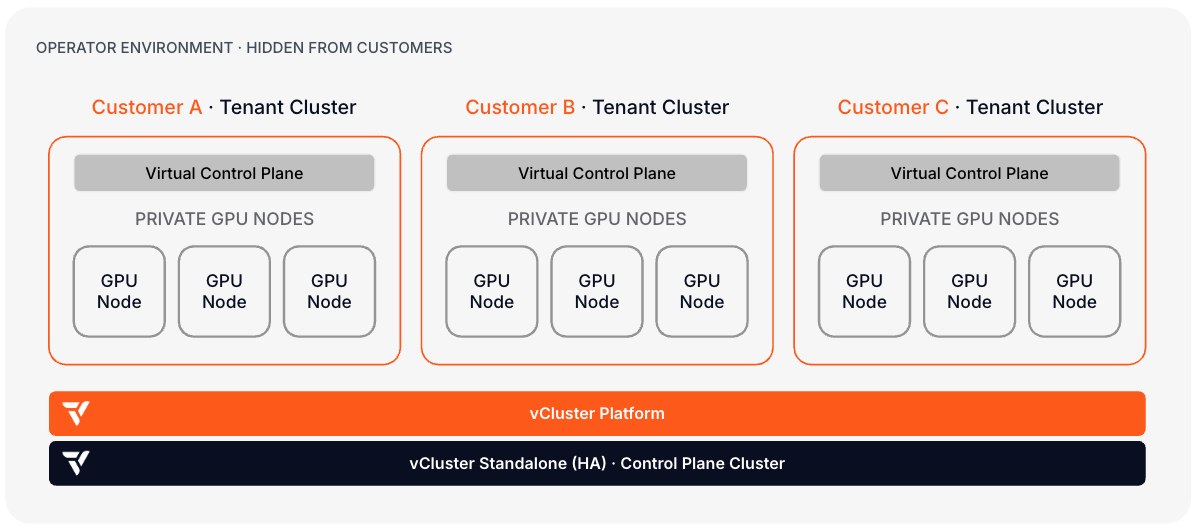
What makes this path different: Customers never access Platform directly. They interact with your product. Platform RBAC locks direct access to your platform engineering team. This architecture also maps to the cluster-level isolation criteria that AI cloud buyers evaluate in frameworks like ClusterMAX.
If your customers buy managed model endpoints instead of Kubernetes clusters, start with Inference Provider: Managed Model Serving. That path uses the same GPU infrastructure building blocks, but the customer-facing product boundary is an inference API and endpoint lifecycle instead of a tenant Kubernetes API.
Day 0: Design decisions
| Decision | Read next | Outcome |
|---|---|---|
| Choose the control plane deployment model | Standalone deployment, Architecture | Control planes as pods on an existing Kubernetes cluster, or Standalone on dedicated CPU nodes. Standalone is the common choice when no prior Kubernetes substrate exists. |
| Plan bare metal GPU provisioning | vMetal docs, Metal3 node provider, bare metal overview | Decide whether vMetal manages the full machine lifecycle (PXE, OS imaging, BMC, reclaim) or nodes are joined manually or using another provisioner. |
| Define per-customer node isolation | Private Nodes, node requirements | Each customer's tenant cluster gets its own dedicated GPU node pool with a separate CNI/CSI, eliminating interference between customers. |
| Plan network isolation | VPN, Netris integration | Tenant clusters connect to their private nodes over an encrypted VPN tunnel. Netris integration adds switch-level VLAN/VXLAN isolation per tenant. |
| Define the default network policy posture | Network policy | Set a default-deny east-west posture per tenant template and confirm the control plane cluster's CNI enforces it. Some CNIs accept NetworkPolicy objects without enforcing them. |
| Choose runtime isolation model | vNode docs, Virtual Nodes | vNode provides kernel-level container isolation without VM overhead. Recommended when customers run privileged workloads, dynamic code execution, or need GPU access using CDI. |
| Choose the GPU scheduling model | DeviceClasses, DRA ResourceClaims | Device-plugin-style DeviceClass sync covers simple, whole-GPU allocation. DRA ResourceClaim sync (Pro) supports fine-grained and shared GPU allocation. |
| Plan tenant storage | Storage classes from host, CSI storage capacities | Decide which storage classes each tenant tier can request (etcd/control-plane storage vs. model weights and checkpoints), and whether to sync host CSIStorageCapacity for scheduler-aware placement. |
| Define cluster templates and AI stacks | Templates, Stacks, create a Stack template, Certified Stacks | Standardize each customer cluster and its AI software. Platform 4.12 includes Certified StackTemplates for dedicated and central NVIDIA Run:ai deployment models; create your own StackTemplates for other schedulers or developer environments. |
| Decide whether to sell inference endpoints | Inference Provider, Inference serving stacks | If your product abstracts Kubernetes away and exposes model endpoints, use the inference provider path for endpoint templates, serving stack deployment, routing, and autoscaling. |
| Plan the customer-facing provisioning API | Product control plane on the Platform API, Projects, Quotas | Your product API calls Platform to provision tenant clusters. Define the project structure, quota model, and automation hooks that back your customer-facing workflows. |
| Plan durability | Backing store, container control plane HA, Standalone HA, Platform HA | Choose the data store and replica model for Platform and per-customer control planes. |
| Plan security hardening and audit logging | Security baseline, CIS hardening guide, Platform audit logging | Apply a CIS benchmark baseline to the control plane cluster and decide audit log retention and SIEM integration before onboarding tenants. |
Day 1: Stand up the first production customer cluster
Steps 3 and 4 configure Platform for your platform engineering team, not for your customers. Customers provision clusters through your product. Platform access should be restricted to your ops team.
- Install vCluster Platform. If building from bare metal, deploy vCluster Standalone first, then move to Standalone HA before production traffic.
- Configure backing store and Platform HA.
- Configure SSO and permissions for your platform engineering team.
- Create projects, templates, quotas, and Auto Nodes to back your customer provisioning workflows.
- Set up vMetal and the Metal3 node provider: register BMC credentials, configure PXE networking, define OS images, and verify bare metal hosts reach
available. - Configure per-customer network isolation with VPN and, if using Netris, the Netris integration. Apply a default-deny network policy per customer template and confirm the control plane cluster's CNI enforces it.
- Configure per-tier storage classes and, if the scheduler needs capacity-aware placement, sync CSI storage capacities.
- Configure GPU scheduling: sync DeviceClasses for device-plugin allocation, or enable DRA ResourceClaim sync for fine-grained allocation.
- Apply the CIS hardening baseline to the control plane cluster and enable Platform audit logging.
- Install vNode on eligible GPU nodes. Configure
sync.toHost.pods.runtimeClassName: vnodein the cluster template. - If you use NVIDIA Run:ai, choose a supported deployment model and install the Run:ai Certified Stacks. Otherwise, create a StackTemplate for the applications your AI environment requires and add it to the tenant cluster configuration.
- Validate tenant isolationTenant IsolationThe capability to host multiple separate users, teams, or workloads on the same infrastructure while providing strong isolation between them. vCluster delivers tenant isolation through dedicated control planes, isolated resource namespaces, and optional private nodes per tenant. from inside the tenant cluster: confirm the customer cannot see the control plane cluster, other tenants, or platform internals.
- Wire your product API to Platform's provisioning endpoints and test the end-to-end customer onboarding flow.
Day 2: Operate
| Operation | Read next |
|---|---|
| Manage bare metal capacity and machine lifecycle | Bare metal overview, Metal3 node provider, vMetal docs |
| Monitor platform and tenant workloads | Fleet Observability, other architectures |
| Operate managed inference endpoints | Inference Provider, Inference serving stacks, GPU and inference autoscaling |
| Upgrade Platform and tenant clusters | Upgrade vCluster, Upgrade Platform |
| Back up and restore tenant clusters and Platform | Snapshots, Restore, Platform backup |
| Manage vNode compatibility during upgrades | vNode limitations, vNode configuration |
| Scale the control plane cluster | Platform HA, multi-region Platform |
| Track GPU utilization and faults for metering and troubleshooting | GPU observability templates, NVSentinel GPU observability |
| Review audit logs and security posture | Platform audit logging, security baseline |