Distributed Compute Aggregation
One management plane for GPU compute from every source you own or contract. Whether that is a cloud region, a co-located data center, or a compute supplier, each site runs a Standalone control plane clusterControl plane clusterThe Kubernetes cluster that hosts the virtualized control planes for clusters. The control plane cluster is operated by the platform provider and is completely invisible to tenants. There are no shared control plane nodes, no in-cluster agent pods, and no lateral path between tenant environments. With shared nodes, this cluster also runs tenant workloads alongside the control plane pods — the same node pool is used for both.. Your central Platform instance sees the full fleet.
Customer access model: Each tenant gets an isolated cluster on dedicated GPU nodes, regardless of which compute source backs it. Worker-node model: Private nodes per tenant clusterClusterA fully isolated Kubernetes environment provisioned for a single tenant. Each cluster has its own API server, controller manager, and resource namespace, backed by a virtualized control plane hosted on a control plane cluster. From the tenant's perspective it behaves exactly like a standard Kubernetes cluster. at every site.
Typical stack: Central Platform (global). Per-DC Standalone control plane cluster. Private GPU nodes co-located with each Standalone instance. vMetal for owned bare metal sites.
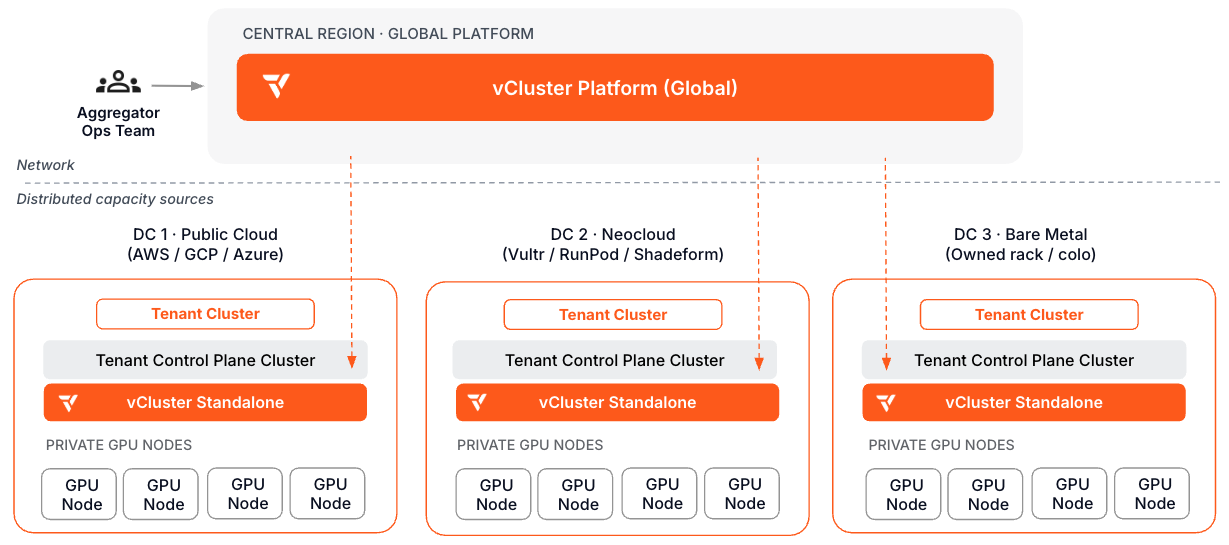
What makes this path different: Every compute source, regardless of where it lives or who operates it, follows the same onboarding playbook. One ops team, one management plane, no per-provider tooling. This architecture also maps to the cluster-level isolation criteria that AI cloud buyers evaluate in frameworks like ClusterMAX.
Day 0: Design decisions
| Decision | Read next | Outcome |
|---|---|---|
| Design the central-regional topology | Multi-region Platform, Standalone deployment | Central Platform registers each DC's Standalone instance as a connected cluster. Tenant control planes run co-located with their GPU nodes at each site. |
| Define the supplier onboarding playbook | Standalone HA, Private Nodes, Auto Nodes | Standardize the steps to register a new compute source: install Standalone, connect to central Platform, join GPU inventory, validate. |
| Plan networking between sites | VPN | Each site's tenant clusters connect to their private nodes over VPN. Define whether tenants can span sites or are bound to a single DC. |
| Define the default network policy posture | Network policy | Set a default-deny east-west posture per tenant template at every site and confirm each site's CNI enforces it. Some CNIs accept NetworkPolicy objects without enforcing them. |
| Define tenant isolation at each site | Private Nodes, vNode docs | Each tenant cluster at a site gets its own dedicated GPU nodes. vNode adds runtime isolation for untrusted workloads. |
| Choose the GPU scheduling model | DeviceClasses, DRA ResourceClaims | Device-plugin-style DeviceClass sync covers simple, whole-GPU allocation. DRA ResourceClaim sync (Pro) supports fine-grained and shared GPU allocation, consistently across every compute source. |
| Standardize tenant GPU software | Stacks, create a Stack template | If you manage tenant software, define one ordered application baseline that can be deployed consistently across compute sources. |
| Plan tenant storage per site | Storage classes from host, CSI storage capacities | Decide which storage classes are available at each site, since local NVMe or shared storage availability can differ by compute source, and whether to sync host CSIStorageCapacity for scheduler-aware placement. |
| Plan security hardening and audit logging | Security baseline, CIS hardening guide, Platform audit logging | Apply a consistent CIS benchmark baseline across every site's control plane cluster and decide audit log retention and SIEM integration before onboarding tenants. |
Day 1: Stand up the first compute source
- Deploy vCluster Platform in the central region. Configure Platform HA and backup.
- At the first compute site, install vCluster Standalone and move to HA.
- Register the site's Standalone control plane cluster with central Platform.
- Join the site's GPU inventory as private nodes. Configure Auto Nodes or vMetal for automated provisioning and reclaim.
- Configure templates and quotas in central Platform for this compute source.
- Apply a default-deny network policy in the site's template and confirm the site's CNI enforces it.
- Configure per-site storage classes for the template.
- Configure GPU scheduling: sync DeviceClasses for device-plugin allocation, or enable DRA ResourceClaim sync for fine-grained allocation.
- If you manage the tenant software layer, create a StackTemplate for the GPU applications that should be consistent across sites, then deploy it to the tenant environments.
- Apply the CIS hardening baseline to the site's control plane cluster and enable Platform audit logging.
- Provision a test tenant cluster at the site. Validate that it appears in central Platform and that workloads land on the correct GPU nodes.
- Document the supplier onboarding playbook. Repeat steps 2-11 for each additional compute source.
Day 2: Operate
| Operation | Read next |
|---|---|
| Monitor the distributed fleet | Fleet Observability, other architectures |
| Onboard a new compute source | Supplier onboarding playbook (internal), Standalone deployment |
| Upgrade across sites | Upgrade vCluster, upgrade Platform |
| Handle site failures | Platform HA, multi-region Platform |
| Track GPU utilization and faults across sites | GPU observability templates, NVSentinel GPU observability |
| Review audit logs and security posture across the fleet | Platform audit logging, security baseline |