Cilium Powered vClusters - Part 2: Running Tenant Clusters on a Cilium-Powered Control Plane Cluster

May 25, 2026
|
min Read

Deploy multiple Tenant Clusters inside a vind Control Plane Cluster and show how each one transparently uses host Cilium for networking without any CNI configuration of its own.
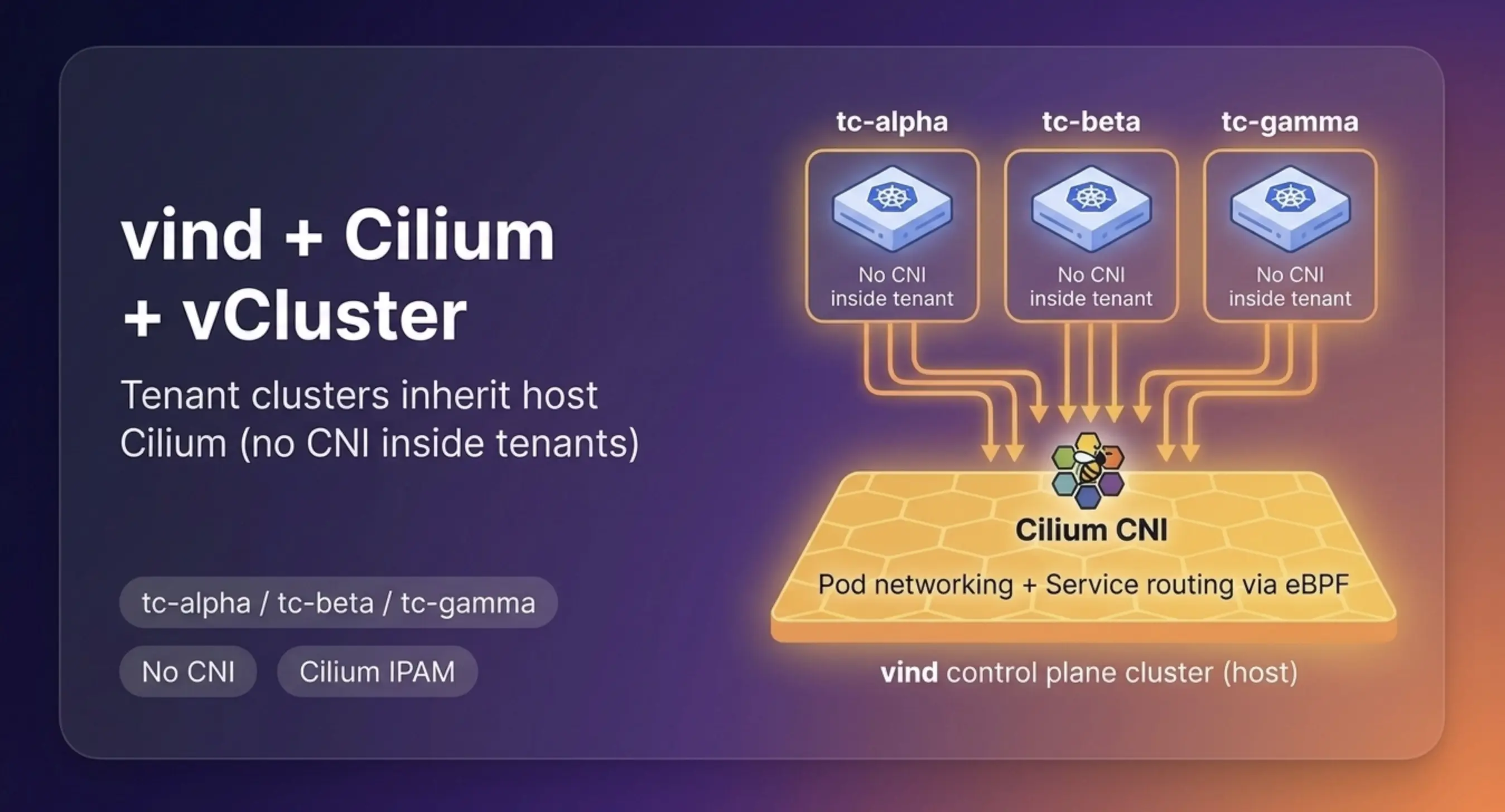
In Part 1 of this series, we set up a vind cluster with Cilium as the CNI, replacing Flannel and kube-proxy with eBPF-powered networking. Now we go one level deeper.
In this part, we deploy three Tenant Clusters inside that same vind Control Plane Cluster. The goal is to show something that surprises most people the first time they see it, each Tenant Cluster gets full pod networking without configuring any CNI of its own. Host Cilium handles everything transparently.
Before running any commands, it is worth understanding what we are actually building.
A Tenant Cluster is not a full Kubernetes cluster in the traditional sense. It has a virtual control plane - its own API server, scheduler, and controller manager but it does not have its own nodes. When a pod is created inside a Tenant Cluster, vCluster syncs that pod down to the real nodes of the host cluster (the Control Plane Cluster). The pod runs on a real node, and the real node's CNI handles its networking.
What this looks like in practice:
vind Control Plane Cluster (cilium-vind)
  ├── Real nodes: cilium-vind, worker-1, worker-2
  ├── Cilium running on every node  ← handles ALL pod networking
  │
  ├── Tenant Cluster: tc-alpha  (virtual control plane only)
  │     └── pods synced → scheduled on real vind nodes
  │           └── Cilium assigns IPs, handles routing
  │
  ├── Tenant Cluster: tc-beta   (virtual control plane only)
  │     └── pods synced → scheduled on real vind nodes
  │           └── Cilium assigns IPs, handles routing
  │
  └── Tenant Cluster: tc-gamma  (virtual control plane only)
        └── pods synced → scheduled on real vind nodes
              └── Cilium assigns IPs, handles routing
The Tenant Clusters themselves have no CNI, no kube-proxy, no IPAM configuration. They do not need any. Cilium on the Control Plane Cluster is the only networking layer, and it handles pods from all Tenant Clusters exactly the same way it handles any other pod.
IPAM stands for IP Address Manager, it is the component responsible for assigning IP addresses to pods. In our setup, Cilium is the IPAM. Every pod created in any Tenant Cluster gets an IP from Cilium's address pool (10.244.x.x). The Tenant Cluster has no say in this, it simply receives the IP that the host Cilium assigned via the vCluster syncer.
This part builds directly on Part 1. You need a running vind cluster with Cilium installed and verified. If you followed Part 1, your setup should look like this:
# Verify vind is running
docker ps --format ".Names" | grep vcluster
Expected output:
vcluster.node.cilium-vind.worker-2
vcluster.node.cilium-vind.worker-1
vcluster.cp.cilium-vind
# Reconnect to vind and verify Cilium
vcluster connect cilium-vind --driver docker
kubectl get pods -n kube-system -l k8s-app=cilium
kubectl get nodes
Expected output:
NAME           READY   STATUS    RESTARTS   AGE
cilium-2cxtk   1/1     Running   0          14m
cilium-8mmfs   1/1     Running   0          14m
cilium-zskxv   1/1     Running   0          14m

NAME          STATUS   ROLES                  VERSION
cilium-vind   Ready    control-plane,master   v1.35.0
worker-1      Ready    <none>                 v1.35.0
worker-2      Ready    <none>                 v1.35.0
Three Cilium agents running, all nodes Ready -> you are good to go.
In Part 1 we used --driver docker to create the vind Control Plane Cluster itself. For Tenant Clusters running inside vind, we use --driver helm instead. This tells the CLI to deploy the Tenant Cluster as a pod inside whichever Kubernetes cluster the current context points to, which is cilium-vind.
Common mistake: Running vcluster create without --driver helm while connected to a vind cluster will create another Docker-level vind cluster instead of a Tenant Cluster pod inside cilium-vind. Always specify --driver helm for Tenant Clusters.
Make sure your context is pointing at cilium-vind, then create the three Tenant Clusters one by one. Each gets its own namespace.
# Confirm you are connected to cilium-vind
kubectl config current-context
# Should show: vcluster-docker_cilium-vind

# Create tc-alpha
vcluster create tc-alpha --namespace tc-alpha --driver helm

# Disconnect back to cilium-vind before creating the next one
vcluster disconnect

# Create tc-beta
vcluster create tc-beta --namespace tc-beta --driver helm
vcluster disconnect

# Create tc-gamma
vcluster create tc-gamma --namespace tc-gamma --driver helm
vcluster disconnect
Why disconnect between creates? Each vcluster create automatically switches your context into the newly created Tenant Cluster. If you forget to disconnect and run the next create from inside a Tenant Cluster, the CLI may behave unexpectedly. Always disconnect back to cilium-vind before creating the next one.
Each Tenant Cluster takes about 20 seconds to become ready. Notice there is no vcluster.yaml - no CNI config, no kube-proxy setting, nothing. The defaults are correct because the host Cilium handles all networking.
From the cilium-vind context, check that all three Tenant Clusters are running as pods:
kubectl get pods -A | grep -E "tc-alpha|tc-beta|tc-gamma"
Expected output:
tc-alpha   coredns-79cf5f4c56-kw4tc-x-kube-system-x-tc-alpha   1/1   Running   0   5m
tc-alpha   tc-alpha-0                                          1/1   Running   0   5m
tc-beta    coredns-79cf5f4c56-l4ktp-x-kube-system-x-tc-beta    1/1   Running   0   2m
tc-beta    tc-beta-0                                           1/1   Running   0   2m
tc-gamma   coredns-79cf5f4c56-9xd24-x-kube-system-x-tc-gamma   1/1   Running   0   56s
tc-gamma   tc-gamma-0                                          1/1   Running   0   78s
Two things to notice in this output. First, each Tenant Cluster shows up as a StatefulSet pod - tc-alpha-0, tc-beta-0, tc-gamma-0 - running in its own namespace on the real vind nodes. Second, each Tenant Cluster's CoreDNS pod has been synced down to the host with a name like coredns-...-x-kube-system-x-tc-alpha. That x-kube-system-x-tc-alpha suffix is vCluster's naming convention for pods synced from inside a Tenant Cluster, it encodes the original namespace and Tenant Cluster name to avoid conflicts on the host.
This is the key proof point of Part 2. Run kubectl get pods -o wide to see which IP addresses and nodes these pods landed on:
kubectl get pods -A -o wide | grep -E "tc-alpha|tc-beta|tc-gamma"
Expected output:
tc-alpha  coredns-...-x-kube-system-x-tc-alpha  1/1  Running  0  5m  10.244.3.69   worker-2
tc-alpha  tc-alpha-0                            1/1  Running  0  5m  10.244.3.80   worker-2
tc-beta   coredns-...-x-kube-system-x-tc-beta   1/1  Running  0  2m  10.244.3.173  worker-2
tc-beta   tc-beta-0                             1/1  Running  0  2m  10.244.0.167  cilium-vind
tc-gamma  coredns-...-x-kube-system-x-tc-gamma  1/1  Running  0  1m  10.244.2.252  worker-1
tc-gamma  tc-gamma-0                            1/1  Running  0  1m  10.244.3.161  worker-2
Every pod, across all three Tenant Clusters has a 10.244.x.x IP address. That is Cilium's address range on the cilium-vind cluster. The Tenant Clusters configured nothing. Cilium on the Control Plane Cluster assigned those addresses automatically, and spread the pods across all three real nodes.
Key Insight
The Tenant Clusters have no idea how their pods got IP addresses. From their perspective, pods just come up with IPs. Under the hood, vCluster synced those pods to the real vind nodes, and host Cilium assigned the addresses. This is Tenant Isolation at the infrastructure layer, the tenants consume networking without being able to configure or interfere with it.
Now let's deploy a workload inside each Tenant Cluster to prove that pod-to-pod networking works. We will run an nginx server and a curl client in each one.
tc-alphavcluster connect tc-alpha --namespace tc-alpha --driver helm
kubectl run nginx --image=nginx --restart=Never
kubectl run curl --image=curlimages/curl --restart=Never -- sleep 3600
kubectl wait pod nginx --for=condition=Ready --timeout=60s
kubectl wait pod curl --for=condition=Ready --timeout=60s
kubectl get pods -o wide
Expected output:
NAME    READY   STATUS    AGE   IP             NODE
curl    1/1     Running   1s    10.244.2.116   worker-1
nginx   1/1     Running   1s    10.244.0.197   cilium-vind
kubectl exec curl -- curl -s --max-time 5 <http://10.244.0.197> | grep -o "<title>.*</title>"
Expected output:
<title>Welcome to nginx!</title>
vcluster disconnect

# tc-beta
vcluster connect tc-beta --namespace tc-beta --driver helm
kubectl run nginx --image=nginx --restart=Never
kubectl run curl --image=curlimages/curl --restart=Never -- sleep 3600
kubectl wait pod nginx --for=condition=Ready --timeout=60s
kubectl wait pod curl --for=condition=Ready --timeout=60s
kubectl get pods -o wide

# Note the nginx IP, then test:
kubectl exec curl -- curl -s --max-time 5 http://<NGINX_IP> | grep -o "<title>.*</title>"
vcluster disconnect

# tc-gamma
vcluster connect tc-gamma --namespace tc-gamma --driver helm
kubectl run nginx --image=nginx --restart=Never
kubectl run curl --image=curlimages/curl --restart=Never -- sleep 3600
kubectl wait pod nginx --for=condition=Ready --timeout=60s
kubectl wait pod curl --for=condition=Ready --timeout=60s
kubectl get pods -o wide

# Note the nginx IP, then test:
kubectl exec curl -- curl -s --max-time 5 http://<NGINX_IP> | grep -o "<title>.*</title>"
With all three Tenant Clusters running workloads, there is one final test. Since we have not applied any network policies yet, the network is fully open - a pod in tc-gamma should be able to reach pods in tc-alpha and tc-beta directly by IP.
From inside tc-gamma, reach the nginx pods in the other two Tenant Cluster:
# Still connected to tc-gamma
# Replace IPs with the actual nginx IPs from tc-alpha and tc-beta

kubectl exec curl -- curl -s --max-time 5 <http://10.244.0.197> | grep -o "<title>.*</title>"
kubectl exec curl -- curl -s --max-time 5 <http://10.244.3.250> | grep -o "<title>.*</title>"
Expected output:
<title>Welcome to nginx!</title>   ← tc-alpha nginx, reached from tc-gamma
<title>Welcome to nginx!</title>   ← tc-beta nginx, reached from tc-gamma
Cross-Tenant traffic works. A pod in tc-gamma can reach pods in tc-alpha and tc-beta with no restrictions. This is expected because we have not applied any network policies yet. The network is flat and open.
This is the cliffhanger. Right now, any pod in any Tenant Cluster can reach any pod in any other Tenant Cluster. For a shared infrastructure scenario where each Tenant Cluster belongs to a different team this is not acceptable. Part 3 of this series will use Cilium network policies to enforce Tenant Isolation and block this cross-tenant traffic completely.
Test         From           To              Result
Intra-tenant tc-alpha/curl  tc-alpha/nginx  Connected
Intra-tenant tc-beta/curl   tc-beta/nginx   Connected
Intra-tenant tc-gamma/curl  tc-gamma/nginx  Connected
Cross-tenant tc-gamma/curl  tc-alpha/nginx  Connected
Cross-tenant tc-gamma/curl  tc-beta/nginx   Connected
All connectivity works, three Tenant Clusters sharing one Cilium-powered Control Plane Cluster, with no CNI configuration inside any Tenant Cluster. The network is currently open, which sets up exactly the problem that Part 3 will solve.
Tenant Clusters deployed inside a vind Control Plane Cluster automatically inherit the host Cilium for all networking. No CNI configuration is needed inside the Tenant Cluster, not even flannel.enabled: false. vCluster syncs pods to the real host nodes, and Cilium assigns their IPs from its own address pool. The Tenant Clusters are networking consumers, not networking owners.
We now have three Tenant Clusters on a single Cilium-powered Control Plane Cluster, with a completely open network between them. In Part 3, we will apply Cilium network policies to enforce Tenant Isolation, blocking cross-tenant traffic at the eBPF layer while keeping intra-tenant traffic flowing. The same setup we built today becomes the target environment for those policies.
Deploy your first virtual cluster today.
