Cilium Powered vClusters - Part 4: Observability with Hubble

May 29, 2026
|
min Read

Enable Cilium Hubble to visualize traffic across tenant clusters. See allowed and dropped flows in real time, and understand exactly which policy is blocking which connection.
Part 3 proved isolation using curl timeouts. Part 4 makes the policy decisions visible: which flows were dropped, when, and why.
In Part 3 we enforced tenant isolation with CiliumNetworkPolicy. We proved it worked because curl timed out (exit code 28), but that does not tell you:
Hubble solves this by exposing Cilium’s eBPF-level visibility via:
Hubble has two components:
Neither is enabled by default. You add them on top of an existing Cilium install with a Helm upgrade (no reinstall) and existing policies/connectivity remain intact.
Check current Helm values:
helm get values cilium -n kube-system
Upgrade Cilium to enable Hubble (preserve existing values):
helm upgrade cilium cilium/cilium \\
  --version 1.16.0 \\
  --namespace kube-system \\
  --reuse-values \\
  --set hubble.enabled=true \\
  --set hubble.relay.enabled=true \\
  --set hubble.ui.enabled=true
kubectl rollout status deployment/hubble-relay -n kube-system
kubectl rollout status deployment/hubble-ui -n kube-system
Expected:
deployment "hubble-relay" successfully rolled outdeployment "hubble-ui" successfully rolled outHubble UI is not exposed externally. Use port-forward:
# Run in a separate terminal and keep it running
kubectl port-forward -n kube-system svc/hubble-ui 12000:80
Open http://localhost:12000 in your browser.
CiliumNetworkPolicy from Part 3.tc-gamma to tc-alpha and tc-beta in parallel:vcluster connect tc-gamma --namespace tc-gamma --driver helm
kubectl exec curl -- curl -s --max-time 5 http://<TC_ALPHA_NGINX_IP>/ &
kubectl exec curl -- curl -s --max-time 5 http://<TC_BETA_NGINX_IP>/ &
wait
Why parallel (&)? Each curl waits up to 5s before timing out. Parallel execution makes both flows show up in the same Hubble time window.
In Hubble UI:
You should see two red flows (port 80) from tc-gamma to tc-alpha and tc-beta.
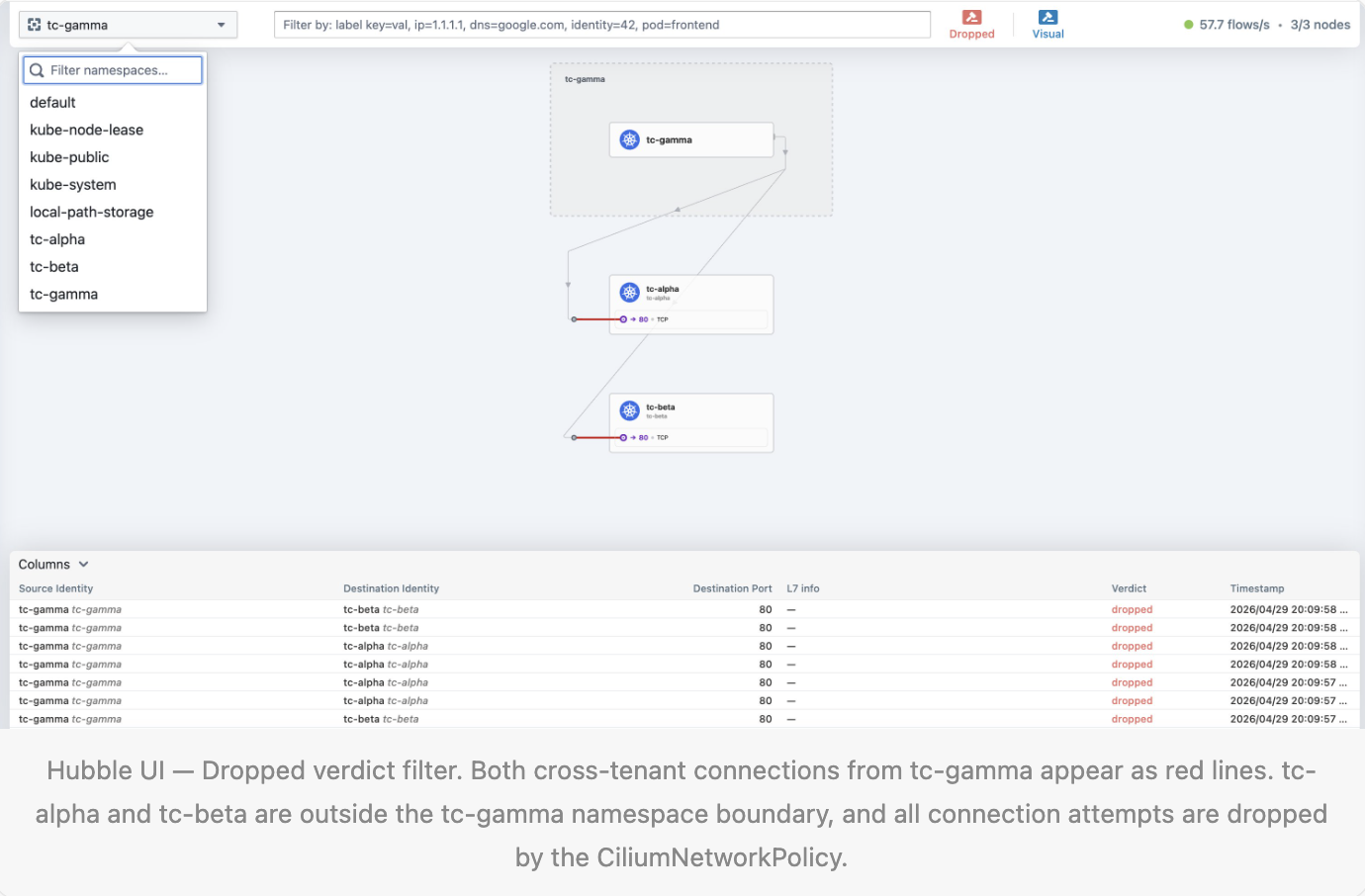
Two red lines, one from tc-gamma to tc-alpha on port 80, one from tc-gamma to tc-beta on port 80. Both dropped simultaneously. The dashed box shows the tc-gamma namespace boundary. Any connection leaving that box towards another Tenant Cluster is blocked by the CiliumNetworkPolicy.
Run from the cilium-vind context:
kubectl exec -n kube-system -it ds/cilium -- hubble observe \\
  --namespace tc-gamma \\
  --last 20
Example drop output:
Apr 29 17:57:28.546: tc-gamma/curl-x-default-x-tc-gamma:44140 (ID:56702) <> tc-alpha/nginx-x-default-x-tc-alpha:80 (ID:9833) policy-verdict:none INGRESS DENIED (TCP Flags: SYN)
Apr 29 17:57:28.546: tc-gamma/curl-x-default-x-tc-gamma:44140 (ID:56702) <> tc-alpha/nginx-x-default-x-tc-alpha:80 (ID:9833) Policy denied DROPPED (TCP Flags: SYN)
How to read it:
You can also view from the receiver side:
kubectl exec -n kube-system -it ds/cilium -- hubble observe \\
  --namespace tc-alpha \\
  --last 20
With standard NetworkPolicy, you often only see “silence” when traffic is blocked. With CiliumNetworkPolicy + Hubble, you get complete visibility: every flow, every drop, pod identities, drop reason, and timestamp.
We now have a fully observable Cilium-powered multi-tenant setup: three Tenant Clusters with enforced isolation and real-time traffic visibility.
Deploy your first virtual cluster today.
