Comprehensive Guide to Multicluster Management in Kubernetes

Nov 2, 2023
|
13
min Read
Imagine effortlessly managing applications across multiple environments with increased efficiency and scalability.
Kubernetes multi-cluster management has changed how we deploy, scale, and manage cloud apps. Google designed Kubernetes. Its main role is to manage containerized applications in a single cluster. But businesses and technology have advanced. Therefore, managing apps across multiple clusters is now essential.
Using multiple clusters, even in similar locations, is better. This multicluster approach improves scalability, reliability, and workload isolation. It also allows for better resource use and enhances fault tolerance. This approach ensures compliance, allowing businesses to meet the demands of modern operations.
This article explores Kubernetes multi-cluster management. It highlights its importance, challenges, and best practices.
In a kubernetes multi cluster management setup, a cluster is a set of node machines for running containerized applications. If you know about server farms, a kubernetes cluster is like that. It's for containerized apps.
A node in a Kubernetes cluster can be a virtual machine or a physical computer. It acts as a worker machine. Each node has a kubelet. It manages the node and interacts with the kubernetes control plane.
The following diagram illustrates a typical Kubernetes cluster setup:
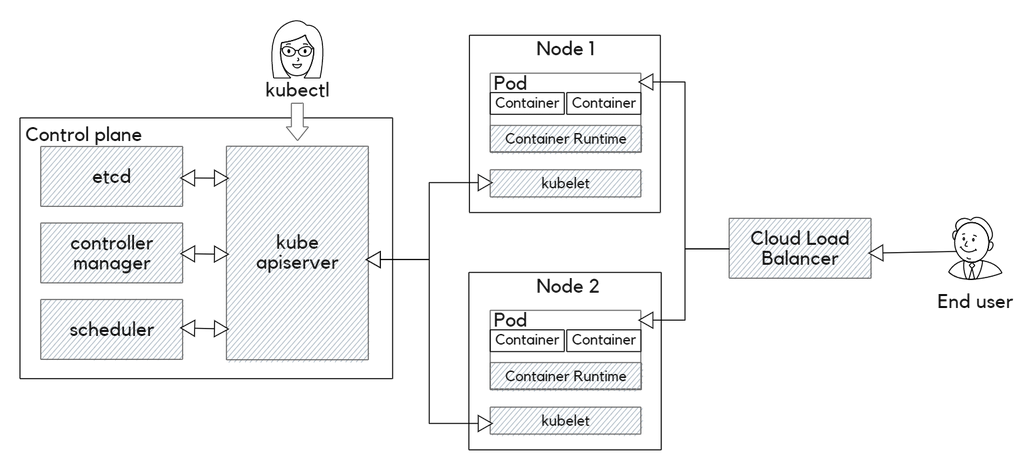
In kubernetes multi-cluster management, the control plane manages all objects. It ensures they match their intended state. It has three main components:
kube-apiserver)kube-controller-manager)kube-scheduler)These components can operate on a single node or be distributed across multiple nodes for better reliability.
The kubernetes management control plane consists of machines that run application containers. The API server, scheduler, and controller manager manage them. The API server is the cluster's access point. It handles client connections, authentication, and proxying to nodes, pods, and services.
Most system resources in Kubernetes come with metadata, a desired state, and a current state. Controllers primarily work to reconcile the current state with the desired state. The controller manager monitors the cluster's state and introduces necessary changes.
While the cloud controller manager ensures smooth integration with public cloud platforms, like Azure Kubernetes Service and Google Kubernetes Engine, this ensures the system self-heals and adheres to the user-defined configurations.
Different controllers manage various aspects of a Kubernetes cluster. They include nodes, autoscaling, and services. The controller manager monitors the cluster's state and makes changes as needed. The cloud controller manager ensures smooth integration with public cloud platforms.
The scheduler distributes containers across the cluster's nodes. It considers resource availability and affinity settings.
Pods are ephemeral and can perform autoscaling, upgrades, and deployments. They can contain multiple containers and storage volumes. In a multi-cluster Kubernetes environment, managing multiple clusters can be complex. This is especially true for clusters in different regions or hosted by various cloud providers.
Kubernetes includes machines called cluster nodes. They run application containers and are managed by the control plane. The kubelet controller running on each node manages the container runtime, which is called "container."
On the other hand, pods are logical constructs. They package a single application and represent a running process on a cluster. Pods are ephemeral and can perform autoscaling, upgrades, and deployments. They can hold multiple containers and storage volumes. They are the main Kubernetes construct that developers use.
Managing multiple Kubernetes clusters can be a complex task. This is especially true for clusters in different locations or on various cloud providers. This setup offers flexibility and better service. But, it greatly increases the complexities of Kubernetes administration.
A single cluster might seem sufficient, especially for small to medium-sized applications. However, as an application grows, several challenges arise with a single cluster setup. Here are some of them:
A kubernetes multi-cluster management setup can overcome these challenges. It has several advantages over a single-cluster setup. They include:
While having multiple clusters offers numerous advantages, managing these clusters can be challenging. It requires a deep knowledge of Kubernetes federation and networking. You must also be able to troubleshoot issues.
Here are some of the key challenges:
Ensuring consistency, having effective resource management, and maintaining security and compliance can be complex. Some tools can simplify some of the operational complexities of the process.
These include Karmada and Cluster API. But careful planning and configuration are still necessary to ensure an effective multicluster setup.
The following are some best practices that can help simplify the process.
Using tools like Helm can help ensure consistent configurations across all clusters. Helm is a Kubernetes package manager. It lets you define, install, and upgrade apps in a cluster. It can also manage configurations across multiple clusters, ensuring uniform operations.
Besides Helm, tools like Kustomize and KubeVela can help manage configurations across clusters. Kustomize is a native Kubernetes tool. It customizes configs for different environments. KubeVela is a cloud-native tool for deploying apps. It lets you define and manage apps across multiple clusters.
Kubernetes operators are another popular option used for managing configurations. Operators are software extensions to Kubernetes. They use custom resources to manage applications and their components. For instance, the Prometheus operator can be used to manage Prometheus and its components.
The Kubernetes control plane comprises the API server, scheduler, and controller manager. It also includes a key-value data store, which is typically etcd. To ensure the high availability of control plane services, you need to run multiple replicas of the services across availability zones.
You should also use highly available etcd clusters for data storage redundancy and load balancers for load balancing. Tools like Kubeadm can bootstrap clusters, ensuring the control plane remains available.
Managing compliance across multiple clusters can be challenging. Tools like Open Policy Agent (OPA) can help ensure compliance. OPA is an open-source policy engine that allows you to define, manage, and enforce policies across clusters.
For instance, you can use OPA to ensure all clusters are configured with the same network policies. You can also use it to ensure all clusters comply with local data laws. Other alternatives to OPA include Kyverno and jsPolicy.
As your clusters grow, complexity can increase. Use a centralized system to track all clusters. It should optimize observability and ensure consistent governance. Tools like Rancher can help manage multiple clusters from a single dashboard.
It allows you to manage clusters across different cloud providers, including AWS, Azure, and Google Cloud. It also lets you manage clusters in different regions from a single dashboard. You can configure access control and resource quotas across clusters.
A virtual cluster is a self-contained Kubernetes cluster. It runs in a specific namespace of another Kubernetes cluster. This new approach lets us create multiple virtual clusters in a single Kubernetes cluster.
Each virtual cluster is isolated from others. A fault in one won't affect the others. Each virtual cluster can have its own configurations. This lets you test different settings without affecting others.
Tools like Loft Lab's vCluster can create virtual clusters in a Kubernetes cluster. vCluster lets you manage access and quotas for each virtual cluster. This ensures effective resource management.
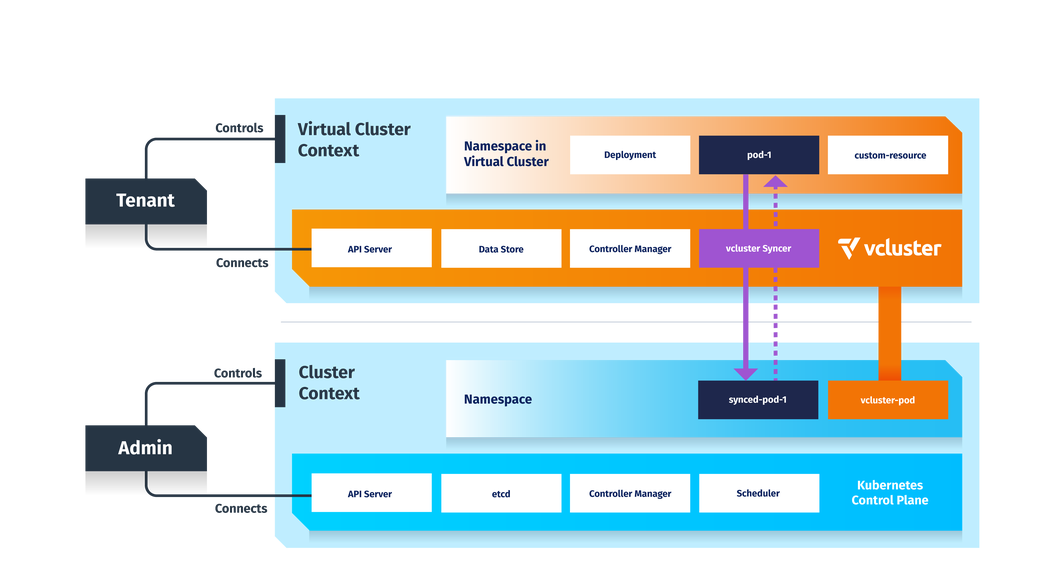
vCluster runs a StatefulSet in a namespace on a host. It has a pod with two main containers: the control plane and the syncer. The control plane, by default, utilizes the API server and controller manager from K3s. It uses SQLite as its data store. You can use other backends, such as etcd, MySQL, and PostgreSQL.
Instead of a traditional scheduler, vCluster employs the syncer to manage pod scheduling. This syncer replicates the virtual cluster's pods to the host. The host's scheduler handles pod scheduling.
The syncer ensures synchronization between the vCluster pod and the host pod. Also, each virtual cluster has its own CoreDNS pod. It resolves DNS requests within the virtual cluster.
The host manages several aspects of the clusters:
The following diagram illustrates the internal workings of vCluster, showcasing components like the API server, data store, controller manager, and syncer. It also depicts how the syncer, with the host cluster's scheduler, manages pod scheduling on the host:
Kubernetes multi-cluster management has many benefits. It boosts reliability and optimizes resource use. However, it also has its challenges. This ensures configuration consistency, managing compliance, and enforcing secure access controls. Loft is here to help you navigate these complexities. We can help you implement a successful multicluster strategy with ease.
Our tools, like vCluster, let you deploy multiple virtual Kubernetes clusters in a single infrastructure. They're powerful. They ensure strong isolation and optimize efficiency. Loft simplifies cluster management. It boosts performance and ensures compliance. It also cuts operational costs.
Platform engineers and architects need deep expertise. They must tackle the challenges of multicluster Kubernetes deployments. With Loft, you can use best practices. You can confidently choose between options like multi-region clusters or virtual clusters. Join Loft today and unlock the future of effortless multicluster Kubernetes management.
Organizations run and manage multiple Kubernetes clusters across different cloud providers or infrastructures. Each kubernetes cluster operates as a self-contained unit. The upstream community now aims to develop a Kubernetes multi-cluster management solution. This effort seeks to address the complexities of multi cluster environments.
A Kubernetes multi-cluster deployment manages applications across multiple clusters. It doesn't rely on just one cluster. This improves scalability and fault tolerance. Workloads are spread across different clusters.
Each cluster works independently, providing better isolation and reliability and ensuring compliance with geographic data regulations. Organizations use this to optimize resources and avoid single points of failure, helping maintain high availability in diverse environments.
You can employ several strategies to manage multi-cluster Kubernetes environments. Two popular methods are: Kubernetes-centric management. It uses Kubernetes-native tools and APIs to manage multiple clusters.
This approach leverages built-in Kubernetes capabilities to manage operations across all clusters efficiently.
Cluster administrators are now facing challenges in managing multi-clusters in their organizations. Kubernetes offers namespaces for soft isolation and virtual clusters for hard multi-tenancy.
But there are times when running multiple clusters becomes necessary.
The main reasons for using multiple clusters are to:
Deploy your first virtual cluster today.
