Introduction to Kubernetes Cluster Autoscaling

Apr 27, 2026
|
9
min Read

Your deployment scaled to 50 replicas during last night's traffic surge, but 30 pods are still stuck in Pending because the cluster exhausted available node capacity at 2 am. The Kubernetes scheduler can't place workloads without compute resources, your fixed node pool is at maximum capacity, and the system continues attempting to add replicas. Manual intervention is the only option, but it defeats the purpose of automated scaling in the first place.
This type of failure occurs because Kubernetes scales workloads without provisioning the infrastructure to run them. Cluster Autoscaler (CA) closes that gap by scaling the cluster itself.
This guide explores what Cluster Autoscaler is, when to use it, basic implementation patterns across major cloud providers, and when specialized alternatives like Karpenter or vCluster provide a better architectural fit.
Before exploring how CA provisions nodes, you need to know how Kubernetes scales workloads.
Kubernetes provides two primary mechanisms for workload-level scaling:
Both autoscalers operate exclusively at the workload layer. HPA adds more pods when demand increases, while VPA right-sizes individual pods. However, they share a critical assumption: sufficient compute nodes must already exist in the cluster. When node capacity is exhausted, HPA cannot schedule new pod replicas, leaving them in a Pending state indefinitely. Similarly, VPA fails when pods require more resources than any single node can provide. This capacity limit reveals the problem with workload-only scaling.
To address this scheduling bottleneck, you need to scale at the infrastructure layer, which is what CA helps you do.
CA dynamically adjusts the number of nodes in a Kubernetes cluster based on pod scheduling demands. When pods cannot be scheduled due to insufficient node capacity, CA provisions additional compute nodes. Conversely, it also removes underutilized nodes when workloads scale down, preventing wasted infrastructure spend.
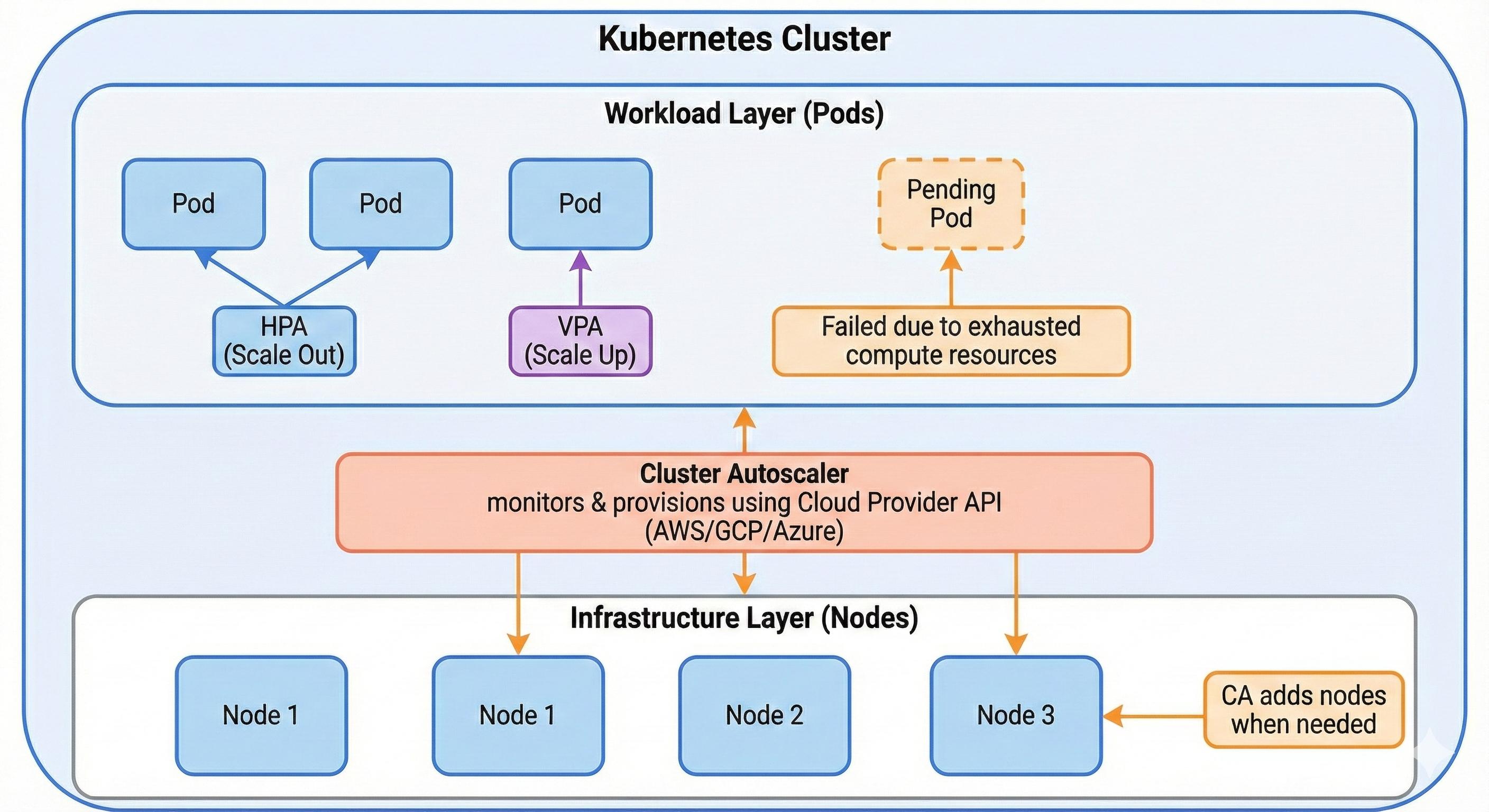
As explained, HPA and VPA assume sufficient compute capacity already exists. CA fills this infrastructure gap by interacting with your cloud provider's API to provision or remove nodes automatically, maintaining optimal capacity without manual intervention.
Originally developed by the Kubernetes SIG Autoscaling team, CA now integrates with all major cloud providers, including AWS (via Auto Scaling Groups), GCP (native node pool integration), and Azure (through Virtual Machine Scale Sets). It supports both managed Kubernetes services like AWS EKS, GKE, and AKS, as well as self-managed clusters that expose compatible cloud APIs.
The relationship between Kubernetes' three autoscaling mechanisms becomes clearer when you examine their respective targets:
CA's node-level focus complements pod-level autoscaling. But does every cluster actually need this infrastructure-layer capability?
Fixed node pools force you into a trade-off. If you underprovision, traffic spikes leave pods unschedulable during marketing campaigns or batch processing runs. If you overprovision for peak capacity, you waste cloud spending on idle nodes during normal operations.
CA solves this by scaling infrastructure. It provisions nodes when pods can't be scheduled, then removes them when utilization drops. You maintain service availability during demand spikes without paying for idle capacity during quiet periods.
CA works best when you can't predict your capacity needs or when you exhibit significant temporal variability. It's great for workloads with unpredictable traffic patterns, dev and staging environments where you want to minimize costs, or applications with different reliability needs running on the same cluster.
The following are the most common patterns where node-level autoscaling becomes operationally necessary:
CA implementation varies by cloud provider, with each offering different integration patterns and operational constraints. The following examples demonstrate basic setup procedures with a few major cloud providers.
AWS EKS deploys CA via Helm or Kubernetes manifests targeting EC2 Auto Scaling Groups (ASGs). The autoscaler requires an IAM role with permissions for autoscaling:SetDesiredCapacity, autoscaling:DescribeAutoScalingGroups, and ec2:DescribeInstances.
You can deploy the autoscaler with the following:
helm install cluster-autoscaler autoscaler/cluster-autoscaler \
  --set autoDiscovery.clusterName=<cluster-name> \
  --set awsRegion=<region>
Critical requirement: ASGs must include specific resource tags (k8s.io/cluster-autoscaler/<cluster-name>: owned and k8s.io/cluster-autoscaler/enabled: true). Missing tags prevent autodiscovery, causing CA to ignore the ASG entirely. Additionally, using multiple ASGs with different instance types requires careful configuration of node affinity rules to prevent scheduling pods on incompatible nodes.
Google Kubernetes Engine (GKE) provides native CA support through node pool configuration. You enable autoscaling when creating a node pool:
gcloud container node-pools create <pool-name> \
  --cluster=<cluster-name> \
  --enable-autoscaling \
  --min-nodes=1 \
  --max-nodes=10
Operational consideration: Setting overly conservative min/max bounds defeats CA's cost optimization benefits. Multiple autoscaling node pools can compete for workload placement, leading to inefficient resource distribution. GKE's autoscaler also respects pod disruption budgets, which can prevent scale-down operations if budgets are too restrictive.
AKS integrates CA at the cluster level, requiring a managed identity or service principal with Virtual Machine Scale Set permissions:
az aks update \
  --resource-group <resource-group> \
  --name <cluster-name> \
  --enable-cluster-autoscaler \
  --min-count 1 \
  --max-count 10
Common pitfall: Mixing manual and autoscaled node pools in the same cluster creates ambiguous scaling behavior. AKS may scale the wrong pool if pod resource requests don't clearly map to node pool specifications. Additionally, the autoscaler's scale-down process respects system pod placement; nodes with kube-system pods often resist termination.
CA operates exclusively at the node group level, requiring predefined instance types within Auto Scaling Groups or node pools. This prevents dynamic selection of optimal instance types based on actual pod requirements.
Additionally, CA's total provisioning time includes both its scan interval (10 seconds by default, tunable to 60 seconds with minimal impact) and cloud provider node launch time, which typically exceeds two minutes. For workloads requiring sub-minute scaling responses, this combined delay becomes operationally significant.
Several alternatives address these constraints by rethinking node provisioning strategies.
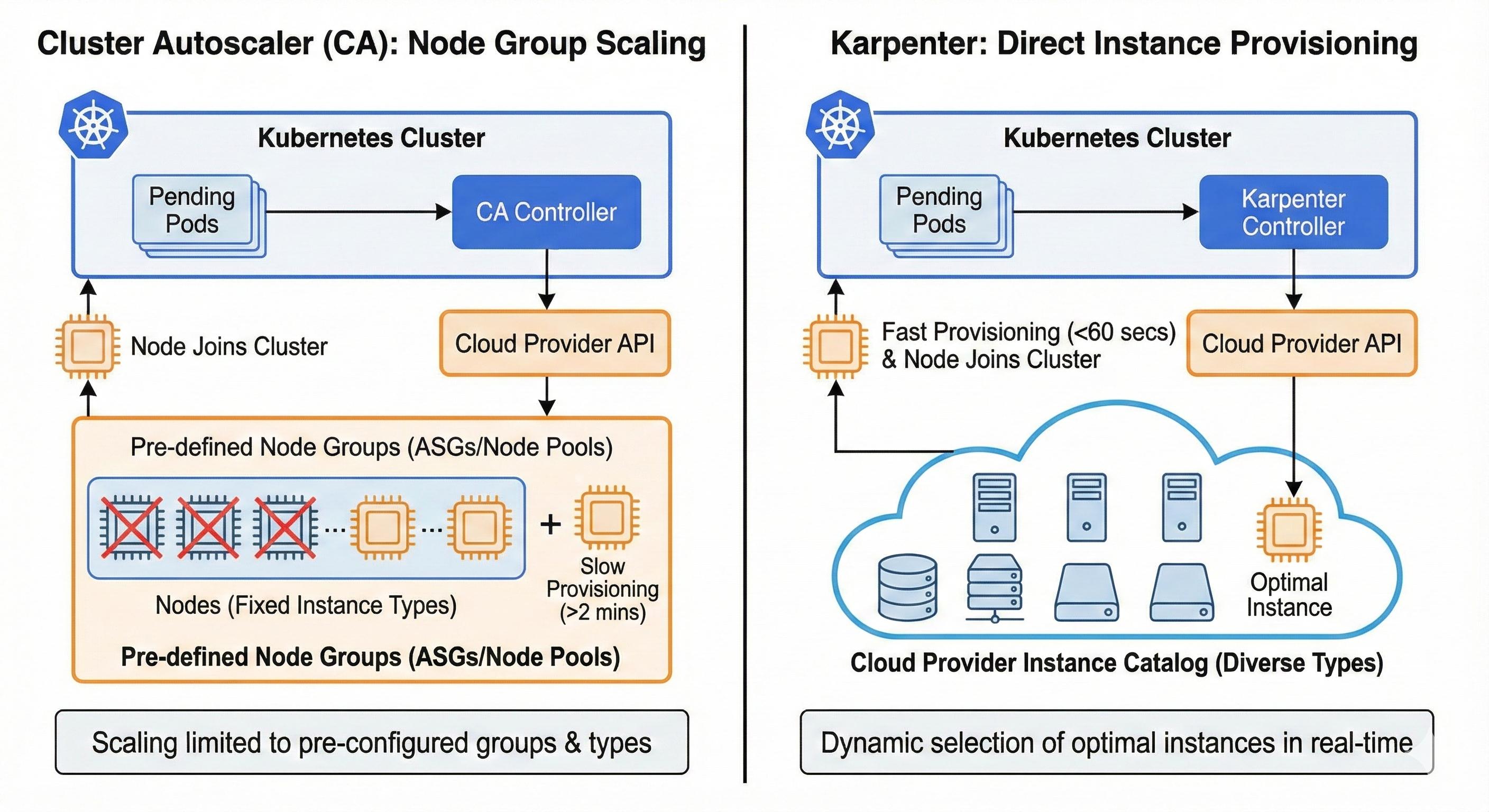
Karpenter addresses CA's speed limitations by provisioning instances directly rather than scaling node groups. When pods become unschedulable, Karpenter selects optimal instance types from the cloud provider's catalog in real time, often completing provisioning in under 60 seconds (actual times vary based on instance availability and cloud provider responsiveness).
Originally built for AWS EKS, Karpenter now supports multiple cloud providers, though AWS implementation is still ideal. The architecture eliminates pre-configured node pools but requires learning Karpenter's custom resource model. For workloads needing sub-minute scaling or dynamic instance selection, Karpenter offers advantages over CA's design. A detailed comparison will be covered in a future article.
Virtual Kubelet and Kubernetes Event-Driven Autoscaling (KEDA) offer complementary approaches to serverless Kubernetes.
Used together, these tools enable workloads to scale from zero while running on serverless infrastructure. However, because serverless platforms prioritize tenant isolation and stateless execution models, pods face restricted network policies, limited persistent storage options, and cold start latencies that can exceed traditional node boot times when provisioning compute on demand.
vCluster Auto Nodes addresses tenant-isolated scaling challenges by virtualizing Kubernetes clusters within a control plane cluster, then automatically provisioning nodes using Karpenter internally for each tenant cluster based on tenant workload demands. This isolation model prevents resource contention between teams while maintaining centralized infrastructure management.
Additionally, tenant clusters scale independently without affecting neighboring tenants, and administrators can enforce per-tenant resource quotas and autoscaling policies. However, the virtualization layer adds scheduling overhead and troubleshooting issues across tenant and physical cluster boundaries.
This approach fits organizations running platform-as-a-service offerings or large-scale development environments requiring strong tenant isolation.
CA solves the node-level scaling problem that pod autoscalers can't address. In this article, you learned how CA monitors pod scheduling failures and provisions nodes automatically, when to use it based on workload patterns, and how to implement it across AWS, GCP, and Azure. For single-tenant applications on managed Kubernetes, CA provides reliable node scaling with minimal operational overhead.
However, tenant-isolated platforms introduce complexity that CA wasn't designed to handle. When teams share infrastructure, you need per-tenant autoscaling with strong isolation and accurate cost attribution. vCluster's Auto Nodes feature extends Karpenter-powered autoscaling to tenant clusters, giving each tenant independent scaling policies while maintaining centralized infrastructure management across any environment: public cloud, private cloud, or bare metal.
Ready to explore autoscaling at scale? Check out vCluster's Auto Nodes documentation to see how tenant clusters handle tenant-isolated infrastructure.
Deploy your first virtual cluster today.
