Installing the NVKE management plane from a signed NVKR release with vCluster Platform

Nov 10, 2026
|
26
min Read

NVIDIA has open-sourced two projects that platform teams at AI factories will want to look at together: NVKE, the NVIDIA Kubernetes Engine, and NVKR, the NVIDIA Kubernetes Recipes build system. NVKE is the management plane you run to create and operate Kubernetes clusters for your customers. NVKR builds NVKE's pieces from pinned source, signs them and publishes them as a release you can verify.
That leaves a practical question for anyone who operates this: how do you install the management plane so that only what NVKR built and signed ends up running? We built a Stack for vCluster Platform that does exactly that. One form in vCluster Platform creates a tenant cluster, checks the signatures and provenance of every piece of the NVKR release, and only then installs NVKE's management plane, in NVKE's own order. Change one character of the release reference and nothing installs.
In this post, we will see:
If you haven't looked at either project yet, here is the short tour.
NVKE, the NVIDIA Kubernetes Engine, is the software an AI factory runs to hand out Kubernetes clusters to its customers on its own NVIDIA GPU machines. NVIDIA describes it as "not a Kubernetes distribution and not a Cluster API flavour" but a "self-hosting factory for Kubernetes clusters".
It has two layers:
A note on names: NVKE's docs sometimes call the clusters it creates tenant clusters. In this post, a tenant cluster is always the cluster that vCluster Platform creates to run NVKE's management plane, and the clusters NVKE creates are workload clusters.
The management plane is what this post installs. It is a small set of services, and each one shows up as a task later:
| Service | What it does in NVKE |
|---|---|
| NVKE controller | Serves NVKE's API and drives every cluster request |
| PostgreSQL | Stores the state of the controller and of Temporal |
| Temporal | Runs long, multi-step jobs, such as provisioning a three-node cluster, and retries failed steps without losing progress |
| SPIRE | Gives every node and workload a cryptographic identity, so components authenticate each other over mTLS instead of passing static credentials |
| NKTP | NVKE's telemetry pipeline, built on OpenTelemetry |
On a real site, the controller gets bare-metal machines from NICo, NVIDIA's infrastructure controller, through Cluster API, and those machines become a customer's workload cluster. NVKE is in preview, and NVIDIA does not recommend it for production yet.
NVKR, NVIDIA Kubernetes Recipes, is how NVKE's pieces get built. It builds them from pinned source, signs them and publishes them, and it never installs anything. It works in three stages:
NVKR is careful about what a signature proves: "A signature authenticates who made a statement about an artifact; a digest binds that statement to specific bytes." It doesn't prove the software is ready to deploy, and no NVKR release is qualified during the preview. So the honest word for what you get is attested.
AICR, the AI Cluster Runtime, is the GPU runtime that goes onto a cluster: version-locked bundles of components like the GPU Operator and Network Operator, for Helm, Argo CD, Flux and others. NVKR's main branch can build AICR bundles too, though that isn't in a release yet. This post doesn't use them, and our AICR deep dive covers them.
The short version: NVKR builds and signs the software, NVKE runs the clusters, and AICR is the runtime that goes on them.
The NVKE management plane creates and operates every cluster your customers get. Whatever it runs, every one of those clusters inherits. NVKR already does the hard part: pinned sources, a record of each build, and signatures you can check. What's left is making sure that check happens at install time, every time.
If NVKR is the factory that builds and seals every box, the Stack is the loading dock that checks each seal before anything is unpacked. The release root is its only release input, it refuses anything that doesn't match what was signed, and it records what it verified: the StackInstance publishes the release root and the time of the check, so you can always answer "which build is running our management plane?" Upgrades work the same way. Run NVKR again, point the Stack at the new root, and the check runs before anything changes.
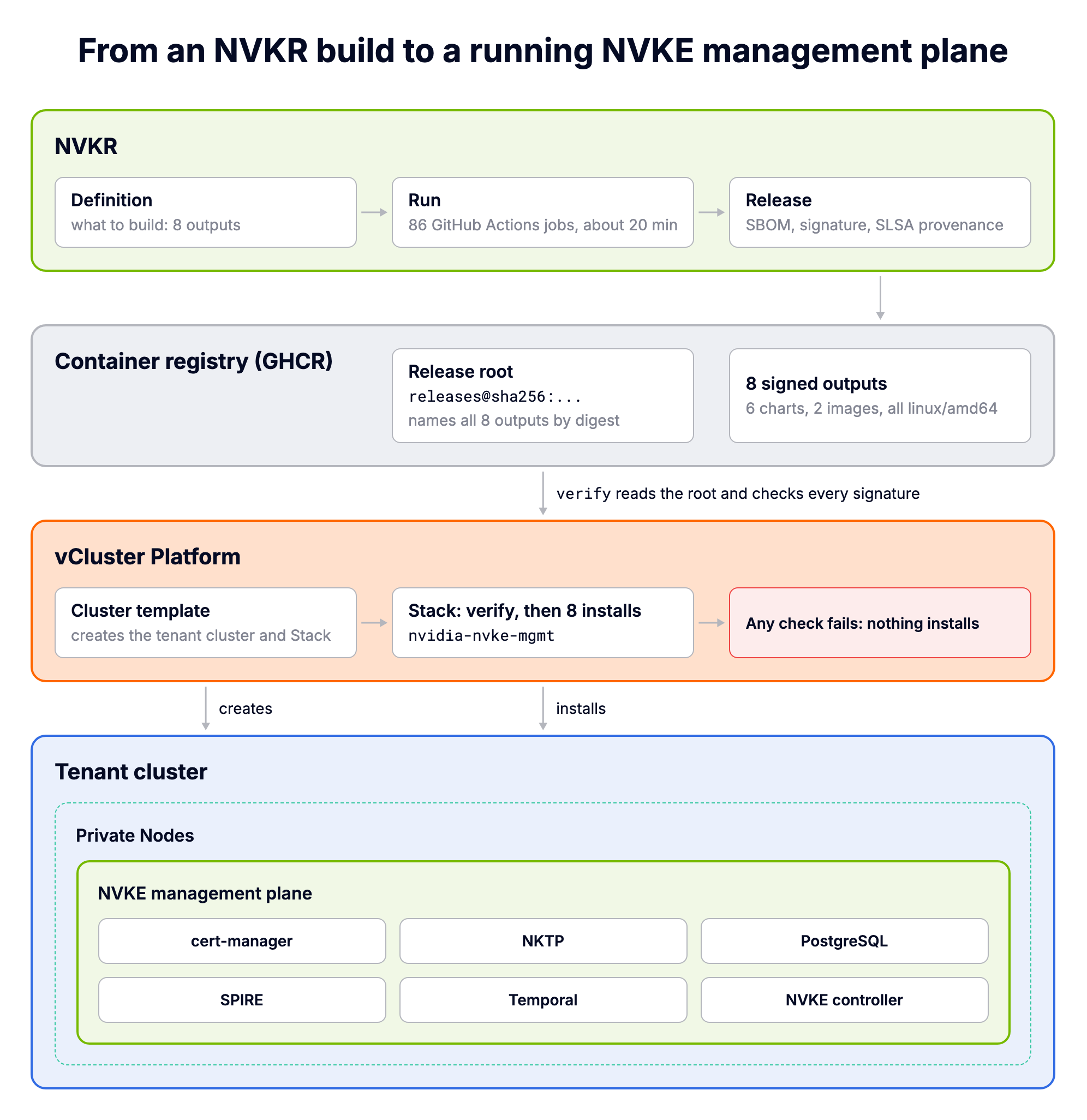
There are three parts:
Why a tenant cluster? The management plane is controllers, a database, a workflow engine and an identity service that the AI factory operates for itself. A tenant cluster gives it its own API server and, with Private Nodes, its own machines, and vCluster Platform handles its lifecycle the same way it does for any other cluster in the fleet.
Let's build the release first.
NVKR is a tool you run, and the release lands in a registry you own, signed by your own pipeline's identity. The Stack doesn't care whose registry it is. It only needs the release root and the identity it should trust.
The Definition the Stack expects ships with it, in nvkr/definition.yaml. It is NVIDIA's own nvke-deploy example without the CLI outputs, plus NKTP, built for linux/amd64:
apiVersion: nvkr.dev/definition/v5
kind: Definition
metadata:
  name: nvke-management-plane
catalog:
  base: ../inputs/catalogs/nvke/release
sbomTool: syft
cosignTool: cosign
outputs:
  - name: controller-chart
    platform: linux/amd64
    format: helm-oci
    components: [nvke-controller-chart]
    helm:
      images:
        controller: cwe
  - name: cwe
    platform: linux/amd64
    format: oci
    components: [nvke-controller]
  - name: nktp
    platform: linux/amd64
    format: helm-oci
    components: [nktp-chart]
    catalog:
      base: ../inputs/catalogs/nvke/release-components
  - name: postgresql
    platform: linux/amd64
    format: helm-oci
    components: [postgresql-chart]
  # ... profiles, spire, spire-crds and temporal follow the same pattern
The eight output names are the contract. The Stack reads them from the release root and installs oci://<prefix>/<output>. The helm.images.controller: cwe line binds the controller chart to the exact controller image that the same Run built.
The Environment decides where the release goes and who signs it. Here is the example for GitHub Actions and GHCR:
apiVersion: nvkr.dev/environment/v1
kind: Environment
metadata:
  name: nvke-github
runtime:
  runtime: docker
publication:
  mode: per-output-v1
  repositoryPrefix: ghcr.io/<org-lowercase>/<repo>
  credentialRef: github:NVKR_REGISTRY_WRITE
signing:
  mode: cosign
  identity: ^https://github\.com/<org>/<repo>/\.github/workflows/nvkr-run\.yml@refs/heads/main$
  issuer: https://token.actions.githubusercontent.com
Two lines matter later. signing.identity is the workflow that signs the release, and it is exactly what the Stack's signerIdentity parameter must match. publication.repositoryPrefix is the Stack's registryPrefix. Signing is keyless: the workflow gets a short-lived certificate from Sigstore through GitHub's OIDC token, so there is no private key to store or leak.
The release in this post comes from a public repository, saiyam1814/nvkr-nvke: NVKR at commit 9686e3c, these two files in nvkr-release/, and the pipeline NVKR generated from them. You can copy it as a starting point.
Let's build the CLI first. NVKR pins its Go version, and make build refuses anything else. With Go 1.26 installed it stops with Go go1.26.6 does not match pinned go1.27.3, so let Go fetch the pinned toolchain for this shell:
$ export GOTOOLCHAIN=go1.27.3
$ make build
go build -ldflags '-X main.version=v0.1.0-11-g9686e3cd -X main.commit=9686e3cd' -o bin/nvkr ./cmd/nvkr
go: downloading github.com/gdamore/tcell/v2 v2.13.10
go: downloading github.com/rivo/tview v0.42.0
...
chmod 0755 bin/nvkr
Now NVKR turns the Definition and Environment into a GitHub Actions pipeline:
$ bin/nvkr run generate --definition nvkr-release/definition.yaml \
    --environment nvkr-release/environment-github.yaml --engine github --root .
generated github hosted run
planDigest: sha256:acf3236714f96324e4ee50819e9965b4a8db2f82ff1a170f48167a1b76b5e9a1
That writes .github/workflows/nvkr-run.yml, an 86-job workflow, and the actions it calls under .github/nvkr-run/. Commit everything to main, since the signing identity names refs/heads/main.
The workflow reads four variables and five secrets. The registry write credentials live in a deployment environment called nvkr-release, which only the publish and sign jobs use:
R=<you>/nvkr-nvke
gh api -X PUT repos/$R/environments/nvkr-release
for v in NVKR_REGISTRY_READ_USER NVKR_CI_STORAGE_READ_USER NVKR_CI_STORAGE_WRITE_USER; do
  gh variable set $v --repo $R --body <you>
done
gh variable set NVKR_REGISTRY_WRITE_USER --repo $R --env nvkr-release --body <you>
for s in NVKR_REGISTRY_READ NVKR_CI_STORAGE_READ_TOKEN NVKR_CI_STORAGE_WRITE_TOKEN NKE_SOURCE_TOKEN; do
  gh secret set $s --repo $R < token.txt
done
gh secret set NVKR_REGISTRY_WRITE --repo $R --env nvkr-release < token.txt
token.txt holds a classic personal access token with the repo and write:packages scopes. One tip before you pick a repository: deployment environments only work in private repositories on paid GitHub plans, so on a free account use a public repository. The secrets stay encrypted and masked in the logs either way.
Start the run:
$ gh workflow run nvkr-run.yml --repo saiyam1814/nvkr-nvke --ref main
$ gh run list --repo saiyam1814/nvkr-nvke --limit 1
in_progress		nvkr-run-nvke-management-plane	nvkr-run-nvke-management-plane	main	workflow_dispatch	41776914104	9s	2026-11-04T05:03:45Z
About 20 minutes later, all 86 jobs are green:
$ gh run view 41776914104 --repo saiyam1814/nvkr-nvke --json conclusion,createdAt,updatedAt,jobs \
    --jq '"\(.conclusion): \(.jobs | length) jobs, \(.createdAt) to \(.updatedAt)"'
success: 86 jobs, 2026-11-04T05:03:45Z to 2026-11-04T05:24:20Z
Each output is built in its own job, gets its own SBOM, and is signed in its own job, which is what publication.mode: per-output-v1 means. The "Publish release" job writes the release root and prints it:
$ gh run view --job 126404079325 --repo saiyam1814/nvkr-nvke --log | grep "Published immutable reference"
Publish release	execute node part-1	2026-11-04T05:19:15.6492570Z Published immutable reference: ghcr.io/saiyam1814/nvkr-nvke/releases@sha256:7575cc7e367bd76ab3ba61666af9182fcc87c63ea95121ed3de415da5ad8df36
Keep that reference. It is the only release input the Stack needs.
The Stack runs this check for you, but it's worth doing once yourself so the Stack's log makes sense later. All you need is cosign (the Stack uses v3.1.3), crane, and read access to the registry. Our packages are private, so point these commands at your own release root and workflow identity. Let's start with the signature on the release root:
$ ROOT=ghcr.io/saiyam1814/nvkr-nvke/releases@sha256:7575cc7e367bd76ab3ba61666af9182fcc87c63ea95121ed3de415da5ad8df36
$ ID='^https://github\.com/saiyam1814/nvkr-nvke/\.github/workflows/nvkr-run\.yml@refs/heads/main$'
$ cosign verify-attestation --type https://sigstore.dev/cosign/sign/v1 \
    --certificate-identity-regexp "$ID" \
    --certificate-oidc-issuer https://token.actions.githubusercontent.com \
    "$ROOT" > /dev/null

Verification for ghcr.io/saiyam1814/nvkr-nvke/releases@sha256:7575cc7e367bd76ab3ba61666af9182fcc87c63ea95121ed3de415da5ad8df36 --
The following checks were performed on each of these signatures:
  - The cosign claims were validated
  - Existence of the claims in the transparency log was verified offline
  - The code-signing certificate was verified using trusted certificate authority certificates
cosign found the attestation stored next to the release root, checked that the certificate Sigstore issued for it belongs to the nvkr-run.yml workflow on main, and confirmed the entry is in Sigstore's public transparency log.
The second attestation is the SLSA provenance, the record of how the release was built. Let's pull out the three fields that matter:
$ cosign verify-attestation --type slsaprovenance1 \
    --certificate-identity-regexp "$ID" \
    --certificate-oidc-issuer https://token.actions.githubusercontent.com \
    "$ROOT" 2>/dev/null | jq -r .payload | base64 -d | jq '{
      builder: .predicate.runDetails.builder.id,
      run: .predicate.runDetails.metadata.invocationId,
      plan: .predicate.buildDefinition.externalParameters.planDigest}'
{
  "builder": "https://github.com/saiyam1814/nvkr-nvke/.github/workflows/nvkr-run.yml@refs/heads/main",
  "run": "https://github.com/saiyam1814/nvkr-nvke/actions/runs/41776914104/attempts/1",
  "plan": "sha256:acf3236714f96324e4ee50819e9965b4a8db2f82ff1a170f48167a1b76b5e9a1"
}
The plan digest is the same one nvkr run generate printed earlier, and the run is the one we just watched. So the signed record points back to the exact plan and the exact workflow run.
Last, the chart tags. NVKR pushes every chart twice, as <version> and as <version>-<digest>. Helm installs by version, so the check is that the version tag still points at the digest the release root names:
$ crane ls ghcr.io/saiyam1814/nvkr-nvke/controller-chart | grep "^0\."
0.22.0-051b3875a5652071cdd10daf6a7c6abef619f48340c7041c11805e303d350dbe
0.22.0
$ crane digest ghcr.io/saiyam1814/nvkr-nvke/controller-chart:0.22.0
sha256:051b3875a5652071cdd10daf6a7c6abef619f48340c7041c11805e303d350dbe
sha256:051b3875... is exactly what the release root lists for controller-chart. None of these checks downloads the artifacts themselves. They authenticate claims about specific digests, which is cheap enough to run on every install.
The Stack needs vCluster Platform 5.0 or later, and vCluster 0.37 or later for deploy.stacks, which is how a cluster template installs a Stack. The runs below used Platform 5.0.0-rc.1, installed on a three-node GKE cluster running Kubernetes 1.36.
$ vcluster platform start --version 5.0.0-rc.1 --context <gke-context> \
    --email <your-email> --password <admin-password> --no-port-forwarding
09:52:31 warn TLS is disabled by default during platform startup because the platform uses a self-signed certificate. Use --secure to enable TLS verification.
09:52:33 info Welcome to vCluster Platform!
09:52:33 info This installer will help you configure and deploy vCluster Platform.
09:52:33 info Starting vCluster platform...
09:52:33 info Waiting for helm command, this can take up to several minutes...
09:52:54 done vCluster Platform has been deployed to your cluster!
09:52:54 info Waiting for vCluster platform pod to be running...
09:53:04 info Please keep waiting, vCluster Platform container is still starting up: ContainerCreating
09:53:20 done vCluster platform pod successfully started
A fresh install starts on the free license, which has to be activated before you can create clusters: the UI asks for an email address and then a one-time code sent to it.
The Stack lives in the vcluster-stacks repository, under certified-stacks/nvidia-nvke-mgmt. Apply the two Apps and the StackTemplate, then the two cluster templates, through the Platform's management API:
$ vcluster platform connect management --print > mgmt.kubeconfig
$ export KUBECONFIG=mgmt.kubeconfig
$ kubectl apply -f apps/ -f stacktemplate.yaml
app.management.loft.sh/nvidia-nvke-mgmt-verify created
app.management.loft.sh/nvidia-nvke-mgmt-base-config created
stacktemplate.management.loft.sh/nvidia-nvke-mgmt created
$ kubectl apply -f virtualclustertemplate-shared-nodes.yaml -f virtualclustertemplate-private-nodes.yaml
virtualclustertemplate.management.loft.sh/nvidia-nvke-mgmt-shared-nodes created
virtualclustertemplate.management.loft.sh/nvidia-nvke-mgmt-private-nodes created
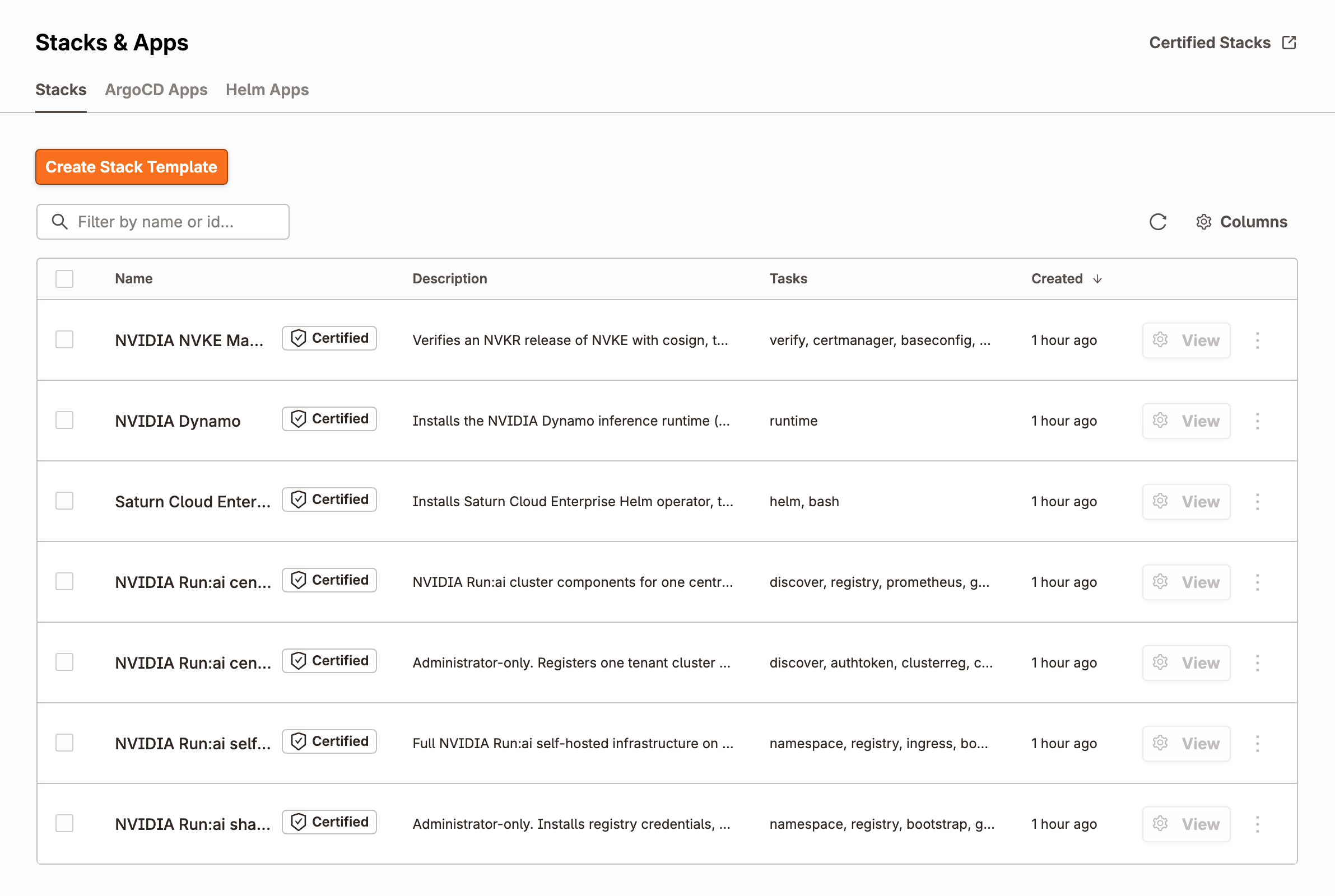
The Stack now shows up under Stacks & Apps, next to the stacks Platform 5.0.0-rc.1 already includes for NVIDIA Dynamo, Run:ai and Saturn:
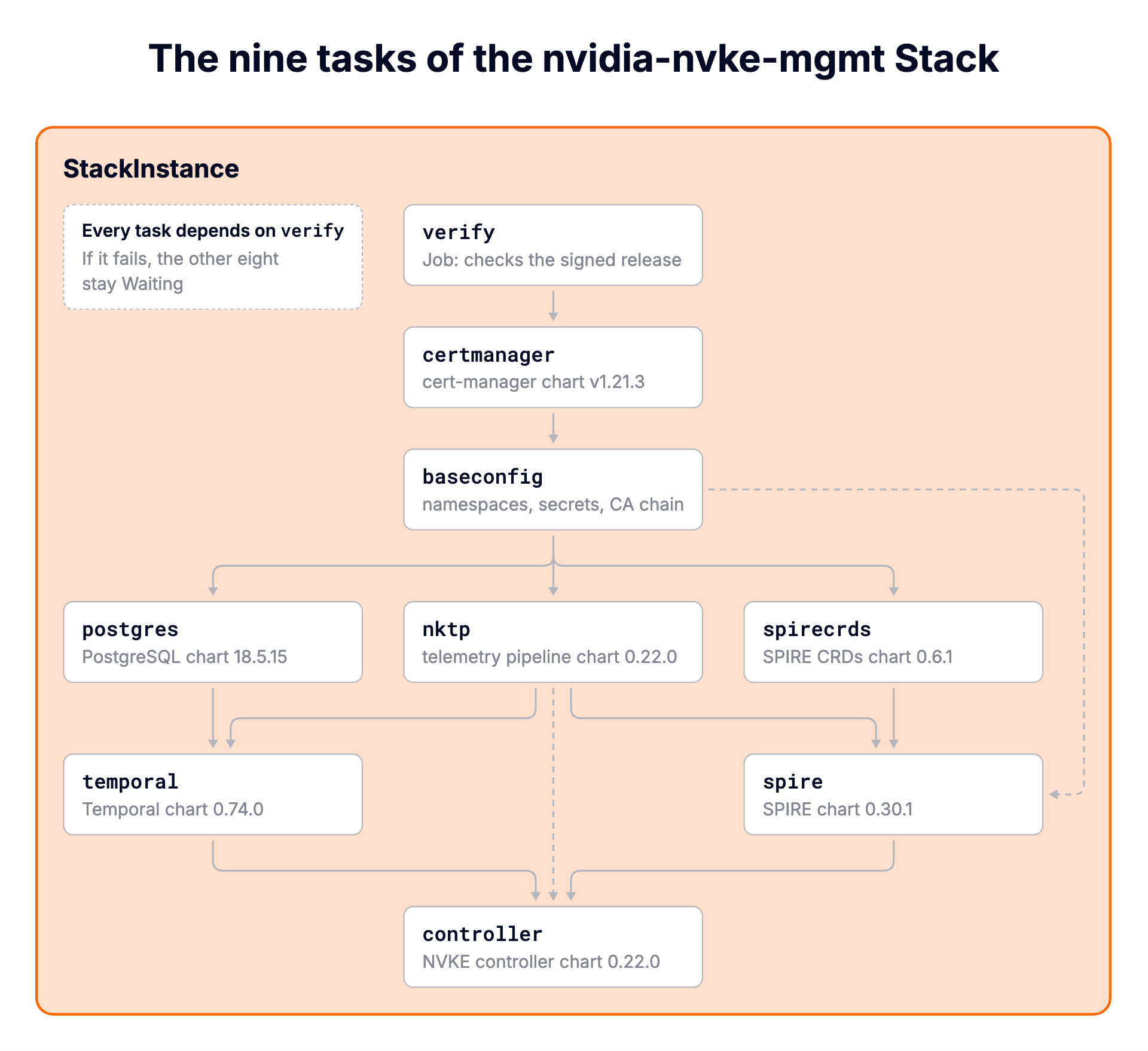
The StackTemplate has nine tasks. Every one of them depends on verify, so if verification fails, the other eight stay Waiting and nothing is installed. After verify, the order is NVKE's own (deploy/nico at v0.22.0): cert-manager, NVKE's base configuration, then NKTP, PostgreSQL and the SPIRE CRDs, then Temporal and SPIRE, and finally the controller. The Helm values are NVKE's too, reduced to what a cluster without NICo, Cluster API or TPM hardware needs.
The chart tasks don't take versions as parameters. They read them from verify's outputs, so the release root really is the only release input. Here is the controller task's chart block from the StackTemplate:
config:
  chart:
    name: controller-chart
    version: "{{ .Outputs.verify.controllerchartversion }}"
    repoURL: "oci://{{ .Values.registryPrefix }}"
A newer NVKE release needs no change to the Stack unless NVKE's own Helm values change. Point it at the new root and verify runs again.
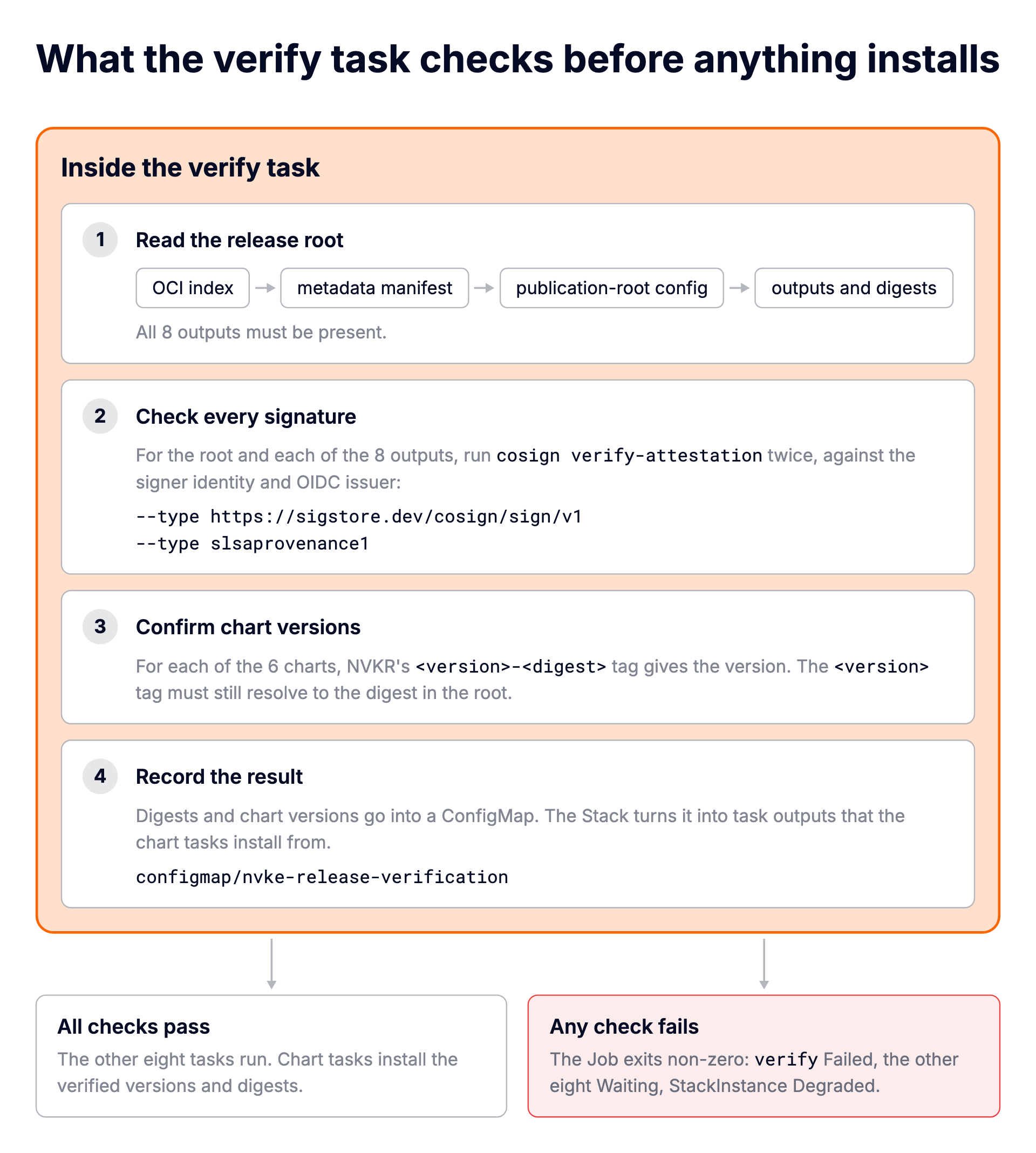
verify is a Job that runs in the Platform's own image with permission to update exactly one ConfigMap. It downloads cosign v3.1.3, checks the binary against a pinned SHA-256, and then:
Let's create the cluster. In the UI it's Clusters, Create, and the template NVIDIA NVKE Management Plane - Private Nodes. The form asks for the release root, the registry prefix, the signer identity, registry credentials and a database password. From the CLI, the same parameters go in a file:
# params.yaml
releaseRoot: ghcr.io/saiyam1814/nvkr-nvke/releases@sha256:7575cc7e367bd76ab3ba61666af9182fcc87c63ea95121ed3de415da5ad8df36
registryPrefix: ghcr.io/saiyam1814/nvkr-nvke
signerIdentity: '^https://github\.com/saiyam1814/nvkr-nvke/\.github/workflows/nvkr-run\.yml@refs/heads/main$'
oidcIssuer: https://token.actions.githubusercontent.com
verifyMode: root
registryUsername: saiyam1814
registryPassword: <a token that can read the packages>
dbPassword: <8 to 64 letters, digits, - or _>
clusterName: nvke
$ vcluster platform create vcluster nvke-mgmt --project default \
--template nvidia-nvke-mgmt-private-nodes --parameters params.yaml --connect=false
11:18:52 info Creating virtual cluster nvke-mgmt in project default with template nvidia-nvke-mgmt-private-nodes...
11:19:34 info Waiting for virtual cluster to be available...
11:19:50 done Successfully created the virtual cluster nvke-mgmt in project default
11:19:50 done Successfully created virtual cluster nvke-mgmt in project default.
- Use 'vcluster connect nvke-mgmt --project default' to access the virtual cluster
- Use `vcluster connect nvke-mgmt --project default -- kubectl get ns` to run a command directly within the vclusterThe cluster has no nodes yet, so the Stack waits. Joining a machine takes one command. The cluster's Nodes page shows it, or you can create it from the CLI with the tenant cluster's kubeconfig:
$ vcluster platform connect vcluster nvke-mgmt --project default --print > nvke-mgmt.kubeconfig
$ export KUBECONFIG=nvke-mgmt.kubeconfig
$ vcluster token create --expires 1h
curl -fsSLk "https://z9mw9p0.loft.host/kubernetes/project/default/virtualcluster/nvke-mgmt/node/join?token=<redacted>" | sh -
Run it as root on the machine, here an Ubuntu 24.04 VM with 4 vCPUs:
$ curl -fsSLk "https://z9mw9p0.loft.host/kubernetes/project/default/virtualcluster/nvke-mgmt/node/join?token=<redacted>" | sudo sh -
Detected OS: ubuntu
Preparing node for Kubernetes installation...
Kubernetes version: v1.36.0
Installing Kubernetes binaries...
...
Starting vcluster-vpn...
...
Waiting for vcluster-vpn at https://100.122.54.96:443 to become reachable...
Starting containerd...
...
Starting kubelet...
...
Installation successful!
Joining node into cluster...
[preflight] Running pre-flight checks
...
Run 'kubectl get nodes' on the control-plane to see this node join the cluster.
The node reaches the tenant cluster through vCluster's VPN, so it needs outbound HTTPS and no inbound ports:
$ kubectl get nodes -o wide
NAME                                                   STATUS   ROLES    AGE   VERSION   INTERNAL-IP     EXTERNAL-IP   OS-IMAGE             KERNEL-VERSION           CONTAINER-RUNTIME
nvke-node-1.us-central1-a.c.hrittik-project.internal   Ready    <none>   58s   v1.36.0   10.128.15.229   <none>        Ubuntu 24.04.5 LTS   7.0.0-1014-gcp (amd64)   containerd://2.2.3
As soon as the node is Ready, the tasks start. The cluster template created a StackInstance for this cluster, and you can watch it from the Platform:
$ export KUBECONFIG=mgmt.kubeconfig
$ kubectl get stackinstance -n p-default nvke-mgmt-nvke-2fc686 \
    -o jsonpath='{range .status.tasks[*]}{.name}{"\t"}{.phase}{"\n"}{end}'
verify	Healthy
certmanager	Healthy
baseconfig	Healthy
nktp	Healthy
postgres	Healthy
spirecrds	Healthy
temporal	Healthy
spire	Healthy
controller	Healthy
From creating the cluster to a Healthy Stack took about seven minutes, including the node join. Once verify passed, the eight installs took under three minutes. Here is the same Stack in the Platform UI:
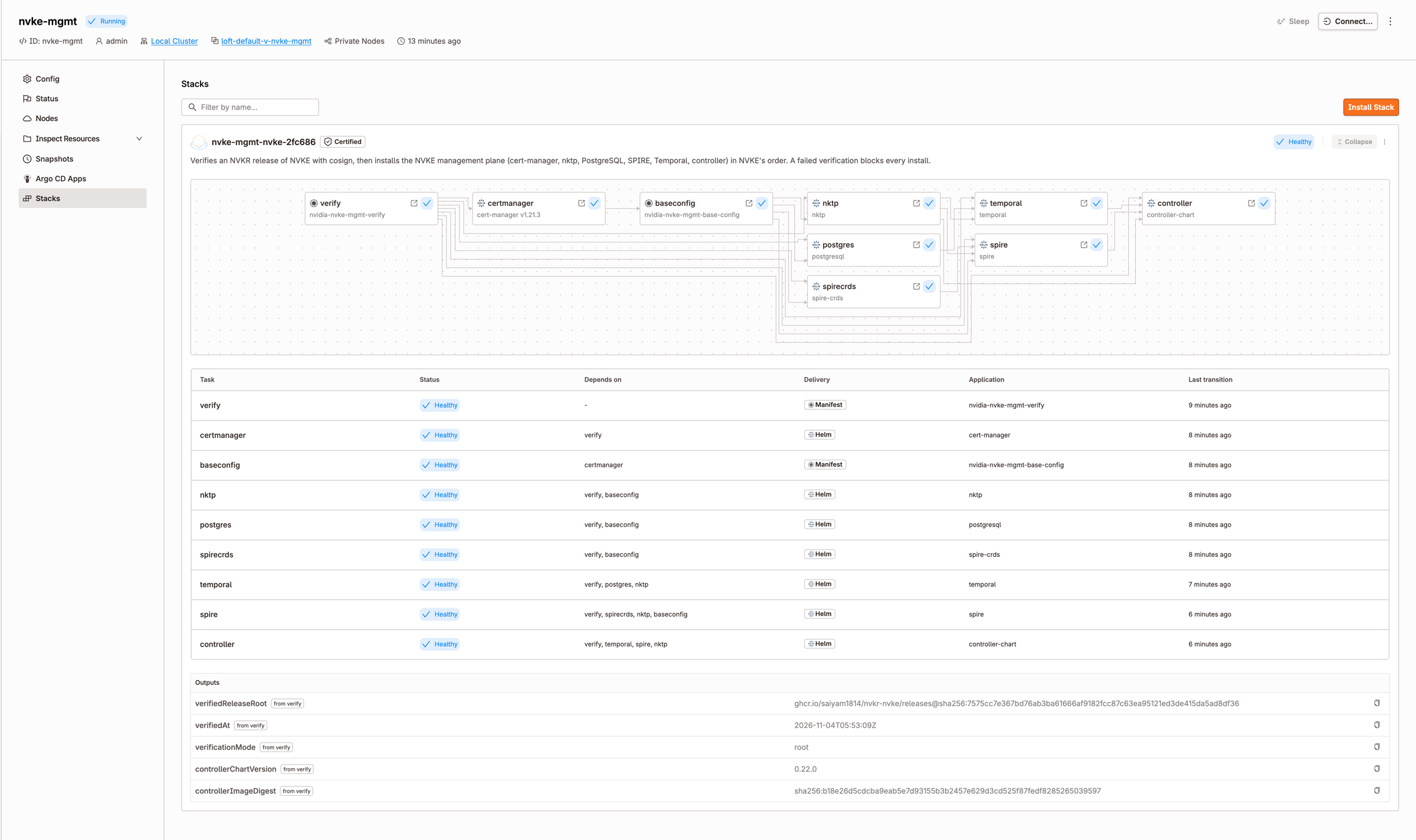
Here is the verify task's log from that run, read from inside the tenant cluster:
$ kubectl logs -n nvke-verify job/verify-d7f0da4171f94884-verify
==> release root:    ghcr.io/saiyam1814/nvkr-nvke/releases@sha256:7575cc7e367bd76ab3ba61666af9182fcc87c63ea95121ed3de415da5ad8df36
==> registry prefix: ghcr.io/saiyam1814/nvkr-nvke
==> mode:            root
==> fetching cosign v3.1.3
==> registry login as saiyam1814
==> reading the release root
    schema nvkr.dev/publication-root/v4, qualification diagnostic, 8 outputs

OUTPUT             SIGNATURE  PROVENANCE  VERSION
------------------ ---------  ----------- -------
==> signer identity: ^https://github\.com/saiyam1814/nvkr-nvke/\.github/workflows/nvkr-run\.yml@refs/heads/main$
releases (root)    ok         ok          -
controller-chart   ok         ok          0.22.0
cwe                ok         ok          -
nktp               ok         ok          0.22.0
postgresql         ok         ok          18.5.15
profiles           ok         ok          -
spire              ok         ok          0.30.1
spire-crds         ok         ok          0.6.1
temporal           ok         ok          0.74.0

==> OK: root and 8 outputs signed and attested by ^https://github\.com/saiyam1814/nvkr-nvke/\.github/workflows/nvkr-run\.yml@refs/heads/main$; chart tags match the root
That's the same check you ran by hand in Step 2, done for the root and all eight outputs, before anything else in the Stack was allowed to start. The qualification diagnostic in the root is NVKR marking the release as not qualified, which matches what it says about the preview.
And what the StackInstance published:
$ kubectl get --raw /apis/management.loft.sh/v1/namespaces/p-default/stackinstances/nvke-mgmt-nvke-2fc686/outputs | jq
{
  "kind": "StackInstanceOutputs",
  "apiVersion": "management.loft.sh/v1",
  "metadata": {},
  "outputs": [
    {
      "name": "verifiedReleaseRoot",
      "task": "verify",
      "sensitive": false,
      "state": "Available",
      "value": "ghcr.io/saiyam1814/nvkr-nvke/releases@sha256:7575cc7e367bd76ab3ba61666af9182fcc87c63ea95121ed3de415da5ad8df36"
    },
    {
      "name": "verifiedAt",
      "task": "verify",
      "sensitive": false,
      "state": "Available",
      "value": "2026-11-04T05:53:09Z"
    },
    {
      "name": "verificationMode",
      "task": "verify",
      "sensitive": false,
      "state": "Available",
      "value": "root"
    },
    {
      "name": "controllerChartVersion",
      "task": "verify",
      "sensitive": false,
      "state": "Available",
      "value": "0.22.0"
    },
    {
      "name": "controllerImageDigest",
      "task": "verify",
      "sensitive": false,
      "state": "Available",
      "value": "sha256:b18e26d5cdcba9eab5e7d93155b3b2457e629d3cd525f87fedf8285265039597"
    }
  ]
}
controllerImageDigest is the exact digest the release root lists for cwe, the controller image. This is the record that answers "which build is running our management plane?" without anyone having to dig through logs.
Inside the tenant cluster, the NVKE management plane is running on the node we joined:
$ export KUBECONFIG=nvke-mgmt.kubeconfig
$ kubectl get pods -A
NAMESPACE            NAME                                                         READY   STATUS      RESTARTS        AGE
cert-manager         cert-manager-55bb6b47cf-5wj5l                                1/1     Running     0               3m53s
cert-manager         cert-manager-cainjector-7c84589448-wndpv                     1/1     Running     0               3m53s
cert-manager         cert-manager-webhook-7949787cd9-6mn97                        1/1     Running     0               3m53s
kube-flannel         kube-flannel-ds-6spwr                                        1/1     Running     0               6m
kube-system          coredns-df8c87f55-dnq65                                      1/1     Running     0               7m22s
kube-system          konnectivity-agent-599bbdf4c8-vzklp                          1/1     Running     0               7m22s
kube-system          kube-proxy-snrcd                                             1/1     Running     0               6m
local-path-storage   local-path-provisioner-6d484fd799-6t5jp                      1/1     Running     0               7m22s
nke-controller       nke-controller-654fbd4877-474cb                              1/1     Running     0               89s
nktp                 nktp-cluster-events-collector-0                              2/2     Running     0               3m7s
nktp                 nktp-daemonset-collector-vcztk                               2/2     Running     0               3m7s
nktp                 nktp-daemonset-targetallocator-68d4d7bcf6-xqgmg              1/1     Running     0               3m5s
nktp                 nktp-gateway-logs-collector-0                                2/2     Running     0               3m5s
nktp                 nktp-gateway-logs-collector-1                                2/2     Running     0               3m4s
nktp                 nktp-gateway-metrics-collector-0                             2/2     Running     0               3m
nktp                 nktp-gateway-metrics-collector-1                             2/2     Running     0               3m
nktp                 nktp-gateway-traces-collector-0                              2/2     Running     0               3m3s
nktp                 nktp-gateway-traces-collector-1                              2/2     Running     0               3m2s
nktp                 nktp-ksm-objects-0-5c445499ff-lj62q                          1/1     Running     0               3m23s
nktp                 nktp-ksm-pods-qxkwz                                          1/1     Running     0               3m23s
nktp                 nktp-ksm-unscheduled-pods-0-57b644d455-tpm54                 1/1     Running     0               3m23s
nktp                 nktp-large-target-metrics-collector-0                        2/2     Running     0               3m9s
nktp                 nktp-large-target-metrics-collector-1                        2/2     Running     0               3m9s
nktp                 nktp-large-target-metrics-targetallocator-5784b8d649-tjx76   1/1     Running     0               3m8s
nktp                 nktp-operator-6cfb4fc964-lrdsq                               1/1     Running     0               3m23s
nktp                 nktp-watchdog-collector-0                                    2/2     Running     0               3m8s
nktp                 nktp-watchdog-collector-1                                    2/2     Running     0               3m8s
nktp                 nktp-watchdog-targetallocator-68cf5c9469-2zs4k               1/1     Running     0               3m8s
nvke-verify          verify-d7f0da4171f94884-verify-tklvl                         0/1     Completed   0               7m14s
postgres             postgres-postgresql-0                                        1/1     Running     0               3m27s
spire-server         spire-server-0                                               2/2     Running     0               2m53s
spire-server         spire-spiffe-oidc-discovery-provider-7d97776df-b76b7         1/1     Running     0               2m53s
spire-server         spire-spiffe-oidc-discovery-provider-7d97776df-nlvtg         1/1     Running     0               2m53s
spire-system         spire-agent-tlkhc                                            1/1     Running     0               2m53s
spire-system         spire-spiffe-csi-driver-rbl45                                2/2     Running     0               2m53s
temporal             temporal-admintools-554945b64d-mwrnf                         1/1     Running     0               2m54s
temporal             temporal-frontend-66b659b7dd-hs4wz                           1/1     Running     3 (2m24s ago)   2m54s
temporal             temporal-history-6b9574c4c8-jwtjk                            1/1     Running     3 (2m31s ago)   2m54s
temporal             temporal-matching-6f9fdbbfb-mjdvw                            1/1     Running     2 (2m20s ago)   2m54s
temporal             temporal-schema-1-2bx5g                                      0/1     Completed   0               2m54s
temporal             temporal-web-756545ff48-w9jdx                                1/1     Running     0               2m54s
temporal             temporal-worker-5c5f86b546-nt5n5                             1/1     Running     3 (2m24s ago)   2m54s
Every service from the table at the start is here: the controller in nke-controller, PostgreSQL, Temporal, SPIRE and NKTP. The Temporal restarts are expected. Its services start before the schema job has created their tables in PostgreSQL, log relation "schema_version" does not exist, and restart until the job finishes. After that they stay up.
On Private Nodes the Stack installs NVKE's full configuration: SPIRE server and agents, the SPIFFE CSI driver, the OIDC discovery provider, and a controller that holds a SPIFFE identity:
$ kubectl exec -n spire-server spire-server-0 -c spire-server -- \
    /opt/spire/bin/spire-server entry show -spiffeID spiffe://example.org/nvke-service/nke-controller
Found 1 entry
Entry ID                : example-cluster.d8561e4f-4e5b-45df-bf9f-50bc0dc76989
SPIFFE ID               : spiffe://example.org/nvke-service/nke-controller
Parent ID               : spiffe://example.org/spire/agent/k8s_psat/example-cluster/f4797889-5c15-4bd2-8da8-7f3e5f914485
Revision                : 0
X509-SVID TTL           : default
JWT-SVID TTL            : default
Selector                : k8s:pod-uid:753b8228-c19f-4255-871b-76b3128956c9
Hint                    : nvke-service

$ kubectl get pods -n nke-controller -o custom-columns=NAME:.metadata.name,UID:.metadata.uid
NAME                              UID
nke-controller-654fbd4877-474cb   753b8228-c19f-4255-871b-76b3128956c9
SPIRE has an identity for the NVKE controller, issued under the SPIRE agent on our node, and the entry's selector is the UID of the running controller pod. That's NVKE's identity setup working as designed, which is the part that needs Private Nodes.
Let's make sure the check actually stops a bad release. We'll give the Stack the same release root with only its last character changed, ...ad8df36 to ...ad8df37. Nothing should install, so this one runs on a quick cluster from the Shared Nodes template:
$ vcluster platform create vcluster nvke-tampered --project default \
    --template nvidia-nvke-mgmt-shared-nodes --parameters params-tampered.yaml --connect=false
11:25:32 info Creating virtual cluster nvke-tampered in project default with template nvidia-nvke-mgmt-shared-nodes...
11:26:13 info Waiting for virtual cluster to be available...
11:26:32 done Successfully created the virtual cluster nvke-tampered in project default
...
A few minutes later, the Stack has stopped:
$ kubectl get stackinstance -n p-default nvke-tampered-nvke-d065f1 \
    -o jsonpath='{.status.phase}{"\n"}{range .status.tasks[*]}{.name}{"\t"}{.phase}{"\n"}{end}'
Degraded
verify	Failed
certmanager	Waiting
baseconfig	Waiting
nktp	Waiting
postgres	Waiting
spirecrds	Waiting
temporal	Waiting
spire	Waiting
controller	Waiting
The Stack withholds verify's error in its own status, because a task's error could quote a password parameter. The Job's log in the tenant cluster has the cause:
$ kubectl logs -n nvke-verify job/verify-b0ccf1804d6eccc8-verify
==> release root:    ghcr.io/saiyam1814/nvkr-nvke/releases@sha256:7575cc7e367bd76ab3ba61666af9182fcc87c63ea95121ed3de415da5ad8df37
==> registry prefix: ghcr.io/saiyam1814/nvkr-nvke
==> mode:            root
==> fetching cosign v3.1.3
==> registry login as saiyam1814
==> reading the release root
curl: (22) The requested URL returned error: 404
FAILED: cannot read the release root manifest
$ kubectl get namespaces
NAME              STATUS   AGE
default           Active   2m12s
kube-node-lease   Active   2m12s
kube-public       Active   2m12s
kube-system       Active   2m12s
nvke-verify       Active   107s
No release with that digest exists, so there is nothing to verify and nothing to install. Apart from Kubernetes' own namespaces, the only one in the cluster is nvke-verify, where the check ran. The UI shows the same thing, with the eight tasks waiting behind the failed verify:
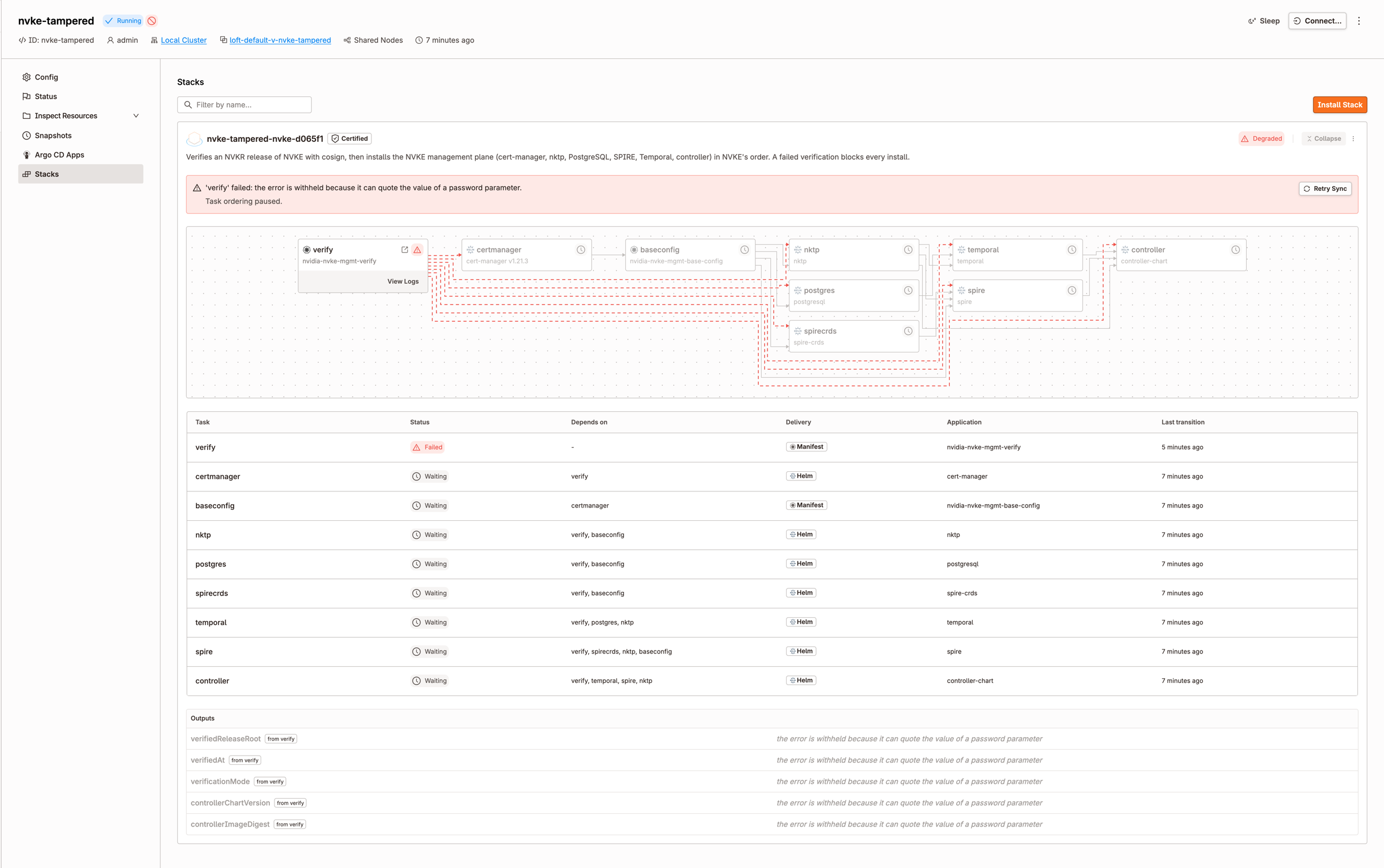
Step 5 shows that a release that doesn't exist gets rejected. The stronger test is a release that does exist and is properly signed, just not by the identity the Stack was told to trust. Let's keep the real release root and change only the signer. Copy params.yaml to params-wrongsigner.yaml and change one line:
$ diff params.yaml params-wrongsigner.yaml
3c3
< signerIdentity: '^https://github\.com/saiyam1814/nvkr-nvke/\.github/workflows/nvkr-run\.yml@refs/heads/main$'
---
> signerIdentity: '^https://github\.com/someone-else/nvkr-nvke/\.github/workflows/nvkr-run\.yml@refs/heads/main$'
Then create another cluster from the Shared Nodes template with that file:
$ vcluster platform create vcluster nvke-wrongsigner --project default \
    --template nvidia-nvke-mgmt-shared-nodes --parameters params-wrongsigner.yaml --connect=false
20:03:29 info Creating virtual cluster nvke-wrongsigner in project default with template nvidia-nvke-mgmt-shared-nodes...
20:04:10 info Waiting for virtual cluster to be available...
20:04:29 done Successfully created the virtual cluster nvke-wrongsigner in project default
...
The Stack stops the same way as in Step 5: verify fails and the other eight tasks keep waiting. The log shows what is different this time:
$ kubectl logs -n nvke-verify job/verify-46e0559462586cc4-verify
==> release root:    ghcr.io/saiyam1814/nvkr-nvke/releases@sha256:7575cc7e367bd76ab3ba61666af9182fcc87c63ea95121ed3de415da5ad8df36
==> registry prefix: ghcr.io/saiyam1814/nvkr-nvke
==> mode:            root
==> fetching cosign v3.1.3
==> registry login as saiyam1814
==> reading the release root
    schema nvkr.dev/publication-root/v4, qualification diagnostic, 8 outputs

OUTPUT             SIGNATURE  PROVENANCE  VERSION
------------------ ---------  ----------- -------
==> signer identity: ^https://github\.com/someone-else/nvkr-nvke/\.github/workflows/nvkr-run\.yml@refs/heads/main$
releases (root)    Error:     no          -
controller-chart   Error:     no          0.22.0
cwe                Error:     no          -
nktp               Error:     no          0.22.0
postgresql         Error:     no          18.5.15
profiles           Error:     no          -
spire              Error:     no          0.30.1
spire-crds         Error:     no          0.6.1
temporal           Error:     no          0.74.0

==> VERIFICATION FAILED:
  root ghcr.io/saiyam1814/nvkr-nvke/releases@sha256:7575cc7e367bd76ab3ba61666af9182fcc87c63ea95121ed3de415da5ad8df36
  ghcr.io/saiyam1814/nvkr-nvke/controller-chart@sha256:051b3875a5652071cdd10daf6a7c6abef619f48340c7041c11805e303d350dbe
  ghcr.io/saiyam1814/nvkr-nvke/cwe@sha256:b18e26d5cdcba9eab5e7d93155b3b2457e629d3cd525f87fedf8285265039597
  ghcr.io/saiyam1814/nvkr-nvke/nktp@sha256:83292faa5d645392c9c745a8b5a2ebf74c95b9e7c2cc5c7b93d957cf54a2c8f0
  ghcr.io/saiyam1814/nvkr-nvke/postgresql@sha256:acd5f2a2f9fdfb4997c4d3de6c2206eab809f3b3aa52afe49ebe494dab8e3eee
  ghcr.io/saiyam1814/nvkr-nvke/profiles@sha256:f3efe707a13f0a1064a2d74df4c369633fa5b8c0b03b4304a4ae36677ee48f9e
  ghcr.io/saiyam1814/nvkr-nvke/spire@sha256:910a1f4974b7f76fedc6f29eb73e72c8b8eb5e2b974bc5ec32eaa947204288f4
  ghcr.io/saiyam1814/nvkr-nvke/spire-crds@sha256:4461e088e273421ed3caf05e287fa777ec0de8b2829c3ef306ee03353f7b5588
  ghcr.io/saiyam1814/nvkr-nvke/temporal@sha256:b048e8baaa71248028ac96a654a0de6547ae28ba7404ba43f2af908a0788a3fa
$ kubectl get namespaces
NAME              STATUS   AGE
default           Active   2m43s
kube-node-lease   Active   2m43s
kube-public       Active   2m43s
kube-system       Active   2m43s
nvke-verify       Active   2m16s
This time the release root reads fine. It exists, and it lists all eight outputs. But every signature and provenance check fails, on the root and on all eight outputs, so verify stops and nothing installs. Again, the only namespace apart from Kubernetes' own is nvke-verify.
The log doesn't print cosign's reason, so here is the check from Step 2 again, by hand, with the same wrong identity:
$ ID='^https://github\.com/someone-else/nvkr-nvke/\.github/workflows/nvkr-run\.yml@refs/heads/main$'
$ cosign verify-attestation --type https://sigstore.dev/cosign/sign/v1 \
    --certificate-identity-regexp "$ID" \
    --certificate-oidc-issuer https://token.actions.githubusercontent.com \
    "$ROOT" > /dev/null
Error: no matching attestations: failed to verify certificate identity: no matching CertificateIdentity found, last error: expected SAN value to match regex "^https://github\.com/someone-else/nvkr-nvke/\.github/workflows/nvkr-run\.yml@refs/heads/main$", got "https://github.com/saiyam1814/nvkr-nvke/.github/workflows/nvkr-run.yml@refs/heads/main"
...
The certificate names the workflow that really signed the release, our nvkr-run.yml in saiyam1814/nvkr-nvke, and that isn't the identity the Stack was given. A valid signature from the wrong signer is still a failure. So the Stack rejects both kinds of bad input: a release root that doesn't exist, and a real, signed release from a signer you didn't choose.
There is also a Shared Nodes template, nvidia-nvke-mgmt-shared-nodes, for a quick look on the control plane cluster's own nodes. It runs a reduced shape. vCluster rewrites hostPath mounts on Shared Nodes, so the Stack leaves out the SPIFFE CSI driver, the SPIRE agents and the OIDC discovery provider, runs the controller without a SPIFFE identity, and keeps NKTP's node collector off. Everything NVKE issues workload identities for needs Private Nodes. Use Shared Nodes for a first look and Private Nodes for anything you will keep.
This is preview software on both sides, and the Stack is honest about its edges:
The video below shows the whole flow in about a minute and a half, from the NVKR pipeline to the green Stack:
[Demo video (1m35s) will be embedded here once it is hosted.]
What I like about this setup is that the check is part of the install itself. You build a release with NVKR, you give the Stack one reference, and the Stack refuses to install anything that doesn't match it. For a team that runs the management plane behind every customer cluster, I think that's the right default, because the check happens on every install without anyone having to think about it.
NVKE and NVKR are both in preview, and so is this Stack. If you're evaluating NVKE for your AI factory, try it with your own NVKR release and tell us what breaks.
Thanks to the NVKE and NVKR teams at NVIDIA for open-sourcing both projects. If you're running NVKE and want to try this, reach out to me on X at @SaiyamPathak or join us in the vCluster community Slack.
Deploy your first tenant cluster today.
