Running Production AI Tenant Fleets with vCluster and Argo CD

Jun 16, 2026
|
9
min Read

If you run a Kubernetes platform for AI workloads across many isolated tenants, you have probably noticed a gap between the documentation and reality. Onboarding a new tenant is easy. You create a tenant cluster, hand the customer a kubeconfig, and they are ready to go in minutes.
Keeping hundreds of clusters healthy over the next year is the real challenge. GPU operator versions drift. CVE patches must be applied everywhere by Tuesday. Observability updates need to reach every tenant. Platform services such as billing exporters, admission webhooks, and monitoring agents often run in places tenants can access. That's usually not what your security team wants. And if tenant clusters run on private networks, GitOps tools often can't reach them without complex proxies that nobody wants to maintain.
Every change becomes a rollout campaign. Every audit becomes a digging expedition to find out who's still on the wrong version. The team that built the tenant fleet ends up spending more time maintaining it than growing it.
We have seen this pattern across AI Cloud platforms. The friction is the same with ten tenants or a thousand. So we built something to fix it.
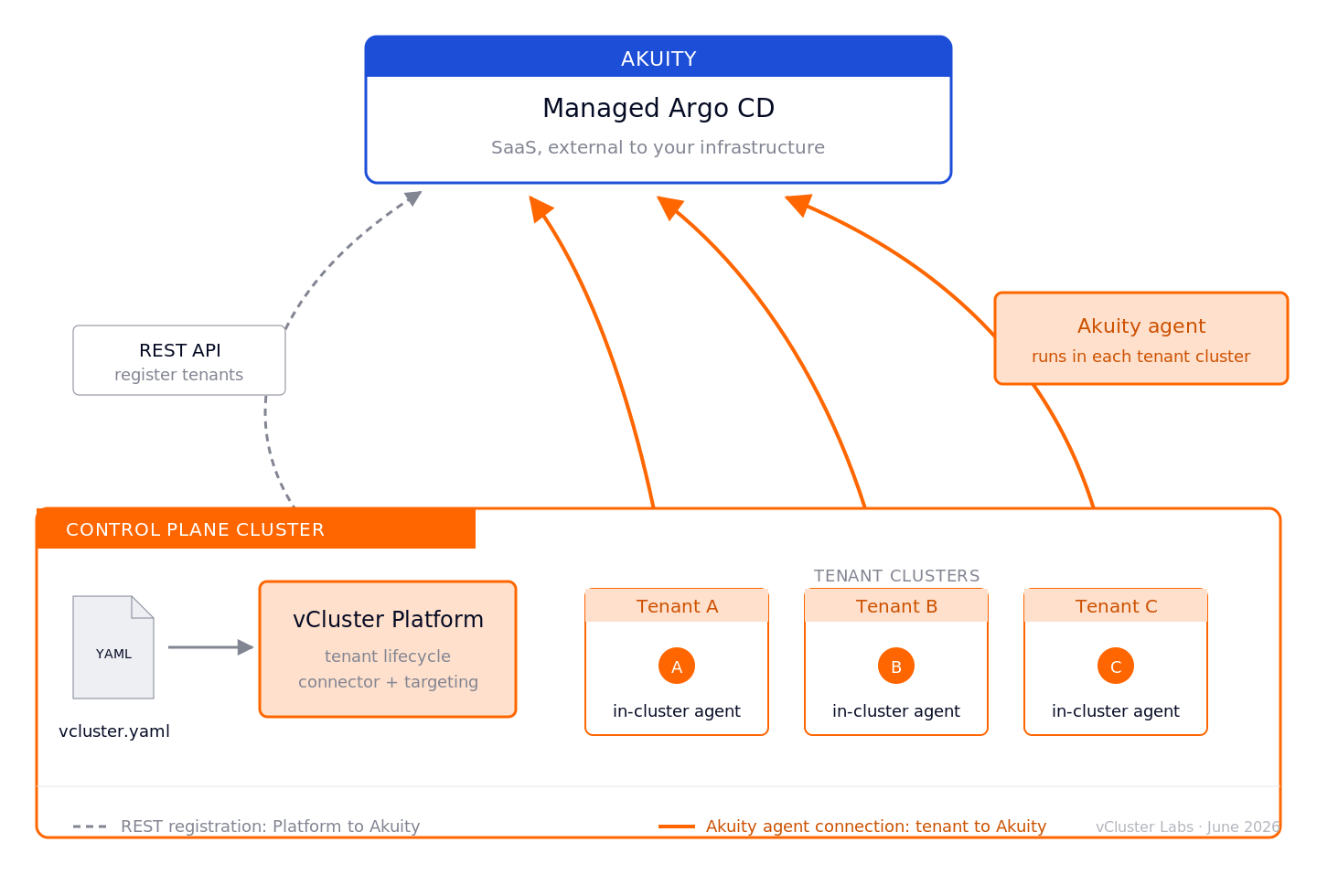
vCluster Platform v4.10 introduces a new Argo CD integration that makes the tenant cluster definition the single source of truth. Platform teams define the entire tenant stack in one vcluster.yaml file. Argo CD, whether self-hosted or run via Akuity, continuously reconciles that definition across every tenant cluster. Any drift is detected and corrected automatically. The result is a consistent, up-to-date fleet without manual rollout campaigns.
The rest of this post walks through what that actually looks like in practice.
There are three concepts worth anchoring on before we get into the walkthrough.
A connector is a Kubernetes Secret in the vCluster Platform namespace. It stores the endpoint and credentials for an Argo CD or Akuity instance. A single connector can be referenced by many tenant clusters. You create it once and reference it by name in each tenant's vcluster.yaml. The Platform automatically discovers connectors through labels and makes them available to tenant clusters within the project.
Every application defined in a vcluster.yaml has a target. Applications with target: vcluster are deployed inside the tenant cluster and are visible to the tenant. Applications with target: host are deployed into the Control Plane Cluster and remain invisible to tenants. This separation allows platform services to run alongside tenant workloads without exposing them to tenants. As a result, tenant isolation extends beyond the Kubernetes API server and into the GitOps layer itself.
Platform operators don't need to register or configure tenant clusters or control plane clusters in Argo CD individually. The connector handles registration automatically. With a self-hosted Argo CD deployment, the connector registers the clusters with Argo CD. When using Akuity, vCluster Platform also deploys Akuity's in-cluster agent into each registered tenant or control plane cluster. Argo CD then connects through the agent. The workflow is the same in both cases. You create a connector, reference it from your tenant definitions, and the Platform takes care of the rest. That's the whole conceptual model. The rest is wiring.
If you don't already have an Akuity organization, the free tier at akuity.io walks you through provisioning one and generating an API key in under five minutes.
In vCluster Platform, open the Connectors page under the Integrations section. Create a new Argo CD connector, select Akuity as the type, and fill in your Akuity organization ID, Argo CD instance ID, API Key ID, and API Key Secret. The API key needs the Admin role in Akuity so vCluster Platform can register, update, and deregister tenant clusters on your behalf. You'll also need to provide either a username and password or a token to authenticate against your Argo CD instance. For sizing, Medium agent size with at least one replica and 1Gi of memory for the repo server is a stable starting point. Name the connector something memorable. We'll use akuity-prod throughout this post.
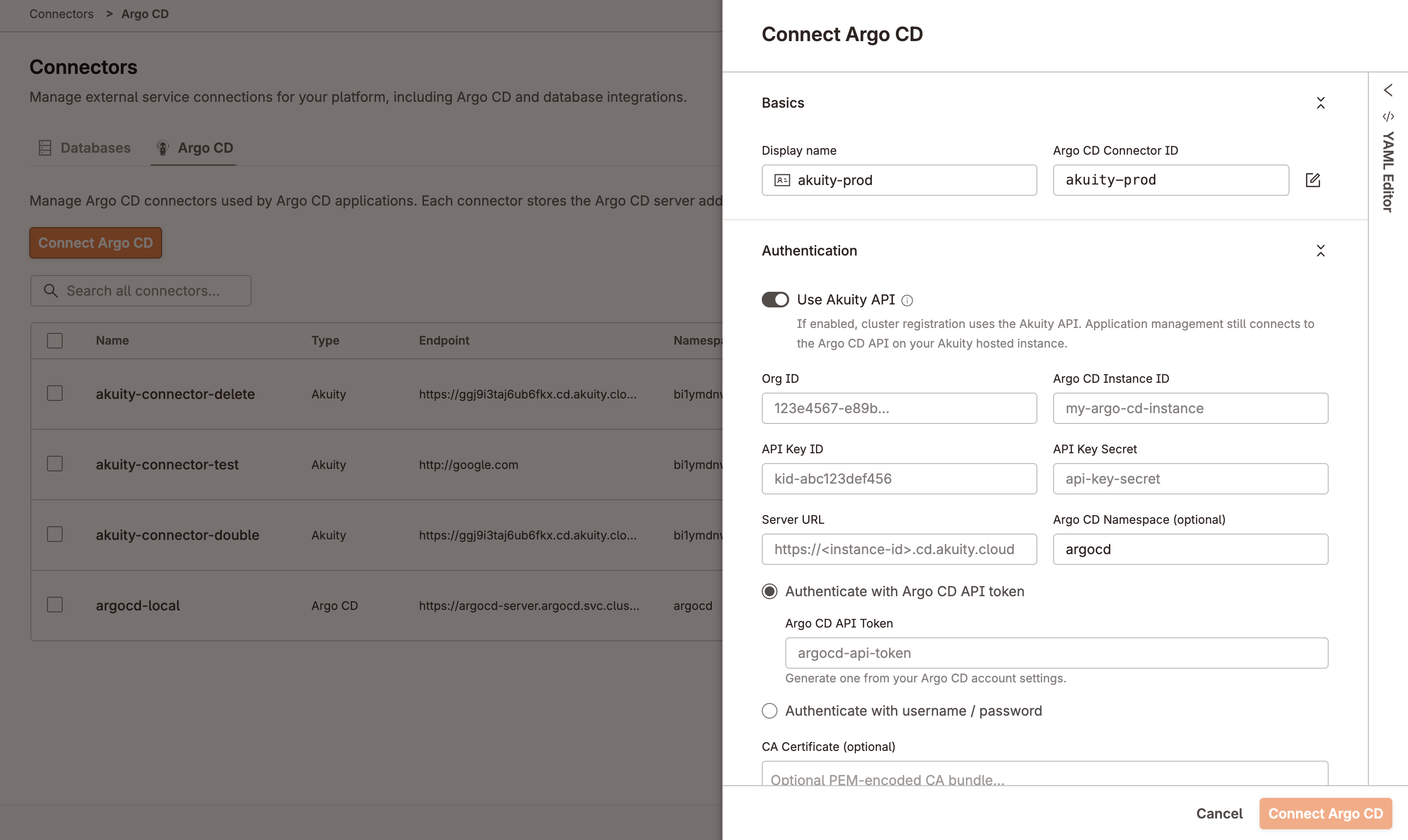
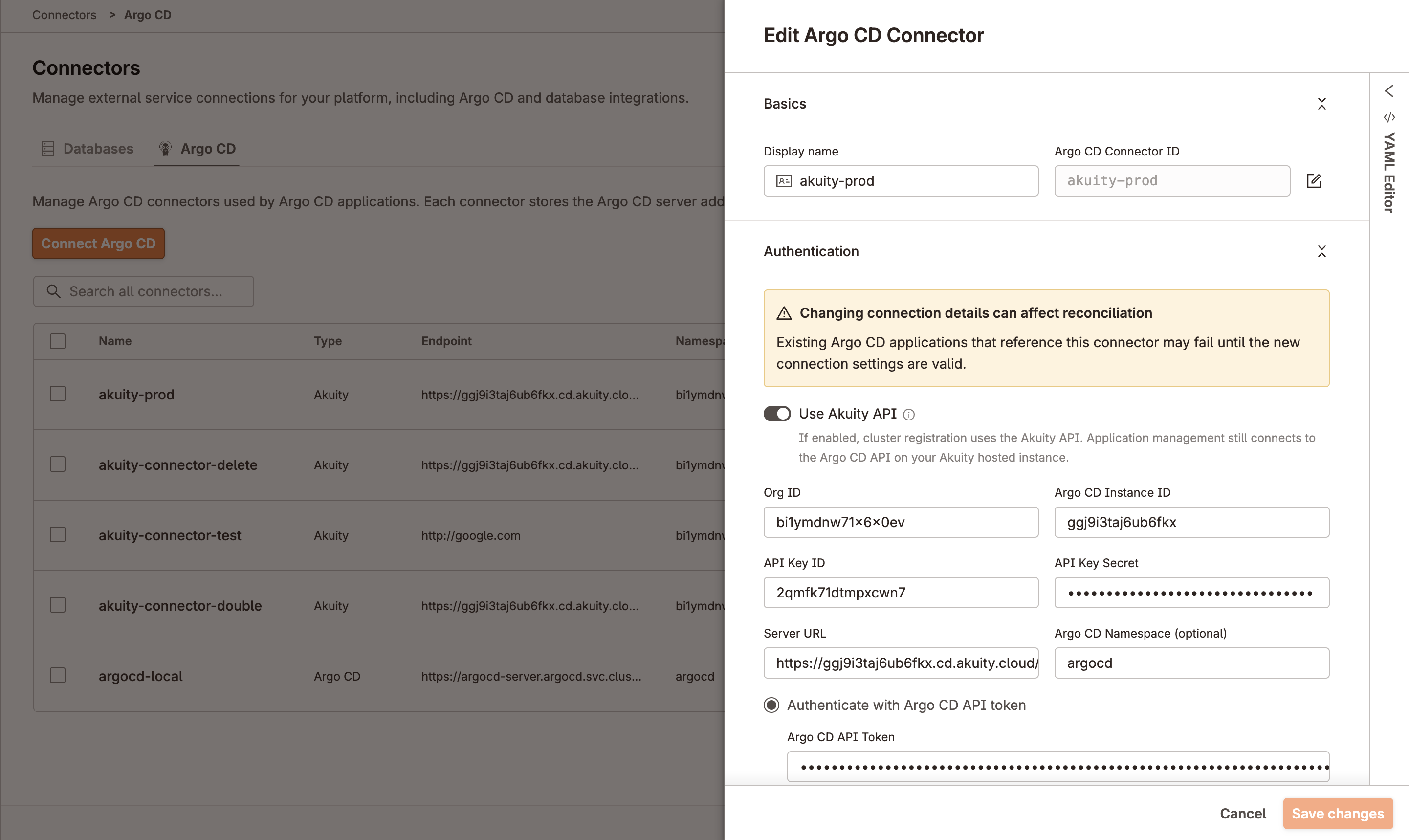
Behind the scenes, vCluster Platform creates a Kubernetes Secret in the Platform namespace. The Secret is labeled to identify it as an Argo CD connector and contains the credentials and endpoint information needed to connect to Argo CD or Akuity. If you prefer a GitOps workflow, skip the UI and create the connector declaratively by applying the Secret directly:
apiVersion: v1
kind: Secret
metadata:
  name: akuity-prod
  namespace: loft
  labels:
    loft.sh/connector-type: argocd
stringData:
  connectorType: "akuity"
  server: "https://<instance-id>.cd.akuity.cloud"
  token: "<argocd-token>"  # or use username + password
  akuityOrgId: "<your-org-uuid>"
  akuityInstanceId: "<your-instance-id>"
  akuityApiKeyId: "<your-api-key-id>"
  akuityApiKeySecret: "<your-api-key-secret>"
  akuityAgentSize: CLUSTER_SIZE_MEDIUM
  insecure: "true"
  akuityRepoServerMemory: 1Gi
  akuityRepoServerReplicas: "1"
The connector is now available to any tenant cluster in the platform. You won't reference it directly again. You'll just point each tenant's vcluster.yaml at it by name.
For any application that uses target: host, the Argo CD integration also needs to be enabled on the Control Plane Cluster itself. Set the argoCD block on the management.loft.sh/v1 Cluster object representing your Control Plane Cluster:
spec:
  argoCD:
    enabled: true
    connector: akuity-prod
This tells the Platform which connector to use for target: host deployments. Apply once and you're done.
Templates let you define an application once and deploy it across your entire fleet. Each tenant can still provide its own configuration through parameters. AI Cloud platforms commonly use templates for GPU operators, monitoring stacks, ML platforms, and security tools. In this walkthrough, we'll use cert-manager. It runs on any Kubernetes cluster, requires no specialized hardware, and makes it easy to follow along.
Define the template at the platform scope:
kind: ArgoCDApplicationTemplate
apiVersion: management.loft.sh/v1
metadata:
  name: cert-manager
spec:
  displayName: cert-manager
  template:
    metadata: {}
    spec:
      source:
        repoURL: https://charts.jetstack.io
        targetRevision: {{ .Values.version }}
        helm:
          values: |
            crds:
              enabled: {{ .Values.installCRDs }}
        chart: cert-manager
      destination:
        namespace: cert-manager
      project: default
      syncPolicy:
        automated:
          prune: true
          selfHeal: true
        syncOptions:
          - CreateNamespace=true
  parameters:
    - variable: version
      label: cert-manager version
      type: string
      defaultValue: v1.16.2
    - variable: installCRDs
      label: Install CRDs
      type: boolean
      defaultValue: 'true'
The parameter system uses {{ .Values.* }} syntax that mirrors what Helm developers already know. Tenant clusters reference the template by name and supply their own values.
Apply the template to the platform. From here, every tenant in every project can reference it.
Define another template for prometheus:
kind: ArgoCDApplicationTemplate
apiVersion: management.loft.sh/v1
metadata:
  name: prometheus
spec:
  displayName: prometheus
  template:
    metadata: {}
    spec:
      source:
        repoURL: https://prometheus-community.github.io/helm-charts
        targetRevision: 86.1.0
        helm:
          values: |
            grafana:
              enabled: false

            alertmanager:
              enabled: false

            prometheus:
              prometheusSpec:
                retention: 15d
        chart: kube-prometheus-stack
      destination:
        namespace: {{ .Values.destinationNamespace }}
      project: default
      syncPolicy:
        automated:
          prune: true
          selfHeal: true
        syncOptions:
          - CreateNamespace=true
          - ServerSideApply=true
  parameters:
    - variable: destinationNamespace
      label: Destination Namespace
      type: string
      required: true
      defaultValue: monitoring
Enable the connector on your control plane cluster by adding this configuration to the cluster object:
spec:
  argoCD:
    enabled: true
    connector: akuity-prod
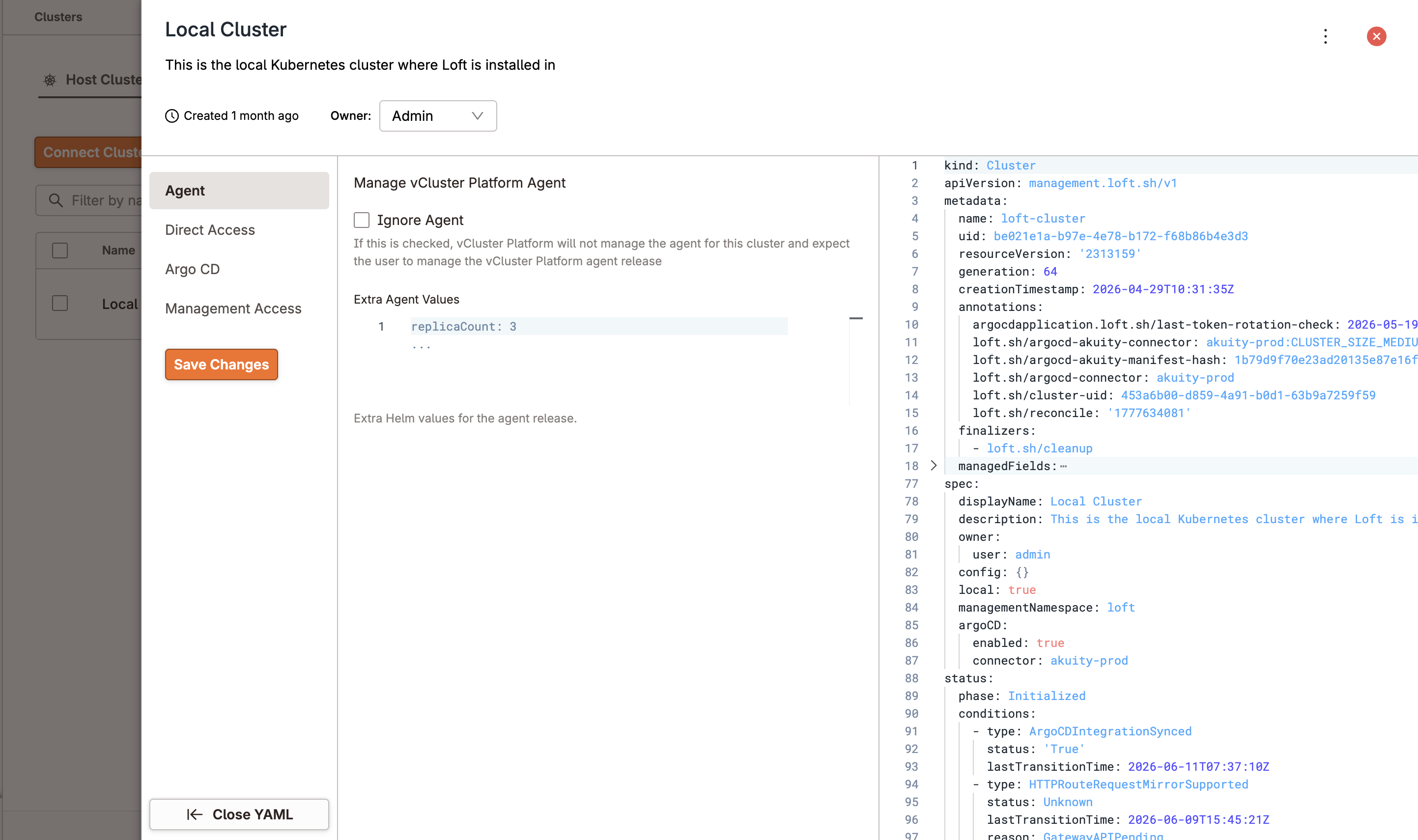
The tenant cluster definition pulls everything together. The same vcluster.yaml that defines the cluster also declares the applications that should run on it:
integrations:
  argoCD:
    connector: akuity-prod
deploy:
  argoCD:
    applications:
      - name: cert-manager
        target: vCluster
        template:
          name: cert-manager
          parameters:
            version: v1.16.2
            installCRDs: 'true'
      - name: prometheus
        target: host
        template:
          name: prometheus
          parameters:
            destinationNamespace: monitoring
cert-manager targets the tenant cluster because that's where workloads need TLS certificates. Prometheus targets the Control Plane Cluster because that's where the platform team needs visibility. Tenants don't need access to the platform's monitoring infrastructure, so it remains isolated from their environment. The prometheus template here is illustrative; bring your own when you adapt this walkthrough to a real cluster. Apply the tenant.
Three things happen, in roughly this order. First, the tenant cluster is created. vCluster Platform then uses the connector to register the cluster as a destination in Akuity. If you're using an Akuity connector, the in-cluster agent is deployed automatically, with no manual configuration required from the operator. Agent registration typically takes up to five minutes.
Next, the cert-manager application appears in Akuity for the new tenant. The tenant-specific parameters are applied automatically from the template. Argo CD then starts syncing the chart into the tenant cluster. At the same time, the Prometheus application appears in Akuity for the Control Plane Cluster. It is deployed outside the tenant cluster and remains invisible to the tenant by design.
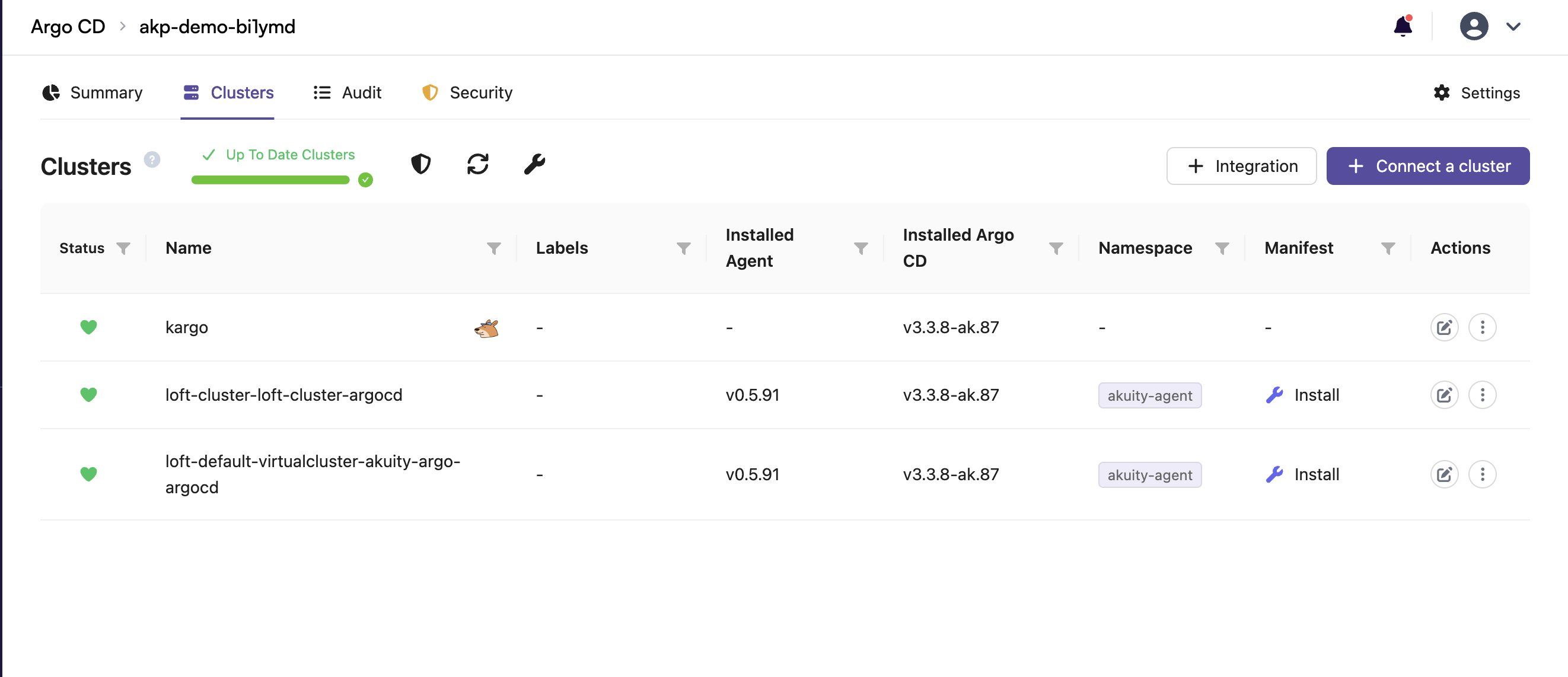
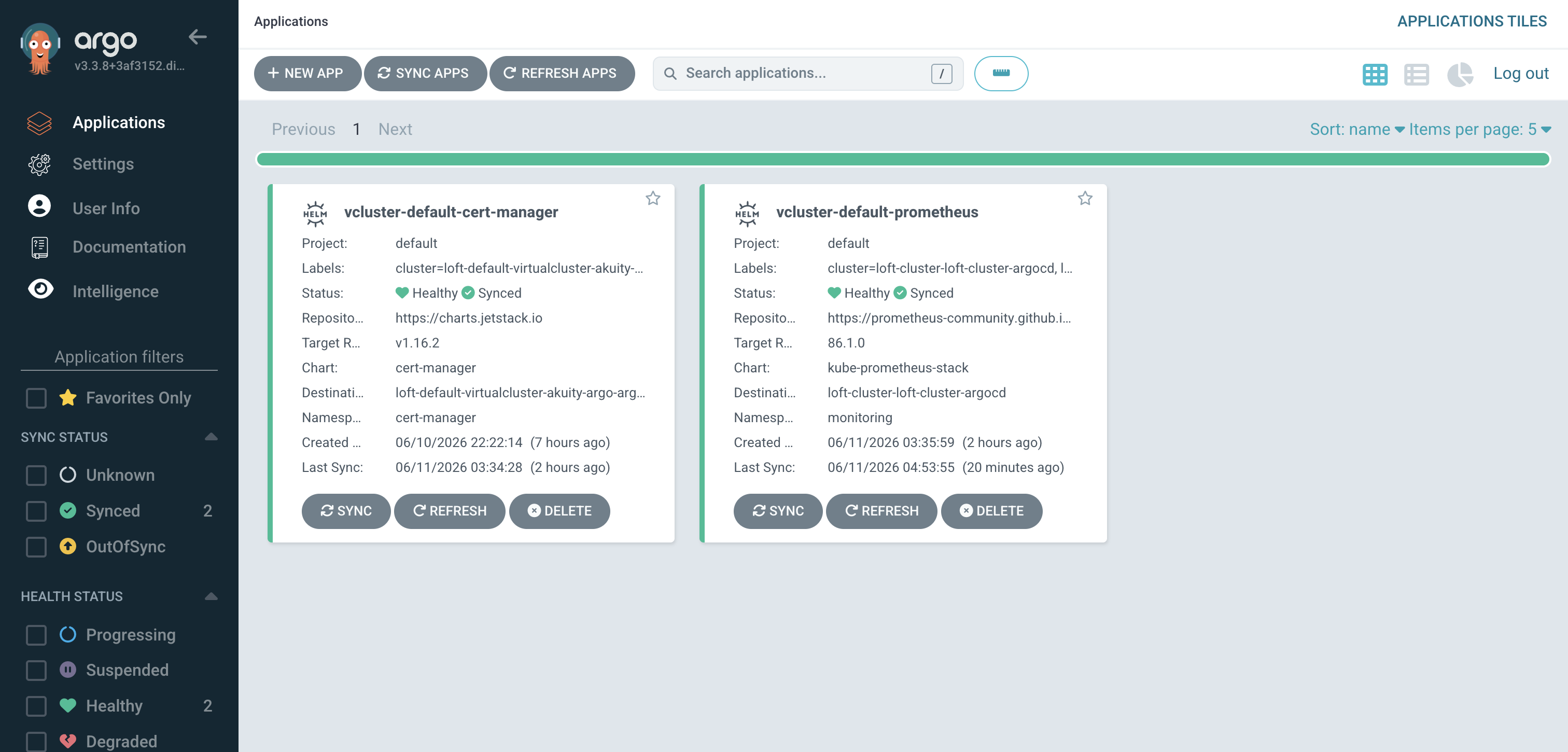
End to end, plan on roughly ten minutes from the moment you apply the tenant to the moment cert-manager and Prometheus are both healthy. Application reconciliation depends on the chart, so heavier stacks take longer. After that, every change you push to a template propagates to every tenant referencing it.
This is the part that actually matters for an operator.
Suppose Run.ai releases version 2.21 on Tuesday morning, and you want every tenant running it by Friday. In the traditional model, that becomes an upgrade campaign across hundreds of clusters. You might automate parts of it with scripts. You might wait for maintenance windows. Either way, it's operational work that pulls the platform team away from building new capabilities.
In the new world, you edit one line in your run-ai template:
- targetRevision: v2.20.0
+ targetRevision: v2.21.0
Commit. Push.
Every tenant cluster picks up the new version on the next Argo CD sync cycle. The default interval is three minutes; you can trigger a sync per application if you need to push immediately, though there's no fleet-wide trigger today. By Friday morning, Akuity shows the entire fleet on 2.21. Healthy tenants are green. Any tenant that ran into a problem is visible in the dashboard with the specific failure surfaced. You get one place to look, fleet-wide, instead of SSHing into each cluster to confirm.
The same workflow works whether you manage ten tenants or a thousand. It also applies to more than application upgrades. CVE patches for GPU operators, new observability exporters, security policy updates, and other platform changes all follow the same process. Instead of rolling out changes tenant by tenant, you update the desired state once and let Argo CD reconcile it across the fleet.
vcluster.yaml are deployed when the cluster is created, not afterward. Monitoring, billing exporters, admission webhooks, GPU operators, and the rest of the platform stack are available from day one. No follow-up tickets. No missing components. Day 0 is simply the first reconcile, and Day 2 looks exactly the same.vcluster.yaml becomes the source of truth for both infrastructure and applications. What you deploy to one tenant, you deploy to all of them in the same way. Onboarding a tenant means creating one definition. Decommissioning a tenant means removing it. The lifecycle is simple, predictable, and easy to audit.None of these capabilities require additional setup. They are built into the integration and work out of the box.
The integration ships in vCluster Platform v4.10. Documentation, including the full walkthrough above with current screenshots and example configurations, lives at vcluster.com/docs/platform/integrations/argocd.
If you have feedback, questions about the integration, or want to share how you're using it, drop a note on the GitHub repo or reach out to the team.
Deploy your first virtual cluster today.
