Reimagining Local Kubernetes: Replacing Kind with vind — A Deep Dive

Feb 11, 2026
|
7
min Read

Kubernetes developers including myself have long relied on tools like KinD, aka, kind (Kubernetes in Docker) to spin up disposable clusters locally for development, testing, and CI/CD workflows. I love the product and have used it many times but there were certain limitations which were a bit annoying like not being able to use service type LoadBalancer, accessing the homelab kind clusters from the web, using the pull through cache, adding a GPU node to your local kind cluster.
Introducing vind (vCluster in Docker) - An open source alternative to kind or you can say kind on steroids. vind enables Kubernetes clusters as first-class Docker containers offering improved performance, modern features, and a more enhanced developer experience.
In this post, we’ll explore what vind is, how it compares to kind, and walk through real-world usage with examples from the vind repository
At its core, vind is a way to run Kubernetes clusters directly as Docker containers. Which you can also do using kind and other tooling, so why vind and why should you try it? Well, here is the thing:
In essence, vind is “a better kind” bringing modern features that matter for real developer workflows.
Let’s see how vind stacks up against Kind:
Kind is useful for several use cases, but vind expands these capabilities to support modern tooling like vCluster and Docker drivers providing a richer multi-cloud developer experience.
The docs that I have created are updated with the instructions needed, so we will just follow that and then attach an external node to my local cluster.
Before we dive into examples, let’s get vind installed.
Ensure you have:
If you have never installed vCluster CLI then you can install from here.
If you already have the CLI then:
vcluster upgrade --version v0.31.0vcluster use driver docker

The vCluster Platform UI gives a nice web interface:
vcluster platform start
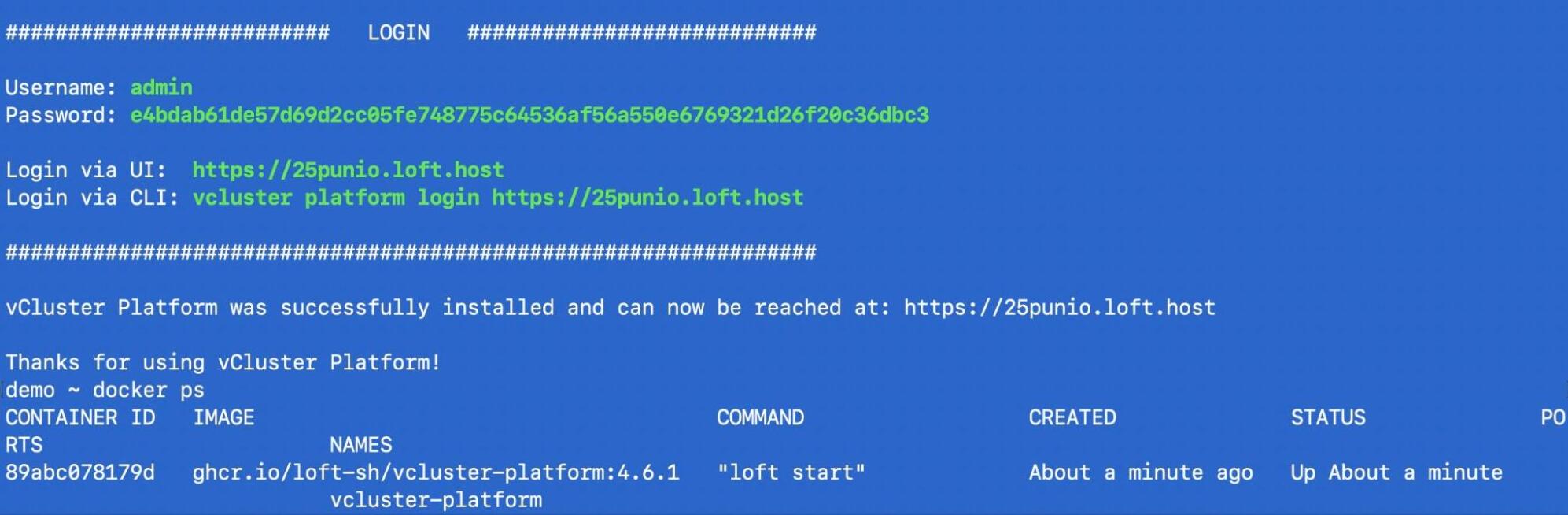
Once booted, you can manage clusters visually, something kind doesn’t provide out of the box.
You will get login details that you can use to login to the UI and manage your clusters via the UI.
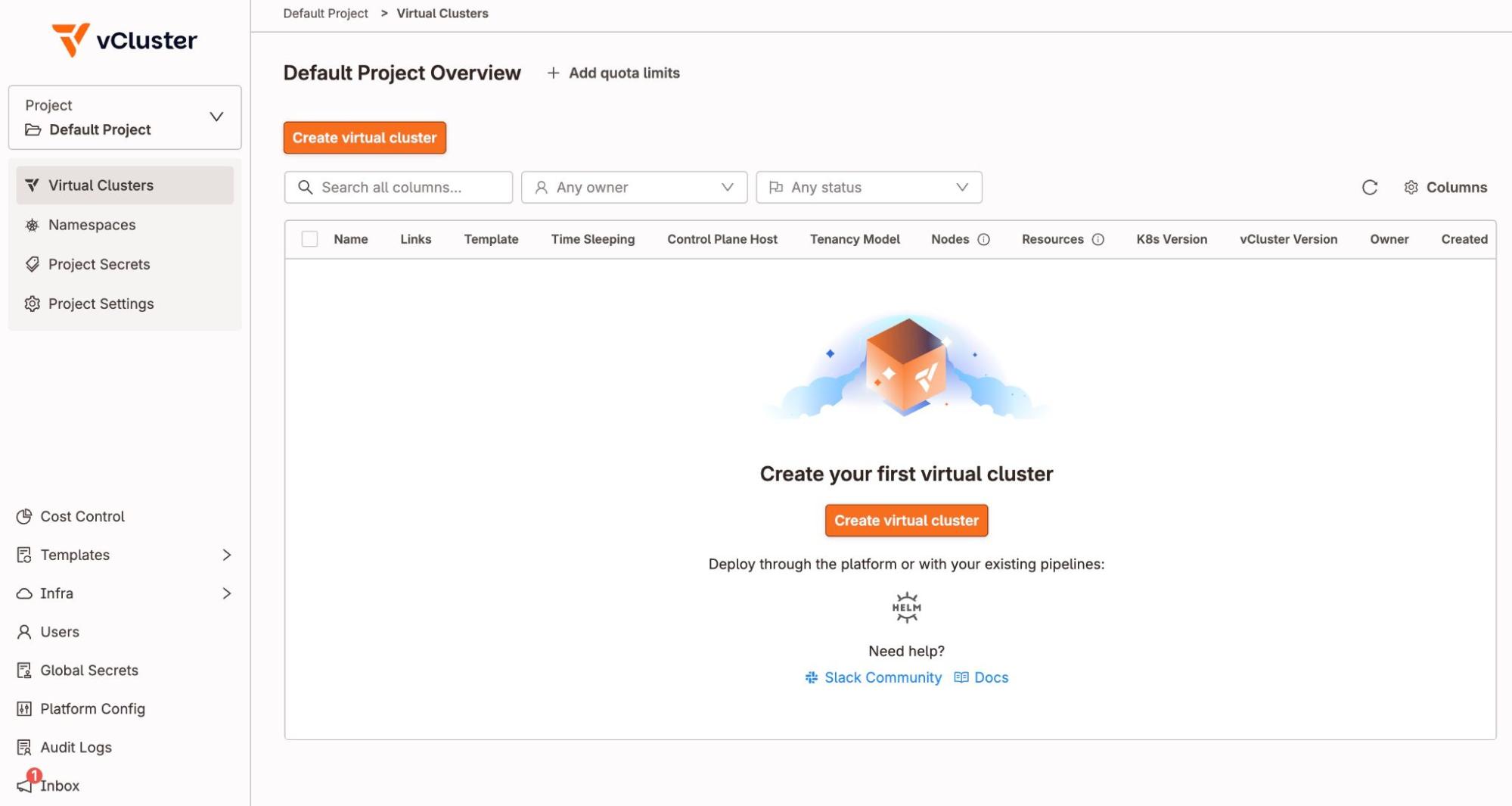
Create Your First vind Cluster
Once set up, creating your first Kubernetes cluster using vind is simple:
vcluster create my-cluster
Then, validate the cluster:
kubectl get nodes
kubectl get namespaces
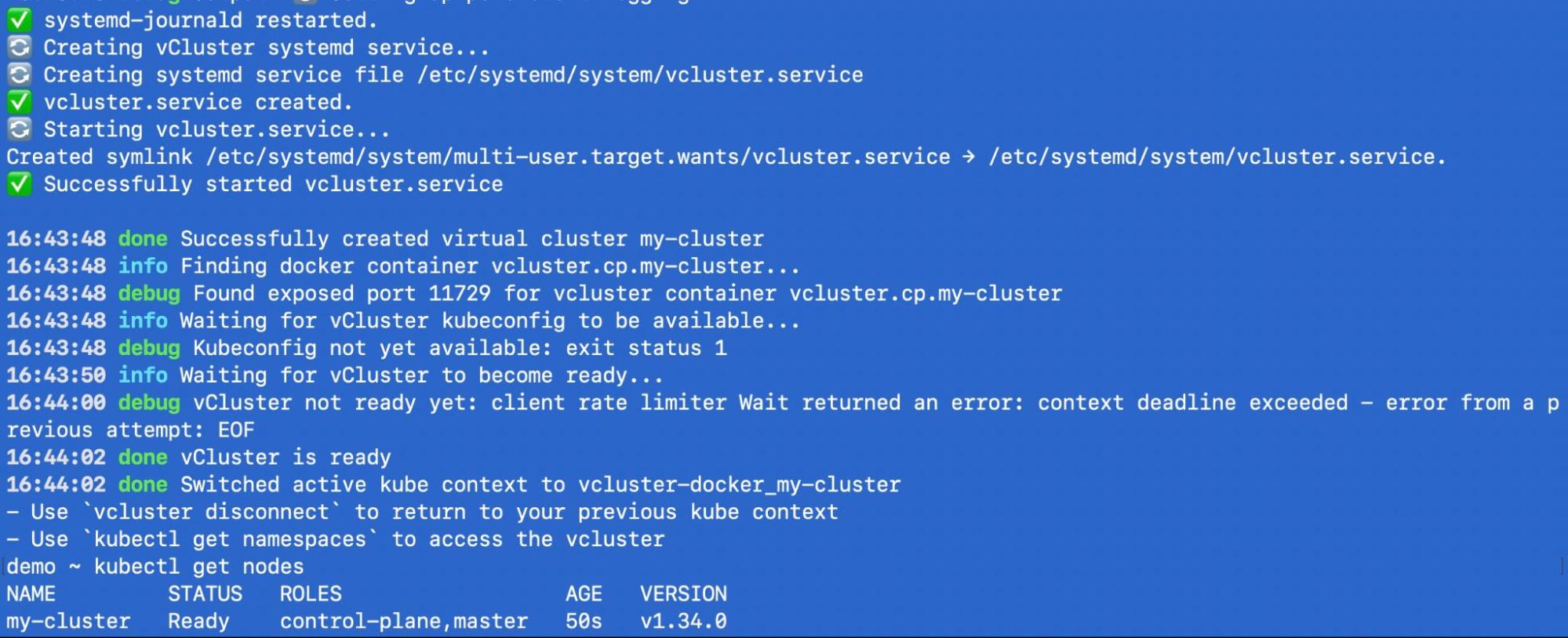
You now have a Kubernetes cluster running inside Docker, ready for development.
Lets try to create a cluster with multiple nodes.
You can use one of the examples - https://github.com/loft-sh/vind/blob/main/examples/multi-node-cluster.yaml
experimental:
  docker:
    # Network configuration
    network: "vind-multi-node"

    # Load balancer and registry proxy are enabled by default

    # Additional worker nodes
    # Note: env vars are Docker container environment variables, not Kubernetes node labels
    nodes:
      - name: worker-1
        env:
          - "CUSTOM_VAR=value1"

      - name: worker-2
        env:
          - "CUSTOM_VAR=value2"

      - name: worker-3
        env:
          - "CUSTOM_VAR=value3"
privateNodes:
  enabled: true
  vpn:
    enabled: true   # This enables node to control plane vpn
    nodeToNode:
      enabled: true
And run the command:
vcluster create my-vcluster -f multi-node-cluster.yaml --upgrade
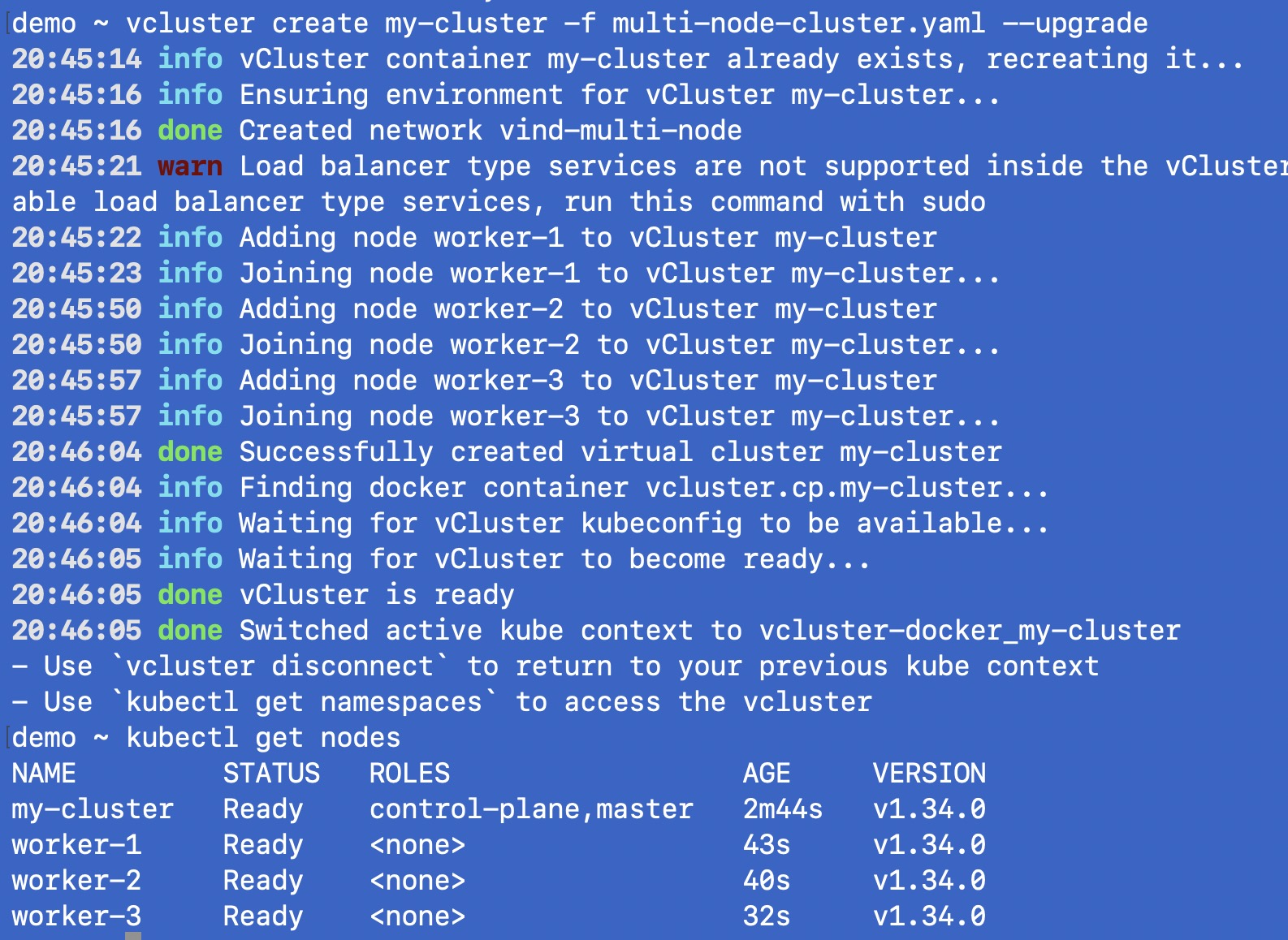
Boom!! You have a multi node Kubernetes cluster!
This is my favourite one!
In case you want to attach a GPU or external node to your local cluster, you can do that using vCluster VPN that comes with vCluster Free tier.
Add below to the multi-node yaml manifest and recreate the cluster:
privateNodes:
  enabled: true
  vpn:
    enabled: true   # This enables node to control plane vpn
    nodeToNode:
      enabled: true
Create the token:
vcluster token createdemo ~ vcluster token create

curl -fsSLk "https://25punio.loft.host/kubernetes/project/default/virtualcluster/my-cluster/node/join?token=eerawx.dwets9a8adfw52gz" | sh -
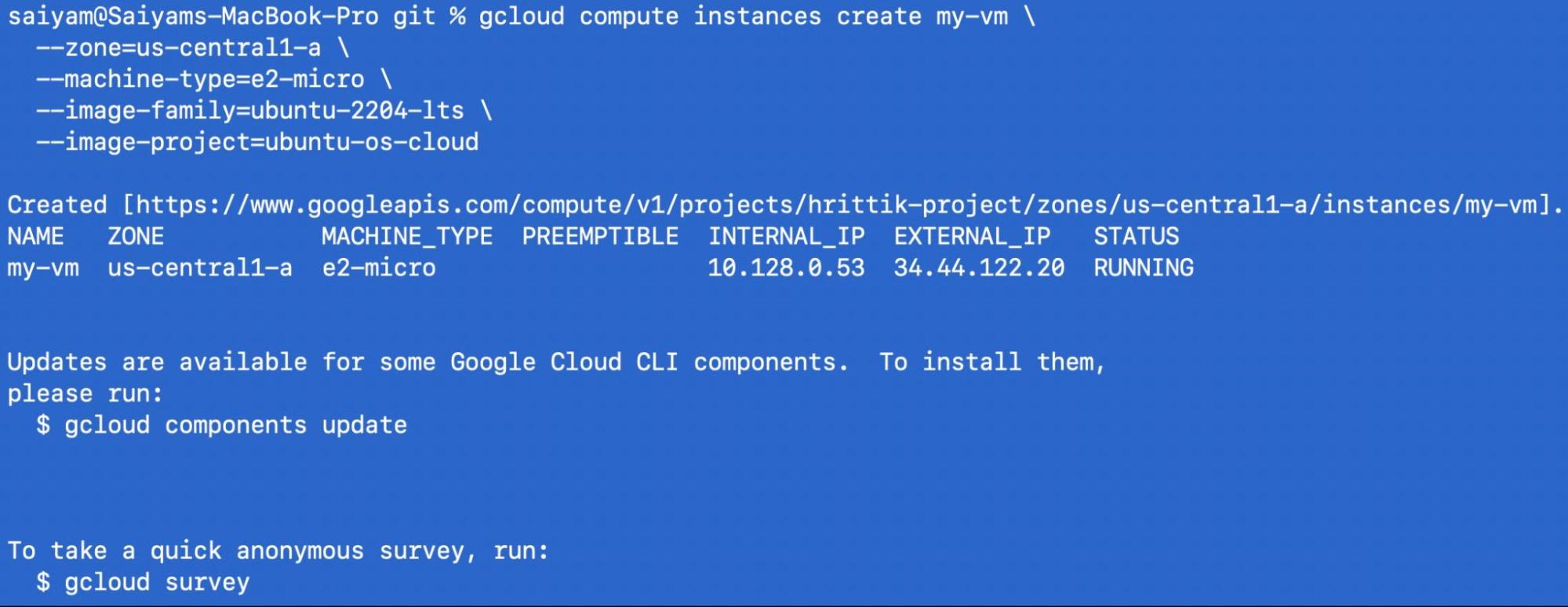
Now you can create an instance in any cloud provider - I have created an instance in google cloud provider.
gcloud compute instances create my-vm \
  --zone=us-central1-a \
  --machine-type=e2-micro \
  --image-family=ubuntu-2204-lts \
  --image-project=ubuntu-os-cloud
Next ssh into the instance:
gcloud compute ssh my-vm --zone=us-central1-a
Run the curl command:
saiyam@my-vm:~$ sudo su
root@my-vm:/home/saiyam# curl -fsSLk "https://25punio.loft.host/kubernetes/project/default/virtualcluster/my-cluster/node/join?token=eerawx.hdnueyd9a8myfr52gz" | sh -
Detected OS: ubuntu
Preparing node for Kubernetes installation...
Kubernetes version: v1.34.0
Installing Kubernetes binaries...
Downloading Kubernetes binaries from https://github.com/loft-sh/kubernetes/releases/download...
Loading bridge and br_netfilter modules...
insmod /lib/modules/6.8.0-1046-gcp/kernel/net/llc/llc.ko
insmod /lib/modules/6.8.0-1046-gcp/kernel/net/802/stp.ko
insmod /lib/modules/6.8.0-1046-gcp/kernel/net/bridge/bridge.ko
insmod /lib/modules/6.8.0-1046-gcp/kernel/net/bridge/br_netfilter.ko
Activating ip_forward...
net.ipv4.ip_forward = 1
net.ipv6.conf.all.forwarding = 1
Resetting node...
Ensuring kubelet is stopped...
kubelet service not found
* Applying /etc/sysctl.d/10-console-messages.conf ...
kernel.printk = 4 4 1 7
* Applying /etc/sysctl.d/10-ipv6-privacy.conf ...
net.ipv6.conf.all.use_tempaddr = 2
net.ipv6.conf.default.use_tempaddr = 2
* Applying /etc/sysctl.d/10-kernel-hardening.conf ...
kernel.kptr_restrict = 1
* Applying /etc/sysctl.d/10-magic-sysrq.conf ...
kernel.sysrq = 176
* Applying /etc/sysctl.d/10-network-security.conf ...
net.ipv4.conf.default.rp_filter = 2
net.ipv4.conf.all.rp_filter = 2
* Applying /etc/sysctl.d/10-ptrace.conf ...
kernel.yama.ptrace_scope = 1
* Applying /etc/sysctl.d/10-zeropage.conf ...
vm.mmap_min_addr = 65536
* Applying /usr/lib/sysctl.d/50-default.conf ...
kernel.core_uses_pid = 1
net.ipv4.conf.default.rp_filter = 2
net.ipv4.conf.default.accept_source_route = 0
sysctl: setting key "net.ipv4.conf.all.accept_source_route": Invalid argument
net.ipv4.conf.default.promote_secondaries = 1
sysctl: setting key "net.ipv4.conf.all.promote_secondaries": Invalid argument
net.ipv4.ping_group_range = 0 2147483647
net.core.default_qdisc = fq_codel
fs.protected_hardlinks = 1
fs.protected_symlinks = 1
fs.protected_regular = 1
fs.protected_fifos = 1
* Applying /usr/lib/sysctl.d/50-pid-max.conf ...
kernel.pid_max = 4194304
* Applying /etc/sysctl.d/60-gce-network-security.conf ...
net.ipv4.tcp_syncookies = 1
net.ipv4.conf.all.accept_source_route = 0
net.ipv4.conf.default.accept_source_route = 0
net.ipv4.conf.all.accept_redirects = 0
net.ipv4.conf.default.accept_redirects = 0
net.ipv4.conf.all.secure_redirects = 1
net.ipv4.conf.default.secure_redirects = 1
net.ipv4.ip_forward = 0
net.ipv4.conf.all.send_redirects = 0
net.ipv4.conf.default.send_redirects = 0
net.ipv4.conf.all.rp_filter = 1
net.ipv4.conf.default.rp_filter = 1
net.ipv4.icmp_echo_ignore_broadcasts = 1
net.ipv4.icmp_ignore_bogus_error_responses = 1
net.ipv4.conf.all.log_martians = 1
net.ipv4.conf.default.log_martians = 1
kernel.randomize_va_space = 2
kernel.panic = 10
* Applying /etc/sysctl.d/99-cloudimg-ipv6.conf ...
net.ipv6.conf.all.use_tempaddr = 0
net.ipv6.conf.default.use_tempaddr = 0
* Applying /etc/sysctl.d/99-gce-strict-reverse-path-filtering.conf ...
* Applying /usr/lib/sysctl.d/99-protect-links.conf ...
fs.protected_fifos = 1
fs.protected_hardlinks = 1
fs.protected_regular = 2
fs.protected_symlinks = 1
* Applying /etc/sysctl.d/99-sysctl.conf ...
* Applying /etc/sysctl.d/99-tailscale.conf ...
* Applying /etc/sysctl.conf ...
Starting vcluster-vpn...
Created symlink /etc/systemd/system/multi-user.target.wants/vcluster-vpn.service → /etc/systemd/system/vcluster-vpn.service.
Waiting for vcluster-vpn to be ready...
Waiting for vcluster-vpn to be ready...
Configuring node to node vpn...
Waiting for a tailscale ip...
Starting containerd...
Created symlink /etc/systemd/system/multi-user.target.wants/containerd.service → /etc/systemd/system/containerd.service.
Importing pause image...
registry.k8s.io/pause:3.10               saved
application/vnd.oci.image.manifest.v1+json sha256:a883b8d67f5fe8ae50f857fb4c11c789913d31edff664135b9d4df44d3cb85cb
Importing elapsed: 0.2 s total:   0.0 B (0.0 B/s)
Starting kubelet...
Created symlink /etc/systemd/system/multi-user.target.wants/kubelet.service → /etc/systemd/system/kubelet.service.
Installation successful!
Joining node into cluster...
[preflight] Running pre-flight checks
W0209 16:03:28.474612    1993 file.go:102] [discovery] Could not access the cluster-info ConfigMap for refreshing the cluster-info information, but the TLS cert is valid so proceeding...
[preflight] Reading configuration from the "kubeadm-config" ConfigMap in namespace "kube-system"...
[preflight] Use 'kubeadm init phase upload-config kubeadm --config your-config-file' to re-upload it.
W0209 16:03:30.253845    1993 utils.go:69] The recommended value for "clusterDNS" in "KubeletConfiguration" is: [10.96.0.10]; the provided value is: [10.109.18.131]
[kubelet-start] Writing kubelet configuration to file "/var/lib/kubelet/instance-config.yaml"
[patches] Applied patch of type "application/strategic-merge-patch+json" to target "kubeletconfiguration"
[kubelet-start] Writing kubelet configuration to file "/var/lib/kubelet/config.yaml"
[kubelet-start] Writing kubelet environment file with flags to file "/var/lib/kubelet/kubeadm-flags.env"
[kubelet-start] Starting the kubelet
[kubelet-check] Waiting for a healthy kubelet at http://127.0.0.1:10248/healthz. This can take up to 4m0s
[kubelet-check] The kubelet is healthy after 1.501478601s
[kubelet-start] Waiting for the kubelet to perform the TLS Bootstrap
This node has joined the cluster:
* Certificate signing request was sent to apiserver and a response was received.
* The Kubelet was informed of the new secure connection details.
Run kubectl get nodes on the control-plane to see this node join the cluster.
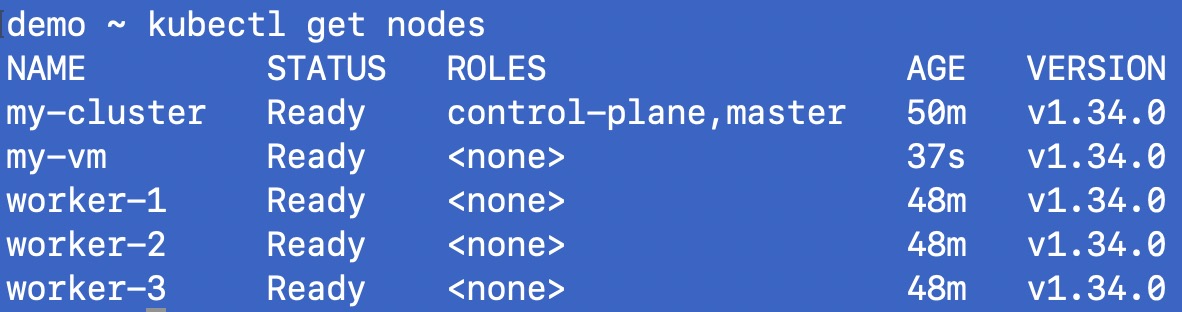
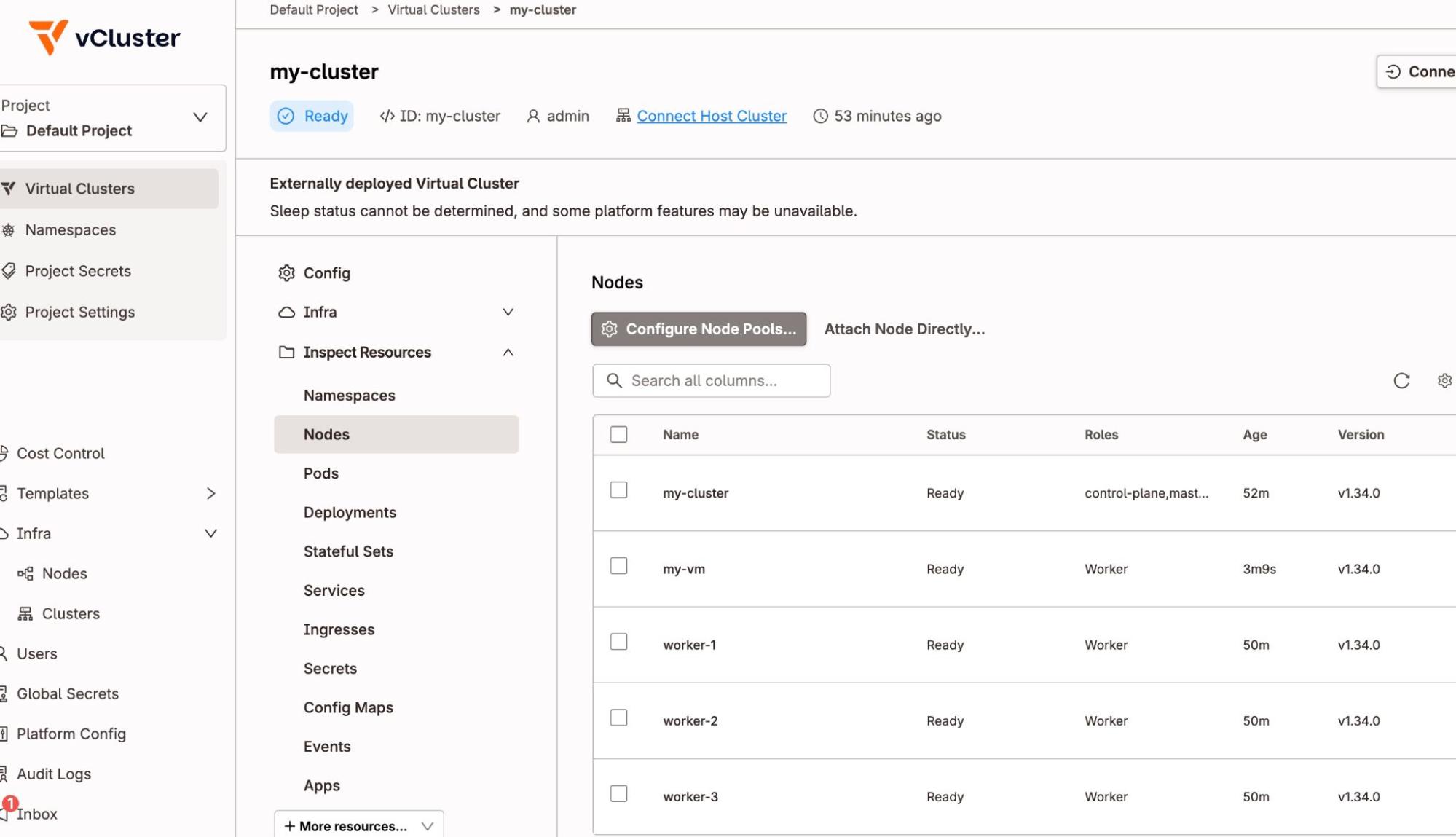
How cool is this!
demo ~ kubectl get po -A
NAMESPACE            NAME                                      READY   STATUS    RESTARTS   AGE
kube-flannel         kube-flannel-ds-nfb6g                     1/1     Running   0          14m
kube-flannel         kube-flannel-ds-nkxfq                     1/1     Running   0          15m
kube-flannel         kube-flannel-ds-r28k7                     1/1     Running   0          42s
kube-flannel         kube-flannel-ds-tr9cm                     1/1     Running   0          14m
kube-flannel         kube-flannel-ds-xx7p7                     1/1     Running   0          14m
kube-system          coredns-75bb76df-5tbdc                    1/1     Running   0          15m
kube-system          kube-proxy-hfgw7                          1/1     Running   0          15m
kube-system          kube-proxy-l86w5                          1/1     Running   0          42s
kube-system          kube-proxy-lqprr                          1/1     Running   0          14m
kube-system          kube-proxy-sz6f2                          1/1     Running   0          14m
kube-system          kube-proxy-wrkzl                          1/1     Running   0          14m
local-path-storage   local-path-provisioner-6f6fd5d9d9-4tpvj   1/1     Running   0          15m
There are many other features like Sleep Mode, where you can sleep and wakeup of a vind Kubernetes cluster, although, accessing your clusters from the UI and attaching external nodes along with working of LoadBalancer service without any additional third party tooling is just amazing!
So I have replaced my kind setup.
For teams focused on:
…vind is worth serious consideration.
If you’re evaluating a modern replacement for kind in your tooling, especially for team and CI/Devflow use cases, vind puts a compelling stake in the ground.
Star the repo - https://github.com/loft-sh/vind/tree/main
Start creating issues and lets discuss to make it even better
Join our slack - https://slack.vcluster.com
Deploy your first virtual cluster today.
