Stronger tenant isolation for NVIDIA Run:ai

Oct 13, 2026
|
10
min Read

NVIDIA has open sourced the full NVIDIA Run:ai platform. You can deploy it, operate it, and integrate it into your own offering without a commercial license.
That removes the easiest thing to solve. Getting NVIDIA Run:ai is now a download.
NVIDIA Run:ai already has tenancy built in. Projects, departments, and quotas let several teams work against one NVIDIA Run:ai without stepping on each other, and that is much of the point of it. For some use cases, a stronger boundary is required between tenants at the Kubernetes API or at the node: customers paying for capacity, regulated or sovereign workloads, business units that should not be able to see each other's work at all.
That boundary is what vCluster adds. It is what lets a provider offer NVIDIA Run:ai to paying customers, and what lets an enterprise give a team real separation in addition to a quota.
This post covers:
NVIDIA Run:ai provides AI workload and GPU orchestration that helps organizations maximize GPU utilization and AI workload throughput. It schedules work across GPUs, enforces fair-share policies across projects, and keeps workloads moving on critical AI infrastructure.
Inside a cluster, NVIDIA Run:ai provides projects, departments, and quotas, which is what lets several teams share AI infrastructure without stepping on each other. For use cases that require a stronger boundary, the next architectural decision is whether tenants share the Kubernetes API and worker nodes or receive dedicated ones. That decision is yours, and there are two conventional answers. Both cost you something.
Namespaces inside one cluster. Every tenant shares a control plane.
A separate physical cluster per tenant. The boundary is real, and the fleet fragments.
The useful thing about running NVIDIA Run:ai on vCluster is that this stops being a choice between isolation and utilization.
vCluster is a certified Kubernetes distribution for hosting NVIDIA Run:ai, validated by NVIDIA as NVIDIA Run:ai conformant. Each tenant gets its own tenant cluster with its own API server, its own CRDs, and its own admin access, while NVIDIA Run:ai continues to schedule across one GPU fleet.
Two tenancy models. Which one is right depends on how much your tenants trust each other.
Each tenant gets dedicated nodes inside its own tenant cluster, with network, storage, and compute isolated per tenant, its own CNI and CSI, and no cross-tenant visibility at the infrastructure level. Nodes are provisioned automatically as tenants are onboarded.
If you are selling capacity, this is the model. Plenty of internal platforms need it too.
Dedicating nodes to a tenant raises the obvious objection: does that not fragment the fleet all over again? It would, if the assignment were permanent. Auto Nodes attaches GPU and CPU nodes to a tenant cluster as scheduling pressure rises and returns them to the shared pool when it falls, using Karpenter-based provisioning driven by real demand rather than by capacity planning. Each tenant gets nodes nobody else runs on, and the fleet still flexes.
Where tenants are internal and trusted, each one can still get an isolated tenant cluster API while workloads land on a common node pool. The control plane boundary is real. The node boundary is not, because tenants share a kernel and share worker nodes.
That makes it a reasonable fit for teams inside one organization that already trust each other: dev and test, CI, research groups working on the same problem. It is the wrong fit for anyone else. If a tenant can run arbitrary containers and you would not be comfortable giving them root on the machine, a shared kernel is not the boundary you want.
Both models need a control plane cluster to host the tenant clusters' virtualized control planes. It runs on CPU-only nodes and does not host tenant AI workloads itself.
That layer does not have to be a full Kubernetes platform you already operate. vCluster Standalone is a minimal distribution purpose-built to host tenant clusters, installed directly on bare metal. If you are building up from the hardware rather than adding tenancy to a cluster you already run, that is one less general-purpose distribution to operate for no reason other than hosting control planes.
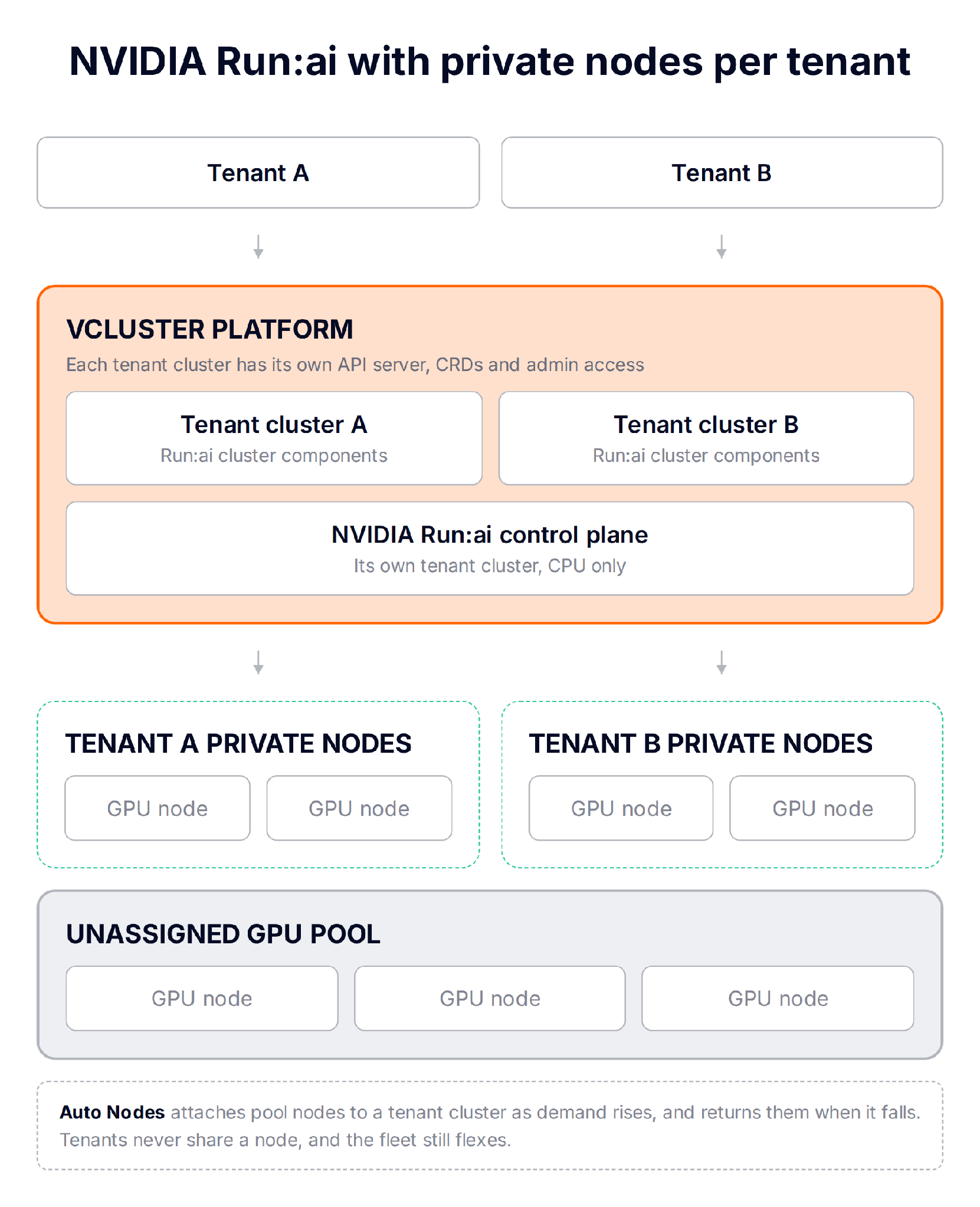
NVIDIA Run:ai's shared control plane model running on private nodes: one NVIDIA Run:ai control plane serving many tenant clusters, each with nodes of its own. Auto Nodes moves capacity between the pool and tenants as demand changes.
A managed NVIDIA Run:ai environment is not just NVIDIA Run:ai. It is registry credentials, an ingress controller, certificates, cert-manager, the NVIDIA GPU Operator, the NVIDIA Run:ai control plane, cluster registration against that control plane, monitoring wired to endpoints that did not exist three steps ago, and a person who knows which order all of that goes in. Then you do it again for the next tenant, correctly, at three in the afternoon on a Friday.
That ordered definition is what a Stack is.
Deploy the template once and you get a working environment. Deploy it fifty times and you get fifty identical working environments, each independently owned, monitored, and removable.
A template is a set of tasks forming a directed acyclic graph. Each task is one of two types:
app task, which deploys a Helm chart, manifest set, or script directlyargoCDApplication task, for anything you want continuously reconciled from GitA task listed in another task's dependsOn must reach Healthy before the dependent task starts. Tasks with no dependency between them run at the same time.
The template author declares parameters under spec.parameters and everything else stays fixed. The person deploying it sets the handful of values you chose to expose, not a Helm values file.
A task can capture a value from a Secret or, by JSONPath, from any Kubernetes resource, and a later task can consume it with {{ .Outputs.<task>.<output> }}. This is the mechanism that matters most for NVIDIA Run:ai, and the next section explains why.
Selected outputs can be surfaced on the StackInstance itself through spec.publishedOutputs, so a login URL or a generated credential is available without exposing everything else.
Certified Stacks are the templates vCluster Labs tests and ships with the platform, so a supported integration arrives as a deployment rather than an integration project. Stacks need no separate license: app and argoCDApplication tasks use features available on every plan.
For the full treatment, start with what are Stacks.
vCluster Platform 4.12 ships four NVIDIA Run:ai StackTemplates, covering both patterns operators actually run. The first stands alone. The other three compose into a shared control plane serving many tenants.
One note on the word "shared," because it means two unrelated things here. In NVIDIA Run:ai it describes whether the control plane is shared across clusters. In vCluster it describes whether tenants share nodes. They are independent choices: a shared NVIDIA Run:ai control plane on top of private nodes is a common combination, and it is what the diagram above shows.
run-ai-dedicated-control-plane installs the NVIDIA Run:ai control plane, GPU components, and cluster components into a single tenant cluster. One tenant, everything in one place, no manual preflight. This is the fastest way to see the whole thing working.
run-ai-central-control-plane-host installs the shared NVIDIA Run:ai control plane once, on the control plane cluster. Every tenant registers against this rather than running a control plane of its own.
run-ai-central-control-plane-registration registers one tenant against that shared control plane, and disconnects that tenant cleanly when they leave. Onboarding and offboarding become routine operations rather than careful ones.
run-ai-central-control-plane installs the per-tenant NVIDIA Run:ai components inside a tenant cluster, configured automatically from the shared foundation.
Two bundled VirtualClusterTemplates, runai-tenant and runai-tenant-central-control-plane, wire stacks 2 through 4 into tenant cluster creation, so a new tenant arrives with NVIDIA Run:ai already configured.
The NVIDIA Run:ai control plane generates a cluster token, and the tenant-side configuration needs it. In a manual install, somebody reads that token out of a Secret and pastes it into a values file, once per tenant, and it is exactly the kind of step that is fine the first three times.
In the Certified Stack, the host task captures the token as an output and the registration task consumes it. Nothing is hand-copied between environments, and the ordering guarantees the token exists before anything asks for it.
The same applies to health gating. The GPU Operator has to be healthy before NVIDIA Run:ai installs on top of it. That is expressed once in the template as a dependency, not remembered by a person each time.
A deployed Stack stays a managed object rather than the residue of a completed script.
The StackInstance reports one aggregate phase:
Pending when a prerequisite needs manual actionProgressing while tasks roll outHealthy when every task is healthyDegraded when a task has failedDeleting while children are being removedEach task carries its own phase underneath, including Waiting for tasks whose dependencies have not finished and Blocked for ones needing manual intervention. A degraded environment tells you which component is wrong, not just that something is.
platform.vcluster.com/stack-retry annotation to that task's name, or to all.prunePolicy decides whether the orphaned child is retained and reported, or pruned in reverse dependency order.Stacks are not a drift reconciliation engine. They order applications, gate them on health, pass values between them, and give you a durable handle on the result.
If Git should be the continuous source of truth for what runs inside a tenant cluster, put argoCDApplication tasks in your Stack and let Argo CD do the job it is good at. The two are complementary, and the four NVIDIA Run:ai templates use app tasks, so none of this requires Argo CD to get started.
NVIDIA Run:ai Clusters run on vCluster Platform v4.12 with vCluster v0.37, and the four NVIDIA Run:ai Certified Stacks are included. Customers using the offering do not require a commercial NVIDIA Run:ai software license.
Deploy an NVIDIA Run:ai Certified Stack, or talk to us about which tenancy model fits what you are building.
Deploy your first virtual cluster today.
