Two Teams, Two Models, One DGX Spark: Minima-Optimized Models with vCluster

Sep 22, 2026
|
18
min Read
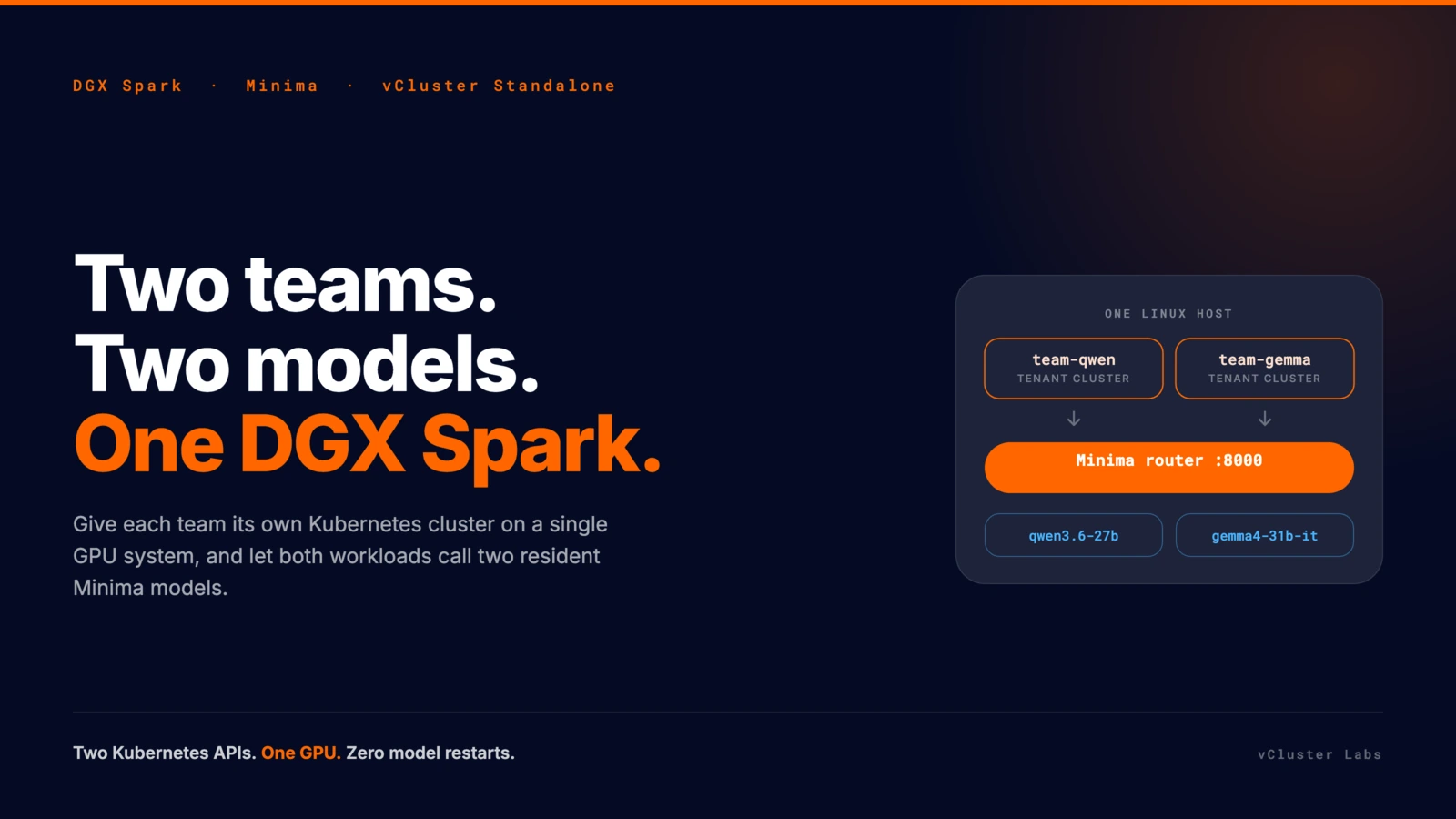
Give each team its own Kubernetes cluster on a single DGX Spark, and let their workloads call two resident Minima models.
One GPU system, two useful models, and more than one team that wants to use them. That is the shape of most local AI infrastructure today. In this blog we will explore the Minima optimized models on a single DGX Spark and have them serve requests from multiple teams using vCluster. In the end, this is the local AI factory, and the same principles apply when we keep adding infrastructure with vCluster serving as the software layer for building AI factories.
This article walks through giving two teams their own Kubernetes cluster on Spark with vCluster Standalone. Each team deploys its own workload, and those workloads call the shared Minima endpoint. We install the cluster next to the running models, create a tenant cluster per team, run both teams' Jobs, destroy and rebuild one team's entire cluster, and confirm the models kept serving the whole time.
DGX Spark. A compact NVIDIA GB10 system running Ubuntu 24.04 on arm64. It is the only GPU in this story, and it was already running Docker, Tailscale, and Minima's model services before the cluster arrived.
Minima. A production-oriented model-compression pipeline. It looks for structure inside a model that can be compressed, applies tensor decompositions, repairs quality with a short fine-tune, and pairs the result with an optimized serving runtime. On this Spark, Minima's router listens on port 8000 and keeps both models resident behind it, so a team asking for Qwen and a team asking for Gemma never wait for a model swap.
vCluster Standalone. vCluster provisions isolated tenant clusters. Standalone runs a tenant cluster's control plane as a binary directly on a machine, so it needs no control plane cluster underneath it, and worker nodes join as private nodes. It can also act as the control plane cluster for further tenant clusters, which is exactly what we do here.
Two teams. team-qwen and team-gemma, each with its own control plane and its own workload. In this walkthrough each workload is a Kubernetes Job running a hardened curl container. It stands in for whatever a team would really deploy: an application, an agent, a batch pipeline. Each Job discovers the node address through status.hostIP and posts one deterministic prompt to its model.
The target shape is deliberately small:
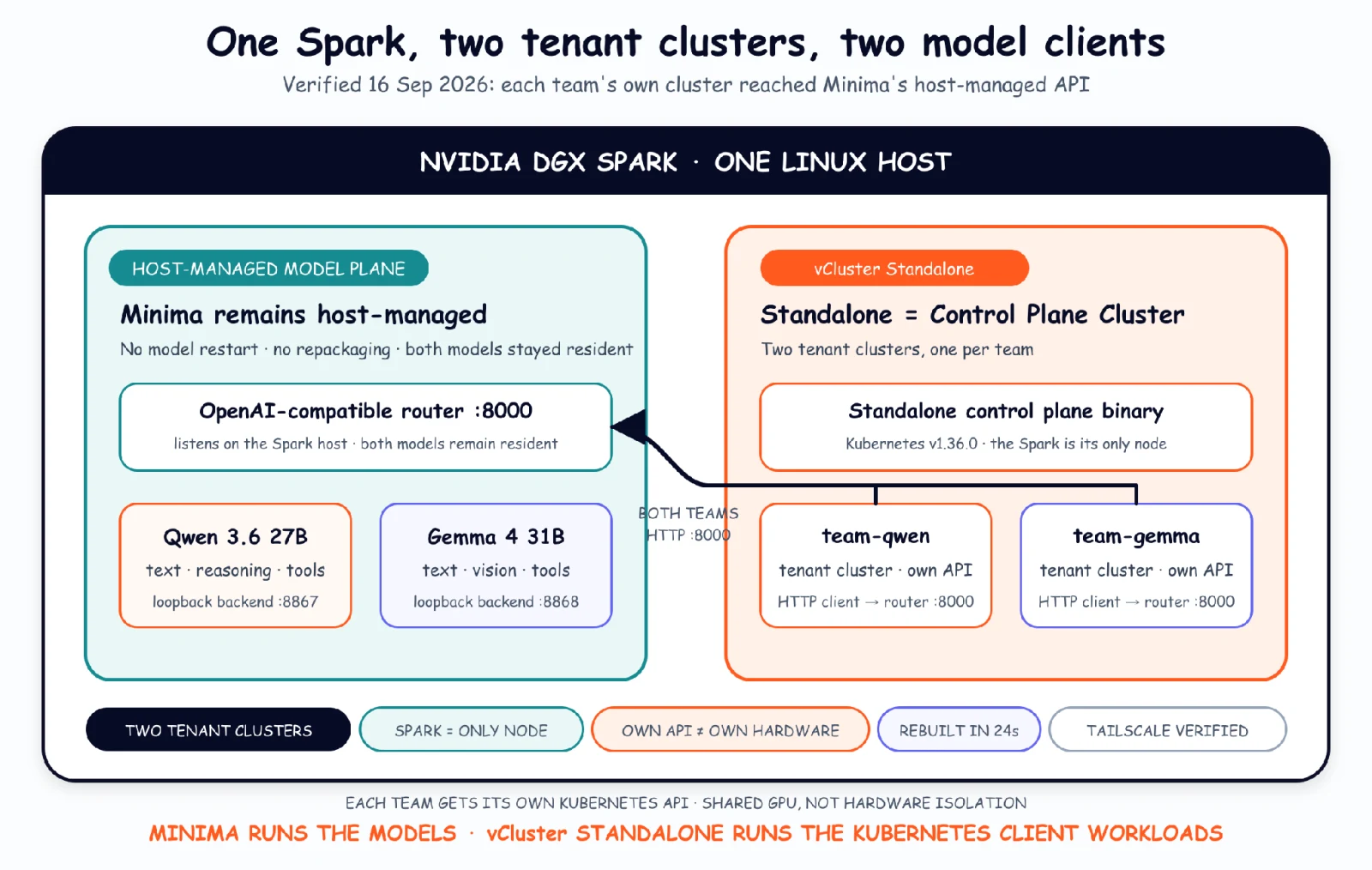
One boundary matters from the start. Each team gets a real cluster, so each team has its own API server, its own CoreDNS, and a view that contains nothing belonging to the other team. For this demo they still share the machine, because there is only one of it. A single Spark means one node, one GPU, and one kernel under both clusters. Hard tenant isolation needs a node per tenant, which is what Private Nodes are for, and it is the first thing that changes when the second machine arrives.
In Minima's published Qwen3-32B evaluation, the team reports reducing peak VRAM from 64 GiB to 40 GiB at 8K context while increasing throughput in a controlled A100 setup.
Minima is an AI inference research company focused on making frontier models more efficient by optimizing the full inference stack, from model weights and KV cache to hardware-specific kernels and the serving runtime. DGX Spark was particularly interesting to us because it combines the Blackwell architecture with a constrained single-system resource envelope, making it a strong target for testing how far model compression and systems-level optimization can push capable models on compact hardware.
Minima's router selects the backend from the OpenAI-compatible model field, so both teams talk to the same address and only the model name differs:
clients
└── Minima router :8000
    ├── qwen3.6-27b   :8867
    └── gemma4-31b-it :8868
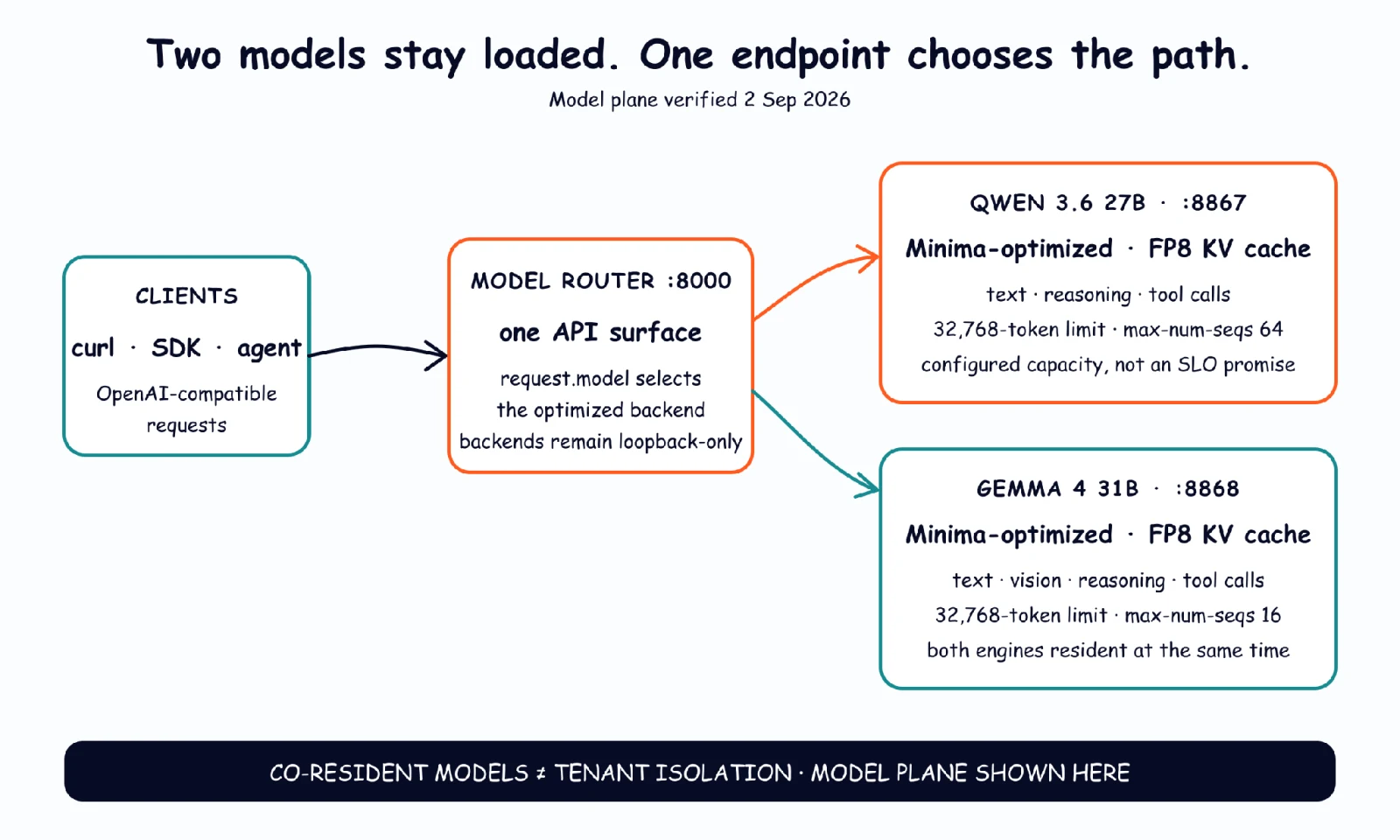
Run on the Spark. Here 127.0.0.1 means the Spark itself, not the laptop and not a Kubernetes Pod:
export MINIMA_BASE_URL="http://127.0.0.1:8000/v1"
curl -fsS "$MINIMA_BASE_URL/models" | python3 -m json.tool
Captured output, trimmed to the two model entries:
gemma4-31b-it  max_model_len=32768
qwen3.6-27b    max_model_len=32768
The simplest Qwen request is plain HTTP. The export is repeated here because MINIMA_BASE_URL lives in one shell only, and it is gone if you open a new session or switch user with sudo -i:
export MINIMA_BASE_URL="http://127.0.0.1:8000/v1"

curl -fsS "$MINIMA_BASE_URL/chat/completions" \
  -H 'Content-Type: application/json' \
  -d '{
    "model": "qwen3.6-27b",
    "messages": [{
      "role": "user",
      "content": "Reply with exactly: Qwen on Spark is ready"
    }],
    "temperature": 0,
    "max_tokens": 32,
    "chat_template_kwargs": {"enable_thinking": false}
  }' \
  | python3 -c 'import json,sys; print(json.load(sys.stdin)["choices"][0]["message"]["content"])'
Captured output:
Qwen on Spark is ready
The same request shape returns Gemma on Spark is ready after changing the model ID and prompt. In a separate vision test, Gemma received the architecture diagram above and correctly described the single router, both backends, their ports, and the fact that the model field chooses the route.
Before adding Kubernetes, it is worth knowing what each team is going to receive. The serial profile used streaming responses, one warm-up, five measured runs per model, and 128 generated tokens:
Three batches of 16 simultaneous 128-token requests per model all completed:
The case that matters most for two teams is both models answering at once. Calling Qwen and Gemma at the same time for five paired batches completed every pair, with a median aggregate output rate of 19.20 tok/s. Under that mixed load, Qwen decoded at roughly 11.1 tok/s and Gemma at roughly 10.0 tok/s.
We wrote a simple script for this article: it opens streaming requests against the router, times the first content event and the decode rate that follows, and writes raw per-request JSON. It never restarts or reconfigures a backend, so it measures the service exactly as Minima handed it over. That is also why the numbers above are client-observed rather than vendor-reported. It lives in the companion repository as scripts/minima_stream_benchmark.py. Run it from a laptop, not on the Spark:
export MINIMA_BASE_URL="http://<SPARK_TAILSCALE_IP>:8000/v1"
python3 scripts/minima_stream_benchmark.py \
  --base-url "$MINIMA_BASE_URL" \
  --max-tokens 128 \
  --serial-runs 5 \
  --concurrency 16 \
  --concurrent-batches 3
It prints one JSON document: a warm-up, every individual request, and a summary block per model. The summary is the part worth reading. Output, trimmed to Qwen's summary block:
"serial_summary": {
  "successful_requests": 5,
  "ttft_seconds": { "median": 0.186, "p95": 0.192, "min": 0.152, "max": 0.194 },
  "decode_tokens_per_second": { "median": 25.96, "p95": 26.05, "min": 25.79, "max": 26.07 },
  "total_seconds": { "median": 5.072, "p95": 5.104, "min": 5.050, "max": 5.111 }
}
The spread is the point. Five runs landed within 40 milliseconds of each other, which is what makes the medians in the tables worth quoting.
A matched stock-vLLM arm with the same artifacts, prompts, cache state, and client does not exist yet, so this article makes no speedup claim.
The Spark was not empty, so before installing anything we noted what had to keep working: both models listed in /v1/models, the router reachable locally and over LAN, SSH over LAN and Tailscale, and the existing Docker and containerd runtime healthy.
The run is pinned to vCluster v0.36.0 and Kubernetes v1.36.0. Three parts of the configuration matter on a machine that is already serving models: reuse the existing CRI socket instead of installing a second containerd, keep host swap available for the memory-heavy model processes while preventing Pods from using it, and join the control-plane host as the single worker.
controlPlane:
  standalone:
    advertiseAddress: <SPARK_LAN_IP>
    joinNode:
      enabled: true
      containerd:
        enabled: false
      preJoinCommands:
        - systemctl start containerd
      nodeRegistration:
        criSocket: unix:///run/containerd/containerd.sock
  distro:
    k8s:
      image:
        tag: v1.36.0
privateNodes:
  enabled: true
  kubelet:
    config:
      failSwapOn: false
      memorySwap:
        swapBehavior: NoSwap
Copy the reviewed file to /etc/vcluster/vcluster.yaml, then run on the Spark:
curl -sfL \
  https://github.com/loft-sh/vcluster/releases/download/v0.36.0/install-standalone.sh \
  | sudo sh -s -- \
  --vcluster-name spark-ai \
  --config /etc/vcluster/vcluster.yaml
Run on the Spark, with SPARK_LAN_IP set to the Spark's private LAN address:
export SPARK_LAN_IP="<SPARK_LAN_IP>"
export POD_CIDR="10.244.0.0/16"

sudo ufw allow in on cni0 from "$POD_CIDR" to "$SPARK_LAN_IP" \
  port 8443 proto tcp comment 'vcluster pods to standalone api'
sudo ufw allow in on cni0 from "$POD_CIDR" to "$SPARK_LAN_IP" \
  port 8000 proto tcp comment 'vcluster pods to minima router'
sudo ufw allow in on cni0 from "$POD_CIDR" to "$SPARK_LAN_IP" \
  port 10250 proto tcp comment 'vcluster agent to kubelet'
Run on the Spark:
export KUBECONFIG=/var/lib/vcluster/kubeconfig.yaml
kubectl get nodes -o wide
Captured output, taken a week after the install:
NAME         STATUS   ROLES                  AGE     VERSION   INTERNAL-IP            CONTAINER-RUNTIME
spark-5385   Ready    control-plane,master   7d23h   v1.36.0   [private LAN address]  containerd://2.2.1
The system components also settled into Running: Flannel, CoreDNS, the Konnectivity agent, kube-proxy, and the local-path provisioner. That last one matters for the next step, because each tenant control plane claims a volume.
From here on, this Standalone instance is the control plane cluster. The teams never touch it.
This is the step that makes the two teams real. Each vcluster create produces a tenant cluster with its own API server, its own CoreDNS, and its own kubeconfig. The --add=false flag skips registration with a vCluster Platform, which is not installed here.
vcluster create team-qwen --namespace team-qwen --add=false
vcluster create team-gemma --namespace team-gemma --add=false
Captured output:
NAME        | NAMESPACE  | STATUS  | VERSION | AGE
------------+------------+---------+---------+------
team-gemma  | team-gemma | Running | 0.36.0  | 52s
team-qwen   | team-qwen  | Running | 0.36.0  | 55s
Both the clusters' control planes were ready inside a minute. Now look at what a team sees. Run from inside team-qwen:
vcluster connect team-qwen --namespace team-qwen -- kubectl get ns
Output:
NAME              STATUS   AGE
default           Active   34s
kube-node-lease   Active   34s
kube-public       Active   34s
kube-system       Active   34s
Four namespaces, all their own. No team-gemma. No kube-flannel or local-path-storage from the cluster underneath. team-gemma sees the identical four and no team-qwen. Each team also gets its own node object:
team-qwen  : spark-5385  Ready  v1.36.0  10.104.23.9
team-gemma : spark-5385  Ready  v1.36.0  10.97.29.108
Same machine, two independent views of it. This is the beauty of vCluster that gives you the isolated control plane. As you go further with private nodes, you get the full managed Kubernetes-like experience on your private infra.
The manifests carry no namespace field, because they are applied inside each team's own cluster.
vcluster connect team-qwen --namespace team-qwen \
  -- kubectl apply -f team-qwen-workload.yaml
vcluster connect team-gemma --namespace team-gemma \
  -- kubectl apply -f team-gemma-workload.yaml
Both completed in three seconds:
team-qwen  : ask-qwen   Complete  1/1  3s
team-gemma : ask-gemma  Complete  1/1  3s
Captured logs, read from inside each team's own cluster:
qwen3.6-27b    hello from team-qwen   prompt=21 completion=6 total=27 tokens
gemma4-31b-it  hello from team-gemma  prompt=23 completion=7 total=30 tokens
On the control plane cluster, the same objects appear under vCluster's name translation, all scheduled on the one Spark node:
NAMESPACE    NAME                                                STATUS      NODE
team-gemma   ask-gemma-ljbrx-x-default-x-team-gemma              Completed   spark-5385
team-gemma   coredns-df8c87f55-lr22n-x-kube-system-x-team-gemma  Running     spark-5385
team-gemma   team-gemma-0                                        Running     spark-5385
team-qwen    ask-qwen-sn7wh-x-default-x-team-qwen                Completed   spark-5385
team-qwen    coredns-df8c87f55-n67jt-x-kube-system-x-team-qwen   Running     spark-5385
team-qwen    team-qwen-0                                         Running     spark-5385
Two teams get two Kubernetes APIs, and the platform operator still sees one node with a handful of pods on it.
A tenant cluster is not impacted by others getting impacted or deleted. Delete the entire team-qwen cluster, not just its workload:
vcluster delete team-qwen --namespace team-qwen
It was gone in a few seconds. Immediately afterwards:
NAME        | NAMESPACE  | STATUS  | VERSION | AGE
------------+------------+---------+---------+--------
team-gemma  | team-gemma | Running | 0.36.0  | 3m47s

NAME        STATUS     COMPLETIONS   DURATION   AGE
ask-gemma   Complete   1/1           3s         71s
team-gemma did not notice. Its cluster stayed Running and its Job stayed Complete. Rebuilding team-qwen and reapplying the same workload file took a few seconds and produced the same answer:
ask-qwen  Complete  1/1  3s
qwen3.6-27b  hello from team-qwen  prompt=21 completion=6 total=27 tokens
Giving a team a cluster they own and can do whatever they need without a ticket and without touching their neighbour, is what vCluster brings to the table.
Adding clusters for the teams is only a win if the models they came for are still there. At the end:
gemma4-31b-it  max_model_len=32768
qwen3.6-27b    max_model_len=32768

live completion through the router: "Qwen on Spark is ready"

ssh active | tailscaled active | vcluster active | kubelet active | containerd active | docker active
docker-model-runner  Up 17 hours
Both models still resident with their 32,768-token limits, the router still answering, every host service active, and the pre-existing Docker container untouched. Host memory ended at 16 GiB available of 121 GiB. Everything noted at the start of Step 3 stayed true.
At vCluster Labs, we describe the job as turning raw GPUs into every kind of cluster, from bare metal up to Kubernetes, Slurm, Ray, and inference, and shipping each one as a managed product. The layers have distinct responsibilities, and this lab exercised the first two.
Minima makes two models fit on one GPU. vCluster gives each team its own cluster on that GPU. vCluster Platform is how one shared Spark becomes a fleet of managed cluster products.
What we built gives each team its own Kubernetes API and its own control plane on one machine. The provider owns and operates the models, and each team calls them from a cluster of its own. That is the right boundary for internal teams on a single box. It is not the boundary you put between competing customers, because with one Spark both clusters still sit on one kernel.
The moment those teams become external customers, the boundary has to move down to the hardware. Hard tenant isolation is not optional for an AI Cloud. The step up keeps exactly these tenant clusters and gives each one its own Private Nodes, with vNode where customer-supplied code runs. Nothing about what the team sees changes. The hardware underneath it does. vMetal enters the picture when an operator wants a stable API to provision and recycle the machines. This Spark already existed and was prepared by hand, so adding vMetal would have proved nothing about the pattern under test.
The honest product map:
TESTED: one Spark, two teams
├── host-managed Minima model plane, two models resident
└── vCluster Standalone instance as the control plane cluster
    ├── tenant cluster: team-qwen  + its workload
    └── tenant cluster: team-gemma + its workload

PRODUCTION DIRECTION (not tested here)
GPU fleet
└── vCluster Platform
    └── the same tenant clusters, on Private Nodes
        └── vNode where customer-supplied code runs

OPTIONAL AT FLEET SCALE
vMetal for automated physical or virtual machine lifecycle
The two-team result is measured. Private Nodes, vNode, vCluster Platform, and vMetal are the production direction, not lab results.
For Qwen 3.6 27B and Gemma 4 31B, Minima applies a combination of structural and non-structural optimization techniques designed specifically for memory-constrained inference on GB10-class hardware.
At the model level, Minima quantizes both the primary model and its speculative decoding model, using residual error compensation to recover quantization-induced error. It also applies structural optimization based on tensor-network methods to reduce the model footprint while preserving behavior. The KV cache is compressed with Minima KV, its cache-compression approach, and performance-critical operations are backed by kernels tuned specifically for the GB10 architecture. The same optimization path is applied to both the main model and the speculator, so memory savings in one component are not offset by the other.
Minima validates every optimized artifact against its original, unmodified model using lm_eval. The unmodified model is benchmarked first to establish a reference, then the optimized artifact runs under the same evaluation configuration. Across the evaluation suite used for these models, the optimized versions stay within approximately one percentage point of the original model's results.
The serving layer is based on a custom Minima build of vLLM. The GB10-specific changes are reusable across GB10 devices rather than being tied to a particular DGX Spark. From an operational perspective, Minima vLLM is designed as a near drop-in replacement for stock vLLM: switching runtimes requires changing the vLLM build and adding a small number of environment variables, while preserving the existing serving workflow.
For deployment and lifecycle management, optimized model artifacts can be versioned alongside the runtime. Health checks verify that the model loads successfully and that the inference endpoint is responsive. Upgrades consist of deploying a new versioned model and runtime combination; rollback simply restores the previous known-good combination. If a model process fails, the serving layer can restart and reload the selected artifact without requiring the optimization process to be repeated.
For a fair stock-vLLM comparison, we use a matched baseline: the same GB10 hardware, source model, workload, context length, concurrency, request distribution, and measurement methodology. The primary variable is therefore the optimized model and Minima serving path versus the original model running on stock vLLM.
Davyd Maiboroda, Head of Research and Founder, Minima: "Our goal is to make devices with constrained throughput feel much closer to a full GPU serving environment while still running frontier-class models. As GB10 systems become more common, teams will increasingly need to solve model hot-swapping and multi-model serving. Fitting two models on a single Spark means a shared GPU no longer has to be dedicated to one workload: different engineers, agents, or services can use different models without constantly unloading and reloading them, making local GPU infrastructure much more practical for teams."
Private model paths, credentials, join tokens, and implementation details Minima has not cleared for publication stay out of the article and out of the companion repository.
The commands in this article are the readable path through the run, and every output above is real. The manifests and scripts are in the companion repository:
Unless a step says otherwise, everything runs in an SSH shell on the Spark. The optional network benchmark runs from a laptop. That distinction matters because 127.0.0.1 always names the machine on which the command is executed.
Two teams wanted two models on one GPU. Minima made the models fit. The vCluster Standalone instance on the Spark became the control plane cluster, and each team got a Kubernetes cluster of its own. Both teams' workloads reached the shared endpoint, and team-qwen's cluster was destroyed and rebuilt in under half a minute while team-gemma kept serving.
The pattern scales beyond this single Spark. The machine becomes a GPU fleet, the models become a provider-operated serving layer, the tenant clusters get their own Private Nodes underneath them, and vCluster Platform manages the whole set. None of that changes the shape a team sees, which is the point. This is the local AI factory in its smallest honest form, and the same software layer runs the large one.
Minima's next focus is extending the same optimization principles to frontier-scale models and larger GPU systems. One deployment currently in development is Qwen3.8 2.4T, which Minima is targeting at a single 8xB200 node; the unoptimized model needs at least four 8xB200 nodes in the same serving configuration. The aim is to cut the infrastructure footprint of multi-trillion-parameter models while preserving quality, and to make frontier-model inference practical on significantly smaller GPU clusters.
Minima co-founder and CEO Sergii Kozyrev discussed the economics behind that comparison with Lukas Gentele, co-founder and CEO at vCluster, at the AI Infra Summit. He covers why a 2.4-trillion-parameter model in BF16 runs to nearly five terabytes of VRAM, and why getting one onto a single node changes more than the rental bill: a model that fits on one node runs as replicas instead of being split across nodes with tensor and pipeline parallelism, so it never pays the interconnect cost.
If you are working out how to serve several teams or customers from your own GPU infrastructure, the vCluster inference platform guide walks through the tenancy models referenced in this article, and why Private Nodes are the boundary once your tenants are customers.
Deploy your first virtual cluster today.
