vMetal Deep Dive: How AI Clouds Turn Bare Metal GPUs Into a Programmable Platform

May 28, 2026
|
13
min Read

vMetal's official pitch in one line: "Run your GPU data center like a hyperscaler."
I made a long-form video walking through what's actually behind that claim. The architecture, the YAML, the network model, the demo. This is the written companion.
📺 Watch the full video walkthrough: vMetal Deep Dive on YouTube
I went into the actual working repos while writing this. The loft-sh/vcluster-bare-metal-with-kubevirt repo gives you a fully self-contained local demo using KubeVirt VMs as fake bare metal, and loft-sh/vcluster-docs has the source of truth for the docs. Everything in this post is grounded in real YAML you can apply, not slideware.
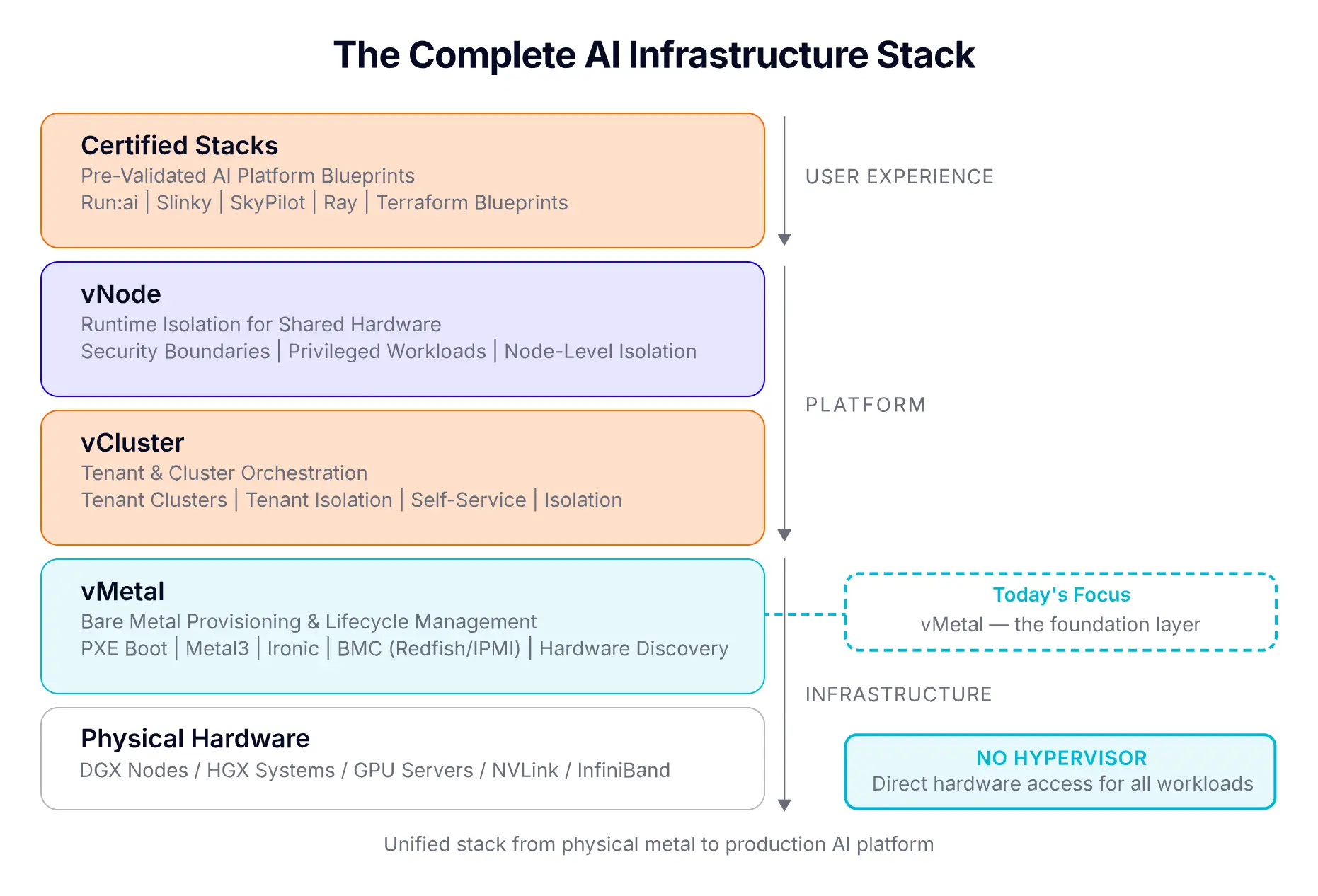
Some terms come up a lot in this post. If any of them feel unfamiliar, here they are in everyday language.
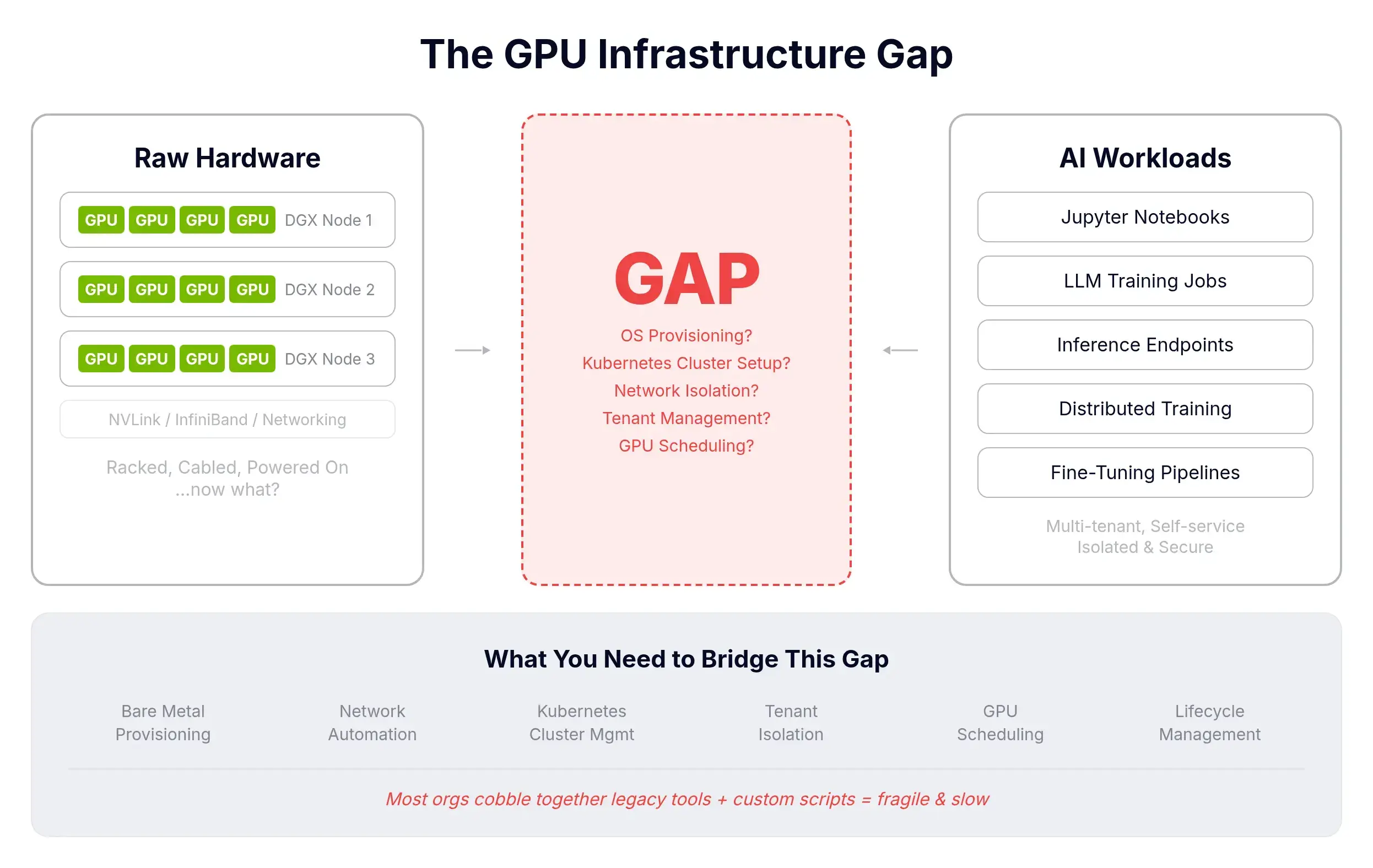
Buying GPUs is the easy part. Then you need provisioning, OS lifecycle, tenant isolation, networking, DNS, and scheduling. And you need it to be self-service so customers or internal teams don't file tickets for every notebook.
Building this internally is typically 6 to 12 months and a serious team. Meanwhile the GPUs depreciate. vMetal's pitch: turn the racks into a compute platform without writing the platform.
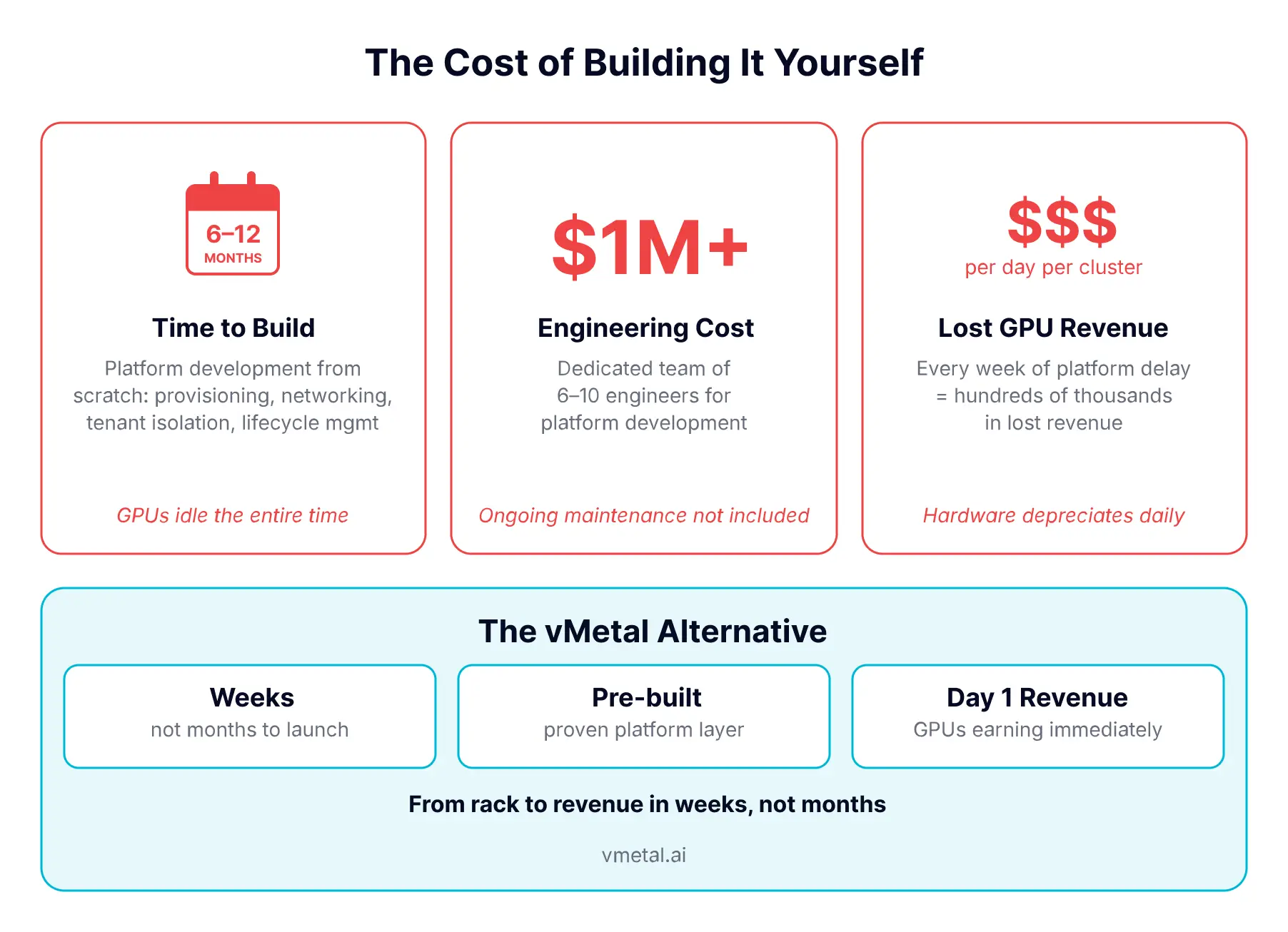
In the simplest possible terms: vMetal lets you treat a rack of physical GPU servers like a cloud. You point it at your hardware once, and from then on you can hand a fresh server to a customer or team in seconds and reclaim it when they're done. All from Kubernetes-native YAML or a UI.
The docs put it more formally:
"vMetal is the bare metal layer of the vCluster Platform. It builds on Metal3 and Ironic to handle BMC communication, PXE boot, OS installation, and server cleaning."
There's no hypervisor in the way. Workloads get direct access to GPUs, NVLink fabric, and InfiniBand. The hardware behaves the way the manufacturer intended. vMetal manages the physical machines themselves: registering them, installing an OS over the network, joining them to a Tenant Cluster, and cleaning them up when the tenant is done.
Built on:
A common question: does vMetal scan the network and auto-discover servers? Today, the model is declarative. You register each server once, and from then on the platform handles everything (registering, inspecting, claiming, provisioning, deprovisioning, reuse). More automated discovery is on the roadmap, so you won't have to declare individual hosts in future versions.
The trigger for a server to enter the system is a BareMetalHost CR pointing at the BMC. You create:
Once those exist, Metal3 and Ironic do the rest automatically. Registering (verify BMC creds), then Inspecting (auto-collect hardware inventory: CPU, RAM, NICs, disks, firmware, GPUs, PCIe), then Available.
Real example from the working kubevirt demo repo:
apiVersion: v1
kind: Secret
metadata:
  name: server-01-bmc
  namespace: metal3-system
type: Opaque
stringData:
  username: admin
  password: <BMC-PASSWORD>
---
apiVersion: metal3.io/v1alpha1
kind: BareMetalHost
metadata:
  name: server-01
  namespace: metal3-system
  labels:
    role: compute
spec:
  bmc:
    address: redfish://192.168.1.100
    credentialsName: server-01-bmc
  bootMACAddress: "aa:bb:cc:dd:ee:01"
If you're racking a fleet, not just one machine, there's a bulk registration path. You concatenate BareMetalHost and Secret resources into a single YAML file (one document per server, separated by ---) and apply it. The docs show this exact pattern:
---
apiVersion: v1
kind: Secret
metadata:
  name: server-01-bmc
  namespace: metal3-system
stringData:
  username: admin
  password: <BMC-PASSWORD>
---
apiVersion: metal3.io/v1alpha1
kind: BareMetalHost
metadata:
  name: server-01
  namespace: metal3-system
  labels:
    role: compute
    rack: rack-a
spec:
  bmc:
    address: redfish://192.168.1.100
    credentialsName: server-01-bmc
  bootMACAddress: "aa:bb:cc:dd:ee:01"
---
# server-02, server-03, ... in the same file
kubectl apply -f servers.yaml
You get parallel registration plus inspection across the whole batch. Combine this with rack/role labels and your hardware inventory becomes a single GitOps-managed manifest.
The Platform UI has a form under Bare Metal Servers. You click Add, fill in the BMC address, credentials, and boot MAC. The platform writes the CR for you. In practice this is operator-side work anyway. The data scientists who consume the GPUs never see this layer.
"Do bare metal servers need to be on the same network as the Control Plane Cluster?"
No. Bare metal servers can sit on completely different networks than the Control Plane Cluster. What you do need is two things wired up. First, the Control Plane Cluster has to be able to reach the BMCs (so it can power servers on and trigger installs). Second, a single network bridge from the cluster into the bare metal provisioning network (so the install actually happens). The next two subsections explain each in plain terms.
Ironic runs inside the Control Plane Cluster. It must have IP reachability to each BMC (the Redfish/IPMI endpoint). Same L2 is not required, same IP range is not required. The docs are explicit:
"Ironic must have network access to the BMC addresses of the bare metal servers."
If your BMCs are on 10.10.0.0/24 and your Control Plane Cluster pods are on 10.244.0.0/16, that's fine, as long as routing exists.
This is the part that needs explicit wiring. The DHCP/PXE proxy pod runs in the Control Plane Cluster and is attached via Multus to the provisioning network. Two modes the docs document:
Bridge mode. Control Plane Cluster nodes have a bridge (e.g. br0) attached to the provisioning network. The DHCP pod attaches through that bridge.
deploy:
  dhcp:
    enabled: true
    helmValues: |
      networkAttachmentDefinition:
        vip: 192.168.100.2/24
        config: |
          {
            "cniVersion": "0.3.1",
            "type": "bridge",
            "bridge": "br0",
            "isDefaultGateway": false
          }
Macvlan mode. Used when "the bare metal servers are on the same network as the Control Plane Cluster nodes." The DHCP pod gets a macvlan interface on eth0.
deploy:
  dhcp:
    enabled: true
    helmValues: |
      networkAttachmentDefinition:
        vip: 10.0.0.2/24
        config: |
          {
            "cniVersion": "0.3.1",
            "type": "macvlan",
            "master": "eth0",
            "mode": "bridge"
          }
In the kubevirt demo, the entire provisioning network is 192.168.100.0/24 on a bridge br0 set up by a DaemonSet. The KubeVirt "fake" bare metal VMs live in 192.168.100.10–20, the bridge IP is 192.168.100.1, and the DHCP pod gets 192.168.100.4. Bridge mode, end to end.
So: bare metal servers don't need to share IP range with the Control Plane Cluster. What they need is a wire from the cluster nodes into their provisioning network (bridge or shared L2 via macvlan), plus IP routability from Ironic to the BMCs.
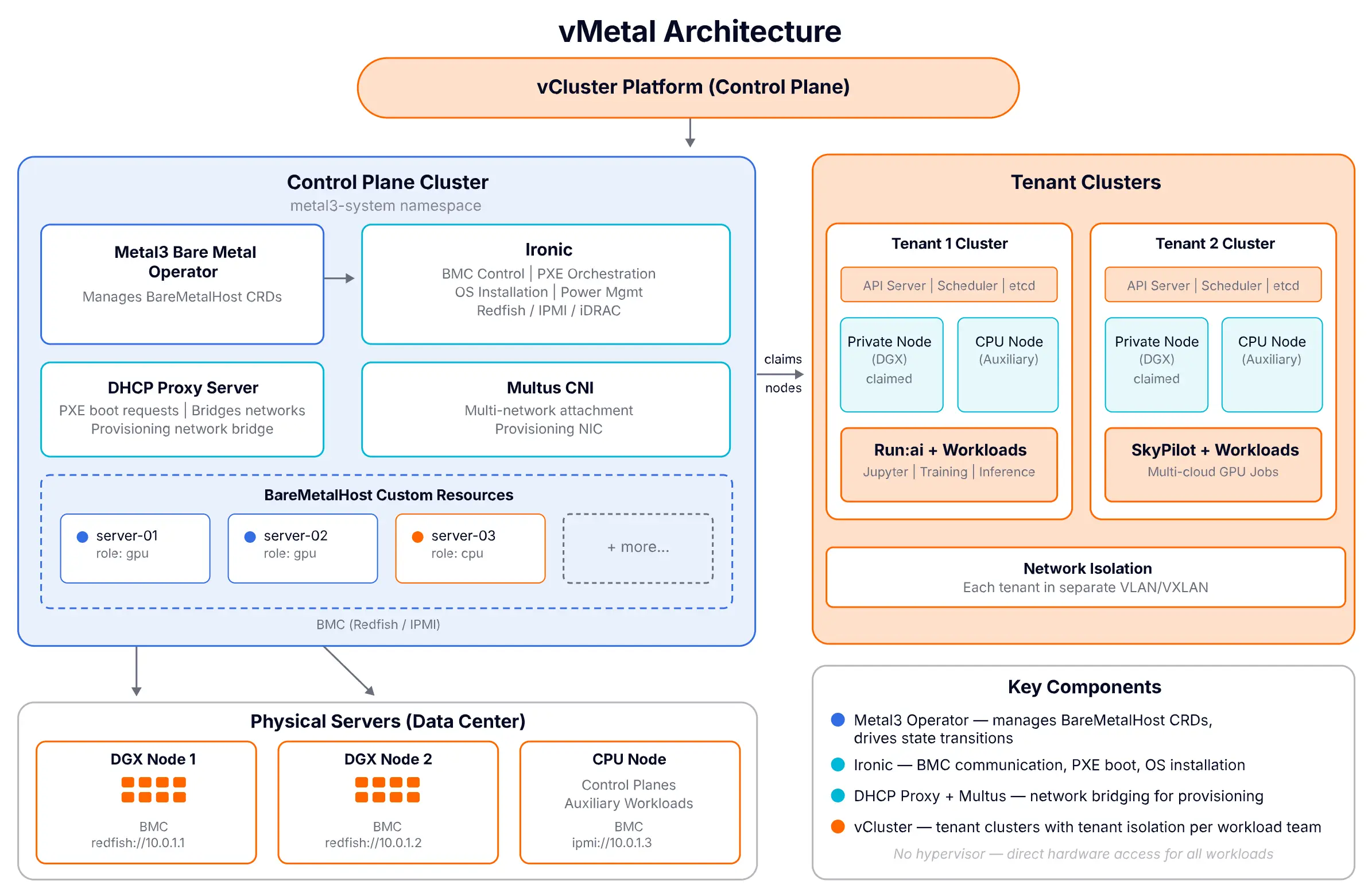
A NodeProvider of type Metal3 can deploy three components into the Control Plane Cluster, each individually toggleable. From the actual node-provider.yaml in the kubevirt demo:
apiVersion: storage.loft.sh/v1
kind: NodeProvider
metadata:
  name: metal3
spec:
  displayName: "Metal3 Bare Metal Hosts"
  metal3:
    clusterRef:
      cluster: loft-cluster
      namespace: default
    deploy:
      multus:
        enabled: true
      metal3:
        enabled: true
      dhcp:
        enabled: true
        helmValues: |
          networkAttachmentDefinition:
            vip: 192.168.100.4/24
    nodeTypes:
      - name: vm
The three components:
If you already run any of these (you have a Metal3 install, your own DHCP, your own Multus) you disable the corresponding deploy.*.enabled field and bring your own.
The configuration surface itself comes down to three Kubernetes resources working together:
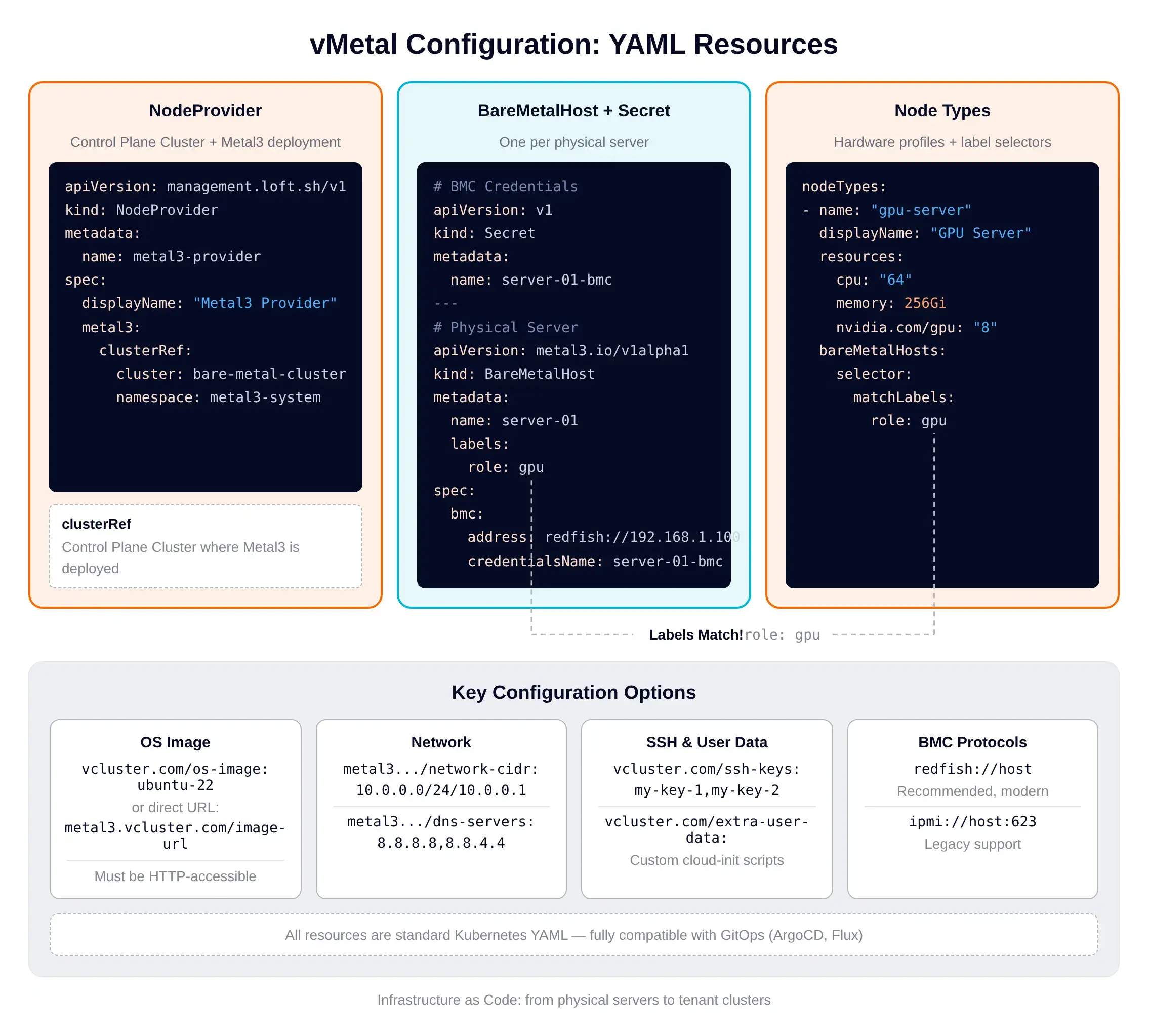
The NodeProvider points at the Control Plane Cluster and toggles what gets deployed. Each BareMetalHost plus its Secret represents one physical server. NodeType resources define hardware profiles (CPU, memory, GPU count) and a label selector that matches BareMetalHost resources. When a workload needs a GPU server, vMetal finds an available host with matching labels. There's also a built-in cost calculation that picks the cheapest matching node type when multiple could fulfill a request.
Every BareMetalHost moves through this state machine:
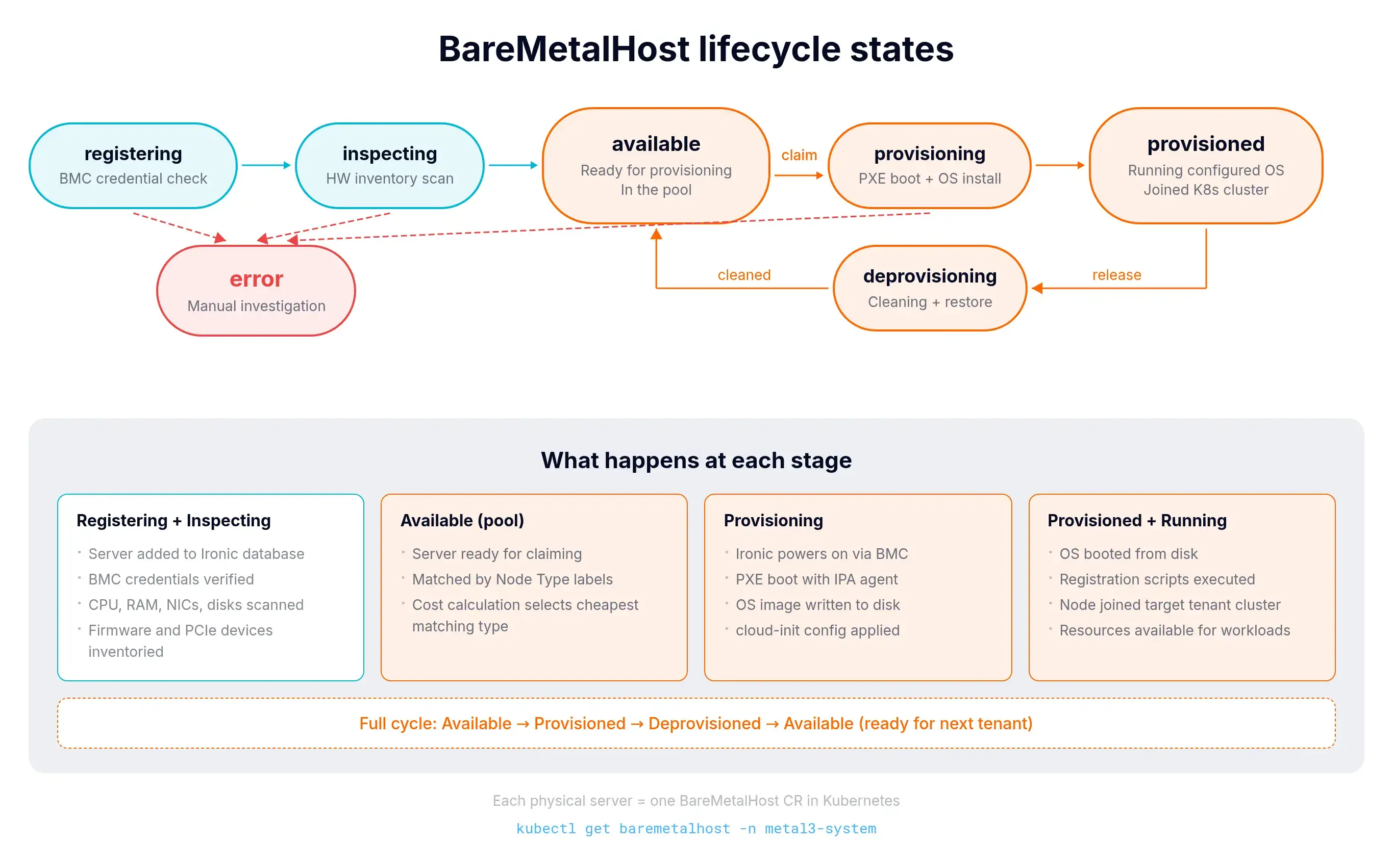
When a Machine (the platform's claim) is deleted, vMetal restores the BareMetalHost to its original state and it becomes Available again. Same server, next tenant.
When a Tenant Cluster requests a bare metal node:
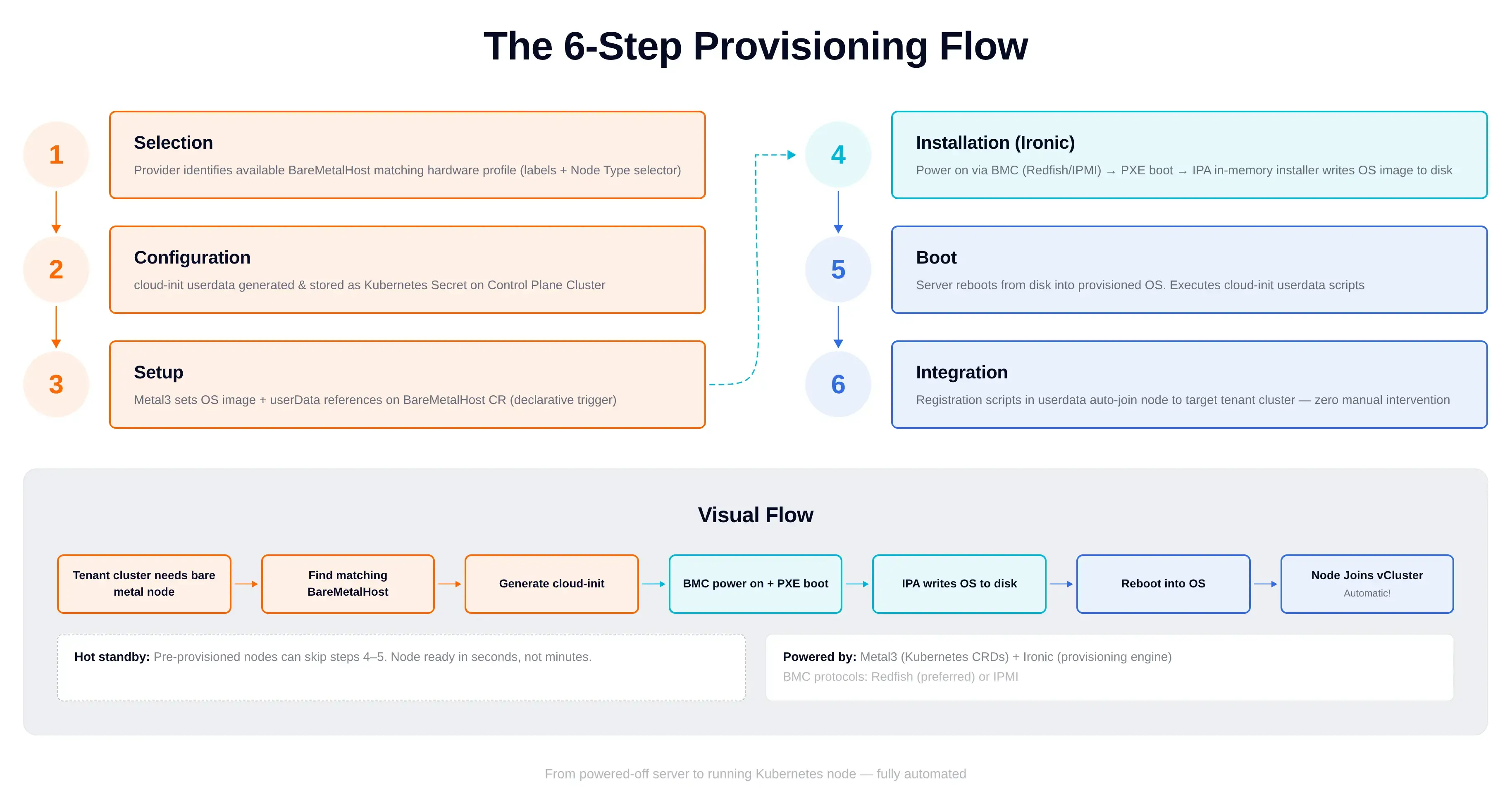
No manual kubeadm join. No manual switch port flipping. No manual DNS update.
The thing that surprised me most: there's a fully working local replica using KubeVirt VMs as fake bare metal servers. The repo loft-sh/vcluster-bare-metal-with-kubevirt has a Makefile that walks you through the whole thing without owning any DGX hardware.
Prerequisites: Docker, vcluster CLI, kubectl, helm, a host with KVM (~16GB RAM, 4+ CPU).
# Create a vcluster-in-docker host cluster
make vind-up

# Install everything (cert-manager, KubeVirt, br0 bridge,
# vCluster Platform, Metal3 NodeProvider, DHCP, Multus)
make install

# Boot KubeVirt VMs that pretend to be bare metal servers
# Each VM has a Redfish BMC shim (virtbmc) the platform can talk to
make create-vms

# Now create a vCluster that auto-claims those "BMHs" as private nodes
make create-vcluster
Behind the scenes:
make create-vcluster then creates a VirtualClusterInstance that requests a node from the metal3 provider. A NodeClaim is created, a BMH is selected and provisioned (Ironic writes the image), the VM boots, cloud-init joins the Tenant Cluster, and kubectl get nodes against the Tenant Cluster shows the new node.
This is the cheapest way I've seen to learn how this stack actually behaves end-to-end.
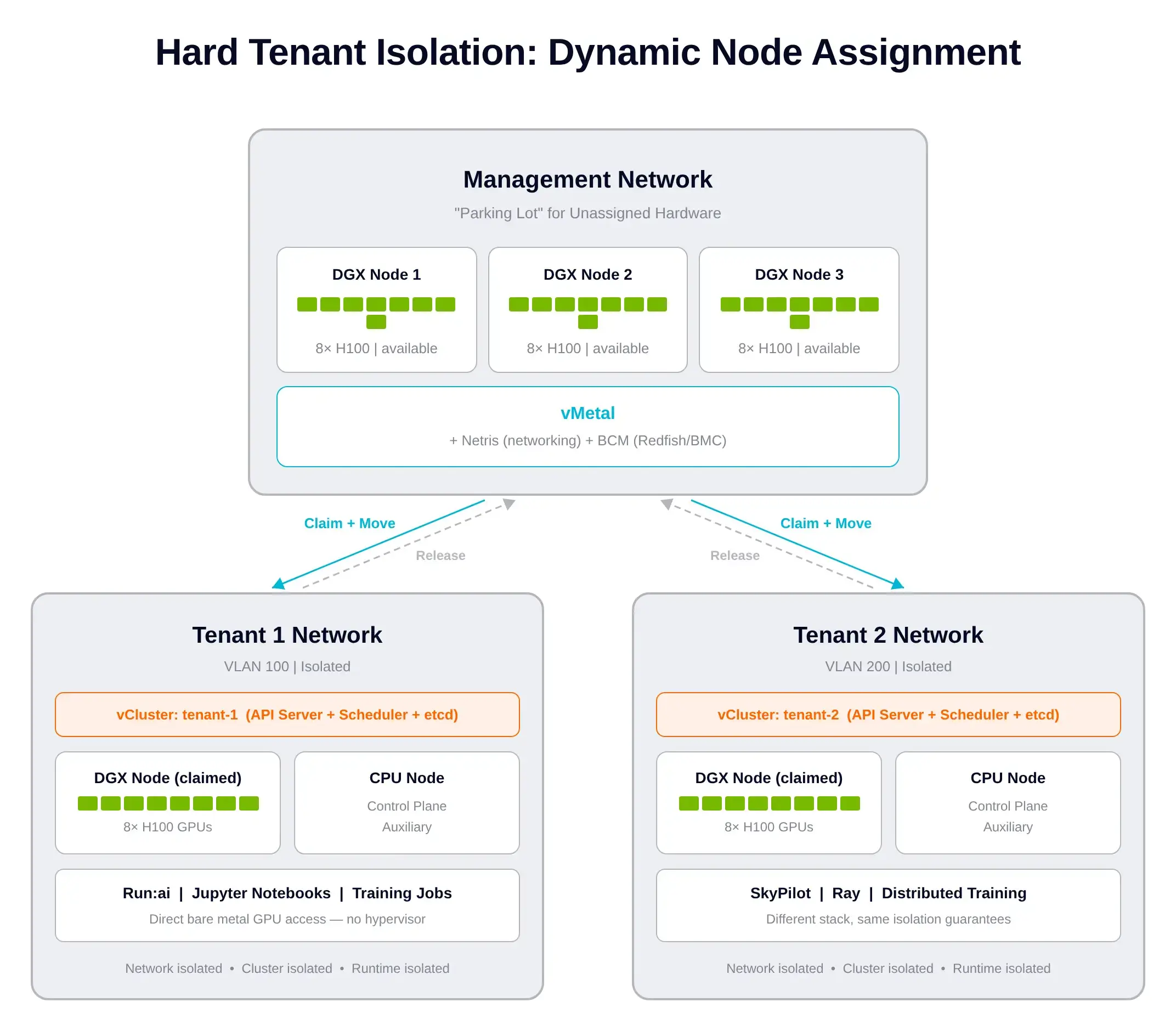
The isolation model has three distinct layers and they all matter:
The hot standby trick: PXE boots are slow. So vMetal keeps DGX nodes pre-provisioned in a "management" pool. Claim time is then a network move plus cluster join, not a full reinstall. Seconds, not minutes.
In the video I walk through the GTC demo. Here's the punch line.
A data scientist opens Run:ai, targets Tenant Cluster #1, and clicks Create Jupyter Notebook. That's the user-side action.
Under the hood:
You can watch this happen live in the Netris UI. Three DGX nodes start in management. After the click, DGX-01 visibly moves into Tenant 1's network. BCM confirms the same. When the tenant releases the node, vMetal reverses everything.
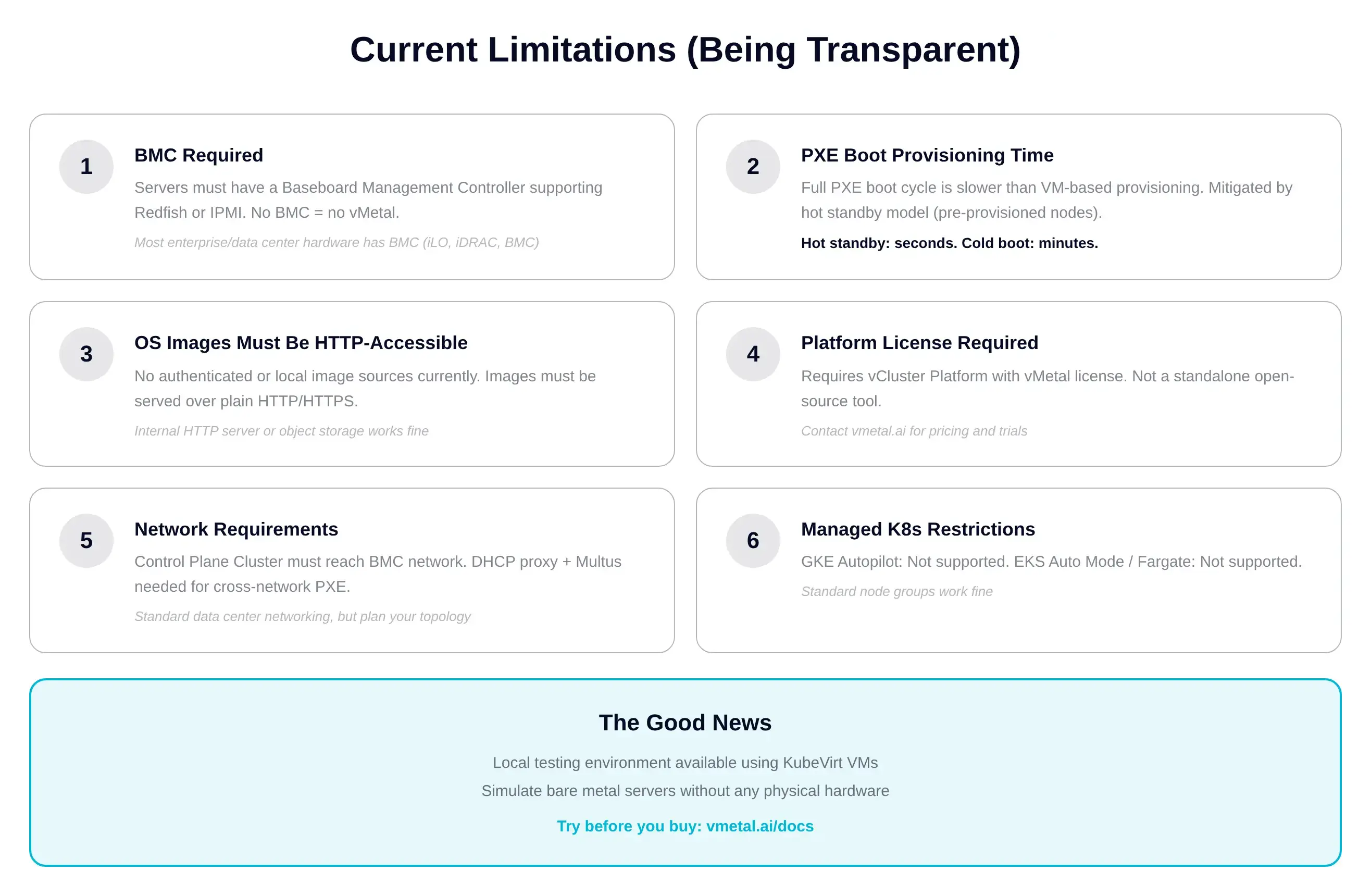
A few practical notes so you can plan your rollout:
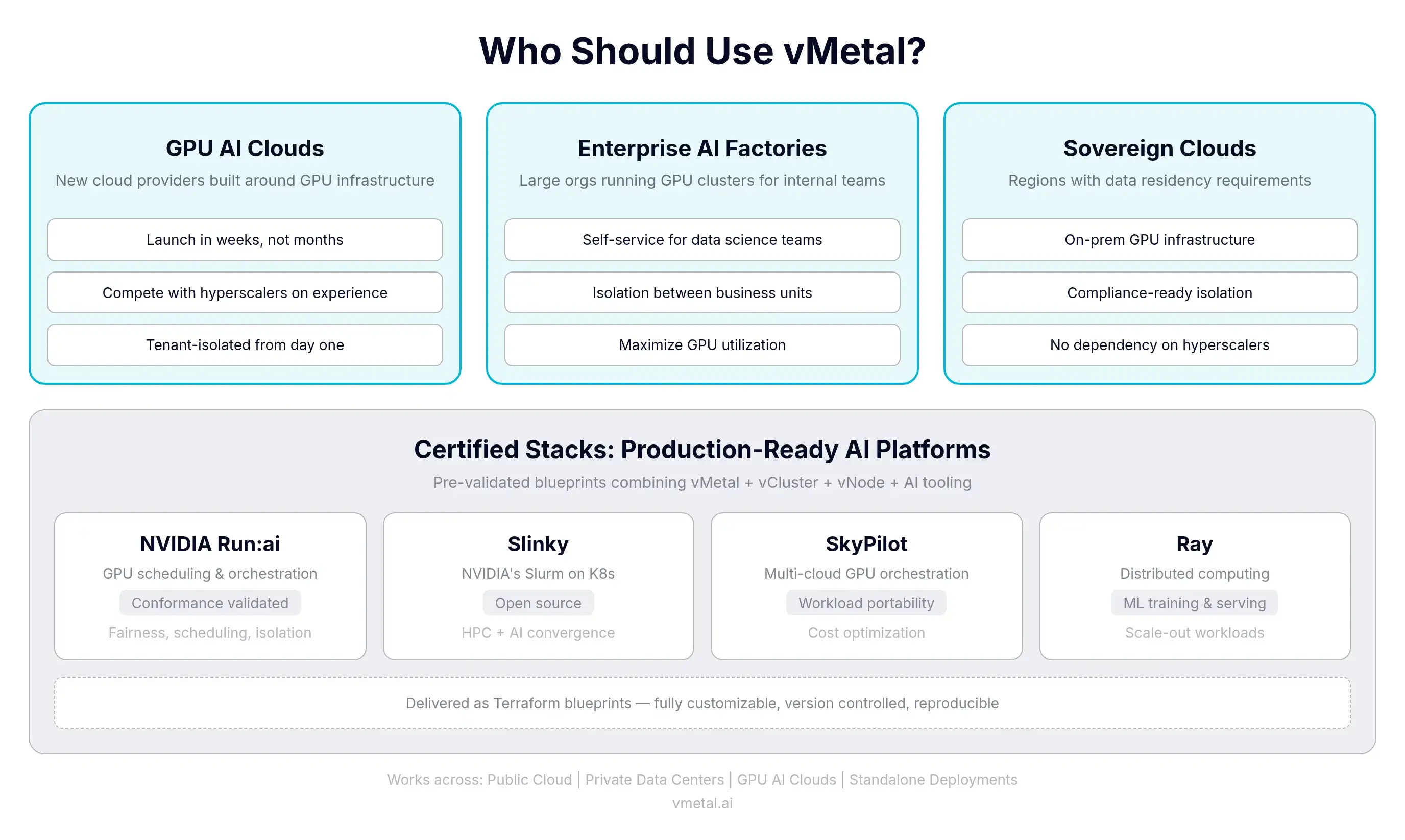
If you're a single team with one rack and one workload, you don't need this. If you have multiple tenants, multiple workload types, or multiple teams sharing hardware, this is the platform layer that solves it.
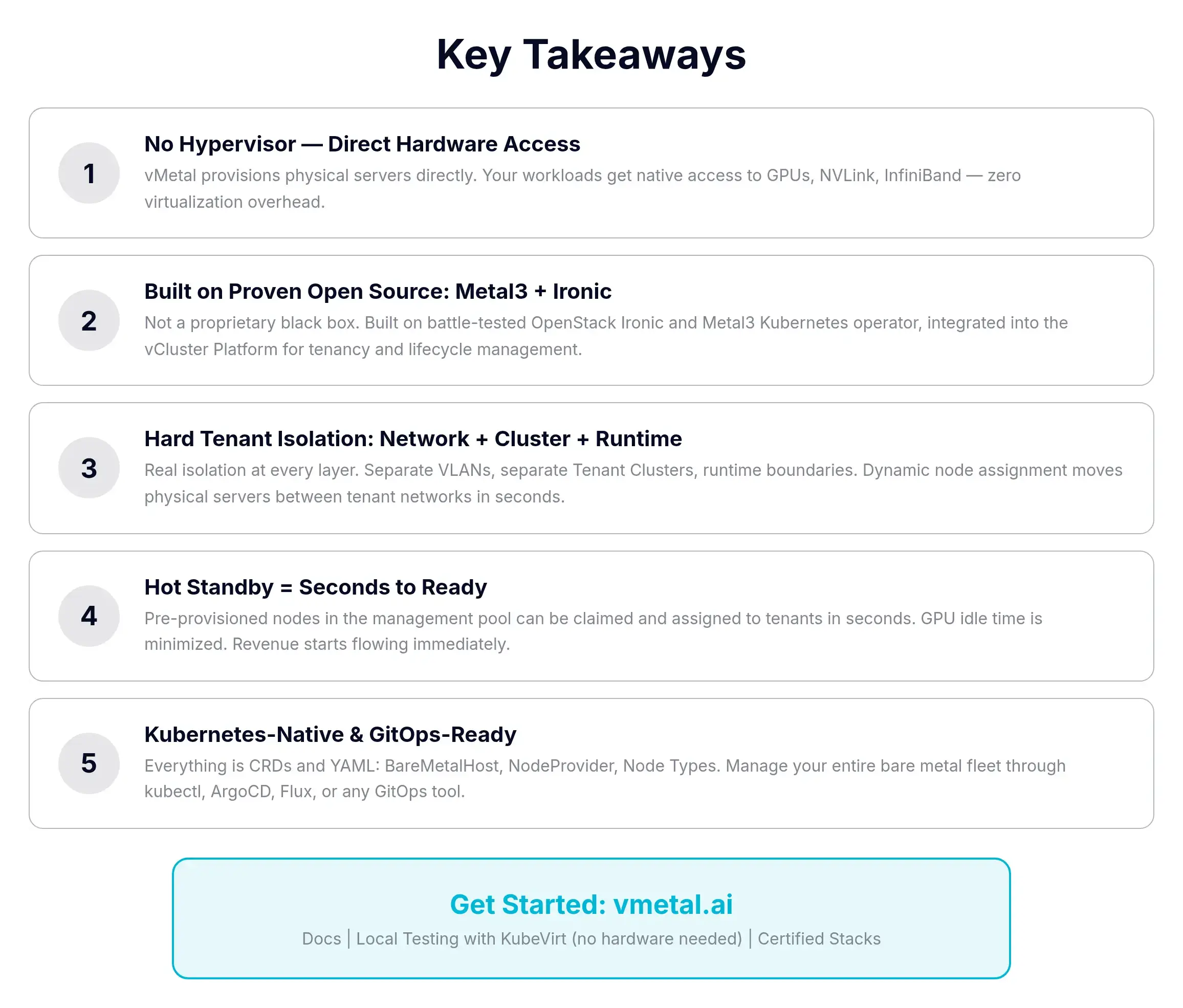
vMetal turns physical GPU servers into a programmable, tenant-isolated, cloud-like platform without a hypervisor. Built on Metal3 plus Ironic. Tenant Clusters via vCluster. Hot standby keeps claim times in seconds. Everything is Kubernetes-native YAML, GitOps-friendly, and there's a UI for the YAML-averse.
The thing that pushed me from "interesting" to "actually convinced" was the kubevirt repo. You can run the entire stack locally on a beefy laptop, watch a BareMetalHost go from Registering to Provisioned, and see a Tenant Cluster auto-claim it as a private node. If you're evaluating vMetal, start there before scheduling a vendor call.
📺 Watch the full video walkthrough: vMetal Deep Dive on YouTube
Deploy your first virtual cluster today.
