Building a Mini AI Platform: LLM Routing, MCP Tools, and Agent Traffic with Agentgateway

Aug 17, 2026
|
23
min Read
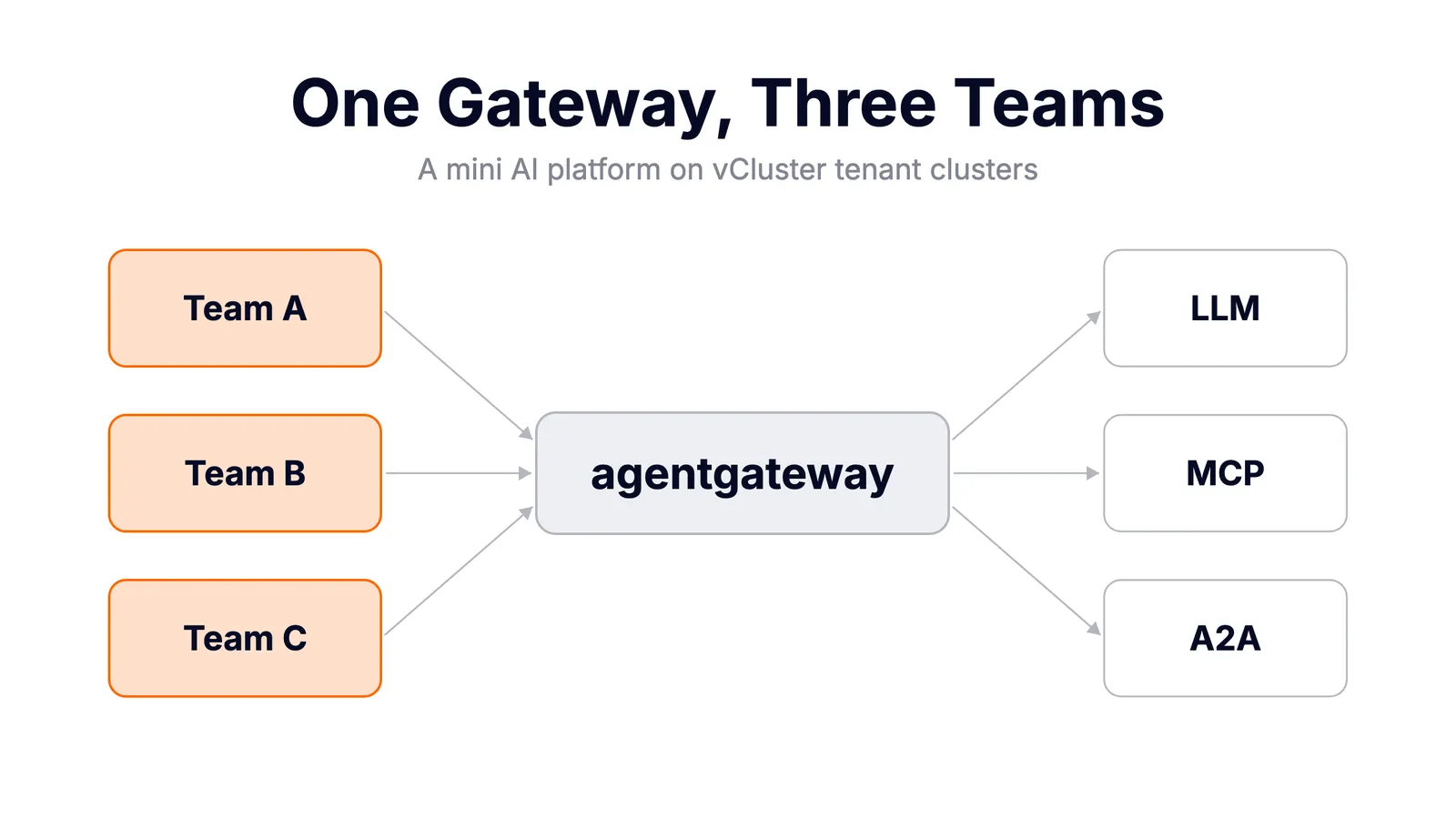
Every company right now has the same three conversations happening in parallel:
Three teams, three ad-hoc solutions, zero governance. No one knows what tokens cost, which keys leaked into which namespace, or why the bill tripled last month.
This is the same problem platform engineering solved for regular workloads years ago, and the answer is the same: build a platform layer. In this post we build a mini AI platform, end to end, on a single laptop:
Team A gets an LLM route. Team B gets an MCP server. Team C gets an agent-to-agent workflow. One gateway governs everything.
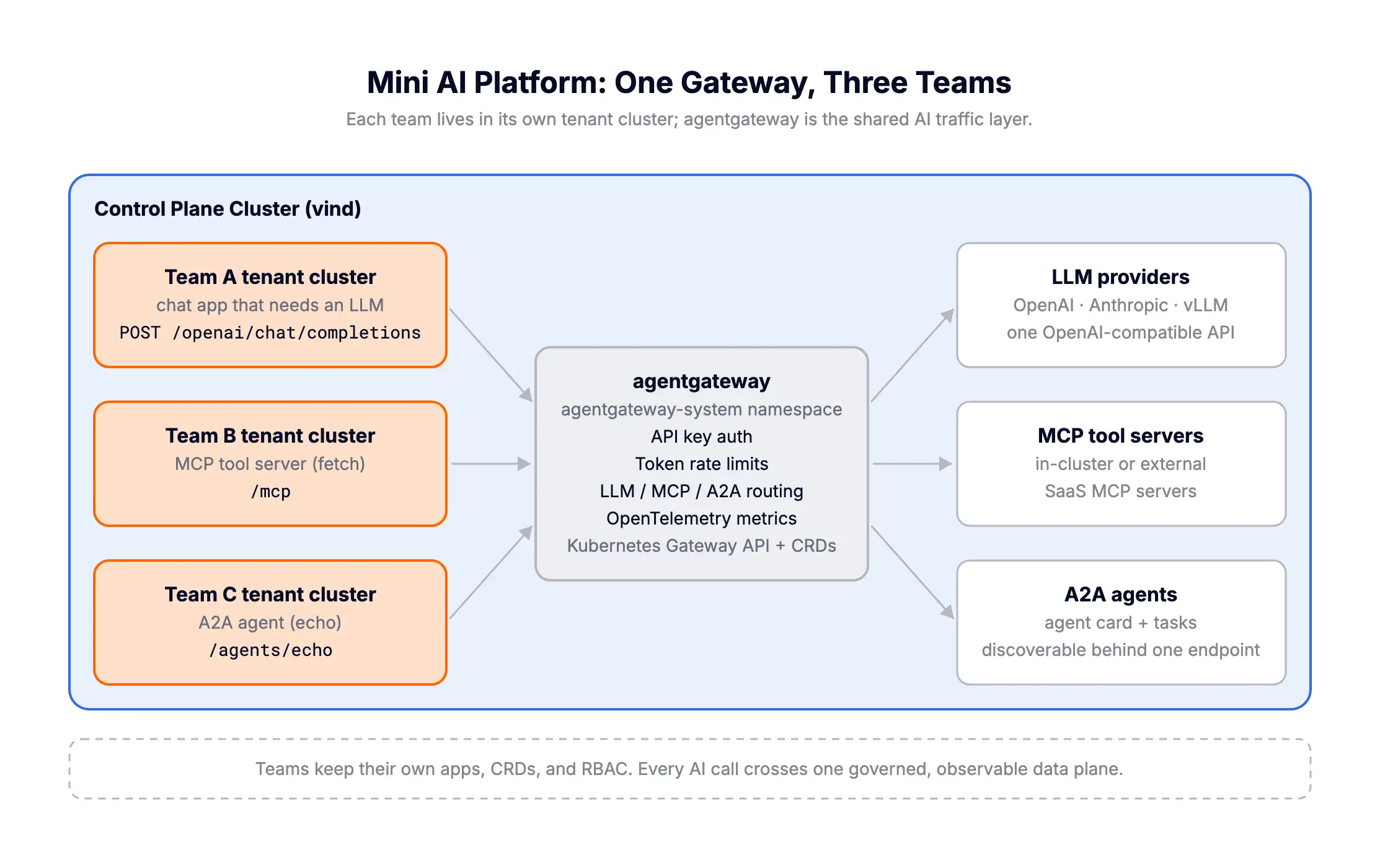
Every output in this post is real, captured from the cluster.
Agentgateway is an open source, AI-native gateway: a Rust-based data plane purpose-built for agentic traffic, contributed by Solo.io to the Linux Foundation in 2025 and developed alongside the CNCF project kgateway. It hit v1.0 in early 2026 and is already used as the data plane by kgateway, Istio's ambient work, and integrations with llm-d and the Gateway API Inference Extension.
The pitch is simple: traditional API gateways don't understand AI traffic. They see opaque HTTP. Agentgateway natively speaks:
On Kubernetes, agentgateway ships a control plane that implements the Kubernetes Gateway API, so you configure it with familiar Gateway and HTTPRoute resources, plus two CRDs:
That's the whole mental model. Everything below is combinations of those pieces.
We could give each team a namespace. But namespaces are a weak tenancy boundary: teams share CRDs, share cluster-scoped resources, and one team's misbehaving operator is everyone's problem.
vCluster gives each team a full tenant cluster: a complete Kubernetes cluster running inside a namespace of the Control Plane Cluster. Each team gets:
The part that makes this architecture work: vCluster syncs pods and Services from the tenant cluster down to the Control Plane Cluster. That means:
Isolation goes up, connectivity goes down.
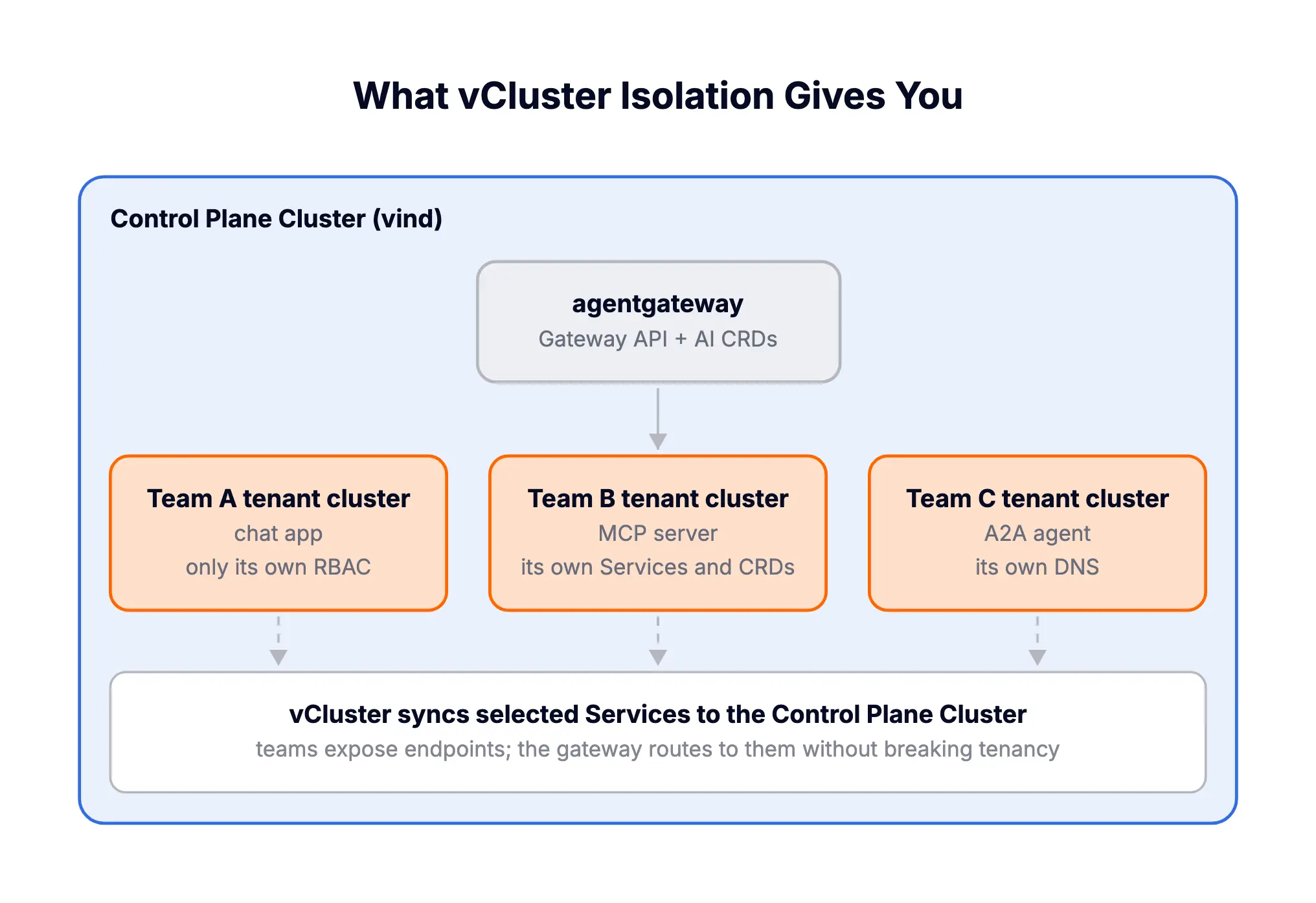
The division of responsibility ends up clean:
| Layer | Owned by | Contains |
|---|---|---|
| Control Plane Cluster + agentgateway-system | Platform team | Gateway, routes, policies, model endpoints, metrics |
| vcluster-team-a/b/c namespaces | Platform team (provisioning) | The tenant cluster control planes + synced workloads |
| Inside each tenant cluster | The team | Their apps, their manifests, their chaos |
Teams never see a provider API key. Teams never configure rate limits. They get a URL and an API key from the platform, and everything else is enforced centrally.
You need Docker, kubectl, helm, and the vcluster CLI. That's it; no cloud account.
Instead of KinD, the Control Plane Cluster is a vind cluster: vCluster's Docker driver. Same idea as KinD (Kubernetes in Docker containers), but with LoadBalancer support, sleep/wake, and the same vcluster CLI we'll use for the team clusters anyway:
vcluster create ai-platform --driver dockerinfo Ensuring environment for vCluster ai-platform...
done Created network vcluster.ai-platform
info Starting vCluster standalone ai-platform
info Waiting for vCluster standalone node to be joined...
done vCluster standalone node joined successfully
done Successfully created virtual cluster ai-platform
info Waiting for vCluster to become ready...
done vCluster is ready
done Switched active kube context to vcluster-docker_ai-platform~25 seconds later there's a full Kubernetes cluster running in a Docker container:
kubectl get nodes -o wideNAME STATUS ROLES AGE VERSION INTERNAL-IP OS-IMAGE CONTAINER-RUNTIME
ai-platform Ready control-plane,master 11s v1.35.0 172.23.0.2 Ubuntu 24.04.3 LTS containerd://2.1.6docker ps --format "table {{.Names}}\t{{.Status}}" | grep vclustervcluster.cp.ai-platform Up 27 minutesTip: on macOS, run the create command with sudo if you want LoadBalancer IPs via the built-in HAProxy. Without it, kubectl port-forward works fine for this demo, which is what we'll use.
Agentgateway's Kubernetes control plane installs via Helm (OCI charts) on top of the Gateway API CRDs:
# 1. Kubernetes Gateway API CRDs
kubectl apply --server-side --force-conflicts -f \
  https://github.com/kubernetes-sigs/gateway-api/releases/download/v1.5.0/standard-install.yaml

# 2. Agentgateway CRDs
helm upgrade -i agentgateway-crds oci://cr.agentgateway.dev/charts/agentgateway-crds \
  --create-namespace --namespace agentgateway-system \
  --version v1.3.1

# 3. Agentgateway control plane
helm upgrade -i agentgateway oci://cr.agentgateway.dev/charts/agentgateway \
  --namespace agentgateway-system \
  --version v1.3.1 \
  --wait
That installs the control plane: it watches Gateway API resources and programs proxies. Now create the actual proxy by creating a Gateway:
kubectl apply -f- <<EOF
apiVersion: gateway.networking.k8s.io/v1
kind: Gateway
metadata:
  name: agentgateway-proxy
  namespace: agentgateway-system
spec:
  gatewayClassName: agentgateway
  listeners:
  - protocol: HTTP
    port: 80
    name: http
    allowedRoutes:
      namespaces:
        from: All
EOF
The control plane sees the Gateway and spins up a proxy deployment:
kubectl get pods,gateway -n agentgateway-systemNAME READY STATUS RESTARTS AGE
pod/agentgateway-6cfd787447-pchgp 1/1 Running 0 41s
pod/agentgateway-proxy-5469569999-sh59t 1/1 Running 0 20s
NAME CLASS ADDRESS PROGRAMMED AGE
gateway.gateway.networking.k8s.io/agentgateway-proxy agentgateway True 20sPort-forward to reach it from the laptop:
kubectl port-forward deployment/agentgateway-proxy -n agentgateway-system 8080:80 &Each team gets a tenant cluster, and each tenant cluster gets the gateway Service replicated inside it, so team workloads can call the gateway at a stable in-cluster address:
# vcluster.yaml - shared config for all teams
networking:
  replicateServices:
    fromHost:
    - from: agentgateway-system/agentgateway-proxy
      to: default/ai-gateway
for t in team-a team-b team-c; do
vcluster create $t --driver helm --namespace vcluster-$t -f vcluster.yaml --connect=false
done(Note the --driver helm: these tenant clusters run inside the Control Plane Cluster, while that cluster itself was created with --driver docker. Same CLI, two layers.)
vcluster list --driver helm NAME | NAMESPACE | STATUS | VERSION | CONNECTED | AGE
--------+-----------------+---------+---------+-----------+------
team-a | vcluster-team-a | Running | 0.34.0 | | 60s
team-b | vcluster-team-b | Running | 0.34.0 | | 57s
team-c | vcluster-team-c | Running | 0.34.0 | | 55sFrom inside any tenant cluster, the gateway is now just ai-gateway.default.svc:
vcluster connect team-a --namespace vcluster-team-a -- kubectl get svc ai-gatewayNAME TYPE CLUSTER-IP EXTERNAL-IP PORT(S) AGE
ai-gateway ClusterIP None <none> 80/TCP 33sIt's a headless mirror of the Control Plane Cluster Service; vCluster keeps the endpoints in sync. The platform foundation is done. Now onboard the teams.
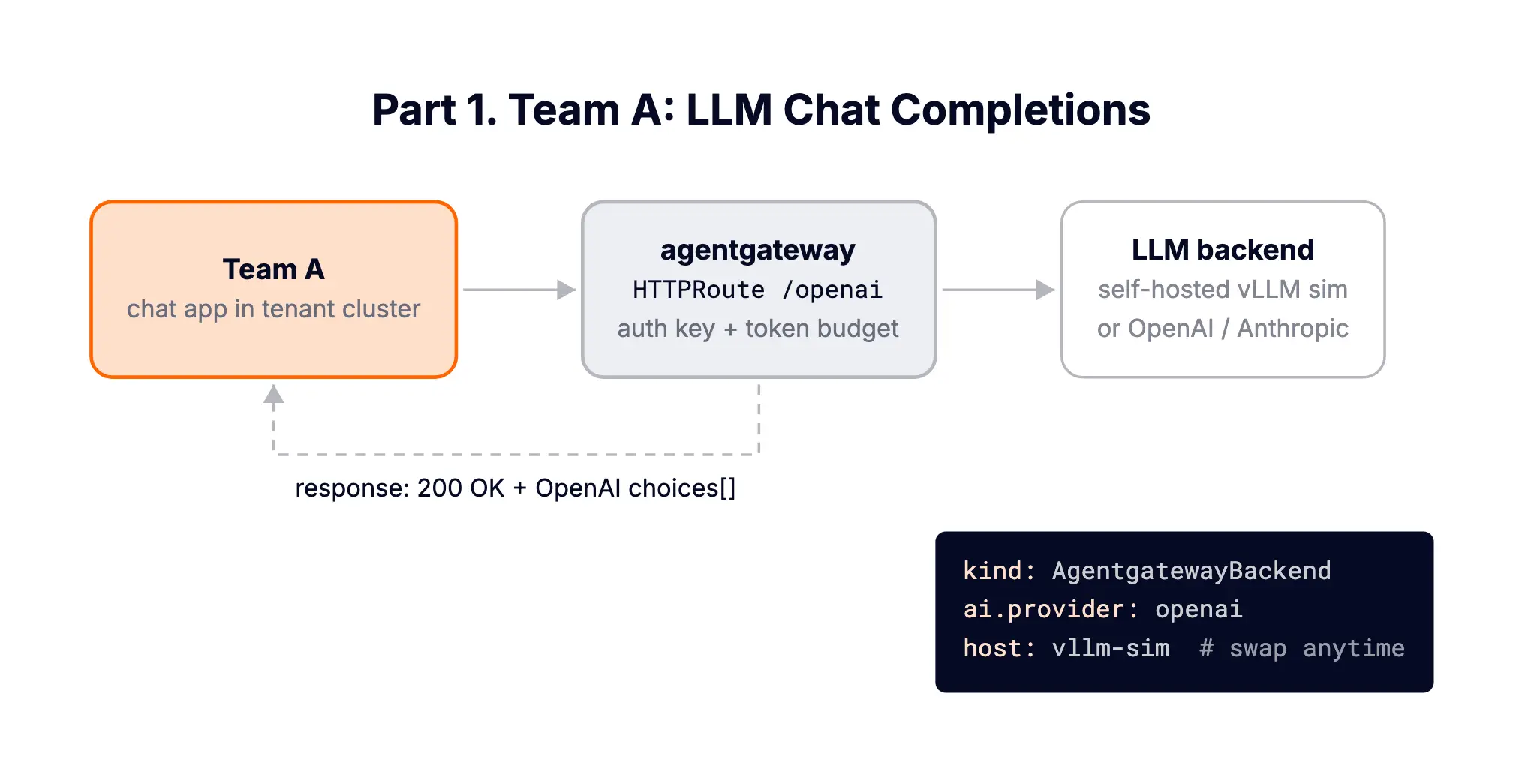
Team A builds a chat app. What they want is an OpenAI-compatible endpoint. What they should not have is any provider API key or any say in where the model actually runs.
Everything in this part is done by the platform team, on the Control Plane Cluster. Team A never sees any of it.
The platform serves models from its own endpoint. In production this would be vLLM on GPU nodes (or a hosted provider, more on that in a second). On a laptop, we use llm-d's inference simulator, which speaks the exact vLLM/OpenAI API, returns real token accounting, and needs no GPU:
kubectl apply -f- <<EOF
apiVersion: apps/v1
kind: Deployment
metadata:
  name: vllm-sim
  namespace: agentgateway-system
spec:
  selector:
    matchLabels:
      app: vllm-sim
  template:
    metadata:
      labels:
        app: vllm-sim
    spec:
      containers:
      - name: vllm-sim
        image: ghcr.io/llm-d/llm-d-inference-sim:v0.3.0
        args: ["--port", "8000", "--model", "meta-llama/Llama-3.1-8B-Instruct", "--mode", "random"]
        ports:
        - containerPort: 8000
---
apiVersion: v1
kind: Service
metadata:
  name: vllm-sim
  namespace: agentgateway-system
spec:
  selector:
    app: vllm-sim
  ports:
  - port: 8000
    targetPort: 8000
EOFAn AgentgatewayBackend with the ai type tells agentgateway "this is an LLM provider: parse the traffic, count the tokens, apply LLM policies". The openai provider type is used because vLLM exposes an OpenAI-compatible API; host/port point it at our in-cluster endpoint:
kubectl apply -f- <<EOF
apiVersion: agentgateway.dev/v1alpha1
kind: AgentgatewayBackend
metadata:
  name: openai
  namespace: agentgateway-system
spec:
  ai:
    provider:
      openai:
        model: meta-llama/Llama-3.1-8B-Instruct
      host: vllm-sim.agentgateway-system.svc.cluster.local
      port: 8000
EOF
This is the swap point of the whole platform. Want real OpenAI instead (or as well)? Drop host/port, set the model, and add policies.auth.secretRef pointing to a Secret with the API key. The key lives here, in agentgateway-system, and nowhere else:
kubectl create secret generic openai-secret -n agentgateway-system \
  --from-literal=Authorization=$OPENAI_API_KEY

kubectl apply -f- <<EOF
apiVersion: agentgateway.dev/v1alpha1
kind: AgentgatewayBackend
metadata:
  name: openai-hosted
  namespace: agentgateway-system
spec:
  ai:
    provider:
      openai:
        model: gpt-4o-mini
  policies:
    auth:
      secretRef:
        name: openai-secret
EOF
We ran both side by side (the hosted one on a /openai-hosted route; no URLRewrite needed this time, since agentgateway rewrites to the provider's completions endpoint automatically for known providers). Same request, real GPT-4o-mini through the same gateway:
{
  "model": "gpt-4o-mini-2024-07-18",
  "usage": {
    "prompt_tokens": 27,
    "completion_tokens": 30,
    "total_tokens": 57
  },
  "choices": [
    {
      "message": {
        "content": "A service mesh is an infrastructure layer that manages service-to-service communication within microservices architectures, providing features like traffic management, security, and observability.",
        "role": "assistant"
      },
      "index": 0,
      "finish_reason": "stop"
    }
  ],
  "id": "chatcmpl-DyhlmUARUns2nJTEgz07bqrTQqqXG",
  "object": "chat.completion"
}
Same front door, same team API keys, same policies. Self-hosted or SaaS is purely the platform team's choice per backend. Team A's app doesn't change either way.
kubectl apply -f- <<EOF
apiVersion: gateway.networking.k8s.io/v1
kind: HTTPRoute
metadata:
  name: team-a-llm
  namespace: agentgateway-system
spec:
  parentRefs:
  - name: agentgateway-proxy
    namespace: agentgateway-system
  rules:
  - matches:
    - path:
        type: PathPrefix
        value: /openai
    filters:
    - type: URLRewrite
      urlRewrite:
        path:
          type: ReplacePrefixMatch
          replacePrefixMatch: /v1/chat/completions
    backendRefs:
    - name: openai
      namespace: agentgateway-system
      group: agentgateway.dev
      kind: AgentgatewayBackend
EOF
One gotcha we hit live: when routing to a hosted provider (no host override), agentgateway rewrites the path to the provider's completions endpoint automatically. With a custom host, you add the URLRewrite yourself; our first attempt without it got a 404 from the sim, visible immediately in the gateway logs.
A plain OpenAI-style request against the gateway:
curl -s http://localhost:8080/openai -H "Content-Type: application/json" -d '{
  "model": "meta-llama/Llama-3.1-8B-Instruct",
  "messages": [
    {"role": "system", "content": "You are a concise assistant."},
    {"role": "user", "content": "In one sentence: what is a service mesh?"}
  ]
}' | jq
{
"model": "meta-llama/Llama-3.1-8B-Instruct",
"usage": {
"prompt_tokens": 13,
"completion_tokens": 10,
"total_tokens": 23
},
"choices": [
{
"message": {
"content": "The temperature here is twenty-five degrees centigrade.",
"role": "assistant"
},
"index": 0,
"finish_reason": "stop"
}
],
"id": "chatcmpl-c4025e02-2492-4b0e-a737-2084daa5d728",
"created": 1783349841,
"object": "chat.completion"
}(The simulator returns random canned sentences; the content is nonsense by design, but the API shape, streaming behavior, and token accounting are the real vLLM protocol, which is what the gateway operates on.)
Team A's app talks to http://ai-gateway.default.svc/openai from inside their tenant cluster. No key, no provider SDK lock-in, no knowledge of where the model runs. And every request produces a structured log line at the gateway:
route=agentgateway-system/team-a-llm endpoint=vllm-sim.agentgateway-system.svc.cluster.local:8000
http.method=POST http.path=/openai http.status=200 protocol=llm
gen_ai.operation.name=chat gen_ai.request.model=meta-llama/Llama-3.1-8B-Instruct
gen_ai.usage.input_tokens=4 gen_ai.usage.output_tokens=10 duration=2ms
The gateway parsed the LLM exchange: operation, model, input/output token counts, per request. Hold that thought for Part 4.
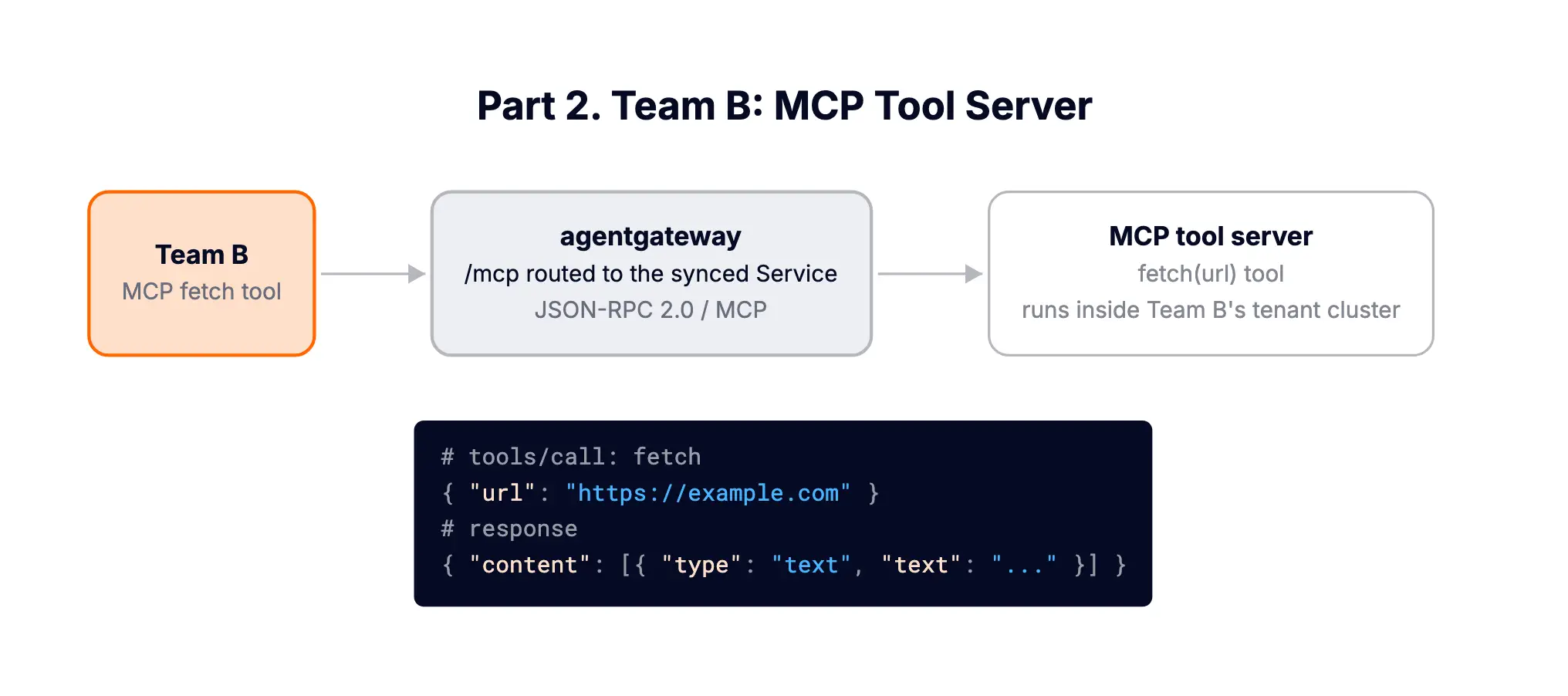
Team B owns internal tooling. They've built an MCP server: in this demo, a simple one with a fetch tool that retrieves a URL's content. They deploy it inside their own tenant cluster, like any normal app.
vcluster connect team-b --namespace vcluster-team-b -- kubectl apply -f- <<EOF
apiVersion: apps/v1
kind: Deployment
metadata:
  name: mcp-website-fetcher
spec:
  selector:
    matchLabels:
      app: mcp-website-fetcher
  template:
    metadata:
      labels:
        app: mcp-website-fetcher
    spec:
      containers:
      - name: mcp-website-fetcher
        image: ghcr.io/peterj/mcp-website-fetcher:main
        imagePullPolicy: Always
---
apiVersion: v1
kind: Service
metadata:
  name: mcp-website-fetcher
spec:
  selector:
    app: mcp-website-fetcher
  ports:
  - port: 80
    targetPort: 8000
    appProtocol: agentgateway.dev/mcp
EOF
The appProtocol: agentgateway.dev/mcp marks this Service as an MCP server so the gateway speaks the right protocol to it.
Here's the vCluster sync at work: that pod and Service appear on the Control Plane Cluster with a mangled but predictable name:
kubectl get svc,pods -n vcluster-team-bNAME TYPE CLUSTER-IP PORT(S) AGE
service/mcp-website-fetcher-x-default-x-team-b ClusterIP 10.105.215.233 80/TCP 38s
service/team-b ClusterIP 10.104.236.243 443/TCP 19m
...
NAME READY STATUS AGE
pod/mcp-website-fetcher-7776756f96-6cs5z-x-default-x-team-b 1/1 Running 38s
pod/team-b-0 1/1 Running 19mThe synced Service name follows <service>-x-<namespace>-x-<vcluster>. The gateway on the Control Plane Cluster can route to it directly.
An MCP-typed AgentgatewayBackend pointing at the synced Service, plus a route exposing it at /mcp:
kubectl apply -f- <<EOF
apiVersion: agentgateway.dev/v1alpha1
kind: AgentgatewayBackend
metadata:
  name: team-b-mcp
  namespace: agentgateway-system
spec:
  mcp:
    targets:
    - name: website-fetcher
      static:
        host: mcp-website-fetcher-x-default-x-team-b.vcluster-team-b.svc.cluster.local
        port: 80
        protocol: SSE
---
apiVersion: gateway.networking.k8s.io/v1
kind: HTTPRoute
metadata:
  name: team-b-mcp
  namespace: agentgateway-system
spec:
  parentRefs:
  - name: agentgateway-proxy
    namespace: agentgateway-system
  rules:
  - matches:
    - path:
        type: PathPrefix
        value: /mcp
    backendRefs:
    - name: team-b-mcp
      group: agentgateway.dev
      kind: AgentgatewayBackend
EOF
Notice mcp.targets is a list. When Team B (or Team D, or Team E) ships more MCP servers later, the platform team adds more targets and agentgateway federates them: clients still connect to one /mcp endpoint and see the union of all tools, with tool names prefixed by target name to avoid collisions.
The friendly way is the MCP Inspector (npx @modelcontextprotocol/inspector, Streamable HTTP, http://localhost:8080/mcp). But raw curl shows the protocol nicely. Initialize a session:
curl -s -D /tmp/headers.txt -X POST http://localhost:8080/mcp \
  -H "Content-Type: application/json" \
  -H "Accept: application/json, text/event-stream" \
  -d '{"jsonrpc":"2.0","id":1,"method":"initialize","params":{
        "protocolVersion":"2025-03-26",
        "capabilities":{},
        "clientInfo":{"name":"curl","version":"0.0.1"}}}'
data: {"jsonrpc":"2.0","id":1,"result":{"protocolVersion":"2025-03-26","capabilities":{"experimental":{},"tools":{"listChanged":false}},"serverInfo":{"name":"mcp-website-fetcher","version":"1.14.1"}}}List the tools (passing the mcp-session-id header the gateway returned):
SESSION=$(grep -i mcp-session-id /tmp/headers.txt | sed 's/mcp-session-id: //I' | tr -d '\r\n')
curl -s -X POST http://localhost:8080/mcp \
  -H "Content-Type: application/json" \
  -H "Accept: application/json, text/event-stream" \
  -H "mcp-session-id: $SESSION" \
  -d '{"jsonrpc":"2.0","id":2,"method":"tools/list"}'
data: {"jsonrpc":"2.0","id":2,"result":{"tools":[{"name":"fetch","description":"Fetches a website and returns its content","inputSchema":{"type":"object","required":["url"],"properties":{"url":{"type":"string","description":"URL to fetch"}}}}]}}And actually call the tool:
curl -s -X POST http://localhost:8080/mcp \
  -H "Content-Type: application/json" \
  -H "Accept: application/json, text/event-stream" \
  -H "mcp-session-id: $SESSION" \
  -d '{"jsonrpc":"2.0","id":3,"method":"tools/call","params":{"name":"fetch","arguments":{"url":"https://example.com"}}}'
data: {"jsonrpc":"2.0","id":3,"result":{"content":[{"type":"text","text":"<!doctype html><html lang=\"en\"><head><title>Example Domain</title>..."}]}}Trace that path for a second: an MCP client on a laptop → port-forward → agentgateway on the Control Plane Cluster → synced Service → Team B's pod inside their tenant cluster → out to the internet and back. The gateway terminated the MCP protocol the whole way, which is what lets it authorize and log individual tool calls rather than opaque HTTP.
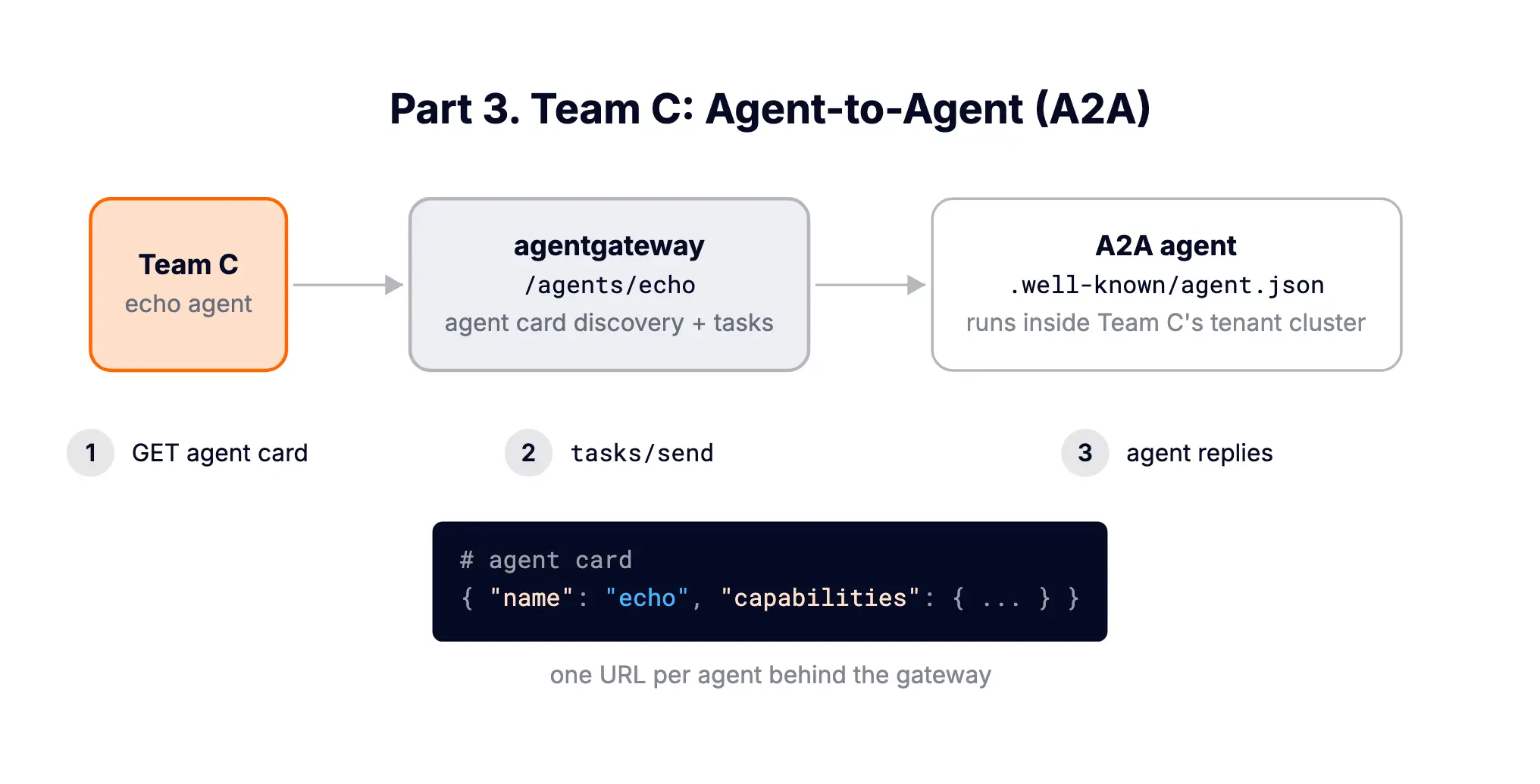
Team C is building multi-agent workflows: a supervisor agent delegates tasks to specialist agents using the A2A protocol: agents publish an agent card at /.well-known/agent.json describing their skills, and receive tasks as JSON-RPC calls.
Without a gateway, this becomes an N×M mess of hardcoded URLs. With agentgateway, every agent lives under one endpoint: /agents/<name>.
A simple A2A echo agent that returns whatever message it receives, which makes the protocol easy to see:
vcluster connect team-c --namespace vcluster-team-c -- kubectl apply -f- <<EOF
apiVersion: apps/v1
kind: Deployment
metadata:
  name: a2a-agent
  labels:
    app: a2a-agent
spec:
  selector:
    matchLabels:
      app: a2a-agent
  template:
    metadata:
      labels:
        app: a2a-agent
    spec:
      containers:
      - name: a2a-agent
        image: gcr.io/solo-public/docs/test-a2a-agent:latest
        ports:
        - containerPort: 9090
---
apiVersion: v1
kind: Service
metadata:
  name: a2a-agent
spec:
  selector:
    app: a2a-agent
  ports:
  - port: 9090
    targetPort: 9090
    appProtocol: kgateway.dev/a2a
EOF
Again the Service syncs to the Control Plane Cluster as a2a-agent-x-default-x-team-c in namespace vcluster-team-c.
An a2a-typed backend plus a route. A2A servers expect traffic on /, so the route rewrites the /agents/echo prefix away:
kubectl apply -f- <<EOF
apiVersion: agentgateway.dev/v1alpha1
kind: AgentgatewayBackend
metadata:
  name: team-c-echo-agent
  namespace: agentgateway-system
spec:
  a2a:
    host: a2a-agent-x-default-x-team-c.vcluster-team-c.svc.cluster.local
    port: 9090
---
apiVersion: gateway.networking.k8s.io/v1
kind: HTTPRoute
metadata:
  name: team-c-a2a
  namespace: agentgateway-system
spec:
  parentRefs:
  - name: agentgateway-proxy
    namespace: agentgateway-system
  rules:
  - matches:
    - path:
        type: PathPrefix
        value: /agents/echo
    filters:
    - type: URLRewrite
      urlRewrite:
        path:
          type: ReplacePrefixMatch
          replacePrefixMatch: /
    backendRefs:
    - name: team-c-echo-agent
      group: agentgateway.dev
      kind: AgentgatewayBackend
EOFStep one of any A2A interaction: fetch the agent card.
curl -s http://localhost:8080/agents/echo/.well-known/agent.json | jq{
"name": "Echo Agent",
"description": "This agent echos the input given",
"url": "http://localhost:8080/agents/echo",
"version": "0.1.0",
"capabilities": {
"streaming": true,
"pushNotifications": false,
"stateTransitionHistory": false
},
"defaultInputModes": ["text"],
"defaultOutputModes": ["text"],
"skills": [
{
"id": "my-project-echo-skill",
"name": "Echo Tool",
"description": "Echos the input given",
"tags": ["echo", "repeater"],
"examples": ["I will see this echoed back to me"]
}
]
}Look at the url field: the agent advertises itself at the gateway address, not its internal pod address. Agentgateway rewrote the card in flight, so discovery is centralized.
Step two: send it a task, exactly as a supervisor agent would:
curl -s -X POST http://localhost:8080/agents/echo \
  -H "Content-Type: application/json" \
  -d '{
    "jsonrpc": "2.0",
    "id": "1",
    "method": "tasks/send",
    "params": {
      "id": "task-001",
      "message": {
        "role": "user",
        "parts": [{"type": "text", "text": "hello from the supervisor agent!"}]
      }
    }
  }' | jq
{
"jsonrpc": "2.0",
"id": "1",
"result": {
"id": "task-001",
"sessionId": "f0a77778428a463dbe4769778e03dd3d",
"status": {
"state": "completed",
"message": {
"role": "agent",
"parts": [
{"type": "text", "text": "on_send_task received: hello from the supervisor agent!"}
]
},
"timestamp": "2026-07-06T15:01:26.860967"
},
"artifacts": [
{
"parts": [
{"type": "text", "text": "on_send_task received: hello from the supervisor agent!"}
],
"index": 0
}
],
"history": [
{
"role": "user",
"parts": [{"type": "text", "text": "hello from the supervisor agent!"}]
}
]
}
}Task sent, task completed, result returned: through the gateway, into Team C's tenant cluster, and back. Add a second agent under /agents/researcher, a third under /agents/reviewer, and Team C's supervisor discovers and calls all of them through one address with one set of credentials. Every delegation is a traced hop instead of dark inter-pod traffic.
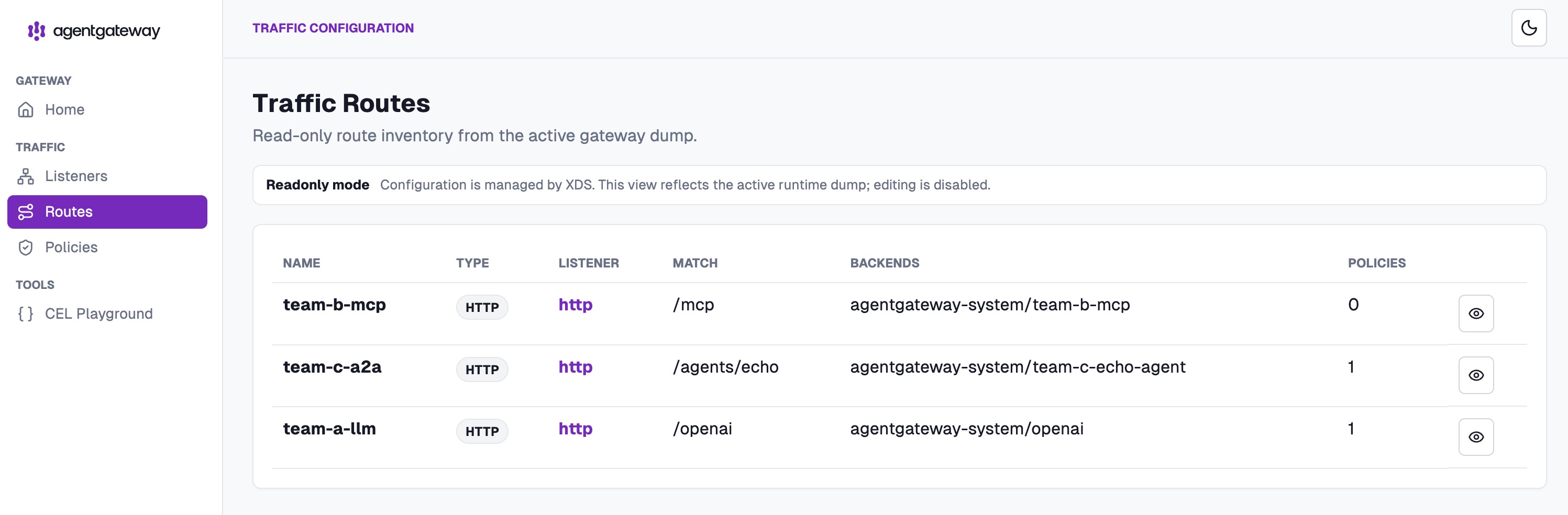
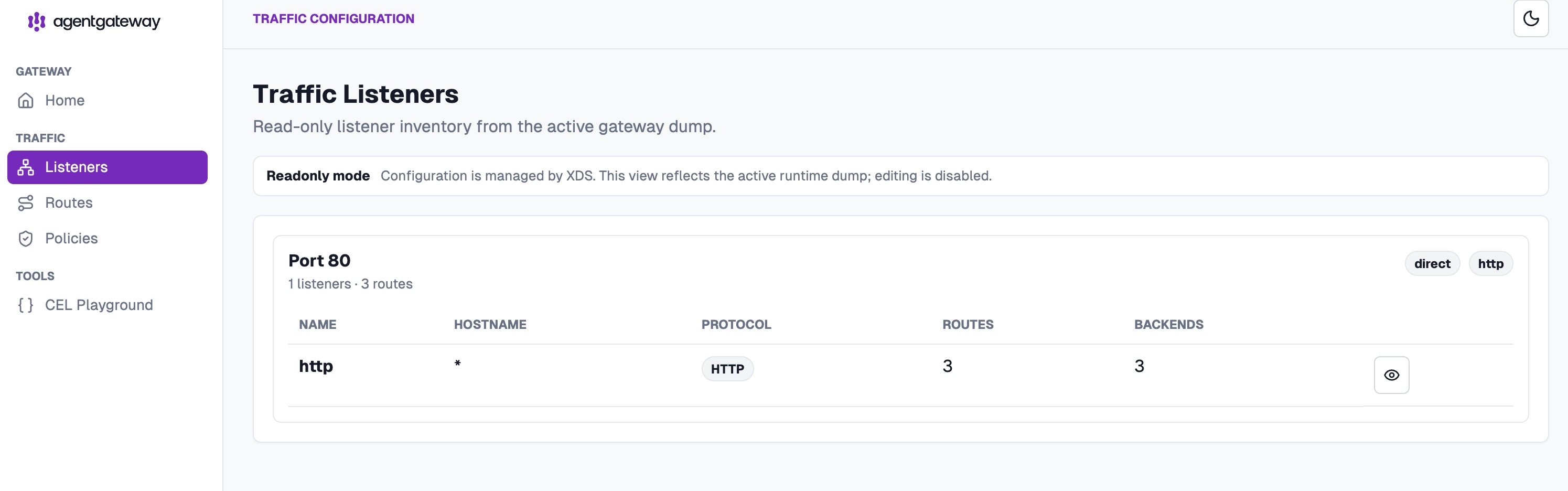
At this point all three teams are live. The gateway's built-in admin UI (port-forward 15000, open /ui) shows the whole picture on one screen: three routes, three protocols, one listener:
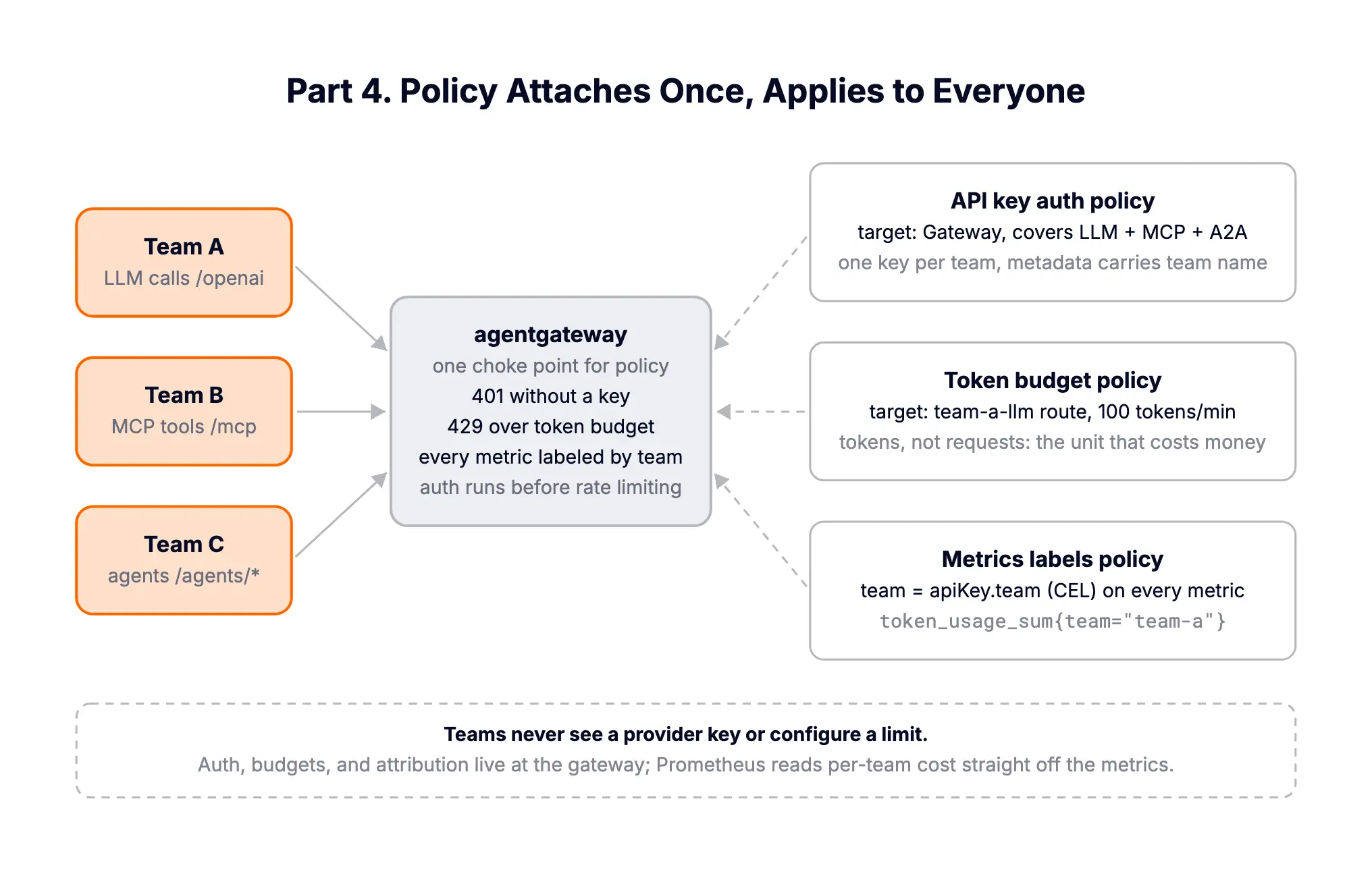
Routing three kinds of traffic through one proxy is nice. What makes it a platform is that policy attaches once, at the gateway, and applies to everyone.
Mint one key per team, stored as a Secret. The value can carry metadata (which we'll reuse for attribution):
kubectl apply -f- <<EOF
apiVersion: v1
kind: Secret
metadata:
  name: team-api-keys
  namespace: agentgateway-system
stringData:
  team-a: |
    {"key": "agp-team-a-Zjk3MWQ4YTQtN2E2Yi00", "metadata": {"team": "team-a"}}
  team-b: |
    {"key": "agp-team-b-N2YwMDIxZTEtNGUzNS1j", "metadata": {"team": "team-b"}}
  team-c: |
    {"key": "agp-team-c-RjBiNjcyLWM0YzQtMGJk", "metadata": {"team": "team-c"}}
EOF
One policy on the Gateway enforces it for every route, LLM, MCP, and A2A alike:
kubectl apply -f- <<EOF
apiVersion: agentgateway.dev/v1alpha1
kind: AgentgatewayPolicy
metadata:
  name: platform-apikey-auth
  namespace: agentgateway-system
spec:
  targetRefs:
  - group: gateway.networking.k8s.io
    kind: Gateway
    name: agentgateway-proxy
  traffic:
    apiKeyAuthentication:
      mode: Strict
      secretRef:
        name: team-api-keys
EOF
Prove it. No key:
curl -si http://localhost:8080/openai -H "Content-Type: application/json" \
  -d '{"model":"meta-llama/Llama-3.1-8B-Instruct","messages":[{"role":"user","content":"hi"}]}'
HTTP/1.1 401 Unauthorized
content-type: text/plain
content-length: 48
api key authentication failure: no API Key foundWith Team A's key:
curl -s http://localhost:8080/openai \
  -H "Authorization: Bearer agp-team-a-Zjk3MWQ4YTQtN2E2Yi00" \
  -H "Content-Type: application/json" \
  -d '{"model":"meta-llama/Llama-3.1-8B-Instruct","messages":[{"role":"user","content":"hi"}]}' \
  | jq -c '{content: .choices[0].message.content, usage}'
{"content":"Testing@, #testing 1$ ,2%,3^, [4&*5], 6~, 7-_ + (8 : 9) / \\ < > .","usage":{"prompt_tokens":1,"completion_tokens":38,"total_tokens":39}}For production you'd swap API keys for JWT (agentgateway validates JWTs against a JWKS endpoint and exposes claims to policies); the shape is the same.
This is where an AI-native gateway earns its keep. Requests are a terrible unit for LLM cost; one request can be 10 tokens or 100,000. Because agentgateway parses LLM responses, it can rate-limit on tokens:
kubectl apply -f- <<EOF
apiVersion: agentgateway.dev/v1alpha1
kind: AgentgatewayPolicy
metadata:
  name: team-a-token-budget
  namespace: agentgateway-system
spec:
  targetRefs:
  - group: gateway.networking.k8s.io
    kind: HTTPRoute
    name: team-a-llm
  traffic:
    rateLimit:
      local:
      - tokens: 100
        unit: Minutes
EOF
kubectl get AgentgatewayPolicy team-a-token-budget -n agentgateway-system \
-o jsonpath='{.status.ancestors[0].conditions}' | jq -c '.[] | {type, status, message}'{"type":"Accepted","status":"True","message":"Policy accepted"}
{"type":"Attached","status":"True","message":"Attached to all targets"}Team A now has a 100-tokens-per-minute budget on their route (deliberately tiny so we can watch it break). Hammer it:
for i in $(seq 1 8); do
  RESPONSE=$(curl -s -w "\nHTTP_STATUS:%{http_code}" http://localhost:8080/openai \
    -H "Authorization: Bearer agp-team-a-Zjk3MWQ4YTQtN2E2Yi00" \
    -H "Content-Type: application/json" \
    -d '{"model":"meta-llama/Llama-3.1-8B-Instruct","messages":[{"role":"user","content":"Write a haiku about Kubernetes."}]}')
  STATUS=$(echo "$RESPONSE" | grep HTTP_STATUS | cut -d: -f2)
  TOKENS=$(echo "$RESPONSE" | sed '$d' | jq -r '.usage.total_tokens // "blocked"' 2>/dev/null)
  echo "Request $i: HTTP $STATUS - tokens: $TOKENS"
done
Request 1: HTTP 200 - tokens: 18
Request 2: HTTP 200 - tokens: 21
Request 3: HTTP 200 - tokens: 14
Request 4: HTTP 200 - tokens: 15
Request 5: HTTP 200 - tokens: 30
Request 6: HTTP 429 - tokens: blocked
Request 7: HTTP 429 - tokens: blocked
Request 8: HTTP 429 - tokens: blockedFive requests burned ~98 tokens; the sixth hit the wall. The 429 comes back with standard headers telling the client exactly where it stands:
HTTP/1.1 429 Too Many Requests
x-ratelimit-limit: 100
x-ratelimit-remaining: 0
x-ratelimit-reset: 33

rate limit exceeded
Streaming responses are handled correctly too: the budget is settled from the final usage chunk after the stream ends.
Two details that matter operationally:
Agentgateway exports OpenTelemetry metrics, logs, and traces natively. And because our API keys carry metadata.team, a small metrics policy adds team attribution as a label on every metric:
kubectl apply -f- <<EOF
apiVersion: agentgateway.dev/v1alpha1
kind: AgentgatewayPolicy
metadata:
  name: team-metrics-label
  namespace: agentgateway-system
spec:
  targetRefs:
  - group: gateway.networking.k8s.io
    kind: Gateway
    name: agentgateway-proxy
  frontend:
    metrics:
      attributes:
        add:
        - name: team
          expression: apiKey.team
EOF
The headline metric for a platform team is token usage. Scrape the proxy's metrics port:
kubectl port-forward deployment/agentgateway-proxy -n agentgateway-system 15020:15020 &
curl -s localhost:15020/metrics | grep gen_ai_client_token_usage_sum
agentgateway_gen_ai_client_token_usage_sum{gen_ai_token_type="output",gen_ai_operation_name="chat",gen_ai_system="openai",gen_ai_request_model="meta-llama/Llama-3.1-8B-Instruct",route="agentgateway-system/team-a-llm",team="team-a"} 10.0(Labels trimmed for readability; the real line also carries the gateway, listener, and response model.) Input and output tokens, per model, per route, per team, following the OpenTelemetry GenAI semantic conventions. Point Prometheus at it and a per-team cost dashboard is one PromQL query away:
sum by (team, gen_ai_request_model) (rate(agentgateway_gen_ai_client_token_usage_sum[5m]))That apiKey.team expression is CEL, which agentgateway uses throughout for authorization rules, transformations, and metric labels. The gateway authenticated the caller and parsed the AI protocol, so it can attribute usage precisely. (The admin UI even ships a CEL Playground for testing these expressions.)
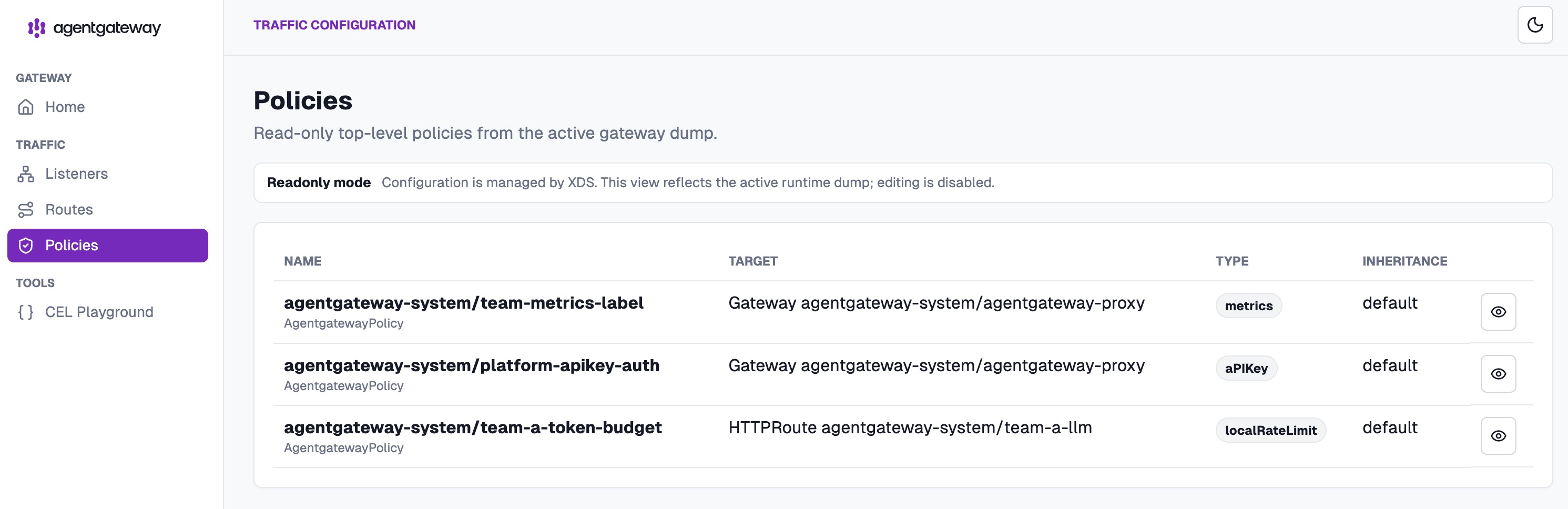
The admin UI's Policies view confirms all three guardrails and what each is attached to: auth and metrics at the Gateway level covering everyone, the token budget scoped to Team A's route:
Step back and look at the shape of the thing:
| Team | Wants | Gets | Governed by |
|---|---|---|---|
| Team A | LLM access | POST /openai, OpenAI-compatible | API key auth, 100 tokens/min, usage metrics |
| Team B | Ship internal tools | Their MCP server at /mcp, federable | Same auth, per-tool-call logging |
| Team C | Multi-agent workflows | Agents at /agents/*, discoverable | Same auth, traced task delegation |
And the platform properties that fall out:
That's the "AI factory" pattern in miniature: workloads on the factory floor (tenant clusters), one loading dock where everything is inspected, metered, and logged (agentgateway).
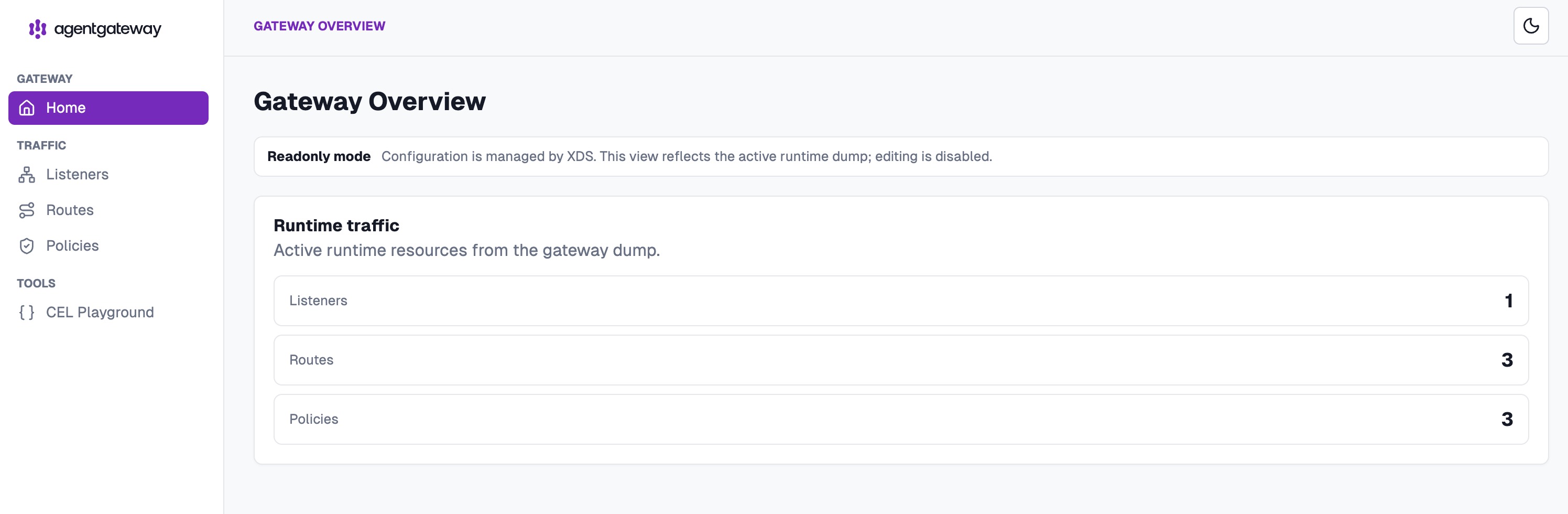
The gateway's own runtime view sums it up: one listener, three routes, three policies:
Things we hit or noted while building this, worth knowing before production:
None of these are blockers; they're the normal rough edges of a young project in a fast-moving space.
The useful thing about agentgateway is the unification: LLM calls, tool calls, and agent tasks are all just traffic, and traffic is a solved problem if your proxy understands the protocols. Pair that with vCluster's hard tenancy boundary (and vind to host the whole thing in Docker), and you get a platform where teams move fast inside their own tenant clusters while the organization keeps one governed, observable, budgeted front door for all things AI.
Cleanup, when you're done:
vcluster delete team-a --namespace vcluster-team-a
vcluster delete team-b --namespace vcluster-team-b
vcluster delete team-c --namespace vcluster-team-c
vcluster delete ai-platform --driver dockerEverything in this post was run on macOS (Apple Silicon) with Docker Desktop, vCluster CLI v0.34.0, agentgateway v1.3.1, and Kubernetes v1.35.0. All outputs are real, captured from the live cluster.
Deploy your first virtual cluster today.
