Dex for Kubernetes: How Does it Work?

Feb 23, 2022
|
min Read

Despite being the most widely used open source container orchestration platform today, Kubernetes does not have the means to create and manage users—at least not natively. Far from being a disadvantage, however, this allows administrators to integrate the most appropriate identity service provider for their organization. For that reason, Dex has become one of the best authentication solutions available for Kubernetes.
In this article, you’ll learn more about Dex for Kubernetes. We’ll explore some of the problems it can solve, walk through a high-level overview of setting it up with a third-party identity provider, and consider some problems that still need to be solved that Dex doesn’t cover.
Dex is an open source CNCF sandbox project and authentication service released by CoreOS, Inc. that uses OpenID Connect (OIDC) to link Kubernetes and other OIDC-compatible services with a myriad of identity providers. Put another way, you can think of Dex as an intermediary between kubectl and widely used identity providers like Okta, GitHub, Google, Microsoft, and Linkedin, among others.
Dex’s ability to serve as a bridge between Kubernetes and other identity providers allows administrators to implement centralized user and group management, which is essential in organizations with multiple teams. Moreover, as you will learn in the following sections, Dex also makes it possible to enforce better security and bring a modern and convenient login experience to Kubernetes.
Before getting into the details of how Dex works, it’s important to understand how the Kubernetes authentication process works.
When communicating with a Kubernetes cluster, what kubectl is actually doing is interacting with the API server. With each HTTP request to the API server, the authentication plug-in looks for the username, UID, and group(s). Such attributes can be provided by client certificates, an authenticating proxy, or bearer tokens. This is where Dex comes in, functioning as a bridge between identity providers and the kubectl client.
Because Dex uses OIDC, it can access user information stored in a third-party identity provider using what it calls “connectors.” This allows Dex to forward user information in the form of bearer tokens to Kubernetes to complete the authentication process. All of this is transparent to the user, as it is done through a Single Sign-On (SSO) process. Moreover, as we will discuss in the next section, the ID token sent by Dex includes information that can be used for user authorization.
The process described above is a simplification of how authentication works in Kubernetes. For more detailed information about the authentication process, check the official Kubernetes documentation.
We’ve already mentioned that Dex extends the functionality of Kubernetes by allowing administrators to manage users and groups using the organization’s identity service provider. However, this is not the only problem that Dex solves. Let’s take a look at some of the other benefits it offers.
Dex improves the security of your Kubernetes cluster in multiple ways:
Every organization has unique requirements, and Dex is flexible enough to allow the use of almost any identity provider. Proof of this is the connectors available for Okta, GitHub, GitLab, Microsoft, Linkedin, and services that use OpenID Connect, OAuth 2.0, LDAP, and SAML 2.0 protocols, among others. Here’s a complete list of the connectors supported by Dex.
Implementing Dex may not be the best solution for small teams. However, for organizations with dozens of users distributed among different teams, Dex is a very powerful tool. The mere fact of not having to create, manage, and distribute kubeconfig files manually is a huge advantage in both time savings and security.
Furthermore, Dex complements Kubernetes by enabling more granular access control. As you will see in the next section, Dex controls the issuance of ID tokens, allowing you to specify their duration, which is handy for cases involving temporary user access. Additionally, you can revoke all ID tokens if necessary. You can even revoke access for a particular user or group.
All in all, Dex allows you to add an efficient and easy-to-use centralized authentication system to Kubernetes.
As we’ve established, Dex acts as a portal that uses connectors to link Kubernetes with multiple identity providers. The following image provides a high-level overview of the Single Sign-On process:
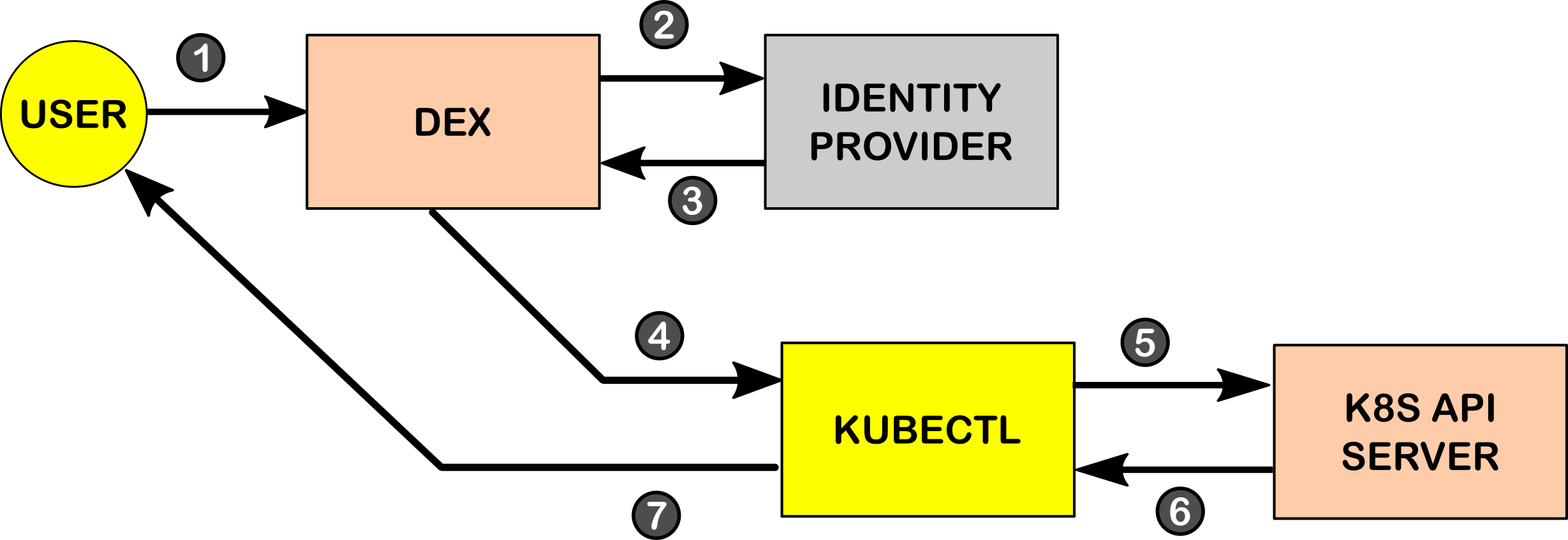
During the authentication process, the following steps are performed:
kubectl client, which forwards the JWT to the API server.kubectl client.kubectl client displays the result to the end-user.For information about authentication through LDAP, read the documentation here. For additional information on how to authenticate through an OpenID Connect provider such as Okta, see the documentation here.
While Dex offers an excellent solution for organizations seeking a Single Sign-On experience for Kubernetes, it is not exempt from the limitations associated with certain identity providers.
As the Dex documentation indicates, not all identity providers support requests for refresh tokens. This means that depending on the identity provider, the user will have to repeat the authentication process described in the previous section from time to time. Moreover, not all Dex connectors are stable. The status of the connectors for Google, Bitbucket Cloud, and OAuth 2.0 is still alpha.
Another point to keep in mind is that Dex is only intended to be an authentication solution. The management of environmental variables, kube-contexts, and costs will have to be done manually or completed through the use of other tools.
In this article, you learned that Dex is a viable solution for achieving a better login experience with Kubernetes. Being an OIDC provider, Dex allows your organization to leverage the identity provider in use to connect to Kubernetes. This is a huge advantage because without adding additional infrastructure, your organization can implement centralized identity management for Kubernetes, which saves time and helps improve security policies.
Photo by Nikola Knezevic on Unsplash
Deploy your first virtual cluster today.
