Solving Kubernetes Multi-tenancy Challenges with vCluster
Jul 21, 2025
|
6
min Read
.png)
Editor's note (August 2026): vCluster now delivers dedicated infrastructure per tenant through Private Nodes: each tenant's workloads run on their own isolated nodes, with nothing shared and nothing synced to a host cluster. This is the isolation model AI Cloud providers and enterprise AI factories run vCluster on today — hard tenant isolation on dedicated hardware, with the same instant provisioning shown below. The walkthrough in this article uses the earlier shared node setup and remains valid for that deployment style. For more information about how vCluster provides hard tenant isolation suitable for large enterprises and AI cloud providers managing AI infrastructure at scale, see our solutions page.
Discover how vCluster resolves Kubernetes multi-tenancy limitations for Internal Developer Platforms by creating isolated virtual clusters within host environments. This technical deep dive explores how platform teams can empower users with full administrative control over their environments while maintaining proper isolation—solving the namespace-level resource limitations that typically challenge multi-tenant architectures. Learn how vCluster enables teams to deploy cluster-scoped resources like CRDs while preserving security and governance through seamless integration with host-level security tools.
When we are building Internal Developer Platforms (IDP) for our customers Kubernetes is often a solid choice as the robust core of this platform. This is due to its technical capabilities and the strong community that is constantly expanding the surrounding ecosystem. One common IDP use case is to support the software development lifecycle (SDLC) of multiple tenants (e.g. multiple applications or software engineering teams). Adopting Kubernetes helps to share resources among these different tenants and while this helps to - among other benefits - optimize costs and enforce standards, it also introduces the challenge of isolating workloads from each other. This is known as multi-tenancy and for an IDP we have to ensure, that this isolation is fair and secure.
Thankfully Kubernetes provides a few out-of-the-box features to support isolation in a multi-tenant setup. This isolation can happen for the control plane and data plane. Let's briefly describe these features.
While these features provide a robust foundation for multi-tenancy they are often times not sufficient in a mature IDP setup. Especially the concept of namespaces is becoming a limiting factor for the isolation on control plane level. Consider the situation where one team (going forward we consider individual teams as individual tenants) needs to deploy a specific Custom Resource Definition (CRD) that is required to run a certain tool only their application requires. As CRDs have to be deployed on cluster-scope they are not namespaced. Hence the team cannot deploy a CRD on their own (as their access is limited to their namespace as per isolation requirements). This means they will reach out to the platform engineering team to ask them for support which then leaves the platform engineers with essentially these options:
None of these options are really compelling in the described use case to either the platform user nor the platform engineers. How can we solve this dilemma? Enter vCluster!
vCluster is a tool allowing us to spin up virtual clusters that are running on a physical host cluster. These virtual clusters are fully functional Kubernetes clusters and provide an API server endpoint. As such they are a compelling offer to support isolation in a multi-tenancy setup. How does that work?
From the physical host cluster perspective vCluster is simply an application running in a namespace. This application consists of two important components.
First there is the Virtual control plane which includes components that you find in every regular cluster as well:
Second there is the Syncer. This component is responsible to sync resources from the virtual cluster to the host namespace where vCluster is running. This is necessary as vCluster itself does not have a network or nodes where workload can be scheduled. By default only the low-level resources like Pods, ConfigMaps, Secrets and Services are synced to the host.
The following diagram, taken from the official documentation, depicts the above-described architecture. Reading the documentation is highly recommended if you are interested in more details.
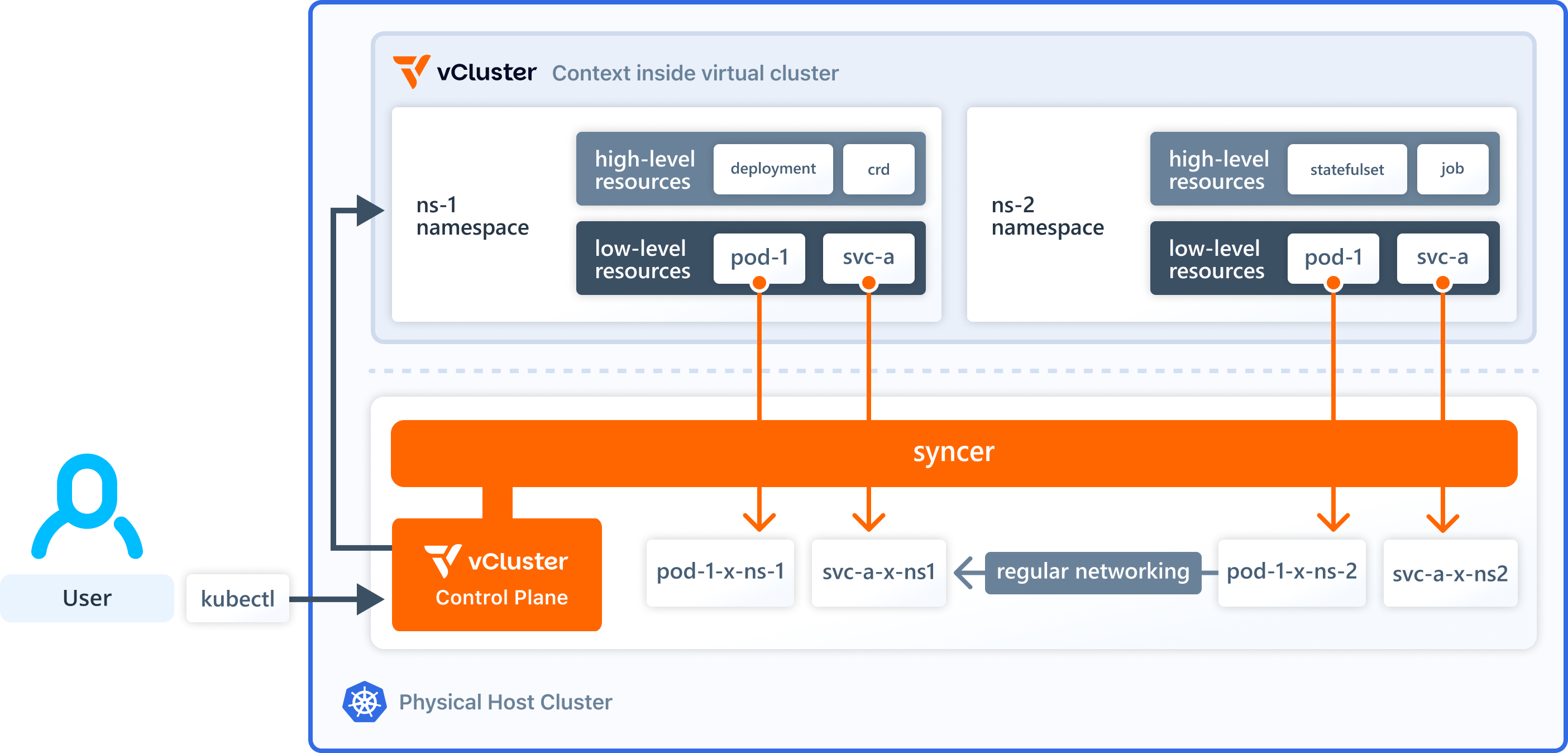
So what can you do with a virtual cluster and how does it help with multi-tenancy? Teams can request a virtual cluster e.g. via a self-service IDP offering. The IDP spins up the virtual cluster in a host namespace that is dedicated to the team and provides the required connection details (e.g. via kubeconfig) back to the requesting team. The team can then use the virtual cluster to deploy e.g. the required CRDs alongside their applications. They can also use the virtual cluster to create as many namespaces as they need. From a host perspective, all virtual cluster workload is still restricted to the assigned host namespace. In this way, vCluster solves the namespace-level multi-tenancy limitations for teams while maintaining it from an IDP perspective. Let's spin up a virtual cluster based on the free vCluster core offering to see it in action.
With access to a Kubernetes cluster we use the vCluster CLI to spin up a virtual cluster:
vcluster create tenant-a-vcluster --namespace tenant-a
to create this virtual cluster. This automatically adds an entry to your kubeconfig and changes your current context to the virtual cluster. By running
kubectl get namespace
you should see the following output which looks comparable to what you find in every physical cluster as well:
NAME STATUS AGE default Active 1m05s kube-node-lease Active 1m05s kube-public Active 1m05s kube-system Active 1m05s
As a next step we deploy some sample workload to see what happens in the virtual and the host cluster:
NGINX_IP=$(kubectl get pod nginx-x-default-x-tenant-a-vcluster -n tenant-a --template '{{.status.podIP}}')kubectl run temp-pod --rm -it --restart=Never --image=curlimages/curl -- curl $NGINX_IPAs we said that deploying CRDs as non-namespaced resources poses challenges in Kubernetes multi-tenancy scenarios, and that vCluster can help with this by allowing tenants to manage CRDs themselves, we need to test this as well.
kubectl apply -f https://raw.githubusercontent.com/Liquid-Reply/vcluster-idp-tools/refs/heads/main/crds/crontabs.yamlkubectl apply -f https://raw.githubusercontent.com/Liquid-Reply/vcluster-idp-tools/refs/heads/main/resources/crontab.yamlcrontab.stable.example.com/my-new-cron-object createdFrom this very basic hands-on we can see the simplicity of spinning up virtual clusters which look and behave like regular clusters. The workload that was deployed to the virtual cluster is synced to the host cluster where it behaves like regular cluster workload. As the virtual cluster brings its own API server and datastore we can deploy e.g. CRDs that are only available there and not on the host. This isolation on the control plane level is a very valuable asset in a multi-tenant environment and can solve the challenge we described initially.
By now it is clear that vCluster is a great fit for platform users that want to manage non-namespaced resources but what about the platform engineering team? Usually this team is deploying an application stack that helps them and the users to ensure among others security, cost efficiency and compliance. Do the tools in this stack still work as expected for the virtual clusters although they are deployed on the host cluster? As an example we will take a look at Falco (detects security threats at runtime) and Kyverno (defines policies that act as guardrails for cluster workload) and see how they interact with the virtual cluster workload.
As Falco is part of the platform stack we first need to install it on the host cluster (see official documentation):
helm repo add falcosecurity https://falcosecurity.github.io/charts
helm repo update
helm install --replace falco --namespace falco --create-namespace --set tty=true falcosecurity/falco
This deploys Falco as a DaemonSet in the falco namespace (the demo uses chart version 4.21.3). Depending on the number of nodes in the host cluster you should see the corresponding pods running if the installation was successful: kubectl get pods -n falco
Falco is tracking suspicious activity like spawning a shell in a container or opening a sensitive file. To test the functionality and interaction with the workload from the virtual cluster we will reuse the nginx pod that we have deployed as part of the demo:
kubectl logs ds/falco -n falco -fkubectl exec -it nginx -- cat etc/shadowWarning Sensitive file opened for reading by non-trusted program ...Since vCluster synchronises workloads from the virtual cluster to the host, Falco can detect this kind of activity as it appears as regular host workload to Falco. This is good news for both the platform users and platform engineers as it means no reconfiguration of Falco is necessary when using vCluster.
Just like Falco we first need to install Kyverno on the host cluster (see official documentation):
helm repo add kyverno https://kyverno.github.io/kyverno/
helm repo update
helm install kyverno kyverno/kyverno -n kyverno --create-namespace
After successful installation, Kyverno is running in the kyverno namespace (the demo uses the chart version 3.4.1): kubectl get pods -n kyverno
To test if Kyverno policies are properly applied to the virtual cluster workload and if violations are surfaced to tenants we will deploy a sample policy on the host cluster. This policy includes a rule that validates if pods are labeled with app.kubernetes.io/name:
kubectl apply -f https://raw.githubusercontent.com/Liquid-Reply/vcluster-idp-tools/refs/heads/main/kyverno-policies/require-labels.yaml
You can check if the policy was properly applied to the workload by checking the events for both the host and the virtual cluster:
kubectl events -n tenant-a | grep PolicyViolationpolicy require-labels/check-for-labels fail: validation error: The label app.kubernetes.io/name is required.kubectl events | grep PolicyViolationThe deployed policy from above is set to Audit which means there will be warnings about policy violations but workload is not blocked from being deployed. Let's see what happens if we deploy the same policy but in an Enforce mode:
kubectl apply -f https://raw.githubusercontent.com/Liquid-Reply/vcluster-idp-tools/refs/heads/main/kyverno-policies/require-labels-enforce.yamlkubectl run nginx-enforce --image=nginxkubectl describe pod nginx-enforceapp.kubernetes.io/name label for workloads.Besides rules in Kyverno policies that validate resources there is another important type of rule. These are mutate rules that can be used to modify resources and we want to test their behaviour as well. For that we will use a policy with rules for the following mutations:
You can take a look at the policy here:
kubectl apply -f kubectl apply -f https://raw.githubusercontent.com/Liquid-Reply/vcluster-idp-tools/refs/heads/main/kyverno-policies/add-labels-annotations-resources.yamlkubectl delete -f https://raw.githubusercontent.com/Liquid-Reply/vcluster-idp-tools/refs/heads/main/kyverno-policies/require-labels-enforce.yamlkubectl run nginx-mutate --image=nginxkubectl describe pod nginx-mutateJust looking at pods from a functionality point of view it might be fine to solely use Kyverno from the host cluster as the policies will be applied to the synced pods on the host. These synced pods are the actual workload running on the underlying nodes so they will adhere to the defined policies of the internal developer platform. The drawback of this solution is, that the tenant that is using the virtual cluster does not have insights into all changes that are applied to his workload as they are not synced back from the host. This can lead to bad developer experience for the platform.
It is even more important to keep in mind that in this setup the Kyverno policies can only be applied to objects that are actually synced from vCluster to the host (by default only pods, secrets, configmaps and services are being synced). For example a Deployment resource in vCluster will not be synced to the host. The consequence is that host Kyverno policies that are targeting Deployments (to e.g. ensure that a minimum number of replicas is defined) will not take effect.
Good news is that there are some ways to improve this setup:
We have explored how vCluster addresses the limitations of native Kubernetes multi-tenancy for Internal Developer Platforms (IDPs) on the control plane level. While Kubernetes offers baseline isolation through namespaces, RBAC, and other features, these become insufficient when teams need to deploy cluster-scoped resources like CRDs.
vCluster solves this by creating virtual Kubernetes clusters within a host cluster. This allows teams to have full administrative control within their isolated environment while maintaining proper constraints from the platform's perspective.
We have demonstrated how workloads sync between virtual and host clusters, and examined the interaction and compatibility with Falco and Kyverno. While some synchronization challenges exist, especially with Kyverno, we have learned that the actual workload is running on the host cluster and as such is properly managed by host applications which is an important aspect for platform engineers and users likewise.
Deploy your first virtual cluster today.
