Architecting a Private Cloud for AI Workloads

Dec 1, 2025
|
9
min Read

The first part of this series explored why GPU infrastructure has become foundational to enterprise AI strategy. The second part covered GPU multitenancy strategies for safely sharing resources across teams and workloads. This final installment turns to architecting an entire private cloud infrastructure that can support your AI workloads at scale. The emergence of powerful LLMs and multimodal generative AI has drastically increased the use of artificial intelligence.
But ever-increasing AI use is also leading to exponentially higher resource consumption demands, particularly for massive parallel processing.
GPUs have become de facto accelerators for training and running modern AI models due to their ability to deliver orders of magnitude higher throughput than CPUs with their thousands of cores. A single modern GPU can deliver, in some cases, more than ten times the performance of a CPU for AI workloads. Therefore, GPU infrastructure decisions on accelerator choice, scale and topology, interconnects, data paths, workload scheduling, and isolation directly shape a company's ability to innovate and compete.
Due to cost considerations, data sovereignty requirements, and the need for customized infrastructure, many companies are exploring alternatives, such as private-cloud or hybrid approaches, for their AI workloads. This article focuses on architecting a private cloud for AI workloads. It explains why enterprises choose a private cloud and shows how to design and operate one from end to end.
A public cloud is a good starting point for AI workloads. However, challenges may arise during production, such as unpredictable costs for continuous GPU usage, egress fees for large data sets, sharing and compliance risks, and limited hardware control. A private cloud addresses these issues with predictable costs, better data residency and management, tailored performance through custom hardware, and hard isolation when needed. The following sections cover the key drivers behind the private-cloud decision, namely cost and ROI, data protection and compliance, performance and customization, security, isolation, and vendor independence.
A private cloud offers better cost control and, with continuous GPU usage, a higher return on investment than a public cloud: You purchase GPUs once and spread the up-front cost over their three- to five-year lifetime, thus avoiding variable on-demand pricing.
While GPU instances in the public cloud are highly convenient, they quickly become expensive for sustained workloads. GPU pricing in public clouds varies widely by provider, region, and usage model. For example, costs for public cloud GPUs can range from $0.14–$6.25 per hour for previous-generation GPUs to $1.90–$12.29 per hour for current-generation H100 GPUs. For 24/7 usage, this results in costs of tens to even hundreds of thousands of dollars annually. As model size increases and the model moves from proof of concept to production, the GPU demand increases.
Privately managed clouds, on the other hand, offer the advantage of a predictable total cost of ownership and no fees for data transfer between services or from your environment. You also benefit from stable power and colocation costs. Together, these factors reduce the effective cost per GPU hour and improve the ROI for teams that continuously train and deploy models.
Training AI models often requires access to sensitive customer or company data. A private cloud gives you more refined control over data residency and security, which can help facilitate compliance with SOC 2, HIPAA, GDPR, financial regulations (PCI DSS), industry-specific requirements (like FDA 21 CFR Part 11 for pharmaceutical companies), and internal governance requirements. That makes a private cloud a good choice for companies subject to strict regulations or working with proprietary models.
AI workloads in practice can vary greatly. Large-scale training jobs require clusters of high-end GPUs connected to high-bandwidth networks and storage. Real-time inference services, on the other hand, require many smaller GPU instances. Private clouds can provide customized GPU hardware and dedicated bandwidth to optimize performance for specific workloads. With a private cloud, you can flexibly customize the hardware, network topology, and storage design to your needs without being limited by a single vendor's product catalog.
Running workloads in a public, shared cloud can be tricky. In highly competitive industries, protecting intellectual property is especially important. There are often concerns about whether the separation between different customers is really sufficient. On the one hand, public cloud providers implement strong tenant-isolation mechanisms, such as AWS Nitro, and provide dedicated-tenancy choices. On the other hand, some teams and companies still might prefer private environments for tighter IP control and governance. Private cloud environments can provide physically and administratively isolated environments where companies can keep control over their entire security stack, from software to applications.
Another advantage is reduced vendor lock-in. If you own your own hardware, you can move or upgrade GPUs as needed. But you're not completely free of dependencies. You remain still tied to hardware manufacturers, data center operators, and software stacks. A further advantage of a private cloud is its independence from cloud APIs. This makes it easier to move workloads between different environments. Furthermore, storing large data sets locally saves costs. If model checkpoints don't need to be transferred between services, expensive data-egress fees are eliminated. With multiple terabytes of data and frequent model iterations, these fees can easily run into the hundreds of thousands of dollars per year.
Building a private AI cloud isn't just about purchasing hardware; it involves coordinating several layers, including compute infrastructure and orchestration, isolation, storage, and networking.
The following sections describe these building blocks and their interrelationships.
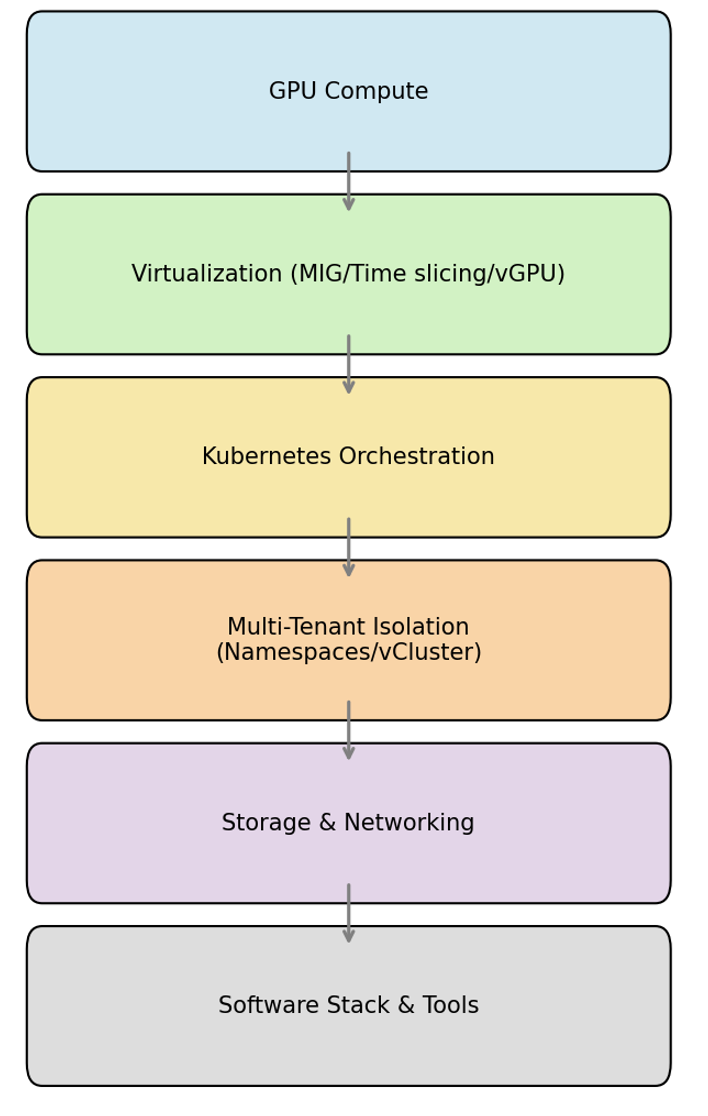
Choosing the right hardware is the foundation. The following are common options:
Consumer GPUs like the RTX 4090, with 24GB memory, can be useful for R & D experiments, small-scale fine-tuning, and CI testing. However, they typically lack ECC memory, data center form factors, and high-bandwidth multi-GPU connections. They're also ill-suited for multitenant clusters or large distributed training environments. Infrastructure architects should adapt their choice of GPU to workload size, precision requirements, availability, and budget.
A private cloud can deploy GPUs directly on bare-metal servers or in virtualized environments. Bare-metal servers offer the highest performance. They minimize overhead for throughput-critical training and latency-sensitive inference. On the other hand, virtualization enables sharing and isolation but costs some overhead.
MIG allows hardware-level partitioning of a single GPU, which can then be exposed on bare metal via GPU pass-through to virtual machines or integrated with NVIDIA's virtual GPU (vGPU) software for more flexible sharing across VMs and containers.
Once you establish your hardware foundation and resource-sharing strategies, the next question is how to efficiently orchestrate these resources. This is where Kubernetes comes into play. Kubernetes has established itself as the standard control plane for AI workloads. Kubernetes can abstract the underlying hardware and enable automation, reproducibility, and scalability. Another key advantage is that resources do not need to be manually provisioned. Instead, users declare the desired state, and Kubernetes schedules the pods accordingly. This allows individual AI jobs—such as data preprocessing, training, analysis, and deployment—to be started in their own container and scaled independently.
For GPU-based nodes, Kubernetes uses device plugins. Each node provides its GPU resources via a device plugin, allowing pods to request GPUs and receive consistent performance. By default, Kubernetes schedules entire GPUs. A pod requesting `nvidia.com/gpu: 1` therefore uses the entire card. However, the GPUs are not oversubscribed, and workloads cannot request fractions of a GPU. Advanced features—such as MIG, vGPU, and time slicing—address this limitation by splitting or sharing GPUs.
An orchestrated cluster alone does not guarantee clean separation between teams or projects. When using a private cloud, you need to isolate teams or applications while still sharing the infrastructure. The simplest model uses Kubernetes namespaces combined with role-based access control (RBAC), resource quotas, and network policies. Namespaces isolate objects within the API, RBAC controls who can read or edit them, and quotas set limits on CPU, memory, and GPU usage.
Virtual clusters offer even greater isolation. Virtual clusters create an independent control plane within a host cluster, and each virtual cluster has its own API server and can run on shared or dedicated infrastructure. Virtual clusters also enable self-service. Developers can create their own virtual Kubernetes environments without deploying entire clusters. Combined with single sign-on (SSO) and identity management, virtual clusters enforce strong boundaries while the platform team maintains governance.
The storage and transport of large amounts of data also require careful planning. Shared file systems—such as Lustre, BeeGFS, and CephFS—offer high throughput and parallel access for distributed training. These are designed to fully utilize the read/write bandwidth of GPUs.
For data sets exceeding tens of terabytes in size, object storage systems, such as MinIO or other S3-compatible solutions, offer cost-effective scalability. In practice, parallel file systems and object storage are often combined. The high-performance file system is used for latency-sensitive training data, while the object storage is used for archives, data sets, and model checkpoints. This tiering provides low-latency support to GPUs while moving large amounts of data or infrequently accessed data to a more cost-effective, highly durable tier. This lowers the cost per terabyte and improves reliability through erasure coding and versioning.
Distributed training and multi-GPU inference move large amounts of data between nodes for gradient swapping, input pipelines, and checkpoint streaming. For example, if the network is slow or congested, GPUs wait for communication instead of computing. Therefore, high-throughput and low-latency networking is critical.
High-bandwidth connections, such as InfiniBand and RDMA over Converged Ethernet (RoCE)), can ensure low latency between GPUs. The choice of Container Network Interface (CNI) can also influence performance. AI clusters often use plugins that support jumbo frames and multiqueue networking. You also need to consider inbound and outbound data traffic. Moving large data sets into the cluster and exporting model artifacts can place a strain on network connections. Colocating memory and compute or using GPUDirect Storage can reduce the overhead of data movement.
When building a private AI cloud, your software-stack choices directly impact GPU efficiency, tenant security, and operational complexity. A typical private AI cloud software stack includes the following:
Operating a private AI cloud is challenging, even with the right hardware and software. GPUs are often expensive and used for frequent, stateful AI jobs. They peak during experiments and settle between training cycles. Balancing load is difficult, and simple capacity plans suffer. Therefore, scaling and lifecycle work requires tight choreography across drivers, CUDA, firmware, kernels, and node images. It's recommended to build new drivers and CUDA builds on a small pool of nodes. Additionally, pods should be drained before reimaging, and GPU resets should be sequenced to allow long-running jobs to perform checkpoints and resume. Missing this choreography risks losing your jobs or incurring downtime.
Utilization and capacity planning depend on avoiding GPU fragmentation, choosing the right sizing, and planning for long lead times. Fragmentation is problematic when the scheduler can only distribute entire devices. A small 8 GB inference service can consume an 80 GB H100. Use better bin packing, fixed instance sizes, and rightsize requests to allow small services to converge. Leave room for larger training tasks, and plan for multimonth procurement and model expansion for capacity. Keep an eye on GPU hours, memory reserves, and connection saturation, and plan buffers for maintenance, requeueing, and supply chain delays.
AI clusters are often underutilized because small services consume entire GPUs, and Kubernetes doesn't overcommit by default. For example, an online inference service that uses about 8 GB of memory and modest processing power still requires an H100, leaving most of it unused. The result is unused capacity that blocks urgent tasks.
Capacity utilization can be improved with a few standard GPU shapes and simple request templates. Enforce rightsizing with CI checks and admission policies. Teams should be encouraged to specify memory and bandwidth requirements in addition to the number of GPUs to ensure smarter placement. Also, place small inference runs on dedicated nodes and large training runs in separate pools. The waste can be visualized with dashboards to track allocated and used memory, active SMs, and throughput over time. Set clear thresholds and trigger reviews when waste persists. Reduce the churn that increases fragmentation by prioritizing stable pods for inference and consolidating bursty work into defined time windows. Over time, these habits increase utilization without new hardware and without impacting latency.
Companies need to predict how many GPUs they will need, especially during development cycles, when training peaks happen. Underprovisioning slows down projects, and overprovisioning ties up money. In practice, teams can estimate the training baseline by measuring how many requests per second a single GPU can handle at the required latency for size inference. Then, they add headroom for packing inefficiencies, maintenance, and growth. For example, if monitoring shows around 2,400 GPU hours per day and a processing target of 1,000 requests per second, with each GPU handling about 180 requests, the cluster will need about 230 GPUs after factoring in safety margins. Platform teams can also set quotas and priority classes to make sure that important workloads always have enough resources.
Automatic scaling of CPU nodes is easy to set up, but GPUs are more expensive and take longer to set up. Private clusters require cross-cluster autoscalers and hardware provisioning. MIG profiles may also need to be dynamically reconfigured because profiles sometimes need to be adjusted on the fly to accommodate workload size. For example, a GPU may be split into smaller instances for inference during the day and reconfigured at night for training. This reconfiguration requires orchestration to avoid interrupting running jobs, but it can usually be performed without rebooting the entire GPU. You should plan for a baseline capacity with additional headroom for peaks and consider burst-capacity agreements with colocation or cloud providers for hybrid scenarios.
AI software updates frequently change driver requirements and library compatibility, thus shifting the boundaries between supported versions. This pace requires maintaining a tested, consistent set of CUDA drivers and frameworks. Otherwise, there's a risk that kernel modules won't load missing symbols in libraries, NCCL communication will be interrupted, or silent performance degradation will occur. Use the GPU operator to lock in known, good combinations, and roll out updates to Kubernetes nodes in a controlled manner. Coordinate patches at regular intervals to reduce drift and downtime, and use canary nodes with automated rollback to ensure running jobs aren't interrupted.
AI workloads can consist of both short-lived jobs, like training and batch inference, which run for hours or days, and persistent services, like online inference, which run continuously. It's important to manage these different lifecycles appropriately. Short-lived jobs require robust checkpoints, retry logic, and cleanup to avoid wasted GPU time. Persistent services, on the other hand, require strong SLOs, autoscaling policies, and secure rollout strategies. The handoff between the two—which is the transfer of a trained model to production—should follow a standardized path via a model registry and CI/CD.
Operational practices—such as scheduling, usage monitoring, and workload isolation—impact both the efficiency of GPU usage for cost management and the fairness and transparency of their allocation to teams for governance. Efficient private-cloud operations require transparency and cost control.
You can use the following strategies to help achieve efficient private-cloud operations with clear accountability and predictable costs:
Container isolation is a good foundation, but in shared AI platforms, teams often share the same physical hardware, such as GPUs. This can cause problems to spill over into container boundaries. For example, if an AI job is completed, residual data (*eg* tensors or model weights) may remain in GPU memory if the runtime or hardware fails to reliably delete it; a subsequent job could see traces of it. For this reason, the hardware itself should be treated as part of the security boundary, not just the containers.
Resources must be more strictly segregated. This includes dedicated GPUs or hard partitioning using technologies such as NVIDIA MIG or AMD MI300X partitioning, where available. Furthermore, all data between tenants must be securely deleted (*eg* through a zero wipe). Access to shared devices should also be strictly restricted. Continuous monitoring of unusual behavior is also required.
Ensure the platform's root of trust is simple and reliable. Machines should only boot with known good software (secure boot). Device firmware should also be kept up-to-date, and configurations should be locked to prevent unauthorized changes. Clear, enforceable rules should be established regarding who can deploy what, where, and with which permissions. These activities should also be secured with comprehensive audit logs. Good record-keeping ("Who did what and when?") can accelerate compliance checks for standards like SOC 2, HIPAA, or GDPR and help teams resolve issues before they become incidents.
For highly confidential models or data, hard tenancy should also be preferred. This means giving each team its own isolated environment, such as virtual Kubernetes clusters (vClusters), which provide complete control plane isolation with dedicated nodes or even dedicated GPUs. Use network segmentation and encrypt data in transit and at rest. Where available, hardware partitioning (*eg* GPU slicing) can further reduce the risk of cross-tenant overflows.
Before deciding on a private cloud for AI workloads, you need to carefully consider whether you're ready for this approach and which implementation strategy makes the most sense. This decision involves understanding the requirements, assessing your team's capabilities, and weighing the pros and cons of different deployment models.
When implementing a private cloud, you have several options:
The choice between these approaches largely depends on the trade-off between control and complexity. If you need maximum control over hardware configurations, network topologies, and software stacks, you're also going to face correspondingly greater operational complexity. A fully self-managed private cloud enables the deployment of customized operating systems, specialized security policies, and custom schedulers. However, this requires a dedicated MLOps team with deep expertise in Kubernetes, CUDA programming, GPU management, and distributed systems. Managed private-cloud services can significantly reduce this operational overhead through out-of-the-box scalability, professional support, and automated updates. However, this limits hardware selection and customization options.
To find the right approach, answer these questions:
Do we need strict tenant separation?
This is required if you process highly sensitive data or operate in a highly competitive environment, which may require dedicated control planes, isolated hardware, or even physically separated infrastructure.
How sensitive are our models and data?
Legal requirements—such as HIPAA, GDPR, or industry-specific compliance regulations—may mandate local processing and storage, making a private-cloud infrastructure essential rather than optional.
Are our teams ready to operate the GPU infrastructure?
Successfully operating a private AI cloud requires specialized expertise in GPU cluster management, CUDA optimization, Kubernetes operations, and distributed training workflows.
What is our long-term AI strategy?
The sustainability of GPU investments depends on workload evolution, model architecture trends, and performance requirements over the typical hardware lifecycle of three to five years.
You should consider a self-built private cloud if you require dedicated hardware isolation for highly sensitive data and have strong internal capabilities. Managed private-cloud services offer an attractive middle ground when you're handling sensitive data but lack the operational expertise to manage infrastructure independently. Public-cloud solutions remain your better choice when you don't need stringent security requirements or when your long-term AI strategy is still evolving; this allows you to defer major infrastructure commitments until your needs become more concrete.
This article explored how to design a private cloud for AI workloads, why teams choose it, and where it provides the greatest benefit. We examined the core components of a private cloud, such as GPU-accelerated computing, Kubernetes as a control plane, multitenant isolation, and high-throughput storage and networking. We also outlined when a private cloud is likely to pay off, for example, with continuous 24/7 training/inference, strict data residency and compliance, strict tenant/IP protection requirements, and minimizing egress traffic.
Building on Lukas Gentele's insights about the foundational importance of GPU infrastructure strategy from part one and the multitenancy approaches covered in part two, this comprehensive approach to private cloud architecture enables you to maximize your AI investments while maintaining the control, security, and cost efficiency that make in-house capabilities attractive.
vCluster simplifies Kubernetes multi-tenancy. Instead of running separate physical clusters for every team, vCluster provisions a fully isolated control plane, complete with its own API server, inside a shared host cluster. This approach delivers strong tenant boundaries, fast and reproducible environments, and true self-service without the overhead of managing dozens of clusters. When paired with RBAC, resource quotas, LimitRanges, network policies, and GPU features like MIG and vGPU, vCluster helps organizations achieve stronger governance, clearer cost and usage tracking, and safer, low-risk upgrades.
Want to Go Deeper on GPU Infrastructure?
If you're building robust GPU-enabled platforms, we've created a comprehensive resource to help. Download our free ebook, "GPU-Enabled Platforms on Kubernetes," which explains how Kubernetes abstracts GPU resources, why traditional isolation fails, and what architectural patterns enable multi-tenant GPU platforms. This guide covers everything from how GPUs meet Kubernetes and why GPU multi-tenancy is hard, to orchestrating GPU sharing, hardware isolation and enforcement, and architecting GPU infrastructure with vCluster for optimal isolation and efficiency.
Deploy your first virtual cluster today.
