Day 2: Getting Started with vind: Your First Deployment with LoadBalancer

Mar 9, 2026
|
5
min Read
Yesterday I introduced vind and why I think it’s a better alternative to KinD. Today, let’s get hands-on. We’ll install vind, create a cluster, deploy an application, and see the built-in LoadBalancer in action.
You need two things:
# Check Docker
Command:
docker version
Output:
Client:
 Version:           28.5.1
 API version:       1.51
 Go version:        go1.24.8
 Git commit:        e180ab8
 Built:             Wed Oct  8 12:16:17 2025
 OS/Arch:           darwin/arm64
 Context:           desktop-linux

Server: Docker Desktop 4.48.0 (207573)
 Engine:
  Version:          28.5.1
  API version:      1.51 (minimum version 1.24)
  Go version:       go1.24.8
  Git commit:       f8215cc
  Built:            Wed Oct  8 12:18:25 2025
  OS/Arch:          linux/arm64
  Experimental:     false
 containerd:
  Version:          1.7.27
  GitCommit:        05044ec0a9a75232cad458027ca83437aae3f4da
 runc:
  Version:          1.2.5
  GitCommit:        v1.2.5-0-g59923ef
 docker-init:
  Version:          0.19.0
  GitCommit:        de40ad0
# Install vCluster CLI (macOS)
$ brew install loft-sh/tap/vcluster
# Or upgrade if you already have it
Command:
sudo vcluster upgrade --version v0.32.1
Output:
11:49:25 info Downloading version v0.32.1...
11:49:30 done Successfully updated vcluster to version v0.32.1
# Verify
Command:
vcluster --version
Output:
vcluster version 0.32.1
This is the key step that tells vCluster to use Docker instead of an existing Kubernetes cluster:
Command:
vcluster use driver docker
Output:
11:50:00 done Successfully switched driver to docker
You only need to do this once. It persists across sessions.
Command:
vcluster create blog-demo
Output:
11:58:04 info Using vCluster driver 'docker' to create your virtual clusters, which means the CLI is managing Docker-based virtual clusters locally
11:58:04 info If you prefer to use helm or the vCluster platform API instead, use '--driver helm' or '--driver platform', or run 'vcluster use driver helm' or 'vcluster use driver platform' to change the default
11:58:04 info Ensuring environment for vCluster blog-demo...
11:58:05 done Created network vcluster.blog-demo
11:58:12 info Will connect vCluster blog-demo to platform...
11:58:13 info Starting vCluster standalone blog-demo
11:58:14 done Successfully created virtual cluster blog-demo
11:58:14 info Finding docker container vcluster.cp.blog-demo...
11:58:14 info Waiting for vCluster kubeconfig to be available...
11:58:17 info Waiting for vCluster to become ready...
11:58:29 done vCluster is ready
11:58:29 done Switched active kube context to vcluster-docker_blog-demo
- Use `vcluster disconnect` to return to your previous kube context
- Use `kubectl get namespaces` to access the vcluster
That took about 20 seconds. Let’s see what we got:
kubectl get nodes -o wide
Output:
NAME        STATUS   ROLES                  AGE   VERSION   INTERNAL-IP   EXTERNAL-IP   OS-IMAGE             KERNEL-VERSION     CONTAINER-RUNTIME
blog-demo   Ready    control-plane,master   30s   v1.35.0   172.23.0.2    <none>        Ubuntu 24.04.3 LTS   6.10.14-linuxkit   containerd://2.1.6
A single-node cluster running Kubernetes v1.35.0 with containerd. Let’s check the namespaces:
Command:
kubectl get namespaces
Output:
NAME                 STATUS   AGE
default              Active   108s
kube-flannel         Active   99s
kube-node-lease      Active   108s
kube-public          Active   109s
kube-system          Active   109s
local-path-storage   Active   99s
Everything you’d expect from a real Kubernetes cluster, including Flannel for networking and local-path-storage for persistent volumes.
Let’s deploy nginx with 2 replicas and expose it via a LoadBalancer service:
$ kubectl create deployment nginx --image=nginx:latest --replicas=2
deployment.apps/nginx created
Create Service with type:LoadBalancer:
$ kubectl expose deployment nginx --type=LoadBalancer --port=80 --target-port=80
service/nginx exposed
Wait a few seconds for the pods to come up:
Get Pods:
$ kubectl get pods -o wide
NAME                    READY   STATUS    RESTARTS   AGE   IP           NODE        NOMINATED NODE   READINESS GATES
nginx-b6485fcbb-6w6gm   1/1     Running   0          29s   10.244.0.4   blog-demo   <none>           <none>
nginx-b6485fcbb-8dvvg   1/1     Running   0          29s   10.244.0.5   blog-demo   <none>           <none>
Get Service:
$ kubectl get svc
NAME         TYPE           CLUSTER-IP      EXTERNAL-IP      PORT(S)        AGE
kubernetes   ClusterIP      10.96.0.1       <none>           443/TCP        3m31s
nginx        LoadBalancer   10.111.30.236   172.23.255.254   80:31860/TCP   37s
Get Deployments:
$ kubectl get deployments
NAME    READY   UP-TO-DATE   AVAILABLE   AGE
nginx   2/2     2            2           69s
Both pods are running. The LoadBalancer service is created, on Linux it gets an external IP automatically. On macOS, you need to run the vCluster create command with sudo to get full LoadBalancer support with HAProxy.
Tip: On macOS, run sudo vCluster create my-cluster to enable LoadBalancer IP assignment via HAProxy. Without sudo, you can still access services via NodePort.
curl 172.23.255.254
<!DOCTYPE html>
<html>
<head>
<title>Welcome to nginx!</title>
<style>
html { color-scheme: light dark; }
body { width: 35em; margin: 0 auto;
font-family: Tahoma, Verdana, Arial, sans-serif; }
</style>
</head>
<body>
<h1>Welcome to nginx!</h1>
<p>If you see this page, the nginx web server is successfully installed and
working. Further configuration is required.</p>

<p>For online documentation and support please refer to
<a href="http://nginx.org/">nginx.org</a>.<br/>
Commercial support is available at
<a href="http://nginx.com/">nginx.com</a>.</p>

<p><em>Thank you for using nginx.</em></p>
</body>
</html>vind gives you simple commands to manage your cluster lifecycle:
# List all clusters
$ vcluster list
   NAME    | STATUS  | CONNECTED |  AGE
-----------+---------+-----------+--------
  blog-demo | running | True      | 102s
# Disconnect from a cluster (keeps it running)
$ vcluster disconnect
# Reconnect later
$ vcluster connect blog-demo
# Delete when done
$ vcluster delete blog-demo
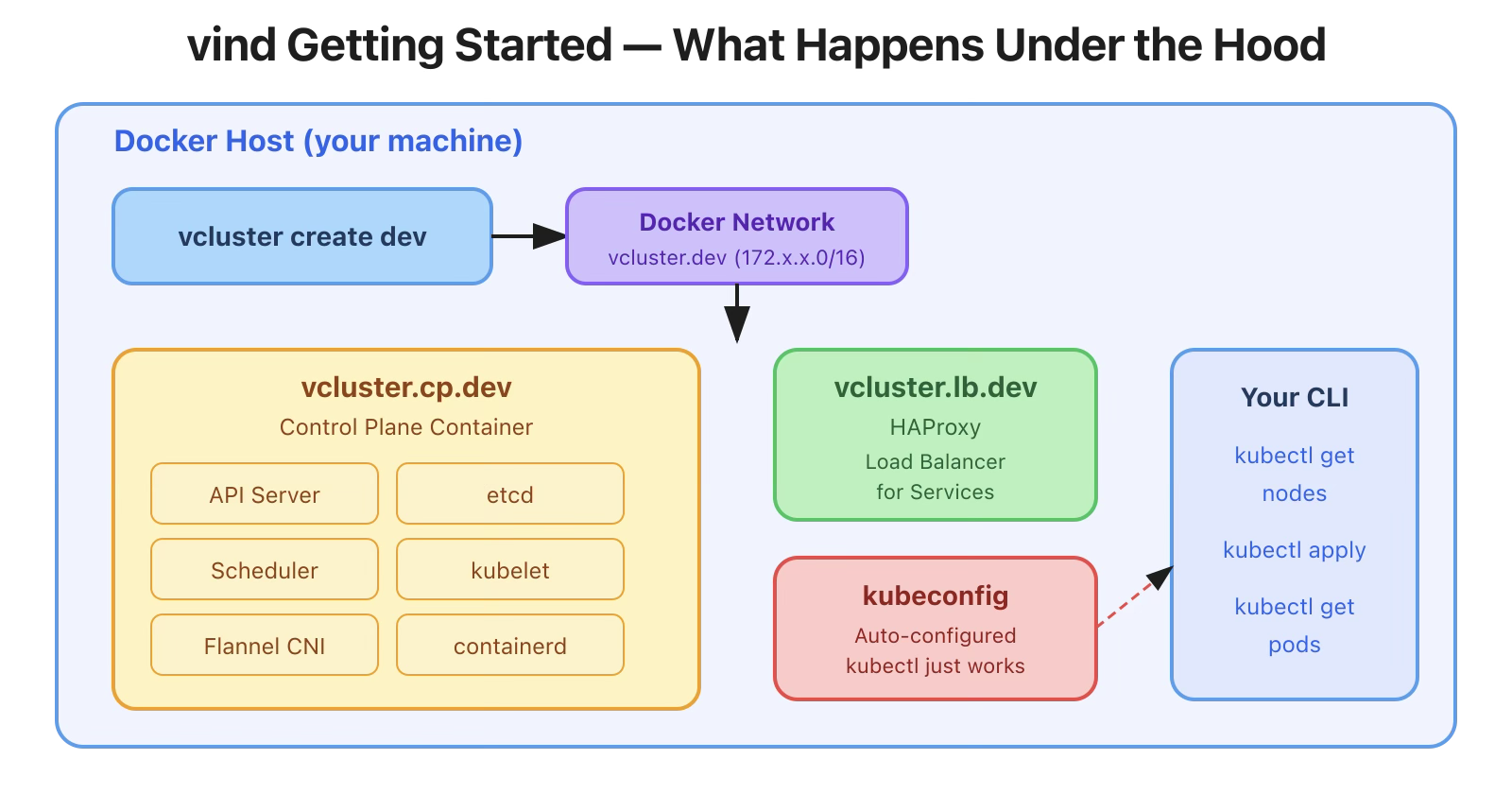
What’s Under the Hood?
When you create a cluster, vind sets up Docker containers:
$ docker ps --format "table {{.Names}}\t{{.Status}}"
NAMES                                 STATUS
vcluster.lb.blog-demo.nginx.default   Up 3 minutes
vcluster.cp.blog-demo                 Up 6 minutes
You can even peek inside:
# View control plane logs
$ docker exec vcluster.cp.blog-demo journalctl -u vcluster --no-pager | tail -5
Mar 06 06:31:14 blog-demo vcluster[188]: 2026-03-06 06:31:14        INFO        commandwriter/commandwriter.go:128        allocated clusterIPs        {"component": "vcluster", "component": "apiserver", "location": "alloc.go:329", "service": "default/nginx", "clusterIPs": "{\"IPv4\":\"10.111.30.236\"}"}
Mar 06 06:31:14 blog-demo vcluster[188]: 2026-03-06 06:31:14        INFO        record/event.go:389        Event occurred        {"component": "vcluster", "object": {"name":"nginx","namespace":"default"}, "fieldPath": "", "kind": "Service", "apiVersion": "v1", "type": "Normal", "reason": "EnsuringLoadBalancer", "message": "Ensuring load balancer"}
Mar 06 06:31:14 blog-demo vcluster[188]: 2026-03-06 06:31:14        INFO        cloudcontrollermanager/loadbalancer_docker.go:247        Image haproxy:3.3-alpine found locally, skipping pull.        {"component": "vcluster"}
Mar 06 06:31:14 blog-demo vcluster[188]: 2026-03-06 06:31:14        INFO        cloudcontrollermanager/loadbalancer_docker.go:198        Started LoadBalancer container vcluster.lb.blog-demo.nginx.default with ip 172.23.255.254 and forward ports enabled        {"component": "vcluster"}
Mar 06 06:31:14 blog-demo vcluster[188]: 2026-03-06 06:31:14        INFO        record/event.go:389        Event occurred        {"component": "vcluster", "object": {"name":"nginx","namespace":"default"}, "fieldPath": "", "kind": "Service", "apiVersion": "v1", "type": "Normal", "reason": "EnsuredLoadBalancer", "message": "Ensured load balancer"}
# Check what's running inside the container
$ docker exec vcluster.cp.blog-demo crictl ps
CONTAINER           IMAGE               CREATED             STATE               NAME                     ATTEMPT             POD ID              POD                                       NAMESPACE
0ce64fdd8ec9d       2af158aaca82b       5 minutes ago       Running             nginx                    0                   d6ced28cb4fe5       nginx-b6485fcbb-8dvvg                     default
56f9406394d3e       2af158aaca82b       5 minutes ago       Running             nginx                    0                   e5b6ab67d5930       nginx-b6485fcbb-6w6gm                     default
181ce2847ff1c       b41714cf62496       7 minutes ago       Running             local-path-provisioner   0                   536bc927ec4eb       local-path-provisioner-5b9b9995f4-4d582   local-path-storage
e7ab4ae96019d       e3b7e577b2a83       7 minutes ago       Running             coredns                  0                   c765485409d89       coredns-79cf5f4c56-jh6jv                  kube-system
d1865682d318c       253e2cac1f011       7 minutes ago       Running             kube-flannel             0                   de40359cb6a81       kube-flannel-ds-5frp9                     kube-flannel
c9133c20d5937       de369f46c2ff5       7 minutes ago       Running             kube-proxy               0                   52d2a265d3d3c       kube-proxy-tvd85                          kube-system
Want a specific Kubernetes version? Easy:
Command:
vcluster create my-cluster \
  --set controlPlane.distro.k8s.version=v1.32.0
Ouput:
NAME         STATUS   ROLES                  AGE   VERSION
my-cluster   Ready    control-plane,master   66s   v1.32.0
No need to find and pull specific node images like with KinD. Just specify the version.
$ vcluster delete blog-demo
info  Removing vCluster container vcluster.cp.blog-demo...
info  Deleted kube context vcluster-docker_blog-demo
done  Successfully deleted virtual cluster blog-demo
Clean and fast.
Today we created a single-node cluster and deployed an app. But what if you need to test pod scheduling across nodes, node affinity, or node drains
Tomorrow, we’ll create a multi-node vind cluster with 3 worker nodes and see pods distributed across them, just like a real cluster.
All commands tested on macOS (Apple Silicon M1) with Docker Desktop and vCluster CLI v0.32.1.
vind is open source: github.com/loft-sh/vind , so do star the repo if you like vind
Deploy your first virtual cluster today.
