GPUs Without the Headache: How to Scale AI Factory Infrastructure for Engineering Teams
How virtual clusters and dynamic node provisioning help enterprises build scalable, cost-efficient AI factories, without frontier lab budgets or massive platform teams.
Enterprises are increasingly investing in GPU infrastructure to support internal AI factories and large-scale AI workloads. While fine-tuning models, running inference in production, and training specialized models don’t require the 10,000+ GPUs that frontier labs use, most organizations still need hundreds of GPUs to support their AI factory initiatives.
However, the traditional approach to infrastructure provisioning—static allocation of compute resources—breaks down when applied to GPUs due to their cost, constrained supply, and operational complexity. For many organizations, the real challenge isn’t just getting GPUs—it’s building an AI factory platform that can securely share them across teams while maintaining cost controls, governance, and performance isolation.
This article explores the challenges of delivering GPU infrastructure at enterprise scale and demonstrates how combining virtual clusters with dynamic node provisioning helps organizations build scalable, multi-tenant AI factory infrastructure. We’ll cover why traditional managed Kubernetes falls short for GPU workloads, how to implement hybrid and multi-cloud GPU provisioning, and best practices for operating GPUs cost-effectively.
Why Traditional GPU Allocation Doesn’t Scale
The cost difference between CPU and GPU compute fundamentally changes infrastructure economics.
A typical EC2 instance with 4 CPUs costs approximately $1,600 per year. If an engineer needs dedicated compute, this is a manageable line item compared to their salary. However, the same approach with a single GPU increases annual costs to $60,000—37 times more expensive.
For an organization with 100 engineers requiring GPU access, static allocation would cost $6 million annually. This becomes unsustainable, especially when considering that most statically allocated GPU capacity sits idle. Organizations running GPU clusters at 20% utilization face a significant efficiency problem: with CPUs, low utilization is wasteful; with GPUs, it becomes a critical business issue that directly impacts the viability of an internal AI factory.
The GPU Lifecycle Challenge
GPUs also differ from CPUs in their technology lifecycle. CPUs typically have 5–7 years of useful life with stable pricing and predictable performance curves. GPUs, by contrast, see new generations every 18–24 months (H100 → H200 → B100), with constrained supply chains and faster obsolescence.
This shorter lifecycle makes long-term capacity planning more difficult and increases the importance of maximizing utilization during the GPU’s effective lifespan. For organizations building AI factories, this makes operational efficiency and flexible provisioning a necessity—not an optimization.
Three Challenges Every AI Factory Hits
Organizations building GPU platforms for AI factories typically encounter three fundamental problems:
1. Sourcing and Provisioning
GPU supply is constrained across all sources. Hyperscalers (AWS, Azure, GCP) can’t guarantee immediate availability of thousands of H100s.
This forces organizations to adopt a hybrid approach across public clouds for fast provisioning, AI Cloud Providers like Lambda Labs and CoreWeave for specialized GPU infrastructure at better pricing, and private cloud AI factory deployments for long-term cost efficiency with complete control.
A robust AI factory strategy requires infrastructure that can seamlessly provision GPU nodes across all these sources based on availability, cost, and workload requirements.
2. Resource Allocation and Sharing
Unlike CPUs, which can be easily divided into fractional shares, GPUs are typically allocated as whole devices. Standard Kubernetes device plugins enforce this limitation:
This means organizations must either overprovision GPUs (wasteful and expensive), queue workloads and accept wait times (reducing developer productivity), or implement complex sharing mechanisms at the application level.
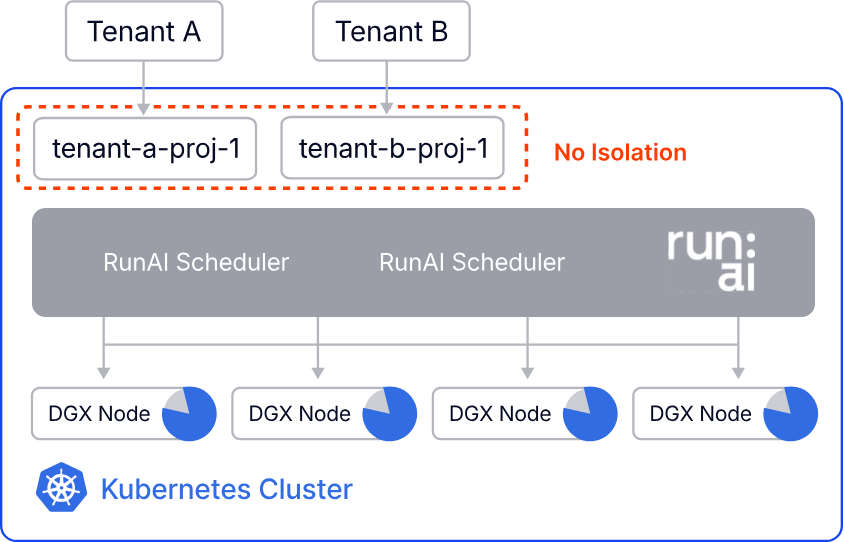
Additionally, noisy neighbor problems are significantly worse with GPUs than CPUs. A single demanding workload can consume all available GPU memory, impacting neighboring deployments on the same node. In an AI factory model where multiple teams share a GPU estate, these isolation challenges quickly become operational blockers.
3. Cost Control and Visibility
Dynamic GPU provisioning creates cost management challenges around budget enforcement, cost attribution in shared environments, cost awareness among engineers who may not realize the 37x difference, and utilization tracking since standard Kubernetes metrics don’t provide GPU-specific visibility.
AI factory operators need real-time cost tracking, automated budget controls, and clear accountability through showbacks or chargebacks. Without governance, GPU infrastructure quickly becomes the most expensive part of the platform stack.
Why Kubernetes Remains the Right Foundation
Despite these challenges, Kubernetes is the most practical platform for AI factory infrastructure. The industry has already made this decision.
Frontier AI labs like OpenAI use Kubernetes extensively for development and experimentation, even when they run custom HPC schedulers for large-scale training. Most AI startups and mid-size organizations have standardized on Kubernetes, particularly in private cloud environments where alternatives are limited.
NVIDIA’s commitment to Kubernetes is clear. The company acquired Run:ai and integrated it deeply into NVIDIA Enterprise AI Stack, signaling that Kubernetes is the orchestration layer for GPU workloads. This isn’t just about containers—it’s about the entire ecosystem that has grown around Kubernetes.
Tools like Kubeflow for ML workflows, Volcano for batch scheduling, Ray for distributed computing, and Kueue for advanced job scheduling all assume Kubernetes as the foundation. Commercial HPC solutions from vendors like Weka (storage) and Arista (networking) integrate natively with Kubernetes.
Perhaps most importantly, enterprises already have Kubernetes expertise. Ten years ago, finding people who understood Kubernetes was difficult. Today, it’s table stakes. Rather than asking teams to learn entirely new platforms, organizations can extend their existing Kubernetes knowledge to power internal AI factories.
Why Managed Kubernetes Alone Isn’t Enough for AI Factories
Standard managed Kubernetes services (EKS, GKE, AKS) have limitations for GPU workloads.
Single-Cloud Lock-In
A typical EKS cluster only provisions EC2 instances. If you need to:
Provision from Azure for better GPU availability
Use your private cloud OpenStack for cost savings
Access bare metal via MAAS in your data center
Manage NVIDIA DGX systems via BCM
You’re forced to create separate clusters for each infrastructure source, increasing operational complexity. For AI factories that need to blend on-prem GPU estates with cloud bursting, this approach doesn’t scale.
Weak Multi-Tenancy
Traditional namespaces provide only soft isolation where:
all tenants share the same Kubernetes version
global CRDs and operators affect all namespaces
control plane isolation is limited
noisy neighbor problems persist on shared nodes
For AI factory workloads, where isolation, compliance, and resource attribution are critical, namespace-based tenancy is insufficient.
Solution: Multi-Tenant AI Factories with Virtual Clusters + Dynamic Node Provisioning
This is where vCluster changes the infrastructure model.
Virtual Clusters for Logical Isolation
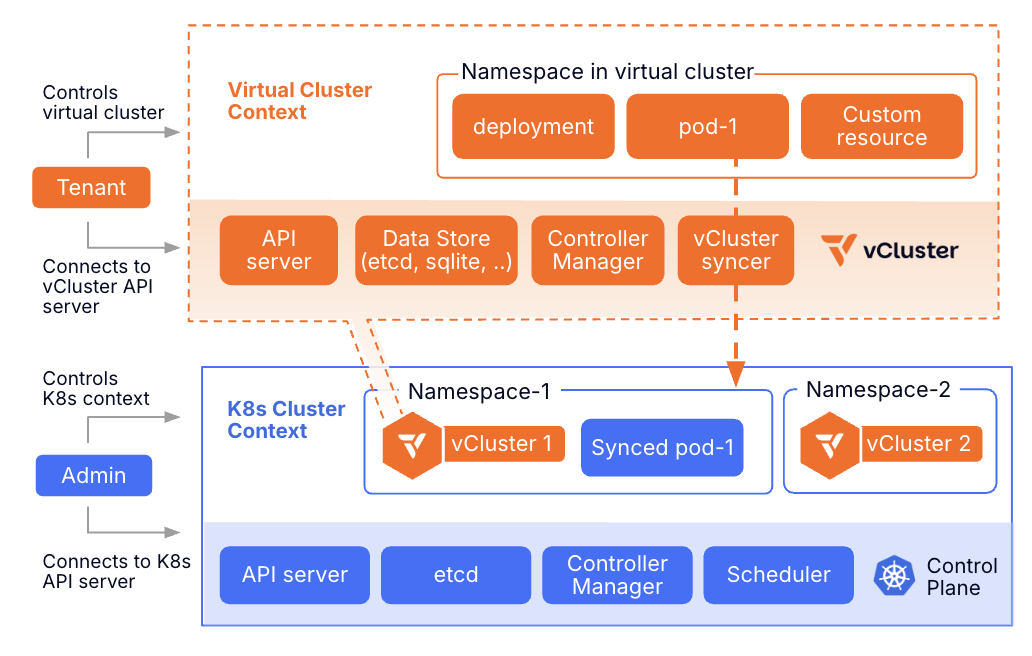
vCluster creates fully isolated Kubernetes environments within a single physical cluster. Each virtual cluster has its own virtualized control plane, runs its own Kubernetes version without requiring lockstep upgrades, supports independent CRDs and operators, provides dedicated control plane RBAC and policies, and shares underlying infrastructure efficiently.
Think of it as VM-level isolation for Kubernetes clusters. One physical cluster can host multiple virtual clusters, each appearing as a completely independent cluster to its users. For AI factories, this is a critical building block: it allows platform teams to provide self-service Kubernetes environments to AI teams without spinning up a separate physical cluster for every tenant.
The Evolution from Shared to Dedicated Nodes
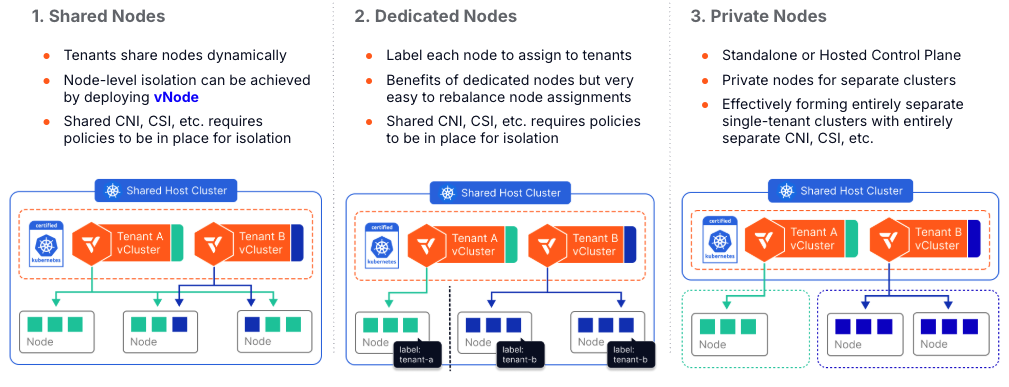
vCluster supports multiple tenancy models, from fully shared to fully isolated.
Shared nodes allow multiple virtual clusters to share the same underlying compute nodes, suitable for development environments where isolation requirements are lower. Private nodes are joined directly into the virtual cluster control plane (not the host cluster), providing true cluster-level isolation.
Auto Nodes combines private nodes with automatic, dynamic node provisioning across any infrastructure.
Auto Nodes: Dynamic Hybrid GPU Provisioning for AI Factories
Auto Nodes extends vCluster with Karpenter-based autoscaling that works across any infrastructure.
Here’s how it works: Karpenter watches for pending pods in the virtual cluster and creates node claims specifying required resources like GPU type, memory, and CPU. vCluster Platform intercepts the claim and selects the appropriate infrastructure, then the node provider provisions the node using Terraform or OpenTofu.
The node joins the virtual cluster automatically, the workload runs with full GPU access, and automatic cleanup occurs when the workload completes.
When a data scientist deploys a training job requiring 8 H100 GPUs, the system:
Analyzes requirements
Checks availability across all configured providers
Provisions from the most cost-effective source
Joins nodes to the virtual cluster
Runs the workload
Deprovisions nodes when complete
Infrastructure Provider Support
Auto Nodes uses Terraform and OpenTofu as the foundation, providing compatibility with virtually any infrastructure.
This includes public cloud providers like AWS (EC2, EKS nodes), Azure (VM instances), and GCP (Compute Engine), as well as private cloud platforms such as OpenStack, VMware vSphere, and Canonical MAAS (Metal as a Service).
For bare metal and specialized AI factory environments, it supports NVIDIA BCM (Base Command Manager) for DGX BasePODs and SuperPODs, KubeVirt for VM-based workloads on Kubernetes, and custom providers via Terraform/OpenTofu.
The Terraform provider ecosystem is mature and well-maintained, making it possible to integrate with any infrastructure that has a Terraform provider.
Real-World AI Factory Architecture: NVIDIA DGX with Cloud Bursting
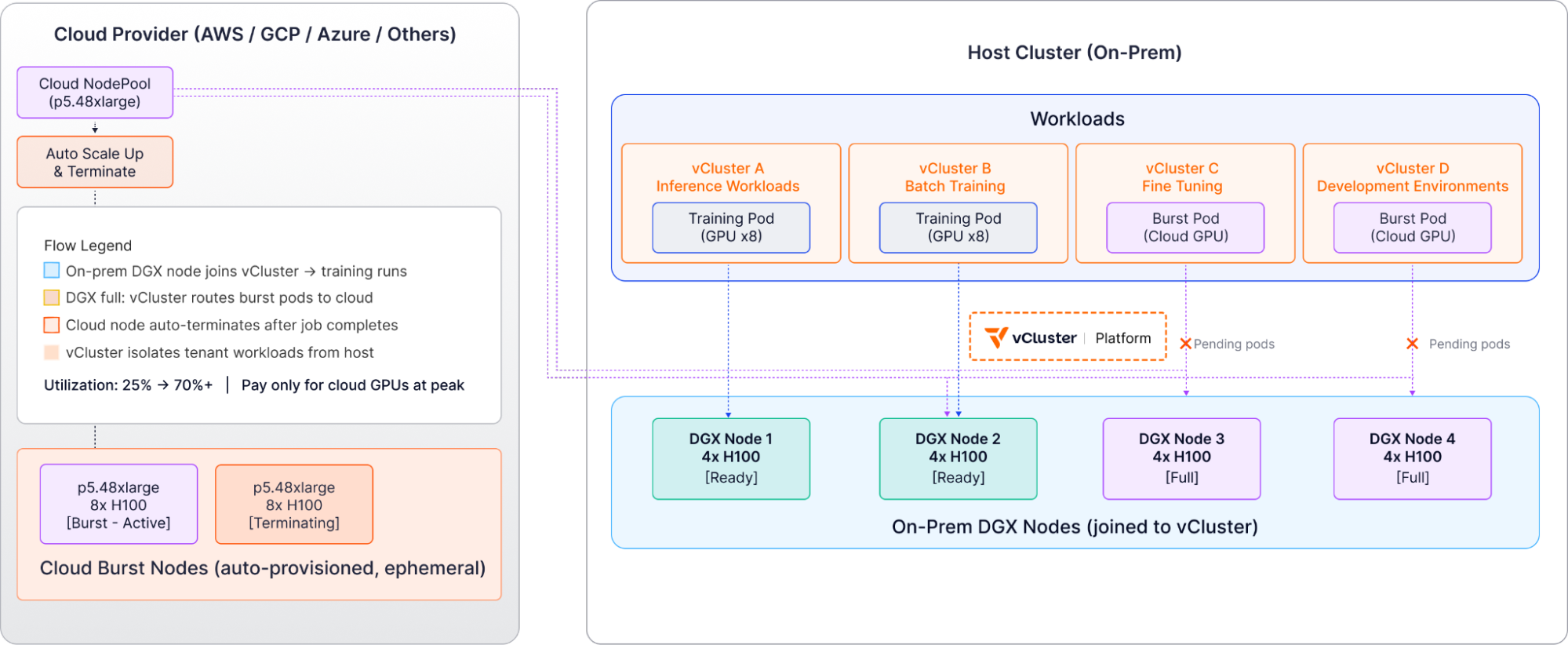
Consider an organization running an internal AI factory built on an NVIDIA DGX SuperPod containing 18 GPU nodes (144 H100 GPUs), with cloud accounts available for bursting.
Infrastructure Setup
The physical cluster runs on CPU nodes for control plane workloads, hosts vCluster Platform, and runs auxiliary services like monitoring and logging.
Virtual clusters are created for:
Production Tenant A (inference workloads)
Production Tenant B (batch training)
Production Tenant C (fine-tuning)
Development environments
Node pools include NVIDIA DGX nodes via BCM integration, AWS p5 instances for cloud burst, Azure ND-series for additional capacity, and MAAS bare metal from private cloud for CPU workloads.
Workflow Example
When a data scientist deploys a training job to Production Tenant B vCluster requiring 16 H100 GPUs, Karpenter sees the pending pods and vCluster Platform checks DGX capacity via BCM.
The system provisions 2 nodes from the DGX SuperPod, which join Production Tenant B vCluster (not the host cluster). Training runs with full GPU access, and upon completion, nodes return to the available pool.
For cloud burst scenarios, when all DGX capacity is utilized and an additional training job requires 8 H100s, vCluster Platform routes the request to the AWS provider and provisions a p5.48xlarge instance.
The node joins the vCluster temporarily, training completes on cloud resources, and the node automatically terminates.
This organization went from 25% utilization (wasting their DGX investment) to 70%+ utilization while only paying for cloud GPUs during peak demand.
Best Practices for AI Factory GPU Operations
1. Implement Resource Quotas at Virtual Cluster Level
Use Kubernetes resource quotas to enforce GPU limits per tenant:
This prevents any single tenant from consuming all available GPUs.
2. Separate Long-Running and Bursty Workloads
Assign different node pools to different workload types:
Training jobs: Long-running workloads on dedicated nodes
Inference: Bursty workloads sharing a pool of GPUs
Development: Shared nodes with vNode isolation
This improves overall utilization while ensuring stable performance for critical workloads.
3. Monitor GPU Utilization with DCGM
Standard Kubernetes metrics don’t cover GPU activity. Use NVIDIA’s DCGM-Exporter with Prometheus to track GPU utilization by tenant, memory consumption, temperature and power usage, and potential bottlenecks.
This visibility enables optimization and identifies which tenants need more or fewer resources.
4. Implement Cost Attribution
Use labels and annotations to track GPU usage by:
team or department
project or customer
environment (dev, staging, production)
Export this data to your FinOps tools for showbacks and chargebacks. Cost awareness drives responsible resource usage.
5. Use NVIDIA MIG When Available
NVIDIA Multi-Instance GPU (MIG) technology partitions a single physical GPU into up to seven isolated instances. When running on compatible hardware (Ampere generation and newer), MIG provides hardware-level memory isolation, dedicated compute resources per instance, and better utilization for smaller workloads.
Configure MIG partitions and expose them as separate GPU devices to Kubernetes.
Operational Efficiency Results
Organizations implementing this AI factory architecture typically see significant improvements.
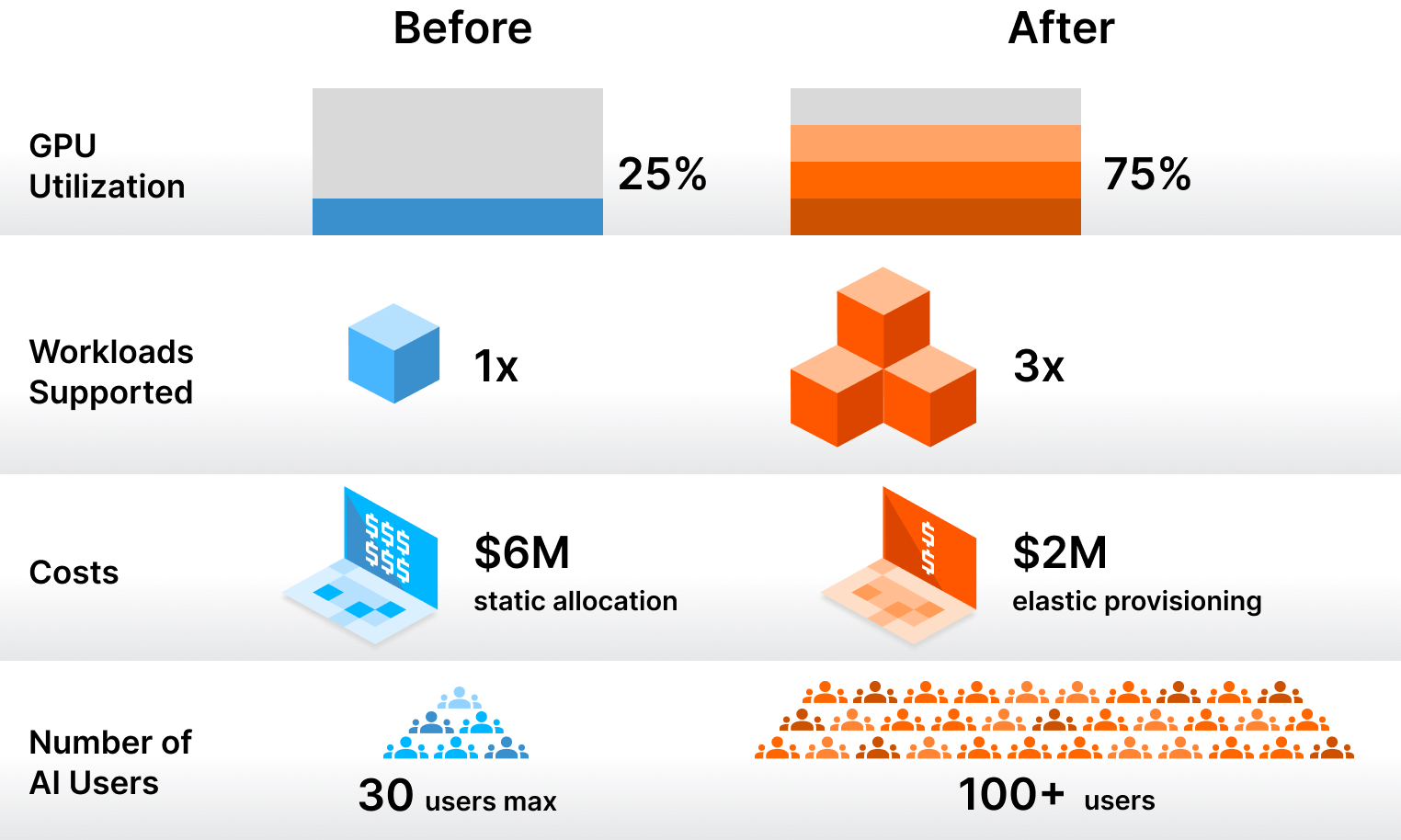
Utilization increases from 20–25% average GPU utilization to 65–75%, allowing the same GPU capacity to serve 3x more workloads. Costs are reduced from a $6M annual budget for 100 engineers with static allocation down to $2M with dynamic provisioning, representing a 67% cost reduction while improving engineer productivity.
Operational scale improves dramatically, with platform teams that previously struggled to support 20–30 data scientists now supporting 200+ users across multiple virtual clusters—a 10x scaling without proportional headcount increase.
Conclusion: Sustainable AI Factory Infrastructure
GPU infrastructure for enterprise AI doesn’t require frontier lab budgets or massive platform teams. The key is moving from static allocation to dynamic provisioning while maintaining strong isolation and cost controls.
Virtual clusters solve the logical isolation problem, giving teams their own Kubernetes environments without operational overhead. Auto Nodes solves the physical provisioning problem, dynamically allocating GPU nodes from any infrastructure based on workload requirements.
Together, these technologies enable organizations to build scalable internal AI factories that can support hundreds of engineers and data scientists, maintain 65–75% utilization rates, reduce infrastructure costs by 60–70%, and operate across hybrid environments spanning cloud and private GPU estates.
The AI era requires GPU infrastructure. Making it sustainable requires rethinking how we provision and manage compute resources.