GitOps and Kubernetes: The Rising Star of The Cloud World

Sep 2, 2020
|
min Read

Due to its enormous potential, GitOps is currently a very hot topic. Eliminating complex CI/CD pipelines, being developer friendly, and offering an automatically integrated authorization process for deployment are just a few of many advantages. Kubernetes, the holy grail of the cloud world, seems to be especially suitable for the implementation of this new paradigm and promises an easy integration. In this article, I will demonstrate how easy the integration of GitOps in Kubernetes really is and which potential obstacles need to be cleared to become a real GitOps superstar. Additionally, I will provide an example implementation of GitOps in a Kubernetes cluster.
GitOps, originally coined by Alexis Richardson at Weavework, has recently gained a lot of popularity. The core concept of GitOps is to use Git as the single source of truth that always contains a complete copy of the desired state of a system. The state is saved in a declarative way within config files and can thus be versioned in Git in the same way as any other source code. GitOps is usually implemented with tools that continually mirror the declarative state within Git with the actual system. This ensures that the system always has the same configuration as Git and vice versa.
GitOps is a logical extension of the infrastructure-as-code idea which allows to define infrastructure with code, mostly in public clouds. Architecturally, GitOps allows you to separate the continuous integration of an application from its actual deployment process. This is possible as the deployment process will no longer be executed via a pipeline directly in the Git-repository but by a remote watcher in the target system, which processes changes in the Git-repository asynchronously. Therefore, it is, for example, not necessary anymore to store the credentials of the production system in the CI/CD pipeline, which improves the security. It is also possible to define several target systems without having to change anything in the Git-repository or the CI/CD pipeline.
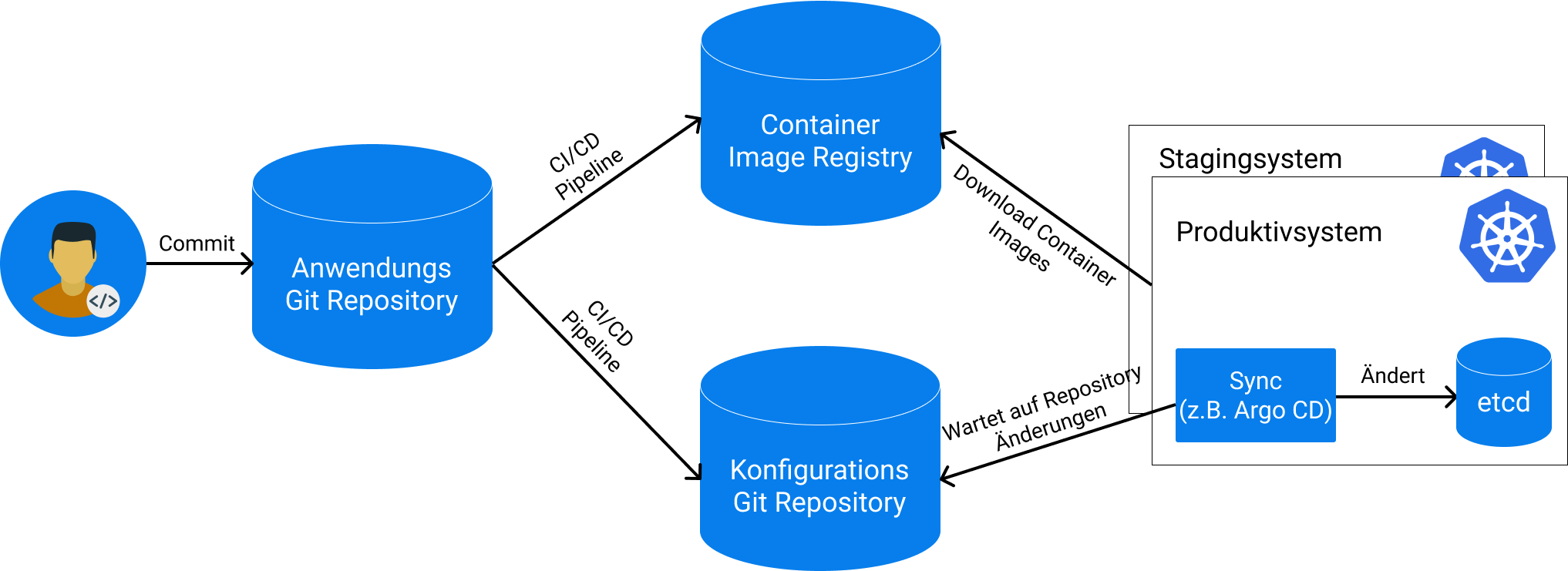
The use of git automatically comes with some additional advantages, such as integrated authentication, authorization processes, and a fast system recovery because the whole state of the system has been versioned.
Another big advantage of GitOps only becomes apparent at a second glance: The proximity to the developer. This is because Git is nowadays often common knowledge and developers work with it daily. Now, GitOps allows everybody who has the right to make changes in the versioning system to also make changes automatically in the target system, which eliminates and automates cumbersome intermediate steps. This reduces the effort on both sides: The developers can work with a tool they already know and the operations department spends less time with creating deployment dashboards and complex CI/CD pipelines.
While GitOps sounds promising, it requires that the target system can be configured declaratively and that the desired state can be described within configuration files. A declaratively configurable system is mainly characterized by the fact that a given problem can be described in a specific way, while the actual computation process to solve this problem is done by the system itself. One currently very popular example of such a system is Kubernetes.
Kubernetes is an open-source platform to manage containerized applications, that was created by Google in 2014 based on its extensive experience with executing production workloads at massive scale. Kubernetes itself is cloud agnostic, i.e. it can run in almost any public cloud as well as in private data centers and even on laptops at home. Together with its vast amount of features and widespread adoption, this has led to an enormous popularity, which is the reason why Kubernetes now has become the de-facto standard for container orchestration.
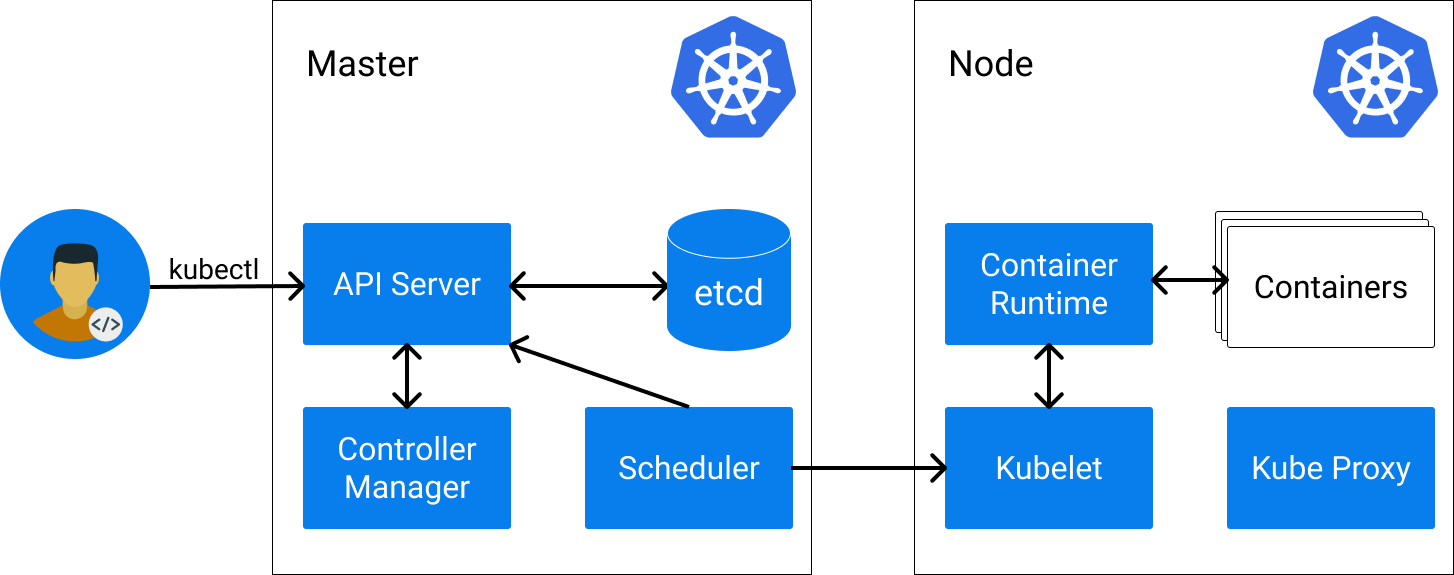
In Kubernetes, the desired state of a system is typically described declaratively in so-called Kubernetes resources in YAML format. These resources are the core of Kubernetes and are persisted in etcd, the data storage backend. The most important resources are nodes, pods, and services:
apiVersion: v1
kind: Node
metadata:
    name: docker-desktop
status:
    addresses:
    - address: 192.168.65.3
      type: InternalIP
    - address: docker-desktop
      type: Hostname
    allocatable:
      cpu: "4"
      ephemeral-storage: "56453061334"
      hugepages-1Gi: "0"
      hugepages-2Mi: "0"
      memory: 3932656Ki
      pods: "110"
...
apiVersion: v1
kind: Pod
metadata:
  name: nginx
spec:
  containers:
  - name: nginx
    image: nginx
It sounds like Kubernetes is a perfect fit for GitOps as the whole state of a Kubernetes cluster can relatively easily be mirrored in Git. For this, Kubernetes provides a native REST API that can be used to request and change resources. However, there are some pitfalls that need to be considered when implementing GitOps with Kubernetes:
With increased interest in GitOps, many tools that implement GitOps in Kubernetes and that take on the task of synchronizing the resources have emerged. One of the most popular tools in the area of GitOps and Kubernetes is Argo CD. Argo CD is an open-source, declarative, GitOps continuous delivery tool for Kubernetes. It has been available on GitHub since 2018 and has been developed by Intuit. In Argo CD, single applications that have a source repository and that should be synchronized into a target system are defined. Argo CD provides a wide range of features and integrations that allow you to adapt its behavior to your needs. The GitOps paradigm is its main focus and Argo CD tries to convey some best practices in this area without forcing its users to adopt them.
Argo CD is directly installed in the Kubernetes cluster as an operator via kubectl or helm and creates an own Kubernetes resource (CRD) to define the applications that should be synchronized into the cluster. All configurations are saved in Kubernetes resources which allows it to run Argo CD itself with the GitOps paradigm.
Argo CD provides a broad feature spectrum:
We are now going to deploy a little WordPress sample application with Argo CD to a Kubernetes cluster. With this we can show how it is possible to implement GitOps in a Kubernetes cluster. Before we begin, we obviously need a working Kubernetes cluster. There are many options to create a Kubernetes cluster but for this example, it is sufficient to install a test cluster such as docker desktop or minikube on your local computer. We further need the Kubernetes CLI tool kubectl that allows us to make changes to the cluster. When both are installed, we can check if the installation worked correctly with:
$ kubectl version
Client Version: version.Info{Major:"1", Minor:"18", GitVersion:"v1.18.3", GitCommit:"2e7996e3e2712684bc73f0dec0200d64eec7fe40", GitTreeState:"clean", BuildDate:"2020-05-20T12:52:00Z", GoVersion:"go1.13.9", Compiler:"gc", Platform:"darwin/amd64"}
Server Version: version.Info{Major:"1", Minor:"16+", GitVersion:"v1.16.6-beta.0", GitCommit:"e7f962ba86f4ce7033828210ca3556393c377bcc", GitTreeState:"clean", BuildDate:"2020-01-15T08:18:29Z", GoVersion:"go1.13.5", Compiler:"gc", Platform:"linux/amd64"}
We now are going to install Argo CD in the Kubernetes Cluster:
kubectl create namespace argocd
kubectl apply -n argocd -f https://raw.githubusercontent.com/argoproj/argo-cd/stable/manifests/install.yaml
With this, the Argo CD components are installed in the cluster, which may take a while depending on your internet connection. We can check the status of Argo CD with kubectl:
$ kubectl get po -n argocd
NAME                                             READY   STATUS              RESTARTS   AGE
argocd-application-controller-775fcd65b9-9n4bg   0/1     ContainerCreating   0          77s
argocd-dex-server-58dcbb59b5-rfbt2               0/1     Init:0/1            0          77s
argocd-redis-8c568b5db-vwltk                     0/1     ContainerCreating   0          77s
argocd-repo-server-b8f8b66c7-g8nn7               0/1     ContainerCreating   0          77s
argocd-server-6ccf9b54d9-fd8mg                   0/1     ContainerCreating   0          77s
Here, we see the different components and their statuses. The Argo CD components take on the following tasks:
After waiting for some time, all components should be started and show the status “Running”:
$ kubectl get po -n argocd
NAME                                             READY   STATUS    RESTARTS   AGE
argocd-application-controller-775fcd65b9-9n4bg   1/1     Running   0          7m54s
argocd-dex-server-58dcbb59b5-rfbt2               1/1     Running   0          7m54s
argocd-redis-8c568b5db-vwltk                     1/1     Running   0          7m54s
argocd-repo-server-b8f8b66c7-g8nn7               1/1     Running   0          7m54s
argocd-server-6ccf9b54d9-fd8mg                   1/1     Running   0          7m54s
Now, we forward the UI port of Argo CD to our local computer via kubectl in a separate terminal to make it available in our web browser:
$ kubectl port-forward svc/argocd-server -n argocd 8080:443
Forwarding from 127.0.0.1:8080 -> 8080
Forwarding from [::1]:8080 -> 8080
In the web browser, Argo CD should be now available at https://localhost:8080 (invalid certificates should be trusted).
The username for the login screen is admin and the password is the pod name of the Argo CD server, which can be displayed with the following command:
$ kubectl get pods -n argocd -l app.kubernetes.io/name=argocd-server -o name | cut -d'/' -f 2
argocd-server-6ccf9b54d9-fd8mg
After successful login, we want to start a little WordPress application. For this, we create the application namespace via kubectl:
$ kubectl create ns wordpress
namespace/wordpress created
Now, we click the “+ NEW APP” button in the Argo CD web interface and create a new application with the following settings:
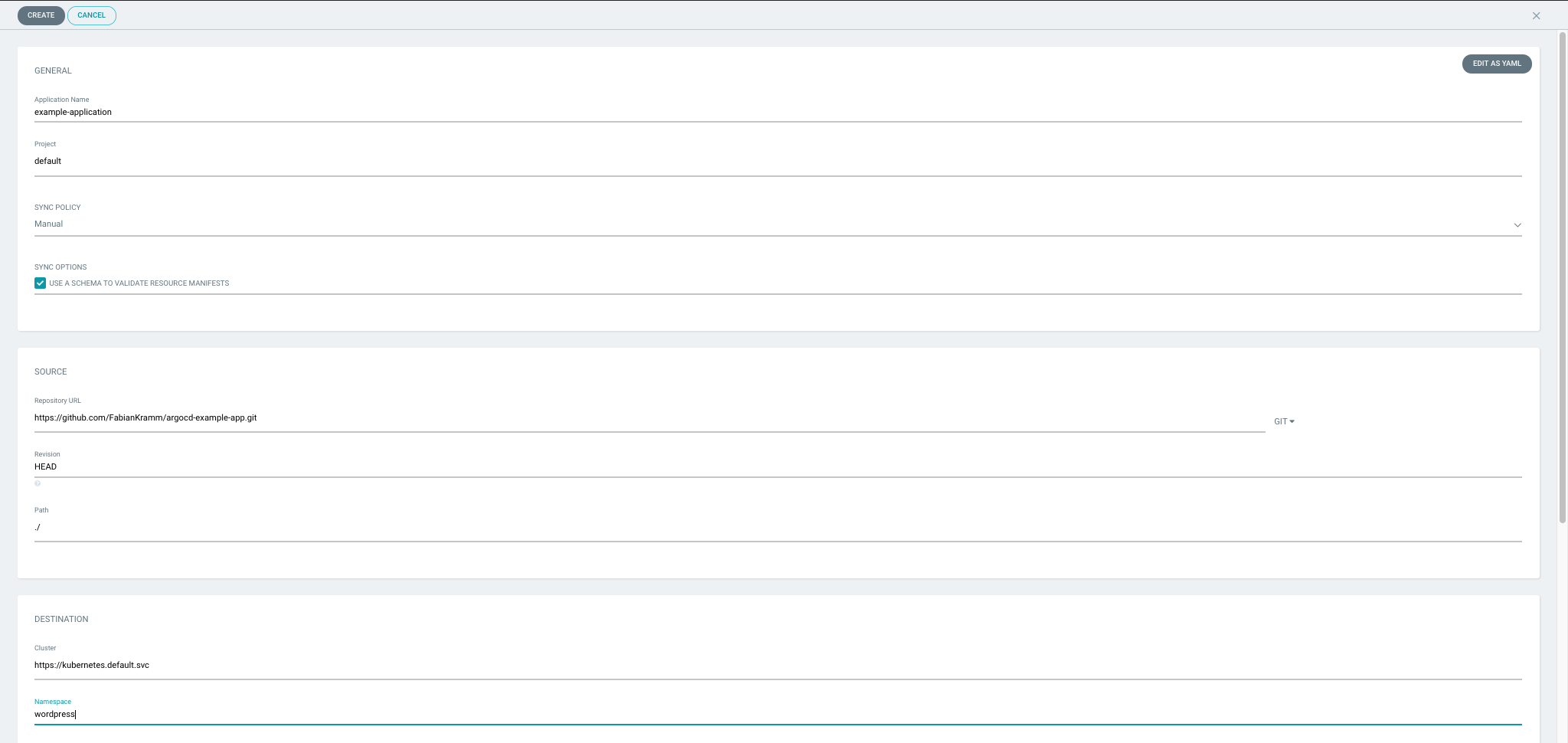
We confirm with “Create” and will see a new application with the current status “OutOfSync” in the main overview. After pressing the “Sync” button, the status of the application should be updated to “Synced” and “Healthy”:
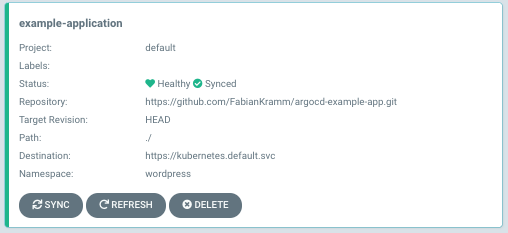
Argo CD has deployed our WordPress application to the Kubernetes namespace wordpress. We can check the successful installation of WordPress with kubectl locally:
$ kubectl get po -n wordpress
NAME                               READY   STATUS    RESTARTS   AGE
wordpress-966746c95-9rjjg          1/1     Running   0          14s
wordpress-mysql-576984556c-rmr85   1/1     Running   0          14s
$ kubectl port-forward -n wordpress svc/wordpress 8090:80
Forwarding from 127.0.0.1:8090 -> 80
Forwarding from [::1]:8090 -> 80
In the web browser, a fully functioning WordPress installation should now be available at http://localhost:8090. To demonstrate what Argo CD does when the state of the Kubernetes cluster changes unexpectedly, we now delete the WordPress deployment with kubectl:
$ kubectl delete deployment wordpress -n wordpress
deployment.apps "wordpress" deleted
Back in the Argo CD web interface, the status of the application should now be “OutOfSync” again. By pressing the “Sync” Button, the WordPress deployment should be recreated. Of course, we can also configure Argo CD in a way that automatic synchronization is started on every change in the cluster or in Git. For this, we click on the application and then press the “APP DETAILS” button at the top of the screen. In the “Sync Policy” section, we press “ENABLE AUTO-SYNC” to enable the automatic synchronization. Additionally, we set the option “Self Heal” to “ENABLE”.

We can now delete the WordPress deployment with kubectl again and see that Argo CD will immediately recreate the deployment and the state from Git is synchronized into the Kubernetes cluster.
Besides Argo CD, there are many other tools for the implementation of GitOps with Kubernetes:
GitOps is a promising new paradigm in the container world that makes it possible to simplify CI/CD processes and that reduces the effort for both developers and administrators. GitOps is the logical next step from the concept of infrastructure-as-code and is focused on Git as central single source of truth. Due to the easy synchronization between Git and target system, complex CI/CD pipelines and authorization processes are automatically eliminated.
The most important prerequisite of GitOps is a declaratively configurable target system as without such a system, GitOps can only be partly implemented. Kubernetes meets this requirement, but the implementation is still not a no-brainer and requires continuous monitoring and maintenance of the system. In the Kubernetes ecosystem, there are several open source tools that can do most of the work and provide some additional helpful features.
In the future, one can expect that these tools provide even more functionality and become fully mature. However, given the fact that GitOps is still a relatively new concept, these tools can already be used without much worries today.
This article was originally published in Informatik Aktuell in German language.
Photo by Benjamin Voros on Unsplash
Deploy your first virtual cluster today.
