Introduction to Virtual Clusters in Kubernetes

Aug 13, 2020
|
min Read

With the increasing adoption of Kubernetes within organizations, the need for Kubernetes access for applications and engineers is also growing. Since it is neither feasible nor cost-efficient to always use whole physical Kubernetes clusters, virtualization for Kubernetes is the obvious solution. In this article, I will describe an implementation of such a Kubernetes virtualization: Virtual clusters. I will also explain how virtual Kubernetes clusters work, how they can be used, and why they are a real alternative to current approaches for Kubernetes access.
We have a hands-on tutorial for Kubernetes virtual clusters if you are looking to get started.
The idea of virtualization within Kubernetes is not new: In the official Kubernetes documentation, namespaces are labeled "virtual clusters" that span a single physical cluster and provide a joint scope for related Kubernetes objects.
With Kubernetes namespaces, it is possible to create separate environments for multiple apps and users in the same Kubernetes cluster.
However, namespaces have some limitations: They cannot contain cluster scoped resources.
While this may seem obvious, a lot of applications actually need to create or at least access cluster scoped resources like nodes, cluster roles, persistent volumes and storage classes.
As soon as this happens, the application breaks its virtual namespace boundary and cannot be properly isolated from other applications anymore.
Problems go even further if applications need to create their own custom resource definition or extend the API server via an APIService.
To solve these issues and create securely isolated ephemeral environments for applications during testing and development, the pattern of spinning up small, throw-away Kubernetes clusters has emerged.
Spinning up small, throw-away Kubernetes clusters solves the problem of coping with cluster scoped resources and isolation, but it is very cost-inefficient and negates one of the key advantages of Kubernetes itself: Being an orchestration system.
Imagine the cost of a single cluster running 1000 containers vs 1000 Kubernetes clusters running a single container:
That is a lot of overhead, which can also result in a significant rise in your infrastructure bill (not even mentioning cluster management fees, such as in AWS and Google Cloud).
Another solution is to extend namespaces and to virtualize Kubernetes itself.
The idea of virtualizing a Kubernetes cluster is similar to virtualizing a physical machine: The host system is used for actual computing, while everything else is emulated.
There are already different implementations of the virtual cluster pattern in Kubernetes:
This article will mostly talk about how vCluster implements virtual Kubernetes clusters.
The basic idea of a virtual cluster is to spin up a new Kubernetes cluster within an existing cluster and sync certain core resources between those two clusters.
A host cluster runs the actual virtual clusters pods and needs to be a fully working Kubernetes cluster. The virtual cluster itself only consists of the core Kubernetes components: API server, controller manager and etcd.
To reduce overhead, vCluster originally built on k3s, and today supports multiple certified distributions.
Besides k3s, there is a Kubernetes syncer that emulates a fully working Kubernetes setup in the virtual cluster. This component syncs certain virtual cluster resources to the host cluster and back:
Besides the synchronization of virtual and host cluster resources, the syncer also redirects certain Kubernetes API requests to the host cluster, such as port forwarding or pod/service proxying. It essentially acts as a reverse proxy for the virtual cluster.
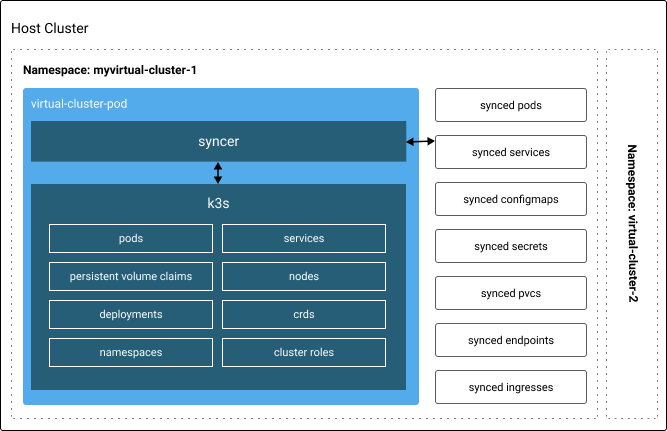
In the host cluster, all created resources by a virtual cluster are encapsulated in a single namespace (it is also possible to have multiple virtual clusters within a single namespace), which allows system admins to restrict resources of a virtual cluster via resource quotas.
With this architecture, virtual clusters improve isolation:
Since the virtual cluster is a working Kubernetes cluster itself, it is also even possible to install virtual clusters within virtual clusters.
To get started, visit the Quick Start page in the vCluster docs. Take note that the primary model today is private nodes, where each virtual cluster gets dedicated worker nodes: hard tenant isolation for production workloads, GPU tenancy, and AI infrastructure at scale. Visit our choose a worker node model docs to find out how to pick a suitable model for your use case.
We think virtual clusters are an interesting new technology that can drastically reduce cost and effort for several use cases, such as ephemeral environments.
Compared to the approach of creating many small independent clusters, virtual clusters have multiple advantages:
While virtual clusters seem promising, they also have some limitations that should be taken into consideration:
Update (2026): Both of these limitations describe virtual clusters as they worked when this article was written. In 2026, shared nodes is no longer the only model. With private nodes, a tenant cluster is assigned dedicated worker nodes instead: its own kubelet, container runtime, CNI, and storage classes, with no kernel shared with any other tenant. The first limitation disappears entirely under this model, and the second inverts — a tenant cluster on private nodes nearly matches standalone-cluster isolation while keeping the management benefits described above. Private nodes is what AI clouds, regulated platforms, and multi-customer offerings run for hard tenant isolation. Visit our docs for more details on the options vCluster offers today.
For a more detailed analysis of benefits and use cases of virtual clusters, take a look at this article.
Virtual clusters have the potential to become an important component in the Kubernetes ecosystem. Being more cost-effective and easier to manage than many small clusters while at the same time being better isolated than namespaces makes virtual clusters a superior solution for many use cases. Examples for this are scenarios in which engineers require access to Kubernetes such as testing, experimentation or cloud-native development. Virtual clusters could so help to foster Kubernetes diffusion in many organizations.
Deploy your first virtual cluster today.
