A first look at NVIDIA Cluster Readiness Engine, run inside a vCluster tenant cluster

Sep 2, 2026
|
19
min Read
NVIDIA's new Cluster Readiness Engine runs real GPU workloads and reports which nodes fail and why. I ran its v0.1.0 release against two A100 nodes attached to a tenant cluster as vCluster Private Nodes, to see what it can check before a GPU tenant cluster is handed to a customer.
A Kubernetes node can be Ready, while the distributed AI stack running on it is anything but ready.
The kubelet is healthy. The API server can reach it. A device plugin advertises nvidia.com/gpu. None of that shows that the GPUs on several nodes can form an NCCL communicator, move data at the expected rate, finish a distributed workload, or tell you which node is at fault when they cannot.
That is the gap NVIDIA's Cluster Readiness Engine targets.
NVIDIA published NVCRE v0.1.0 on 1 September 2026. It is a Kubernetes controller for GPU cluster burn-in and certification, aimed at teams that bring up, validate, or resell GPU clusters. The v0.1.0 catalog contains:
NVCRE detects the GPU architecture from the nvidia.com/gpu.product label and the platform from the Node providerID, then applies catalog overrides for that combination: EFA on AWS, TCPXO or RoCE on GCP, InfiniBand on Azure, and so on. Each run is composed from Kubernetes resources, the same way a Deployment composes ReplicaSets and Pods:
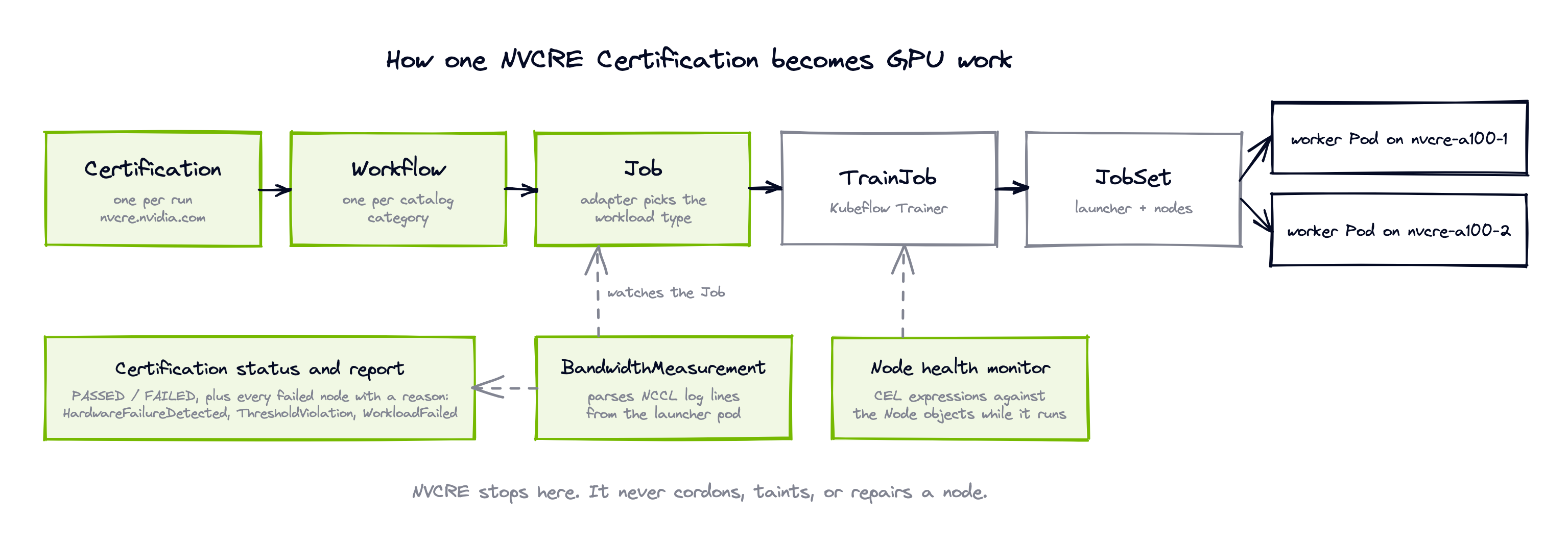
A BandwidthMeasurement parses NCCL output. A GoodputMeasurement parses training logs. CEL expressions watch node health while the workload runs. When a node fails, the Certification records it with one of three reasons: HardwareFailureDetected, ThresholdViolation, or WorkloadFailed.
NVCRE stops at evidence. It does not cordon, taint, drain, or repair anything. It is not a monitoring system or a benchmark leaderboard. It runs on any Kubernetes GPU cluster it supports.
An AI cloud provider does not hand customers its infrastructure cluster. It hands them a tenant cluster backed by an assigned set of GPU workers. That changes the readiness question from "is the fleet healthy?" to "can the exact Kubernetes API, CNI, GPU software stack, and worker set this customer will receive complete a distributed workload?"
vCluster Labs positions vCluster as the platform that turns raw GPUs into managed Kubernetes, Slurm, Ray, and inference clusters, each delivered as a tenant product. This lab uses only the Kubernetes tenant cluster. Every tenant cluster gets its own control plane, and the worker model sets the data-plane boundary:
Private Nodes are the fit for a burn-in test. NCCL and training workloads are meant to be punishing, and running them on workers other tenants share would cause interference. With Private Nodes, the test scope is exactly the capacity the tenant is about to receive. If a provider only wants fleet-wide hardware burn-in before assigning nodes, running NVCRE directly on the infrastructure cluster is simpler.
vCluster does not install GPU drivers or make accelerators appear. The node image, NVIDIA GPU Operator, device plugin, or DRA driver still own that layer. Private Nodes let the tenant cluster own it, instead of depending on the control plane cluster's GPU stack.
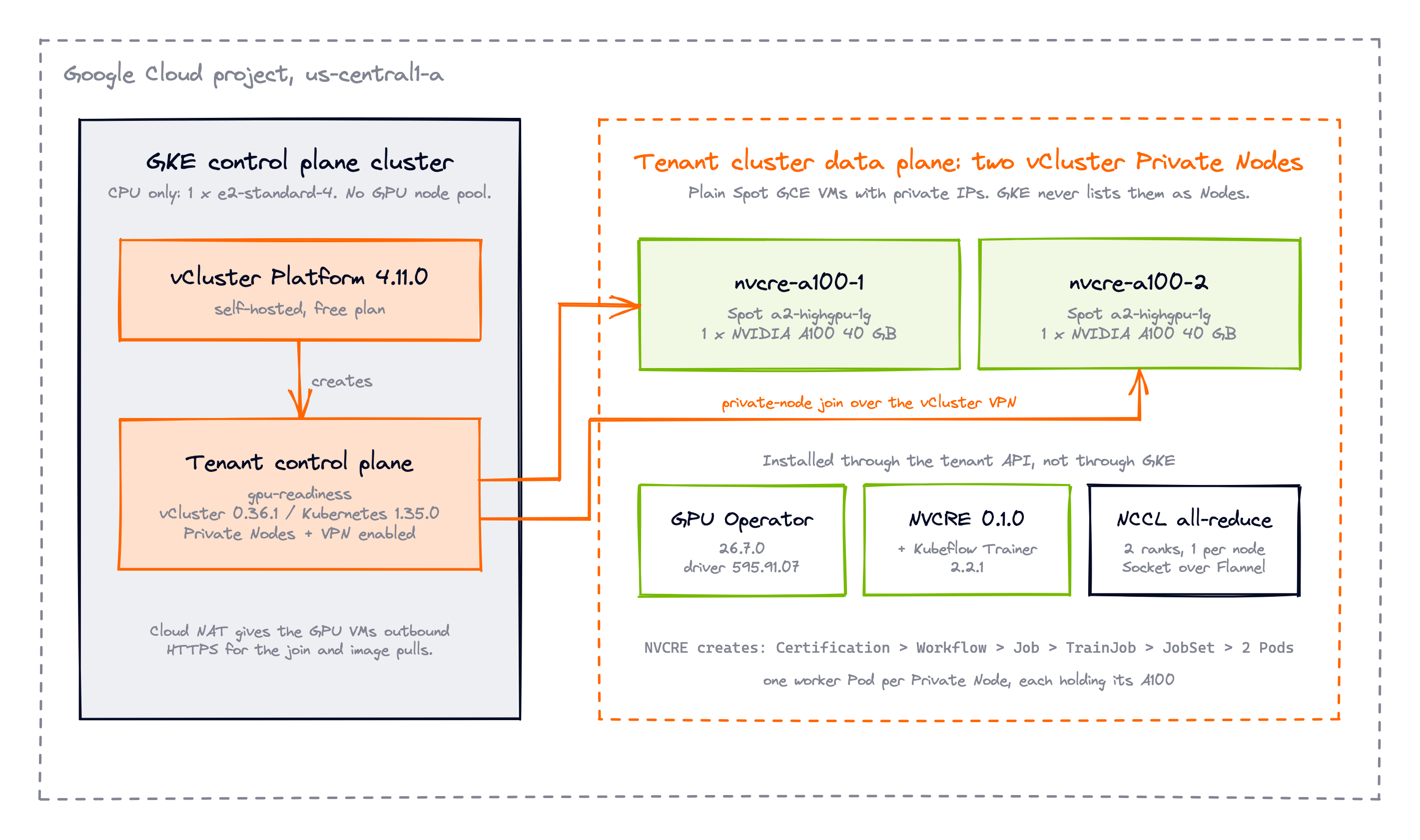
GKE has one e2-standard-4 CPU node. The two A100 machines are plain GCE VMs with private IPs, joined directly to the tenant cluster.
A small zonal GKE cluster hosts vCluster Platform and the tenant's virtual control plane. In the actual run, every command carried an isolated KUBECONFIG and a vcluster --config path so the lab could not touch my other clusters. Those flags are omitted below for readability, the project ID is a placeholder, and each command assumes the intended GKE or tenant kube context is active.
export GCP_PROJECT_ID="<your-gcp-project-id>"

gcloud container clusters create nvcre-vcluster-demo \
  --project "$GCP_PROJECT_ID" \
  --zone us-central1-a \
  --machine-type e2-standard-4 \
  --num-nodes 1 \
  --disk-type pd-balanced \
  --disk-size 50 \
  --network default \
  --subnetwork default \
  --release-channel regular \
  --enable-ip-alias \
  --enable-shielded-nodes \
  --workload-pool "${GCP_PROJECT_ID}.svc.id.goog" \
  --enable-autorepair \
  --enable-autoupgrade \
  --no-enable-basic-auth \
  --no-issue-client-certificate \
  --metadata disable-legacy-endpoints=true
The resulting cluster ran Kubernetes 1.35.7-gke.1027000 with one CPU node.
The GPU VMs will have no public IPs, but they need outbound HTTPS for the node join and image pulls. Cloud NAT covers that:
gcloud compute routers create nvcre-demo-router \
  --project "$GCP_PROJECT_ID" \
  --region us-central1 \
  --network default

gcloud compute routers nats create nvcre-demo-nat \
  --project "$GCP_PROJECT_ID" \
  --router nvcre-demo-router \
  --router-region us-central1 \
  --auto-allocate-nat-external-ips \
  --nat-all-subnet-ip-ranges \
  --enable-logging \
  --log-filter=ERRORS_ONLY
Install vCluster Platform on the GKE context:
vcluster platform start --version 4.11.0
Private Nodes require vCluster Platform, and the free plan supports them. One thing to know about a fresh self-hosted instance: my first vcluster create failed with license limits are exceeded even though usage was zero. The instance had not been activated yet. Activating it from the Platform configuration page in the Admin UI cleared the error.
Private Nodes must be chosen when the tenant cluster is created. An existing shared-node tenant cluster cannot be migrated to Private Nodes later. The exact values file used in this walkthrough is included as BLOG_VCLUSTER.yaml:
privateNodes:
  enabled: true
  vpn:
    enabled: true

controlPlane:
  distro:
    k8s:
      image:
        tag: v1.35.0

networking:
  podCIDR: 10.64.0.0/16
  serviceCIDR: 10.128.0.0/16
Create the tenant control plane:
vcluster create gpu-readiness \
  --namespace tenant-gpu-readiness \
  --driver helm \
  --chart-version 0.36.1 \
  --values BLOG_VCLUSTER.yaml \
  --add \
  --connect=false
The control plane came up with an empty node list:
kubectl get nodes
kubectl version | grep Server No resources found
Server Version: v1.35.0
A running control plane is not compute. The workers join next.
Two Spot A100 VMs, no public addresses, no attached Google Cloud service account:
gcloud compute instances create nvcre-a100-1 nvcre-a100-2 \
  --project "$GCP_PROJECT_ID" \
  --zone us-central1-a \
  --machine-type a2-highgpu-1g \
  --provisioning-model SPOT \
  --instance-termination-action DELETE \
  --maintenance-policy TERMINATE \
  --no-restart-on-failure \
  --image-family ubuntu-2204-lts \
  --image-project ubuntu-os-cloud \
  --boot-disk-type pd-balanced \
  --boot-disk-size 200GB \
  --boot-disk-auto-delete \
  --network default \
  --subnet default \
  --no-address \
  --metadata enable-oslogin=TRUE,block-project-ssh-keys=TRUE \
  --no-service-account \
  --no-scopes
The fresh hosts could see the PCI device but had no NVIDIA driver:
for VM in nvcre-a100-1 nvcre-a100-2; do
  echo "node=$VM"
  gcloud compute ssh "$VM" \
    --project "$GCP_PROJECT_ID" \
    --zone us-central1-a \
    --tunnel-through-iap \
    --quiet \
    --command 'lspci | grep -i nvidia; command -v nvidia-smi >/dev/null || echo "nvidia-smi: not installed"'
donenode=nvcre-a100-1
00:04.0 3D controller: NVIDIA Corporation GA100 [A100 SXM4 40GB]
nvidia-smi: not installed

node=nvcre-a100-2
00:04.0 3D controller: NVIDIA Corporation GA100 [A100 SXM4 40GB]
nvidia-smi: not installed
Connect to the tenant cluster and create a short-lived join token:
vcluster platform connect vcluster gpu-readiness \
  --project default \
  --background-proxy=false
To avoid printing the token, I captured the generated join command and streamed it to each VM over IAP:
TOKEN_OUTPUT="$(vcluster token create --expires=2h 2>&1)"
JOIN_CMD="$(printf '%s\n' "$TOKEN_OUTPUT" | \
  awk 'index($0,"curl -fsSLk"){sub(/^.*curl/,"curl"); print; exit}')"
unset TOKEN_OUTPUT

for VM in nvcre-a100-1 nvcre-a100-2; do
  printf '%s\n' "$JOIN_CMD" | \
    gcloud compute ssh "$VM" \
      --project "$GCP_PROJECT_ID" \
      --zone us-central1-a \
      --tunnel-through-iap \
      --quiet \
      --command 'sudo bash -s'
done
unset JOIN_CMD
Both nodes finished with:
This node has joined the cluster:
* Certificate signing request was sent to apiserver and a response was received.
* The Kubelet was informed of the new secure connection details.
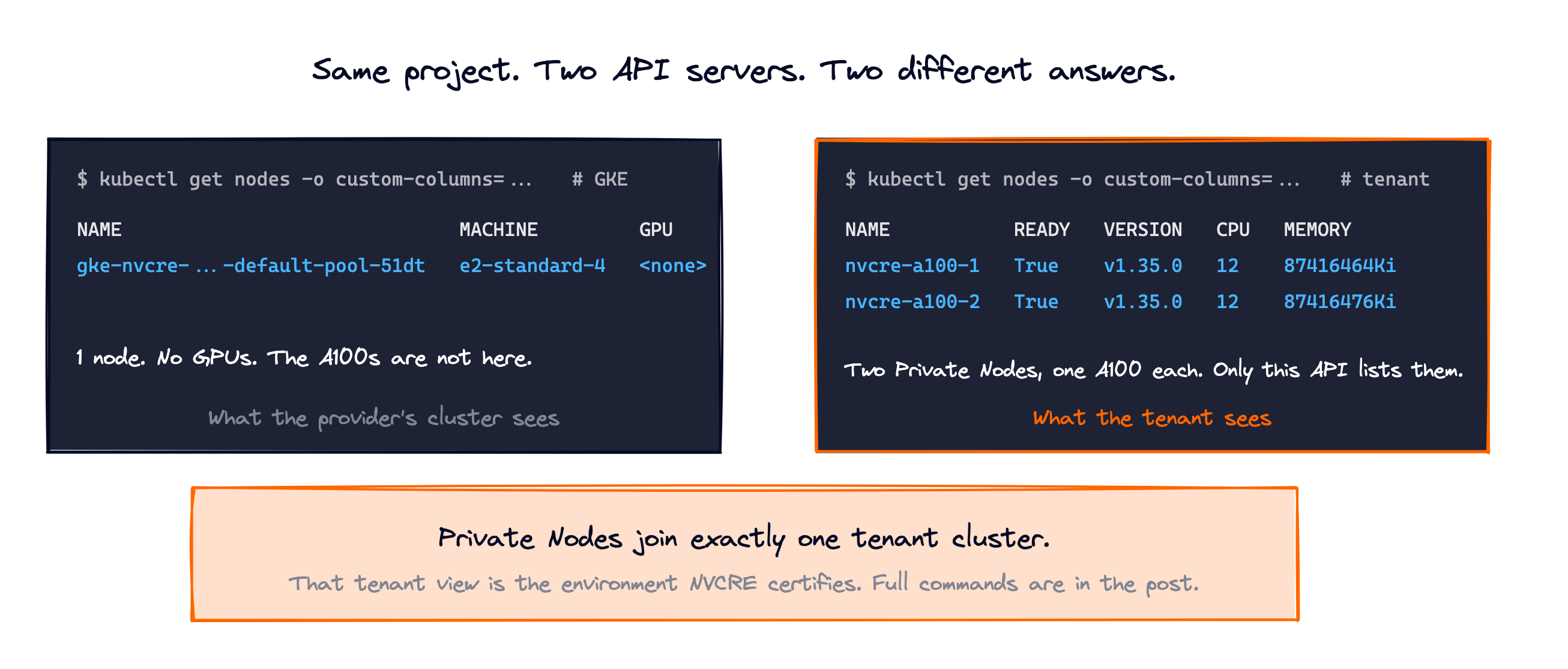
Now compare the two API views with a few custom columns. From the tenant cluster:
kubectl get nodes -o custom-columns=\
NAME:.metadata.name,\
READY:'.status.conditions[?(@.type=="Ready")].status',\
VERSION:.status.nodeInfo.kubeletVersion,\
CPU:.status.allocatable.cpu,\
MEMORY:.status.allocatable.memory
NAME           READY   VERSION   CPU   MEMORY
nvcre-a100-1   True    v1.35.0   12    87416464Ki
nvcre-a100-2   True    v1.35.0   12    87416476Ki
From GKE:
kubectl get nodes -o custom-columns=\
NAME:.metadata.name,\
MACHINE:'.metadata.labels.node\.kubernetes\.io/instance-type',\
GPU:'.status.allocatable.nvidia\.com/gpu'
NAME                                                 MACHINE         GPU
gke-nvcre-vcluster-demo-default-pool-710bfc59-51dt   e2-standard-4   <none>
GKE does not see either A100 as a Node. The tenant cluster sees only its two private workers. That is the boundary this lab is about.
vCluster installs Flannel by default for Private Nodes, so the tenant already had a pod network. The tenant owns these workers, so the NVIDIA GPU Operator goes into the tenant cluster:
kubectl create namespace gpu-operator
kubectl label --overwrite namespace gpu-operator \
  pod-security.kubernetes.io/enforce=privileged

helm install gpu-operator \
  oci://nvcr.io/nvidia/cloud-native-charts/gpu-operator \
  --version v26.7.0 \
  --namespace gpu-operator \
  --wait \
  --timeout 30m
GPU Operator built and loaded driver 595.91.07 for the nodes' 6.8.0-1066-gcp kernel. The ClusterPolicy reports the rollout state:
kubectl get clusterpolicy
NAME             STATUS   AGE
cluster-policy   ready    2026-09-02T09:33:51Z
GPU Feature Discovery then labels each node, and the device plugin advertises the GPU as allocatable:
kubectl get nodes -o custom-columns=\
NAME:.metadata.name,\
GPU-PRESENT:'.metadata.labels.nvidia\.com/gpu\.present',\
GPU-PRODUCT:'.metadata.labels.nvidia\.com/gpu\.product',\
GPU-COUNT:'.metadata.labels.nvidia\.com/gpu\.count',\
GPU-ALLOCATABLE:'.status.allocatable.nvidia\.com/gpu'
NAME           GPU-PRESENT   GPU-PRODUCT             GPU-COUNT   GPU-ALLOCATABLE
nvcre-a100-1   true          NVIDIA-A100-SXM4-40GB   1           1
nvcre-a100-2   true          NVIDIA-A100-SXM4-40GB   1           1
As a first smoke test, I ran the CUDA vector-add pod from the vCluster GPU guide, with restartPolicy: Never so a failure would stay visible instead of restarting. Save this as cuda-vectoradd.yaml:
apiVersion: v1
kind: Pod
metadata:
name: cuda-vectoradd
spec:
restartPolicy: Never
containers:
- name: cuda-vectoradd
image: nvcr.io/nvidia/k8s/cuda-sample:vectoradd-cuda12.5.0-ubuntu22.04
resources:
limits:
nvidia.com/gpu: 1kubectl apply -f cuda-vectoradd.yaml
kubectl wait --for=jsonpath='{.status.phase}'=Succeeded \
pod/cuda-vectoradd --timeout=300s
kubectl logs pod/cuda-vectoradd
[Vector addition of 50000 elements]
Copy input data from the host memory to the CUDA device
CUDA kernel launch with 196 blocks of 256 threads
Copy output data from the CUDA device to the host memory
Test PASSED
Done
That shows one container can use one accelerator. It says nothing about whether two nodes can run a collective together.
NVCRE's Helm chart creates a ServiceMonitor by default. The tenant cluster had no Prometheus Operator, so I installed only the CRDs rather than a second monitoring stack:
helm install prometheus-operator-crds \
  oci://ghcr.io/prometheus-community/charts/prometheus-operator-crds \
  --version 31.0.1 \
  --namespace monitoring \
  --create-namespace \
  --wait
The release ships an installer for the nvcrectl CLI, which also registers it as a kubectl nvcre plugin:
curl -fsSL \
  https://github.com/NVIDIA/cluster-readiness-engine/releases/download/v0.1.0/installer \
  | bash -s -- -v v0.1.0
I was working from a source checkout of the same tag, so I built the binary with the release version string:
go build -ldflags '-s -w -X main.version=v0.1.0' \
  -o bin/nvcrectl ./cmd/nvcrectl/

./bin/nvcrectl --version
nvcrectl version v0.1.0
The commands below show ./bin/nvcrectl. With the installer, use nvcrectl instead.
Before installing the controller, nvcrectl cluster info reads the node inventory:
./bin/nvcrectl cluster info
Platform:     onprem
GPU:          NVIDIA-A100-SXM4-40GB (a100, 1 GPUs/node)
Nodes:        2 ready
Total GPUs:   2

The catalog assumes 8 GPUs per node for a100. Set gpusPerNode in the
certification, or the pods ask for more GPUs than a node has.
Two things in that output shaped the rest of the run.
The catalog assumes DGX-style eight-GPU A100 nodes. These are single-GPU A2 instances, and NVCRE read the allocatable count and told me to override the default rather than failing later at scheduling time.
The platform shows as onprem. NVCRE recognizes GCP by a gce:// Node provider ID, but manually joined Private Nodes carry vcluster:// IDs. For a generic A100 test over sockets that is harmless, since none of the GCP overrides apply to this hardware anyway. A production setup that wants GCP-specific catalog overrides needs accurate cloud provider IDs from its node bootstrap or a cloud controller manager.
Install NVCRE and Kubeflow Trainer:
./bin/nvcrectl setup init --auto-approve
./bin/nvcrectl setup status
Setup installed Kubeflow Trainer 2.2.1, seven NVCRE CRDs, the controller, RBAC, and the built-in log profiles:
NVCRE CRDs                      installed
NVCRE Controller                installed
Kubeflow Trainer                installed (v2.2.1)
Log Profiles                    installed
GPU Operator                    installed
Helm release nvcre              deployed
Helm release kubeflow-trainer   deployed
Status: ready
Standalone DCGM stayed off. Only the diagnostics/dcgm-level4 category needs it.
Before configuring the final lab check, I ran the NCCL category once without a threshold to observe the tenant's actual network path. NCCL found no InfiniBand device and selected Socket over Flannel, and the partial NVCRE report recorded 0.60 GB/s at 128 MB. The catalog's default sweep (16 GiB messages, 100 timed iterations, 10 cycles) is far longer than this non-RDMA path warrants, so I captured the partial report and deleted that temporary Certification. Deleting it removed only its owned test resources; the tenant cluster, the A100 workers, the GPU stack, and the NVCRE installation stayed in place.
For the final smoke test I reduced the timed work to three iterations and one cycle (the documented maxBytes knob is unusable in v0.1.0, see the field notes) and added a threshold. NVCRE ships no thresholds, and without one a run can only end Succeeded, so the 0.5 GB/s check exists to exercise the pass/fail evaluation. It sits just under the measured baseline and is not an A100 performance recommendation. Save this as BLOG_CERTIFICATION.yaml:
apiVersion: nvcre.nvidia.com/v1alpha1
kind: Certification
metadata:
  name: vcluster-a100-gate
  namespace: nvcre-blog
spec:
  target:
    nodeSelector:
      nvidia.com/gpu.product: NVIDIA-A100-SXM4-40GB
  nodesPerJob: 2
  gpusPerNode: 1
  categories:
    - domain: communication
      variant: nccl-all-reduce
      options:
        numIterations: 3
        numCycles: 1
        thresholds:
          busBandwidthGBps: "value >= 0.5"
Two validation steps before running it. Server-side dry run checks the Certification against the live API:
kubectl apply --dry-run=server -f BLOG_CERTIFICATION.yaml
certification.nvcre.nvidia.com/vcluster-a100-gate created (server dry run)
Then nvcrectl certification render --dry-run shows what NVCRE will generate from it and validates those resources against the API server as well:
./bin/nvcrectl certification render --dry-run \
  --namespace nvcre-blog \
  --output json \
  BLOG_CERTIFICATION.yaml
The TrainingRuntime and NVCRE Job came back OK. The TrainJob came back with the expected warning that its TrainingRuntime is created at runtime. Pulled from the rendered JSON:
Nodes:             2
Processes/node:    1
NCCL maximum:      16G
Iterations:        3
Cycles:            1
Threshold:         value >= 0.5
Then the run:
./bin/nvcrectl certification run \
  --cert-file ./BLOG_CERTIFICATION.yaml \
  --wait \
  --timeout 30m \
  --results-file ./BLOG_NVCRE_GATE_RESULTS.json
╔════════════════════════════════════════════════════════════════╗
║                      Certification Report                      ║
╚════════════════════════════════════════════════════════════════╝

  Name:      vcluster-a100-gate
  Platform:  onprem
  GPU:       a100
  Nodes:     2

┌────────────────────────────────────────────────────────────────┐
│  communication/nccl-all-reduce                                 │
├────────────────────────────────────────────────────────────────┤
│  Status:    Succeeded                                          │
│  Runtime:   5m 54s                                             │
│  Scale:     full-scale                                         │
│  Nodes/Job: 2                                                  │
│  Jobs:      1                                                  │
│                                                                │
│  Bandwidth:                                                    │
│    Size       AlgBW        BusBW        Samples                │
│    4 GB       0.55 GB/s    0.55 GB/s    1                      │
└────────────────────────────────────────────────────────────────┘

┌────────────────────────────────────────────────────────────────┐
│  Summary                                                       │
├────────────────────────────────────────────────────────────────┤
│  Categories:   1/1 passed                                      │
│  Failed Nodes: none                                            │
│  Result:       PASSED                                          │
└────────────────────────────────────────────────────────────────┘
The NVCRE Job's conditions show the pass included threshold evaluation, not just a zero exit code. ValidationFailed=False with reason ThresholdsMet carries the message "All performance thresholds satisfied":
kubectl get jobs.nvcre.nvidia.com -n nvcre-blog \
  -o jsonpath='{range .items[0].status.conditions[*]}{.type}={.status} reason={.reason}{"\n"}{end}'
InProgress=False reason=NotApplicable
Succeeded=True reason=WorkloadCompleted
Failed=False reason=NotApplicable
ValidationFailed=False reason=ThresholdsMet
One detail on the bandwidth row. The raw NCCL log ran through an 8 GiB message size with zero out-of-bounds values, but NVCRE reads pod logs in bounded windows with an 8 MiB cap per fetch, and for this verbose run the finalized BandwidthMeasurement held samples through 4 GiB. The report labels that row 4 GB. The same results are written as JSON by the --results-file flag.
The full tenant-stack path works:
This lab stopped at a machine-readable report. The obvious next step is to make the report a decision:
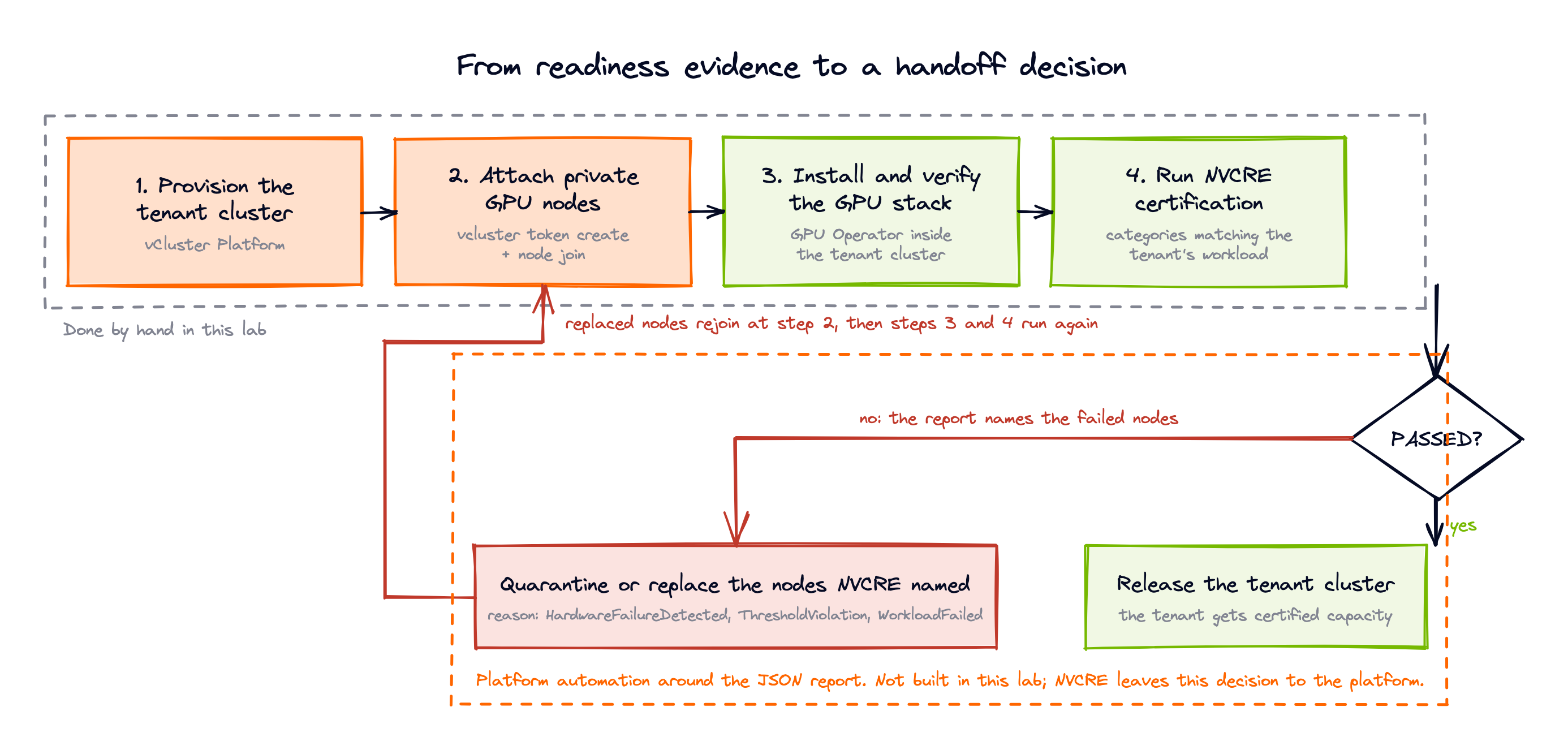
NVCRE writes the report as JSON and names each failed node with a reason, so the handoff can be a pipeline decision rather than a ticket or a screenshot. What happens to a failed machine stays the platform's call.
"Node Ready" is a Kubernetes control plane statement. "GPU cluster ready" is an infrastructure claim, and infrastructure claims need evidence under load.
In this lab, two A100 machines stayed invisible to the provider's Kubernetes node view, appeared inside one tenant cluster, received their own GPU stack, completed a two-node NCCL workload, and produced a threshold-evaluated report. That is more than kubectl get nodes can tell you, but it is still a smoke test. Turning it into a handoff gate takes the intended fabric, representative thresholds, correct platform detection, and automation around the report.
Private Nodes give each tenant cluster dedicated workers that never appear in the control plane cluster. If you want to try the join flow yourself, start with the Private Nodes quick start.
Deploy your first virtual cluster today.
