Build Managed Inference Clusters with vCluster Stacks: A Reference Architecture

Nov 17, 2026
|
9
min Read

Serving one model behind an OpenAI-compatible endpoint is a weekend project. Serving a private endpoint to every customer is a platform: an inference engine, a model, a gateway that checks keys, limits request rates, and counts tokens, a hostname and certificate per customer, metrics that know which customer sent which request. Underneath are the machines, and all of it has to come up in the right order, isolated from the next customer.
Many services solve this by sharing: serverless inference puts every customer on one pool. Managed inference gives each customer their own cluster and endpoint instead. For an AI Cloud provider, that’s an inference offering to sell under its own brand. For an enterprise AI factory, it’s a private endpoint for every internal team, with models and data kept in-house. Either way, your users see an endpoint, and everything else is yours to run.
The managed inference solutions page covers why operators compose this service themselves, rather than build it from scratch or adopt a fixed one. This post shows how, with a reference implementation built with vCluster Stacks. Each customer or team gets their own tenant cluster on Private Nodes with its own endpoint, hostname, certificate and API key, and every token is metered at a shared gateway and turned into showback. The service itself is one Stack per customer, on a small platform you set up once, all of it open, forkable, driven by API, and small enough to run on a single machine.
Your users see an endpoint; everything else is yours to run. Creating a tenant cluster from one template gives that customer:
<tenant-cluster>.<project>.<domain>, with its own TLS certificate. Any OpenAI SDK works against it.chat.<tenant-cluster>.<project>.<domain>, metered through the same gateway.The operator, or individual user, chooses the model, the engine, and the node size per tenant cluster, as template parameters. NVIDIA Dynamo is the certified engine, covered below; this walkthrough uses the KubeAI community Stack (Ollama or vLLM) so the whole service runs on a laptop.
The solutions page describes four steps: machines, a cluster for each customer, an inference Stack and an endpoint. In this implementation, KubeVirt VMs are the machines, each customer's tenant cluster runs on them as Private Nodes, a KubeAI Stack serves the model, and a shared gateway publishes and meters each endpoint. Any layer can be swapped for another tool. The managed inference service is one Stack, installed by the tenant cluster template for each customer. It hooks into a minimal platform of two Stacks that you install once in the control plane cluster.
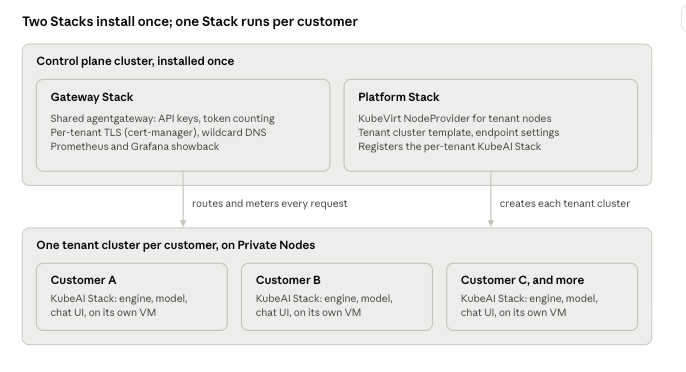
The platform, set up once
The gateway and platform Stacks pass values to each other instead of being configured twice: the gateway Stack publishes its domain and TLS settings in a contract ConfigMap, and the platform Stack reads that contract to fill in the tenant cluster template.
The managed inference service, per customer
The template installs the KubeAI Stack into each customer’s tenant cluster and runs a small endpoint app in that tenant cluster's namespace in the control plane cluster. It attaches the tenant's HTTPS listener, route and API key policy to the shared Gateway and keeps the backend pointed at the tenant's node, so adding a customer never edits the Gateway itself.
The complete architecture, every object the Stacks create and how requests and metrics move between them, ships with the Stack:
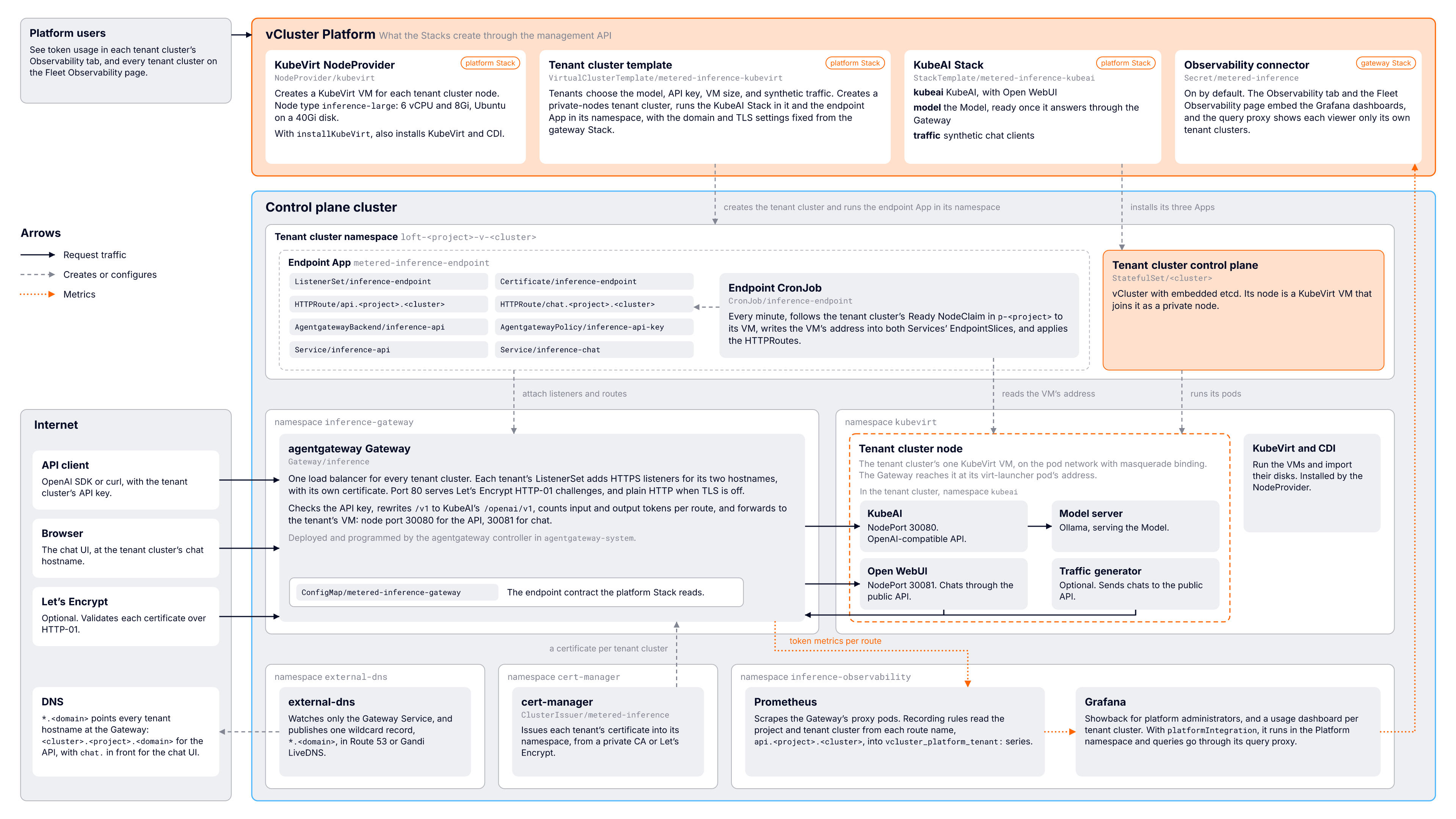
Full reference architecture, from the metered-inference README in loft-sh/vcluster-stacks.
A request to https://<tenant-cluster>.<project>.<domain>/v1 takes four hops:
*.<domain>, points at the Gateway's load balancer. external-dns publishes it once, so a new tenant cluster's hostname resolves the moment it exists.ListenerSet in the tenant cluster's namespace gives the shared Gateway an HTTPS listener for that tenant's hostnames, with a certificate cert-manager issued into that namespace. Tenants never share a key, and adding one never changes the Gateway.HTTPRoute named api.<project>.<cluster> requires the tenant's API key and forwards to an AgentgatewayBackend that treats KubeAI as an OpenAI provider. Because the Gateway parses every request and response, it counts input and output tokens, streamed responses included.A token becomes showback in three steps:
gen_ai metrics: token usage by type, request duration, time to first token and time per output token, each labeled with the route and the model.The chat UI is metered the same way: Open WebUI calls the tenant's public endpoint, so its tokens pass through the Gateway too.
Everything here runs on vCluster Free, on a single machine. The quick start uses every default: KubeVirt is installed for you, endpoints get <gateway-address>.sslip.io hostnames, and certificates come from a private CA. All you need is a node with hardware virtualization (/dev/kvm) that can run a 6 vCPU, 8 GiB VM. On a Mac with at least 32 GiB of memory, Colima works:
colima start -p inference-stack -k --cpu 12 --memory 24 --disk 60 \
  --nested-virtualization -r containerd --network-address
Install vCluster Platform, then register the two control plane Stacks and their Apps from the repository root:
vcluster use driver helm
vcluster platform start

kubectl apply -f community-stacks/metered-inference/gateway/apps/ \
  -f community-stacks/metered-inference/gateway/stacktemplate.yaml
kubectl apply -f community-stacks/metered-inference/platform/apps/ \
  -f community-stacks/metered-inference/platform/stacktemplate.yaml
Install the gateway Stack, then the platform Stack, waiting for each:
kubectl -n p-default apply -f community-stacks/metered-inference/gateway/example/stackinstance-self-signed.yaml
kubectl -n p-default wait --for condition=Ready stackinstance metered-inference-gateway --timeout 15m

kubectl -n p-default apply -f community-stacks/metered-inference/platform/example/stackinstance.yaml
kubectl -n p-default wait --for condition=Ready stackinstance metered-inference-platform --timeout 15m
Now create a customer and include a synthetic traffic generator so that we can see some sample metered usage. Every choice is a template parameter:
APIKEY=$(openssl rand -hex 24)
vcluster platform create vcluster inference-1 --project default \
  --template metered-inference-kubevirt \
  --set-params modelURL=ollama://qwen2.5:1.5b \
  --set-params modelId=qwen2-5-1-5b \
  --set-params nodeType=inference-large \
  --set-params nodeCount=1 \
  --set-params apiKey=$APIKEY \
  --set-params trafficGenerators=1
After a few minutes, while the VM boots and the model downloads, the tenant cluster shows a Chat UI link in vCluster Platform, and its Observability tab starts showing requests and tokens, including the synthetic traffic.
The API is OpenAI compatible. Send the API key as a Bearer token and the model ID as model:
BASE=https://inference-1.default.<domain>/v1

curl -s "$BASE/chat/completions" -H "Authorization: Bearer $APIKEY" \
  -H 'Content-Type: application/json' \
  -d '{"model": "qwen2-5-1-5b", "messages": [{"role": "user", "content": "Hello"}]}'
Any OpenAI SDK works the same way:
from openai import OpenAI

client = OpenAI(base_url="https://inference-1.default.<domain>/v1", api_key="<apiKey>")
reply = client.chat.completions.create(
    model="qwen2-5-1-5b",
    messages=[{"role": "user", "content": "Hello"}],
)
print(reply.choices[0].message.content)
With the self-signed issuer from the quick start, pass the private CA (--cacert metered-inference-ca.crt for curl).
NVIDIA Dynamo is the certified engine for managed inference clusters on vCluster. The quick start uses the KubeAI community Stack because it runs on a CPU VM; on GPUs, the certified nvidia-dynamo Stack is the supported starting point.
It's deliberately small. One task, runtime, installs NVIDIA's dynamo-platform Helm chart into the destination the StackInstance selects, either a tenant cluster or a control plane cluster:
Once the Stack is healthy, models are served with DynamoGraphDeployment resources. Installing it into a tenant cluster takes one StackInstance:
vcluster platform connect management
kubectl apply -n p-default -f certified-stacks/nvidia-dynamo/example/stackinstance-tenant-cluster.yaml
It has two parameters (version, default 1.5.0, and namespace, default dynamo-system), needs Kubernetes 1.30 or later and a default StorageClass in the destination, and installs at most once per destination, because the operator and its CRDs are cluster-scoped. The runtime itself needs no GPUs; the models you deploy afterwards do.
Because the engine is one task in one Stack, every other engine is a Stack away. One note for anyone combining the two today: the metered-inference Stacks wire KubeAI to the gateway, and a Dynamo-based tenant Stack that keeps the same gateway, endpoint and metering Stacks hasn't been built yet. It's the natural next Stack for the catalog.
The quick start gets its nodes from KubeVirt VMs. On GPU hardware, the nodes come from bare metal, and the same Stacks model reaches all the way down.
Dan Welch's vcluster-nico-stack installs NVIDIA Infra Controller (NICo) with two StackTemplates instead of NVIDIA's 16-phase shell installer:
nico-site stands up a NICo site in 19 tasks, from the Postgres operator to machines attached to an instance type. It publishes three outputs: the site ID, the IP block ID and the instance type ID.nico-platform reads those outputs and turns them into vCluster Platform objects: a NodeProvider, an OS image, a tenant and a network environment.From there a tenant cluster claims machines the same way the inference template claims VMs: a NodeClaim against the NodeProvider.
The repository's README is worth reading for anyone authoring large Stacks: it covers threading runtime values through task outputs (a Vault root token, database credentials, a site ID), using hook Jobs for scripted steps, and the 20-task limit per template.
Inference isn't the only service built this way. Dan also built a Slinky Stack that deploys Slurm into a tenant cluster, and it follows the same contract as the inference template: the AI Cloud collects a few parameters from the customer, the Stack installs the service in order, and its outputs hand back what the customer needs. For inference, that's an endpoint and an API key; for Slurm, it's the login node's address and port.
Dan's template runs Slurm on Private Nodes, the same model the inference service uses. His demo mounts NFS in a way he called demo-only, so treat it as a pattern rather than a production Stack until it lands in the catalog.
Put together, an AI Cloud can offer managed inference next to managed Slurm, Kubernetes and NVIDIA Run:ai clusters, each defined as Stacks and provisioned from the same machines.
The metered-inference Stacks are a community Stack, not a certified one, and the README is direct about what to harden:
The current version also has known limits: one API key and one VM per tenant cluster, no rate limiting at the gateway, endpoint updates within a minute rather than instantly, and node addresses found through KubeVirt only. Each is listed in the README with the reason, so you can decide which ones matter for your service.
For the business case and the options for AI Cloud providers and AI factories, see the managed inference solutions page or contact us to schedule a demo.
Deploy your first tenant cluster today.
