Syncing Custom Resources from Tenant Clusters, Part 2: Enforcing Istio Policies with Patches

|
19
min Read

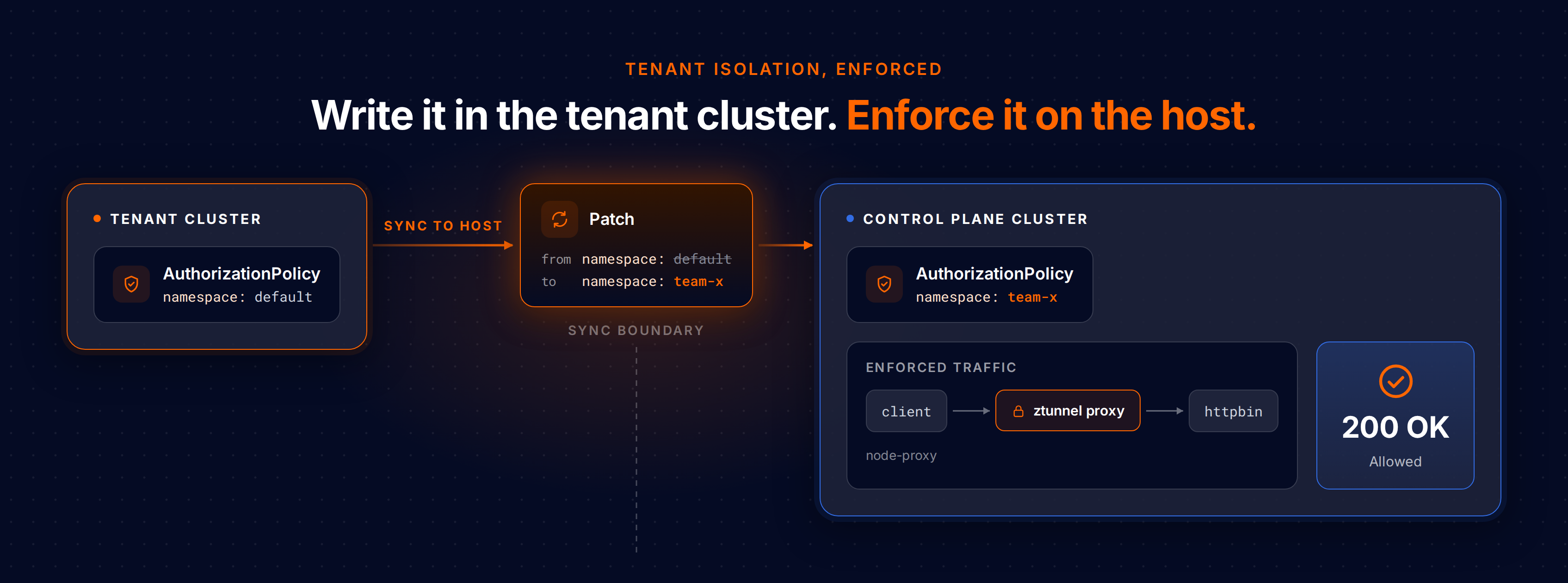
In Part 1 we got an AuthorizationPolicy to sync out of a tenant cluster and onto the control plane cluster, where Istio can read it. This led to something that started failing quietly. The policy synced without errors, but on the control plane cluster it still said from namespace default, even though the tenant's workloads actually run in the team-x namespace on the control plane cluster. At the time it was just a string in a YAML field. Nothing was enforcing it yet.
In this part we turn enforcement on, notice that a connection gets rejected because the namespace reference is wrong, and then fix it with a vCluster feature called patches. This patch rewrites the namespace as the policy crosses the sync boundary. Then we look at the other things patches can do, because the same problem shows up all over Istio mesh config.
This is Part 2 of a three-part series. Part 1 got the policy to sync. Here we make it enforce correctly. In Part 3 we bake the whole setup into a template so every tenant gets it automatically.
Quick recap. A developer writes this policy inside their tenant cluster:
apiVersion: security.istio.io/v1
kind: AuthorizationPolicy
metadata:
  name: httpbin-allow
  namespace: default
spec:
  selector:
    matchLabels:
      app: httpbin
  action: ALLOW
  rules:
    - from:
        - source:
            namespaces: ["default"]
Inside the tenant cluster this reads exactly the way we would expect: allow calls to httpbin from the default namespace, where the caller lives. Custom resource sync copies this to the control plane cluster. But vCluster lands the tenant's pods in team-x on the control plane cluster, and the rule's namespaces: ["default"] gets copied over. The policy points at default but the pods are in team-x. The mismatch stays unnoticed until something enforces it.
Istio can only enforce an AuthorizationPolicy on workloads that are actually in the mesh, and vCluster's Istio integration is what puts them there using Istio ambient mode. Ambient mode runs a proxy on every node called ztunnel, which sits in front of each meshed pod and watches the TCP connections going in and out. When a policy says no, ztunnel drops the connection before the application ever sees it, so the caller gets a connection reset instead of an HTTP response.
One practical note before we start: ztunnel intercepts TCP but handles DNS (UDP) differently. To keep this part focused on policy enforcement rather than DNS routing, we will use the service's ClusterIP in our curl commands. In production we would use service names as usual, so treat the ClusterIP here as just a reliable test handle.
Turning enforcement on needs three things that the minimal Istio install from Part 1 did not include: the Gateway API CRDs on the control plane cluster, Istio running in ambient mode, and vCluster's Istio integration enabled on the tenant cluster.
Note: the Istio integration is a commercial vCluster feature. Unlike custom resource sync and patches, which run on the free tier we used in Part 1, the integrations.istio feature needs a vCluster Platform with a license that grants it. Without one, the tenant cluster's syncer will refuse to start:
'Istio Integration' (istio-integration) ... disabled in your license
Licensing is normally handled for you. The integration comes with your Platform license, so there is usually no license token to install and no upgrade command to run on your side. If your Platform is not licensed for the integration yet, reach out through your account team or the vCluster contact page to get it enabled. One thing to watch out for: a tenant reads its entitlements from the Platform when it starts, so create or recreate the tenant after the license is in place, otherwise it comes up without the integration.
We need:
Everything in this part was tested with vCluster 0.35.1, Istio 1.26.2, and Gateway API 1.2.1. Newer versions should work the same way, but if a step behaves differently, pin these versions first.
The vCluster Istio integration requires the Gateway API CRDs on the control plane cluster. Install the standard set:
kubectl apply -f "https://github.com/kubernetes-sigs/gateway-api/releases/download/v1.2.1/standard-install.yaml"
Expected output:
customresourcedefinition.apiextensions.k8s.io/gatewayclasses.gateway.networking.k8s.io created
customresourcedefinition.apiextensions.k8s.io/gateways.gateway.networking.k8s.io created
customresourcedefinition.apiextensions.k8s.io/grpcroutes.gateway.networking.k8s.io created
customresourcedefinition.apiextensions.k8s.io/httproutes.gateway.networking.k8s.io created
customresourcedefinition.apiextensions.k8s.io/referencegrants.gateway.networking.k8s.io created
Part 1 got away with installing just Istiod, but enforcement needs the full ambient data plane behind it: ztunnel to police the traffic, and the CNI plugin that enrolls pods into the mesh in the first place. Pay attention to the dnsCapture=false flag below. It stops the CNI from routing DNS traffic through ztunnel, and leaving it out will break DNS inside the tenant cluster.
istioctl install \
  --set profile=ambient \
  --set values.cni.ambient.dnsCapture=false \
  -y
Expected output:
✔ Istio core installed
✔ CNI installed
✔ Ztunnel installed
✔ Istiod installed
✔ Installation complete
The ambient profile has been installed successfully, enjoy Istio without sidecars!
Confirm ztunnel is running:
kubectl get pods -n istio-system
Expected output:
NAME                     READY   STATUS    RESTARTS   AGE
istio-cni-node-xxxxx     1/1     Running   0          1m
istiod-xxxxx             1/1     Running   0          1m
ztunnel-xxxxx            1/1     Running   0          1m
Save this as vcluster.yaml. The integrations.istio block is the new part, and it tells vCluster to sync the ambient mesh label from tenant cluster namespaces down to the individual workload pods on the control plane cluster.
integrations:
  istio:
    enabled: true
sync:
  toHost:
    customResources:
      authorizationpolicies.security.istio.io/v1:
        enabled: true
        scope: Namespaced
Switch back to the control plane cluster context and upgrade. If vcluster disconnect reports that no tenant cluster is connected, we were already on the control plane cluster, so just carry on. Note the --connect=false flag: without it, vcluster create connects us to the tenant cluster as soon as the upgrade finishes, and from here on we want to choose each context switch ourselves with explicit vcluster connect and vcluster disconnect commands.
vcluster disconnect
vcluster create tenant --namespace team-x --values vcluster.yaml --upgrade --connect=false
Connect to the tenant cluster, then deploy httpbin and a client inside it:
vcluster connect tenant -n team-x
kubectl create deployment httpbin --image=kennethreitz/httpbin --port=80
kubectl expose deployment httpbin --port=80
kubectl run client --image=curlimages/curl --command -- sleep infinity
kubectl wait --for=condition=ready pod/client --timeout=60s
Now grab the httpbin ClusterIP. We use it directly in our curl commands because ztunnel's per-workload DNS proxy does not forward DNS for tenant cluster service names:
HTTPBIN_IP=$(kubectl get svc httpbin -o jsonpath='{.spec.clusterIP}')
echo $HTTPBIN_IP
It will look something like 10.96.x.x. Before we add the mesh, let us confirm the workloads can reach each other. Nothing is enforcing anything yet, because the namespace is not enrolled in ambient:
kubectl exec client -- curl -s -o /dev/null -w "%{http_code}\n" http://$HTTPBIN_IP
Expected output:
200
Now label the default namespace, and do it inside the tenant cluster rather than on the control plane cluster. We are still connected to the tenant cluster from Step 4, so no context switch is needed here. vCluster's Istio integration watches for that label and copies it onto the individual workload pods running on the control plane cluster, while carefully stepping around vCluster's own infrastructure pods like CoreDNS.
kubectl label namespace default istio.io/dataplane-mode=ambient
Switch over to the control plane cluster and check that the workload pods show up as HBONE (in the mesh) while the infrastructure pods stay on TCP (not meshed):
vcluster disconnect
istioctl ztunnel-config workload | grep team-x
Expected output:
team-x   client-x-default-x-tenant                       10.244.0.20   ip-172-31-23-155   None   HBONE
team-x   coredns-df8c87f55-h8pvw-x-kube-system-x-tenant   10.244.0.14   ip-172-31-23-155   None   TCP
team-x   httpbin-545d7f5848-qjqht-x-default-x-tenant      10.244.0.21   ip-172-31-23-155   None   HBONE
team-x   tenant-0                                        10.244.0.19   ip-172-31-23-155   None   TCP
Notice the split in that output. The workload pods, httpbin and client, came out as HBONE, while coredns and tenant-0 stayed on plain TCP. That is the whole reason we labelled the namespace from inside the tenant cluster. If we had labelled team-x directly on the control plane cluster instead, we would have swept vCluster's own infrastructure into the mesh along with our workloads, taking out its DNS and its connection to the API server.
Reconnect to the tenant cluster and make sure the AuthorizationPolicy from Part 1 is present in it:
vcluster connect tenant -n team-x
kubectl apply -f authz-policy.yaml
If we carried straight on from Part 1 the policy is still sitting there, so this reports unchanged. Coming from a fresh tenant cluster, it gets created now. Either way, the policy itself is not what armed enforcement. It had been sitting in the tenant cluster since Part 1 doing nothing at all, because there was no mesh to act on it. Enrolling the namespace back in Step 5 is what changed that. Now that the workloads are meshed, ztunnel finally has a policy to read and a connection to act on. Let us test it:
kubectl exec client -- curl -s -o /dev/null -w "%{http_code}\n" http://$HTTPBIN_IP --connect-timeout 5
Expected output:
000
A 000 with a connection reset means ztunnel stepped in and denied the connection at L4 before any HTTP response was sent, so enforcement is working exactly as it should. Now let us look at why it denied a call that we meant to allow. Switch back to the control plane cluster and check the synced policy:
vcluster disconnect
kubectl describe authorizationpolicy -n team-x | grep -A2 "Namespaces"
Expected output:
Namespaces:
  default
And there is the problem. The developer wrote default and the control plane cluster sees default, but the pods actually live in team-x, so the policy ends up denying every connection it was supposed to allow.
Warning: do not try to fix this by hand-editing the synced policy. The tempting move is to edit the synced object directly on the control plane cluster (kubectl edit authorizationpolicy -n team-x) and change namespaces: ["default"] to namespaces: ["team-x"]. The connection will start working, so it looks like a fix. It is not. We have just hand-edited a generated object: the next time the policy is recreated or the tenant cluster restarts, vCluster regenerates it from the tenant-side original and our edit is gone. Across dozens of tenants that becomes a pile of manual edits that silently revert. It works in a demo and falls apart in production. Skip this and use the patch in the next step instead.
Instead of fixing this by hand, we can let vCluster do the translation on every sync. Update vcluster.yaml to add a patches block:
integrations:
  istio:
    enabled: true
sync:
  toHost:
    customResources:
      authorizationpolicies.security.istio.io/v1:
        enabled: true
        scope: Namespaced
        patches:
          - path: spec.rules[*].from[*].source.namespaces[*]
            expression: "context.vcluster.namespace"
The path targets every namespace entry in every rule, and the expression is a single line of JavaScript. context.vcluster.namespace resolves to the namespace on the control plane cluster that backs the tenant cluster, which here is team-x. So every namespaces value gets rewritten to team-x as the policy crosses the sync boundary.
Upgrade the tenant cluster. We are still on the control plane cluster from the last check, and --connect=false keeps us there:
vcluster create tenant --namespace team-x --values vcluster.yaml --upgrade --connect=false
The upgrade restarts the syncer so it picks up the new patch. Wait for it to come back before we touch the policy, because if we recreate the policy against a syncer that has not loaded the patch yet, it syncs untranslated. This check runs on the control plane cluster, where the team-x namespace and the tenant statefulset actually live:
kubectl -n team-x rollout status statefulset/tenant
Patches only apply on a sync event, never retroactively, and re-applying an unchanged policy does nothing at all (kubectl apply reports unchanged, so no sync fires). What we need is a fresh sync, and getting one means deleting the policy on both sides.
Deleting it only in the tenant cluster is not enough. The copy on the control plane cluster survives, vCluster syncs it back down, and the tenant object comes back unchanged, which means the next kubectl apply reports unchanged and no toHost sync ever fires. The policy keeps its untranslated namespace and the connection stays broken.
Delete it in the tenant cluster and on the control plane cluster, then re-apply in the tenant cluster. First connect to the tenant cluster and delete the original, then switch back to the control plane cluster and delete the synced copy:
vcluster connect tenant -n team-x
kubectl delete -f authz-policy.yaml
vcluster disconnect
kubectl -n team-x delete authorizationpolicy --all
Then reconnect to the tenant cluster and apply it again:
vcluster connect tenant -n team-x
kubectl apply -f authz-policy.yaml
Switch back to the control plane cluster and wait for the rewritten value to show up. The object itself lives in the team-x namespace, so we match inside the rule's Namespaces: block specifically rather than anywhere in the output:
vcluster disconnect
until kubectl describe authorizationpolicy -n team-x 2>/dev/null \
  | grep -A2 "Namespaces" | grep -qw team-x; do
  sleep 2
done
Confirm the namespace was rewritten:
kubectl describe authorizationpolicy -n team-x | grep -A2 "Namespaces"
Expected output:
Namespaces:
  team-x
The developer still wrote default, and on the control plane cluster it now reads team-x, without anyone hand-editing a thing. Reconnect to the tenant cluster and test the connection again:
vcluster connect tenant -n team-x
kubectl exec client -- curl -s -o /dev/null -w "%{http_code}\n" http://$HTTPBIN_IP
Expected output:
200
And we are back to 200.
Here is what just happened. The developer's file never changed; it still says default. The patch ran on the way out, swapping that for the namespace actually backing the tenant cluster, and Istio read the rewritten copy, matched pods that really are in team-x, and let the call through.
So there are two versions of the policy now, each correct where it lives. The rule that converts one into the other sits in the sync config rather than in either copy, so it keeps working after any recreate or restart, with nobody needing to manually modify it.
The namespace rewrite is just one patch type. Three more will cover most of what we run into when translating Istio mesh config.
vCluster renames objects as it syncs them, so any field that points to another Kubernetes object by name will break unless we translate it too. The classic case is an Istio Gateway whose tls.credentialName names a Secret. vCluster renames the Secret on sync, the Gateway can no longer find it, and TLS fails. A reference patch rewrites the field to the translated name for us:
patches:
  - path: spec.servers[*].tls.credentialName
    reference:
      apiVersion: v1
      kind: Secret
We do not have to work out the new name ourselves. vCluster already keeps a translation table of everything it has renamed, and the patch looks the name up there. If the path turns out to be empty or the name is not in the table, the patch quietly does nothing rather than failing, so we can apply it broadly without worrying about the cases where it does not apply.
A crucial case where patches save a lot of time is when a field buries a name inside a longer string, and SPIFFE identities are the clearest example to showcase this. Istio does not identify a workload by its IP address, which can change at any moment. Every pod instead gets a cryptographic identity based on the service account it runs as, written out as a path: cluster.local/ns/default/sa/frontend means the frontend service account in the default namespace. A policy can then allow requests from an identity rather than from an IP.
The catch is the default sitting in the middle of that path. It is the same namespace problem as before, only buried inside a string instead of sitting in its own field, so a reference patch has nothing to latch onto. An expression can reach in and rewrite just that segment:
patches:
  - path: spec.rules[*].from[*].source.principals[*]
    expression: "value.replace('/ns/default/', '/ns/' + context.vcluster.namespace + '/')"
Here value holds the current field value. The expression can be any single-line JavaScript, so we have conditional rewrites and string methods available whenever a simple substitution is not enough.
When a selector targets labels that vCluster rewrites during sync, point a labels patch at it:
patches:
  - path: spec.selector.matchLabels
    labels: {}
Use labels: {} here, not labels: true. The field is an object rather than a boolean, so labels: true fails schema validation. For plain user labels like app: httpbin this patch is a no-op, since vCluster does not rewrite user-defined labels. It only starts to matter once platform-translated labels show up in the selector.
We fixed an AuthorizationPolicy here, but both the problem and the fix are general. Any synced custom resource can carry a field that names another Kubernetes object, and vCluster copies that field across the sync boundary as-is. If the referenced object was renamed or moved during sync, the reference is now pointing at the wrong thing, and a patch is what translates it.
So when we sync a new CRD, we walk through its spec once and ask the same question of every field: does this name another object? Each kind of reference maps onto one of the patch types we used in this part:
The shape of the config stays the same no matter which CRD we are dealing with. Only the path and the patch type change:
sync:
  toHost:
    customResources:
      <plural>.<group>:
        enabled: true
        scope: Namespaced
        patches:
          - path: <field that references another object>
            <reference | expression | labels>: ...
As in Part 1, append /<version> to the key (for example authorizationpolicies.security.istio.io/v1) when the policy needs a specific CRD version rather than the storage version.
Two things to remember, because they affect every CRD:
The same recipe shows up all over the place: a cert-manager Certificate.spec.secretName (reference, kind: Secret), a Gateway API HTTPRoute.spec.rules[*].backendRefs[*].name (reference, kind: Service), or an AuthorizationPolicy.spec.rules[*].from[*].source.principals[*] SPIFFE identity (expression). The idea never changes: authors write tenant-cluster names, and a patch translates them on sync.
A synced policy can be perfectly valid and still be semantically wrong. The namespace reference in our rule was written using tenant cluster names and then copied straight to the control plane cluster, where those same names mean something else entirely. A single expression patch translates that reference on every sync, so developers keep writing policies in tenant-cluster terms while the control plane cluster always sees the right values.
Right now the fix lives in one tenant cluster's vcluster.yaml, edited by hand. In Part 3 we move the security-CRD sync and these patches into a VirtualClusterTemplate, so every new tenant cluster gets correct Istio policy translation without anyone touching a config file. We will also take on the harder cross-namespace cases like SPIFFE principals, and look at how translation differs between single- and multi-namespace mode.
We finished Step 7 connected to the tenant cluster, so disconnect first, then delete it:
vcluster disconnect
vcluster delete tenant --namespace team-x
Then tear down the Standalone control plane by deleting the node or VM we provisioned for it (for example, terraform destroy if we created it with Terraform), as in Part 1.
Deploy your first virtual cluster today.
