Kubernetes Namespaces vs. Nested Clusters

Jun 21, 2021
|
min Read

If you need to spin up a Kubernetes environment to run your end-to-end tests, what do you do? Of course, you want your setup to mirror production, but starting a Kubernetes cluster (or multiple clusters) is resource-intensive and slow. So, you might consider using a namespace to achieve this kind of isolated environment in an already running cluster.
Namespaces are relatively isolated environments that run inside a single physical Kubernetes cluster. You can create a new environment for each of your test runs with namespaces, but they come with limitations.
For example, if your application needs to create cluster-scoped resources (nodes, persistent volumes, storage classes, etc.), namespaces aren't a good fit. They can only access these resources through the underlying cluster, which won't work if you need true isolation between environments.
Nested clusters — first introduced as "virtual clusters", are another solution for creating a full control plane without standing up a dedicated physical cluster each time. Each nested cluster gets its own API server, scheduler, etcd, RBAC, and CRDs, so tenants get a stronger separation of concerns, with access to cluster-level resources that namespaces cannot access in isolation.
Both namespaces and nested clusters are useful tools for running isolated Kubernetes workloads, but the distinction is significant. This article will look at the pros and cons of using namespaces and nested clusters in Kubernetes. Along the way, you'll learn about specific use cases for each so you can make the best decision in your situation.
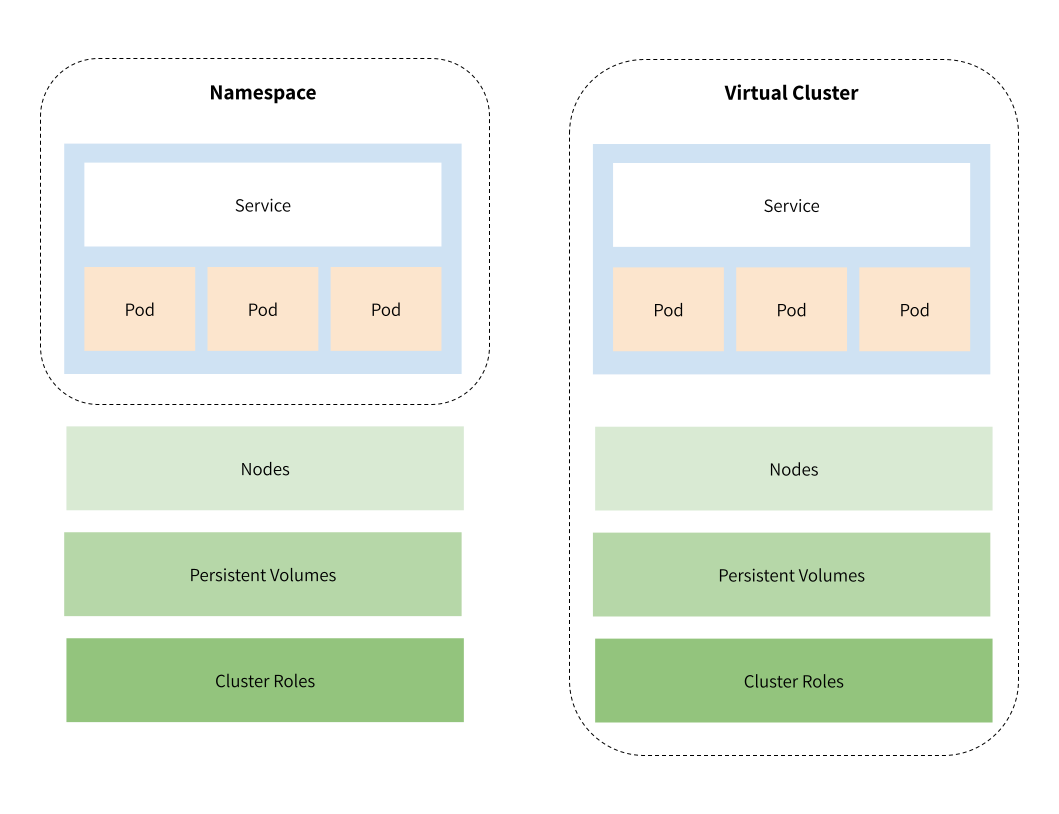
Namespaces are designed to divide clusters into environments where users are spread across several teams or projects that all share the same Kubernetes cluster. They have separate services and pods and provide a scope for naming resources but cannot be nested inside each other and may still communicate with one another.
If you run a complex application with many teams that deploy applications independently and have many dedicated resources, your default namespace will quickly become hard to navigate. In addition, having hundreds of services running in a single namespace makes it hard to understand what's connected, so namespaces are an excellent way to logically group resources inside your cluster.
Microservices are a good use case for namespaces. They help avoid naming collisions and encourage separation of concerns by making it harder for multiple services to use the same database. At the same time, you can share some resources when it makes sense.
Another common use case for namespaces is to separate staging and development environments. For example, if you're using an Elastic stack for logging, you can deploy it in one cluster and use it for both environments. There are some significant drawbacks to this approach (which I'll address in the next section), but it's worth pointing out as it's commonly used.
Namespaces enable the division of a cluster's resources between multiple teams, but they also allow you to implement resource quotas.
So, let's say you have a development cluster with limited resources, and you want to give each team a share of its resources for their application. You can define resource quotas per namespace that limit how much CPU or RAM each namespace can use. This prevents situations where one team's application consumes so much memory that other parts of your application start to fail.
Finally, namespaces enhance role-based access controls. For example, permissions can be set such that a team can create, update, and delete resources in their namespace, but they cannot do similar operations in other namespaces. This minimizes the risk of a new engineer accidentally interfering with another team's application.
While namespaces are a good tool for some light isolation, they are not complete Kubernetes clusters on their own, which means that you run some serious risks and limitations when you rely on namespace-based isolation.
First, all your namespaces use the same Kubernetes control plane, so the API server, etcd, scheduler, and controller-manager are shared between namespaces. Unfortunately, this means that you can't run custom configurations on any of the Kubernetes-level resources within a namespace.
Second, some components in Kubernetes are not namespaced. They live just globally in the cluster, and you can't isolate them using namespaces. For example, persistent volumes are accessible throughout your whole cluster. So even if you isolate your Elastic logging service mentioned above, a service in another namespace could connect to the same volume and read or write data to it.
This limitation applies to other important resources like ingress controllers, nodes, and storage classes too. So, if one of your microservices needs to spin up new nodes based on increased load, you can't do it at the namespace level - you'll need to do it at the Kubernetes cluster level.
Teams who need a higher level of configurability or better isolation between resources often have to set up multiple clusters. As mentioned above, that can be expensive and much slower to spin up. Each cluster has to create an additional API server, controller manager, etcd, and kubelet just to get going.
Fortunately, there is another solution: nested clusters.
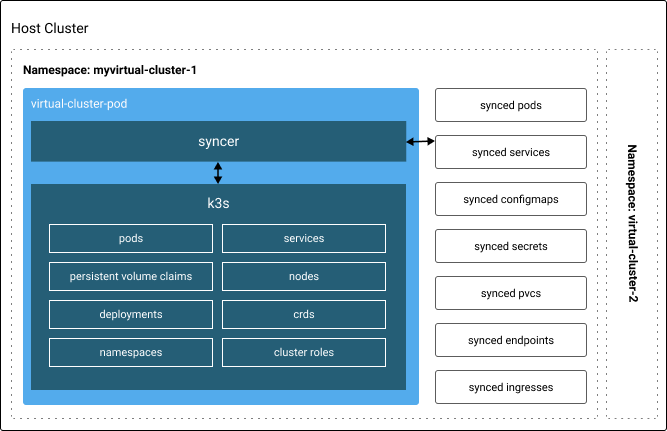
Nested Kubernetes clusters give you a full Kubernetes control plane without provisioning a new physical cluster every time. Each nested cluster runs its own API server, scheduler, controller manager, etcd, RBAC, and CRDs, which are synced with the underlying control plane cluster. This gives the nested cluster its own identity and core Kubernetes resources while keeping the operational overhead of a single shared cluster.
While there are a few ways to run nested clusters, the approach the vCluster project pioneered uses a lightweight control plane running in pods within your existing Kubernetes cluster. Nested clusters run as pods in a namespace, have a virtual identity, and use their own core Kubernetes resources, which are synced with the control plane cluster.
"Besides the synchronization of nested and control plane cluster resources, the hypervisor also redirects certain Kubernetes API requests to the control plane cluster, such as port forwarding or pod/service proxying. It essentially acts as a reverse proxy for the nested cluster." - Introduction to Virtual Clusters
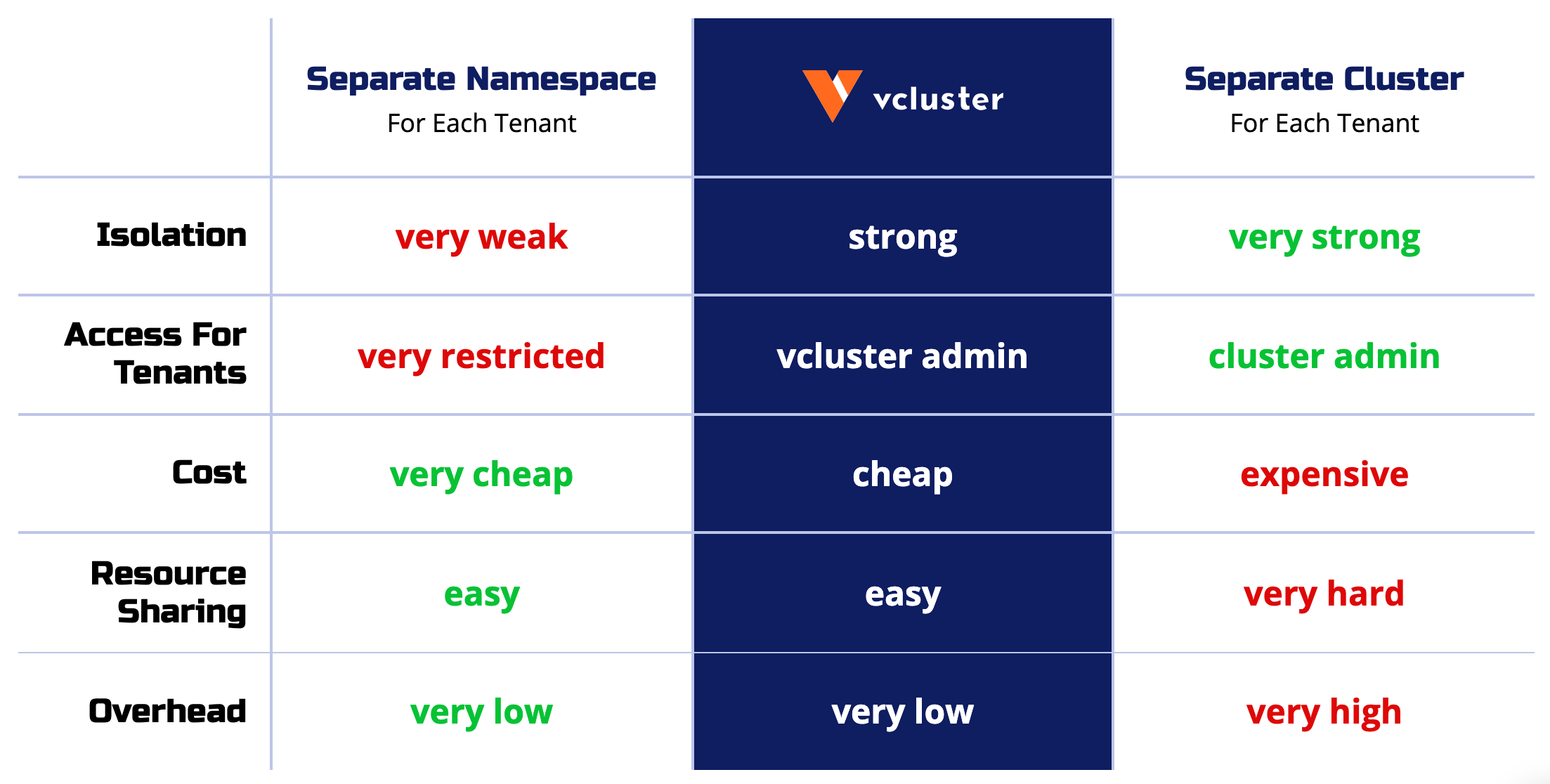
Nested clusters solve many of the problems that namespaces present.
Because you can run many bound nested clusters within a single namespace, they are much cheaper than the traditional Kubernetes clusters, and they require lower management and maintenance efforts. This makes them ideal for running experiments, continuous integration, and setting up sandbox environments.
Nested clusters also provide more stability than namespaces in many situations. Each nested cluster creates its own Kubernetes resource objects, which are stored in its own data store. The control plane cluster has no knowledge of these resources.
Isolation like this is excellent for resiliency. As mentioned above, engineers who use namespace-based isolation can still access cluster-level resources like persistent volumes or the etcd configuration. If an engineer breaks something in one of these shared resources, it will likely fail for all the teams that rely on it.
Finally, nested clusters can be configured independently of the underlying cluster. This is great for multi-tenancy, like giving your customers the ability to spin up a new environment or quickly setting up demo applications for your sales team.
Achieving Network, Namespace, and Cluster Isolation in Kubernetes with vcluster. In this article you'll learn how to implement security measures necessary to ensure proper isolation, using Kubernetes native resources as well as vCluster's nested clusters.
While nested clusters provide stronger isolation than namespaces, they also have their limitations because they run on shared nodes.
Because nested clusters share the same underlying nodes, control-plane isolation on its own is not a security boundary for untrusted tenants. This is fine for development, testing, CI/CD, and trusted internal teams. For production environments where tenants must be fully separated, vCluster's enterprise product goes further: tenant clusters run on Private Nodes, which are dedicated worker nodes per tenant with per-tenant CNI and storage. This delivers hardware-level isolation approaching a dedicated physical cluster.
Nested clusters also don't support all Kubernetes features at the moment. For example, virtual storage classes, container runtimes, and network plugins are unavailable in vclusters, so you either have to limit access to these features within your application or fall back to the control plane cluster.
To get started with vclusters, check out vCluster Project. It runs on any Kubernetes cluster and can be installed in just five minutes.
vCluster builds a new namespace and runs a full control plane as pods inside the namespace when creating a nested cluster. Then the vCluster controller syncs the Kubernetes resources between the nested cluster and your underlying control plane cluster.
Your developers can use a nested cluster anytime they need an isolated environment. Because they don't have direct access to the control plane cluster, you can be confident that they're unlikely to take down your whole application with a bad deployment.
To help you save on infrastructure costs, vCluster also offers a sleep mode that will scale down your cluster's resources automatically. To get started, check out the vCluster documentation.
Nested clusters are the open-source, shared node model. They are a lightweight way to give many internal teams isolated control planes on top of one cluster, which makes them a good fit for development, testing, CI/CD, and trusted internal teams.
When you need production isolation, vCluster's enterprise platform goes further. Tenant clusters run on Private Nodes, which are dedicated worker nodes per tenant with per-tenant CNI and storage. That delivers hardware-level isolation approaching a dedicated physical cluster, and it supports any cluster type, including Kubernetes, Slurm, Run:AI, Ray, and inference clusters.
So the choice comes down to your isolation requirements. Use namespaces for lightweight grouping inside a single team's cluster. Use nested clusters when you want isolated control planes for internal, trusted workloads. Use tenant clusters on Private Nodes when you need production-grade isolation for every cluster type you offer your customers.
Namespaces are sometimes an acceptable choice for running multiple environments within a cluster. They provide limited user permissions, usage quotas, and some isolated resources within Kubernetes. Just be sure to learn about the best practices and limitations before you go too far down that path.
Nested clusters improve on namespaces in many ways by providing more substantial isolation for a more stable, resilient, and flexible Kubernetes environment. They can be used for development, test, and CI/CD workloads and help you save money versus traditional clusters. When your isolation requirements grow to production, tenant clusters on Private Nodes take it further with hardware-level isolation and support for every cluster type. To learn more or get started, check out vCluster.
Deploy your first virtual cluster today.
